
Granting and Managing Item Level Permission using SharePoint2013 Designer Workflow
https://gnanasivamgunasekaran.wordpress.com/2015/12/29/granting-and-managing-item-level-permission-using-sharepoint2013-designer-workflow/
Granting permission to the user by SharePoint 2013 designer workflow is different from SharePoint 2010.we are using the Rest API to grant the permission as follows
Create the Workflow and assign permission
- Open the site in SharePoint 2013 designer and select the list for which workflows needs to be created and click new option,
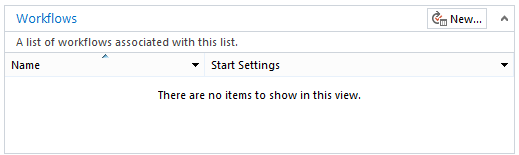
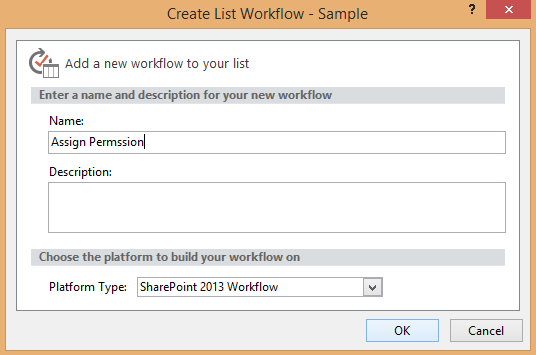
- Specify the name of the workflow and click ok ,
- Add the action build the dictionary ,

- After adding the actions create the headers for REST api call as follows,

- Click the link this and create the following two variables
| Name | Type | Value |
| Accept | String | application/json;odata=verbose |
| Content-Type | String | application/json;odata=verbose |
- Create the following local variables by clicking the local variables link in top ribbon,

| Name | Type |
| responseContent | Dictionary |
| responseHeaders | Dictionary |
| responseCode | String |
| requestHeaders | Dictionary |
- Now set the requestHeaders variable to the outcome variable of dictionary builded.
- Then add the Call Http web service action,

- Right click the above action and configure the properties as follows,
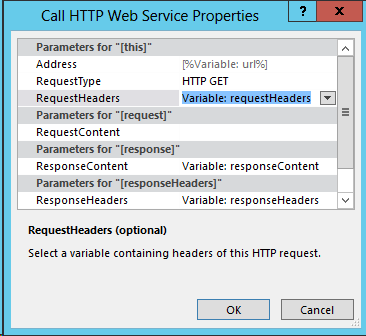
- Add the following URL in above action and select the HTTP method as POST as follows,
“{SiteURL}/_api/web/lists/getbytitle(‘Sample’)/items(1)/breakroleinheritance(true)”

- The above http call will stop inheritance of permission for the item with id 1.
- After that add one more Call http web service action, configure the same properties as same as previous action.
- Now configure the following URL in Enter Http web service URL and specify the method as HTTP Post,
“{SiteURL}/_api/web/lists/getbytitle(‘Sample’)/items(1)/roleassignments/addroleassignment(principalid=12,roleDefId=1073741926)”
- In this Principal ID is the Id of the User to whom we need to grant permission and roledefinition Id is the permission level Id which can identified using the following URL
“{SiteURL}/_api/web/roledefinitions”

- That’s it , while running this workflow the REST api call will break the inheritance role for the particular item and grant the specified permission level (RolDefId) for the user .
Removing the Permission of Specified user
- For removing the permission of the user in particular item, we need to design workflow as same as above for granting permissions.
- Similarly same HTTP action to be called to break the role inheritance and call one HTTP action with the below URL,
{SiteURL}/_api/web/lists/getbytitle(‘Sample’)/items(1)/roleassignments/getbyprincipalid(12)
Get by principal ID is the ID of the User.
- Then select the HTTP method as delete

- Now running the above workflow it will fill stop inheriting the permission and the second web service call will remove the permission for the user with ID 12.
Granting and Managing Item Level Permission using SharePoint2013 Designer Workflow的更多相关文章
- SharePoint2013工作流workflow manager配置
SharePoint2013版本的工作流较sharepoint 2010变化较大,将工作流部分从sharepoint中分离出来为单独的服务,通过与sharepoint关联使用. SharePoint2 ...
- SharePoint Security and Permission System Overview
转:http://www.sharepointblues.com/2010/09/01/sharepoint-security-and-permission-system-overview/ Shar ...
- Binary Tree Level Order Traversal II [LeetCode]
Given a binary tree, return the bottom-up level order traversal of its nodes' values. (ie, from left ...
- Binary Tree Level Order Traversal [LeetCode]
Given a binary tree, return the level order traversal of its nodes' values. (ie, from left to right, ...
- 4.4. Item Pipeline管道文件
0:Spider爬取数据 # -*- coding: utf-8 -*- import scrapy import sys from mySpider.items import ItcastItem ...
- Sharepoint学习笔记—习题系列--70-576习题解析 -(Q25-Q28)
Question 25 You are designing a SharePoint 2010 farm in your organization. You need to design the li ...
- Oracle Applications Multiple Organizations Access Control for Custom Code
档 ID 420787.1 White Paper Oracle Applications Multiple Organizations Access Control for Custom Code ...
- SharePoint Server 2019新特性
.基于.NET4.7框架 功能基本是把office365的SPO功能搬家过来.如下: Sharepoint server 2019将在2018年发布 New web parts There were ...
- Microsoft SQL Server Trace Flags
Complete list of Microsoft SQL Server trace flags (585 trace flags) REMEMBER: Be extremely careful w ...
随机推荐
- NGINX:sticky模块实现基于cookie的负载均衡
Sticky模块 简述: 之前公司部署了一套网站及时发布系统,架构如下图所示:Nginx做前端代理,发布系统用tomcat运行,一台共享存储,一台数据库服务器:由于网站及时发布系统涉及到了用户登录操作 ...
- 小米范工具系列之一:小米范 web查找器
最新版本1.5,下载地址:http://pan.baidu.com/s/1c1NDSVe 文件名web finder,请使用java1.8运行 小米范 web查找器主要功能为快速端口扫描,并识别we ...
- python之celery队列模块
一.celery队列简介 Celery 是一个 基于python开发的分布式异步消息任务队列,通过它可以轻松的实现任务的异步处理, 如果你的业务场景中需要用到异步任务,就可以考虑使用celery. 1 ...
- (转) SpringBoot非官方教程 | 第二篇:Spring Boot配置文件详解
springboot采纳了建立生产就绪spring应用程序的观点. Spring Boot优先于配置的惯例,旨在让您尽快启动和运行.在一般情况下,我们不需要做太多的配置就能够让spring boot正 ...
- POJ3233:Matrix Power Series(矩阵快速幂+二分)
http://poj.org/problem?id=3233 题目大意:给定矩阵A,求A + A^2 + A^3 + … + A^k的结果(两个矩阵相加就是对应位置分别相加).输出的数据mod m.k ...
- 4.6 Routing -- Rendering A Tempalte
1. route handler一个重要的任务就是渲染合适的模板到屏幕. 2. 默认的,一个route handler将会呈现模板到最近的父模板. app/router.js Router.map(f ...
- SpringData关键字查询练习
我们在上一节知道SpringData关键字有很多,我就拿几个例子练练手 1.需求我们查询lastName like sun and id < ?的查询 package com.fxr.sprin ...
- 手把手教你学node.js之一个简单的express应用
一个简单的express应用 目标 建立一个 lesson1 项目,在其中编写代码.当在浏览器中访问 http://localhost:3000/ 时,输出 Hello World. 挑战 访问 ht ...
- SqlServer2005 各版本区别
SQL2005 分五个版本,如下所列, 1.Enterprise(企业版), 2.Development(开发版), 3.Workgroup,(工作群版) 4.Standard,(标准版) 5.Exp ...
- VS2010/MFC编程入门之十七(对话框:文件对话框)
上一讲鸡啄米介绍的是消息对话框,本节讲解文件对话框.文件对话框也是很常用的一类对话框. 文件对话框的分类 文件对话框分为打开文件对话框和保存文件对话框,相信大家在Windows系统中经常见 ...