
.NET Core调用WCF的最佳实践
现在.NET Core貌似很火,与其他.NET开发者交流不说上几句.NET Core都感觉自己落伍了一样。但是冷静背后我们要也看到.NET Core目前还有太多不足,别的不多说,与自家的服务框架WCF集成起来就不咋地,从最初不支持,到现在有个笨笨咔咔的Web Service Reference Provider,生成的代理类简直不堪入目,还特别的慢。所以本人本着为将来框架的兼容性做准备,就着手研究了下能不能不通过代理类访问WCF,好在微软开源了一部分WCF代码。
WCF的开发者一定很熟悉,WCF的所有配置都是可以通过代码和配置文件两种方式,而大多数开发者都会选择配置文件,但是从.NET Core开始,微软干掉了Web/App.config,不知道别人怎么样,反正我是非常之不习惯。干掉Web/App.config的后果,就是开源支持.NET Core的那部分Client Side没有配置文件的支持,翻看源码后发现,只要是读取配置文件的地方,都是这样的代码 —— PlatformNotSupported。
protected void InitializeEndpoint(string configurationName, EndpointAddress address)

{

            _serviceEndpoint = this.CreateDescription();

            ServiceEndpoint serviceEndpointFromConfig = null;

            // Project N and K do not support System.Configuration, but this method is part of Windows Store contract.

            // The configurationName==null path occurs in normal use.

            if (configurationName != null)

            {

                throw ExceptionHelper.PlatformNotSupported();

                // serviceEndpointFromConfig = ConfigLoader.LookupEndpoint(configurationName, address, this.serviceEndpoint.Contract);
       }
}
但是好在微软又推出了System.Configuration.ConfigurationManager的NuGet包,所以本人仿照WCF原生的配置文件,自己实现一套配置,经过两个晚上的战斗,已经成功。好了,废话不多说,上代码了。
先看看最终的效果是什么样的,WCF服务端的代码结构如下:

采用标准的WCF分层方式,用控制台做宿主,其中IAppService项目版本为.NET Standard 2.0,每个终结点同时使用BasicHttpBinding与NetTcpBinding双重绑定,配置文件如下:
<?xml version="1.0" encoding="utf-8"?>

<configuration>

  <!--WCF配置-->

  <system.serviceModel>

    <!--WCF服务配置,手动增加service节点-->

    <services>

      <!--产品服务配置-->

      <service behaviorConfiguration="DefaultBehavior" name="WCF.AppService.Implements.ProductService">

        <host>

          <baseAddresses>

            <add baseAddress="http://localhost:8098/Hosts/ProductService.svc" />

            <add baseAddress="net.tcp://localhost:8099/Hosts/ProductService.svc" />

          </baseAddresses>

        </host>

        <endpoint binding="basicHttpBinding" bindingConfiguration="basicBinding" contract="WCF.IAppService.Interfaces.IProductService" />

        <endpoint binding="netTcpBinding" bindingConfiguration="tcpBinding" contract="WCF.IAppService.Interfaces.IProductService" />

      </service>

      <!--订单服务配置-->

      <service behaviorConfiguration="DefaultBehavior" name="WCF.AppService.Implements.OrderService">

        <host>

          <baseAddresses>

            <add baseAddress="http://localhost:8098/Hosts/OrderService.svc" />

            <add baseAddress="net.tcp://localhost:8099/Hosts/OrderService.svc" />

          </baseAddresses>

        </host>

        <endpoint binding="basicHttpBinding" bindingConfiguration="basicBinding" contract="WCF.IAppService.Interfaces.IOrderService" />

        <endpoint binding="netTcpBinding" bindingConfiguration="tcpBinding" contract="WCF.IAppService.Interfaces.IOrderService" />

      </service>

      <!--集成服务配置-->

      <service behaviorConfiguration="DefaultBehavior" name="WCF.AppService.Implements.IntegrationService">

        <host>

          <baseAddresses>

            <add baseAddress="http://localhost:8098/Hosts/IntegrationService.svc" />

            <add baseAddress="net.tcp://localhost:8099/Hosts/IntegrationService.svc" />

          </baseAddresses>

        </host>

        <endpoint binding="basicHttpBinding" bindingConfiguration="basicBinding" contract="WCF.IAppService.Interfaces.IIntegrationService" />

        <endpoint binding="netTcpBinding" bindingConfiguration="tcpBinding" contract="WCF.IAppService.Interfaces.IIntegrationService" />

      </service>

    </services>

    <!--WCF行为配置,配置好无需修改-->

    <behaviors>

      <serviceBehaviors>

        <behavior name="DefaultBehavior">

          <!--是否允许get请求访问-->

          <serviceMetadata httpGetEnabled="true" />

          <!--允许从请求消息头中检索元数据地址信息-->

          <useRequestHeadersForMetadataAddress />

          <!--是否显示异常信息-->

          <serviceDebug includeExceptionDetailInFaults="true" />

          <!--最大序列化的对象个数-->

          <dataContractSerializer maxItemsInObjectGraph="2147483647" />

        </behavior>

      </serviceBehaviors>

    </behaviors>

    <!--WCF绑定配置,配置好无需修改-->

    <bindings>

      <netTcpBinding>

        <binding name="tcpBinding" maxBufferPoolSize="2147483647" maxBufferSize="2147483647" maxReceivedMessageSize="2147483647" closeTimeout="00:10:00" openTimeout="00:10:00" receiveTimeout="00:10:00" sendTimeout="00:10:00" />

      </netTcpBinding>

      <basicHttpBinding>

        <binding name="basicBinding" maxBufferPoolSize="2147483647" maxBufferSize="2147483647" maxReceivedMessageSize="2147483647" closeTimeout="00:10:00" openTimeout="00:10:00" receiveTimeout="00:10:00" sendTimeout="00:10:00" />

      </basicHttpBinding>

    </bindings>

    <!--WCF多宿主绑定配置-->

    <serviceHostingEnvironment multipleSiteBindingsEnabled="true" />

  </system.serviceModel>

</configuration>
运行测试没问题,服务端不多说,重点是客户端,因为IAppService是.NET Standard 2.0的类库版本,所以.NET Core客户端是可以正常引用的,新建.NET Core控制台,并引用上述IAppService项目。
客户端项目结构如下:
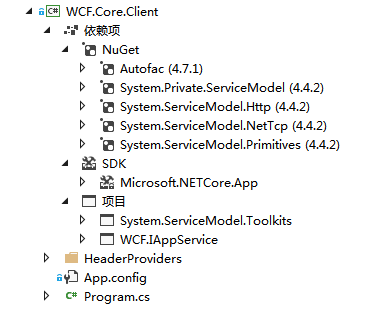
客户端配置文件如下:
<?xml version="1.0" encoding="utf-8" ?>

<configuration>

  <configSections>

    <!--WCF配置节点-->

    <section name="system.serviceModel" type="System.ServiceModel.ServiceModelSection, System.ServiceModel.Toolkits" />

  </configSections>

  <!--WCF配置-->

  <system.serviceModel>

    <!--WCF客户端配置,手动增加endpoint节点-->

    <client>

      <!--商品服务契约配置-->

      <endpoint address="net.tcp://localhost:8099/Hosts/ProductService.svc" binding="netTcpBinding" contract="WCF.IAppService.Interfaces.IProductService" name="WCF.IAppService.Interfaces.IProductService">

        <headerProvider type="WCF.Core.Client.HeaderProviders.MyHeaderProvider" assembly="WCF.Core.Client"/>

      </endpoint>

      <!--订单服务契约配置-->

      <endpoint address="net.tcp://localhost:8099/Hosts/OrderService.svc" binding="netTcpBinding" contract="WCF.IAppService.Interfaces.IOrderService" name="WCF.IAppService.Interfaces.IOrderService" />

      <!--集成服务契约配置-->

      <endpoint address="net.tcp://localhost:8099/Hosts/IntegrationService.svc" binding="netTcpBinding" contract="WCF.IAppService.Interfaces.IIntegrationService" name="WCF.IAppService.Interfaces.IIntegrationService" />

    </client>

  </system.serviceModel>

</configuration>
Main方法中代码如下:
class Program

    {

        static void Main(string[] args)

        {

            //初始化容器

            IContainer container = InitContainer();

            //调用

            IProductService productService = container.Resolve<IProductService>();

            string products = productService.GetProducts();

            Console.WriteLine(products);

            container.Dispose();

            Console.ReadKey();

        }

        static IContainer InitContainer()

        {

            ContainerBuilder builder = new ContainerBuilder();

            Assembly wcfInterfaceAssembly = Assembly.Load("WCF.IAppService");

            //获取WCF接口类型集

            IEnumerable<Type> types = wcfInterfaceAssembly.GetTypes().Where(type => type.IsInterface);

            //获取服务代理泛型类型

            Type proxyGenericType = typeof(ServiceProxy<>);

            //注册WCF接口

            foreach (Type type in types)

            {

                Type proxyType = proxyGenericType.MakeGenericType(type);

                PropertyInfo propChannel = proxyType.GetProperty(ServiceProxy.ChannelPropertyName, type);

                builder.RegisterType(proxyType).OnRelease(proxy => ((IDisposable)proxy).Dispose());

                builder.Register(container => propChannel.GetValue(container.Resolve(proxyType))).

                    As(type).

                    OnRelease(channel => channel.CloseChannel());

            }

            return builder.Build();

        }

    }
启动运行结果如下:
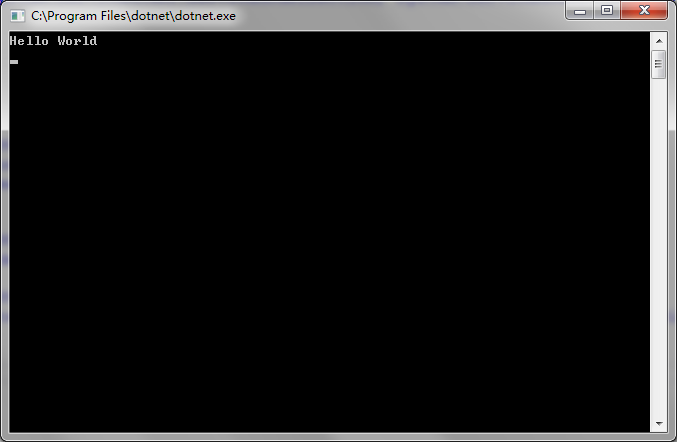
怎么样?是不是觉得很清爽?如果你有兴趣,可以到我的Git看全部源码,地址如下:
https://gitee.com/lishilei0523/WCF-DotNetCore
Ps:因为微软公开的WCF类库本身就不完善,所以我也没法提供全部的功能,本人所作调用方式目前支持BasicHttpBinding和NetTcpBinding,并且包含消息头支持。如果你觉得代码对你有帮助,麻烦点个Star,不胜感激。
.NET Core调用WCF的最佳实践的更多相关文章
- .NET Core 调用WCF 服务
.NET Core 和ASP.NET Core 已经可以调用WCF 服务. 环境要求: VS2015 Update 2 +VS2015 Tooling + .NET Core SDK 下载地址: ht ...
- EntityFramework Core进行读写分离最佳实践方式,了解一下(二)?
前言 写过上一篇关于EF Core中读写分离最佳实践方式后,虽然在一定程度上改善了问题,但是在评论中有的指出更换到从数据库,那么接下来要进行插入此时又要切换到主数据库,同时有的指出是否可以进行底层无感 ...
- EntityFramework Core进行读写分离最佳实践方式,了解一下(一)?
前言 本来打算写ASP.NET Core MVC基础系列内容,看到有园友提出如何实现读写分离,这个问题提的好,大多数情况下,对于园友在评论中提出的问题,如果是值得深究或者大多数同行比较关注的问题我都会 ...
- WCF+AJAX最佳实践
本文是基于Frank Xu的一个webcast上的串并总结,图片等都截至视频,谨致谢. 路线图 什么是WCF Windows Communication Foundation是MS为构建面向服务的应用 ...
- POST调用WCF方法-项目实践
做即时通信项目时,需要与OA系统对接接口,主要目标是实现在OA里进行一项事项,通过调用我们的接口,即时通知过来,并弹出消息框提示一下.我们的即时通信使用的WCF服务进行通信,在客户端调用通信时,用的就 ...
- 【转】.NET(C#):浅谈程序集清单资源和RESX资源 关于单元测试的思考--Asp.Net Core单元测试最佳实践 封装自己的dapper lambda扩展-设计篇 编写自己的dapper lambda扩展-使用篇 正确理解CAP定理 Quartz.NET的使用(附源码) 整理自己的.net工具库 GC的前世与今生 Visual Studio Package 插件开发之自动生
[转].NET(C#):浅谈程序集清单资源和RESX资源 目录 程序集清单资源 RESX资源文件 使用ResourceReader和ResourceSet解析二进制资源文件 使用ResourceM ...
- ASP.NET Core Web API 最佳实践指南
原文地址: ASP.NET-Core-Web-API-Best-Practices-Guide 介绍 当我们编写一个项目的时候,我们的主要目标是使它能如期运行,并尽可能地满足所有用户需求. 但是,你难 ...
- [转]ASP.NET Core Web API 最佳实践指南
原文地址: ASP.NET-Core-Web-API-Best-Practices-Guide 转自 介绍# 当我们编写一个项目的时候,我们的主要目标是使它能如期运行,并尽可能地满足所有用户需求. 但 ...
- ASP.NET Core 依赖注入最佳实践与技巧
ASP.NET Core 依赖注入最佳实践与技巧 原文地址:https://medium.com/volosoft/asp-net-core-dependency-injection-best-pra ...
随机推荐
- Sqoop导入关系数据库到Hive
参考:segmentfault.com:Sqoop导入关系数据库到Hive Sqoop 是 apache 下用于 RDBMS 和 HDFS 互相导数据的工具.本文以 mysql 数据库为例,实现关系数 ...
- FireDAC 之FDMetaInfoQuery
FDMetaInfoQuery http://docs.embarcadero.com/products/rad_studio/firedac/frames.html http://docwiki.e ...
- sdm 使用阿里云域名申请 Let’s Encrypt 通配符 域名证书
安装acme 进入 套件中心 点击安装 Git Server 之后进入SSh会使用git命令 方法1--------------------------------------- 获取代码 git c ...
- Linux中shell变量$0,$?等含义
linux中shell变量$#,$@,$0,$1,$2的基本含义: 变量说明: $$ Shell本身的PID(ProcessID) $! Shell最后运行的后台Process的PID $? 最后运行 ...
- 59. Spiral Matrix II (Array)
Given an integer n, generate a square matrix filled with elements from 1 to n2 in spiral order. For ...
- Notebook computer(Ubuntu)
==============Mask_RCNN============== source activate flappbird cd /home/luo/Desktop/MyFile/MaskRCNN ...
- 41-邮差送信(dfs)
邮差送信 (15分)C时间限制:1 毫秒 | C内存限制:3000 Kb题目内容: 有一个邮递员要在n个城市之间来回送信.但有的城市之间有大路相连而有的没有路.现在要由一个城市到另一个城市送信,中途 ...
- MYISM表并发写请求过多 导致无法被读取解决方案
MyISAM锁调度是如何实现的呢,这也是一个很关键的问题.例如,当一个进程请求某个MyISAM表的读锁,同时另一个进程也请求同一表的写锁,此时MySQL将会如优先处理进程呢?通过研究表明,写进程将先获 ...
- juniper交换机配置
1.链接串口配置: minicom -s ```bash Serial port setup A - Serial Device : /dev/ttyS1 ...
- 解析config文件 练手代码
解析一个如下的CONFIG文件 #config.txt #SHTTPD Web 服务器配置文件示例 #侦听端口 ListenPort = 80 #最大并发访问客户端数目 MaxClient = 8 # ...