
[翻译] TLTagsControl
TLTagsControl

https://github.com/ali312/TLTagsControl#tltagscontrol
A nice and simple tags input control for iOS.
You are able to easily setup different colors for control elements and set different displaying modes
一个简单的便签控件.
你可以很容易的给便签设置不同的颜色或者是不同的显示样式.
Switching between displaying modes
在不同的样式中切换
You are able to switch between displyaing modes by setting the mode property
你可以用mode属性来设置便签的显示样式.
@property (nonatomic) TLTagsControlMode mode;TLTagsControl has two displaying modes
TLTagsControl有两种显示样式
TLTagsControlModeEdit,
This mode allows user to input new tags and delete tags that are already presented.
In this mode control will look like below:
一种有取消"x"标志的样式,看起来效果如下:

TLTagsControlModeList,
This mode allows only listing of already presented tags
In this mode control will look like below:
一种是纯粹显示文本的效果,如下:

Setting different colors of control elements
You are able to change colors of different element by setting these prperties
你可以设置这个控件不同元素上面的颜色,比如字体颜色,背景色等
@property (nonatomic, strong) UIColor *tagsBackgroungColor;

@property (nonatomic, strong) UIColor *tagsTextColor;

@property (nonatomic, strong) UIColor *tagsDeleteButtonColor;
Applying changes
To apply your changes you should call the method below
如果要执行变化,请调用以下方法.
- (void)reloadTagSubviews;
Example:
//assuming tagControl will be set initialized from stroryboard

@interface ViewController ()

@property (nonatomic, strong) IBOutlet TLTagsControl *tagControl;

@end

....

@implementation ViewController

- (void)viewDidLoad {

  [super viewDidLoad];

  UIColor *blueBackgroundColor = [UIColor colorWithRed:75.0/255.0 green:186.0/255.0 blue:251.0/255.0 alpha:1];

  UIColor *whiteTextColor = [UIColor whiteColor];

  self.tagControl.tagsBackgroungColor = blueBackgroundColor;

  self.tagControl.tagsDeleteButtonColor = whiteTextColor;

  self.tagControl.tagsTextColor = whiteTextColor;

  self.tagControl.mode = TLTagsControlModeList;

  [self.tagControl reloadTagSubviews];

}

@end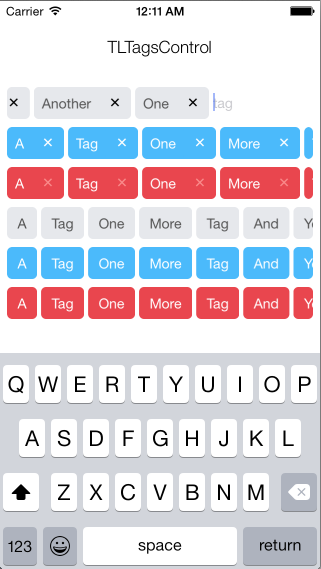
[翻译] TLTagsControl的更多相关文章
- 《Django By Example》第五章 中文 翻译 (个人学习,渣翻)
书籍出处:https://www.packtpub.com/web-development/django-example 原作者:Antonio Melé (译者@ucag注:大家好,我是新来的翻译, ...
- 《Django By Example》第四章 中文 翻译 (个人学习,渣翻)
书籍出处:https://www.packtpub.com/web-development/django-example 原作者:Antonio Melé (译者注:祝大家新年快乐,这次带来<D ...
- [翻译]开发文档:android Bitmap的高效使用
内容概述 本文内容来自开发文档"Traning > Displaying Bitmaps Efficiently",包括大尺寸Bitmap的高效加载,图片的异步加载和数据缓存 ...
- 【探索】机器指令翻译成 JavaScript
前言 前些时候研究脚本混淆时,打算先学一些「程序流程」相关的概念.为了不因太枯燥而放弃,决定想一个有趣的案例,可以边探索边学. 于是想了一个话题:尝试将机器指令 1:1 翻译 成 JavaScript ...
- 《Django By Example》第三章 中文 翻译 (个人学习,渣翻)
书籍出处:https://www.packtpub.com/web-development/django-example 原作者:Antonio Melé (译者注:第三章滚烫出炉,大家请不要吐槽文中 ...
- 《Django By Example》第二章 中文 翻译 (个人学习,渣翻)
书籍出处:https://www.packtpub.com/web-development/django-example 原作者:Antonio Melé (译者注:翻译完第一章后,发现翻译第二章的速 ...
- 《Django By Example》第一章 中文 翻译 (个人学习,渣翻)
书籍出处:https://www.packtpub.com/web-development/django-example 原作者:Antonio Melé (译者注:本人目前在杭州某家互联网公司工作, ...
- 【翻译】Awesome R资源大全中文版来了,全球最火的R工具包一网打尽,超过300+工具,还在等什么?
0.前言 虽然很早就知道R被微软收购,也很早知道R在统计分析处理方面很强大,开始一直没有行动过...直到 直到12月初在微软技术大会,看到我软的工程师演示R的使用,我就震惊了,然后最近在网上到处了解和 ...
- ASP.NET MVC with Entity Framework and CSS一书翻译系列文章之第一章:创建基本的MVC Web站点
在这一章中,我们将学习如何使用基架快速搭建和运行一个简单的Microsoft ASP.NET MVC Web站点.在我们马上投入学习和编码之前,我们首先了解一些有关ASP.NET MVC和Entity ...
随机推荐
- Spring Boot遇到的某些问题
Spring Boot遇到的某些问题 1.关于templates的html包格式问题: <properties> <project.build.sourceEncoding>U ...
- $scope作用域与依赖注入
一.$scope与$rootscope作用域 $scope下的数据作为该控制器下的数据moduel,只有在该控制器下才能够访问:而$rootScope则可以可以再任何有效的地方访问到,这个有效的地方指 ...
- hadoop-2.6.0-cdh5.4.5.tar.gz(CDH)的3节点集群搭建(含zookeeper集群安装)
前言 本人呕心沥血所写,经过好一段时间反复锤炼和整理修改.感谢所参考的博友们!同时,欢迎前来查阅赏脸的博友们收藏和转载,附上本人的链接 http://www.cnblogs.com/zlslch/p/ ...
- 自定义ContentTypeHandler在struts2-rest-2.3.16.2不生效
需要使用自定义的ContentHandler格式化json中的时间类型为指定模式. 在struts.xml中增加了自定义的ContentHandler,但不会生效. http://blog.csdn. ...
- jQuery事件篇---事件对象
内容提纲: 1.事件对象 2.冒泡和默认行为 发文不易,转载请注明出处! JavaScript 在事件处理函数中默认传递了 event 对象,也就是事件对象.但由于浏览器的兼容性,开发者总是会做兼容方 ...
- golang广度优先算法-走迷宫
广度优先遍历,走迷宫思路: 1.创建二维数组,0表示是路,1表示是墙:创建队列Q,存储可遍历的点,Q的第一个元素为起始点 2.从队列中取一个点,开始,按上.左.下.右的顺序遍历周围的点next,nex ...
- "类工厂模式"改写SqlHelper
看到标题您一定很疑惑,23种经典设计模式什么时候多了一个"类工厂模式",稍等,请听我慢慢道来. 实践是检验真理的唯一途径.最近用了"类工厂模式"改写了我公司的S ...
- [javaEE] response实现图片下载
在Servlet中的doGet()方法中 获取FileInputStream对象,new出来,构造参数:String的文件路径 得到文件路径,调用this.getServletContext().ge ...
- 动态页面技术之JSP
1.什么是JSP技术 JSP全名为Java Server Pages,中文名叫java服务器页面,其根本是一个简化的Servlet设计,它是由Sun Microsystems公司倡导.许多公司参与一起 ...
- redis的默认配置文件redis.conf详解
# redis 配置文件示例 # 当你需要为某个配置项指定内存大小的时候,必须要带上单位, # 通常的格式就是 1k 5gb 4m 等酱紫: # # 1k => 1000 bytes # 1kb ...