
李洪强iOS开发之UICollectionView的使用
想做如下的界面效果(纯代码)
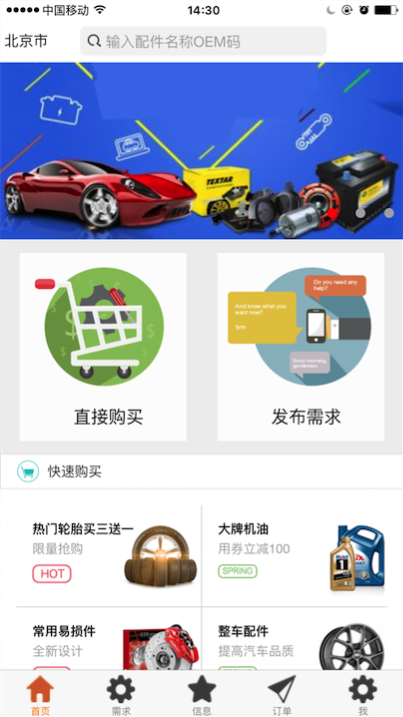


------------------------------------------------------------------------------------

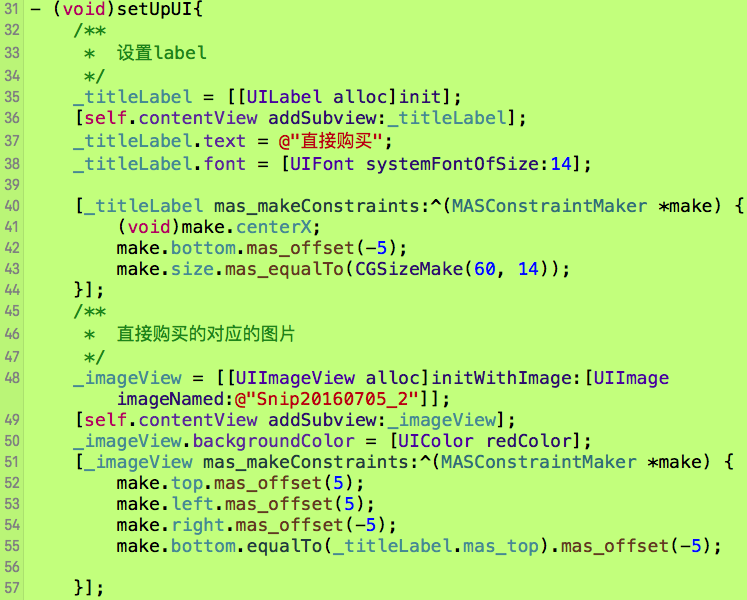
----------------------------------------------------------------------------


//
// ViewController.m
// A22 - 李洪强CollectionVIew的使用
//
// Created by vic fan on 16/7/4.
// Copyright © 2016年 李洪强. All rights reserved.
//
#define SCREENW [UIScreen mainScreen].bounds.size.width
#define SCREENH [UIScreen mainScreen].bounds.size.height
#import "ViewController.h"
#import "LHQHeadCellView.h"
#import "LHQPromptBuyCell.h"
@interface ViewController ()<UICollectionViewDelegate,UICollectionViewDataSource,UICollectionViewDelegateFlowLayout>{
}
/**
* 父页面
*/
@property(nonatomic,strong)UICollectionView *collectionView;
@end
static NSString *const bannerId = @"bannerId";//轮播cell
static NSString *const PromptBuyId = @"PromptBuyId";//直接购买
static NSString *const fastBuyId = @"fastBuyId";//快速购买
static NSString *const dataId = @"dataID";//
@implementation ViewController
- (void)viewDidLoad {
[super viewDidLoad];
[self setUpUI];
}
/**
* 创建UI
*/
- (void)setUpUI{
/**
* 1 创建布局对象
*/
UICollectionViewFlowLayout *flowlayout = [[UICollectionViewFlowLayout alloc]init];
// 2 设置横向滚动
flowlayout.scrollDirection = UICollectionViewScrollDirectionVertical;
/**
* 3 初始化collectionVIew 并且设置flowlayout
*/
_collectionView = [[UICollectionView alloc]initWithFrame:CGRectMake(0, 0, [UIScreen mainScreen].bounds.size.width, [UIScreen mainScreen].bounds.size.height) collectionViewLayout:flowlayout];
/**
* 4 设置_collectionView的背景颜色
*/
_collectionView.backgroundColor = [UIColor grayColor];
/**
* 5 设置collectionVIew的代理和数据源的方法
*/
_collectionView.delegate = self;
_collectionView.dataSource = self;
/**
* 6 添加到主页面
*/
[self.view addSubview:_collectionView];
/**
* 7 collectionViewcell的注册
*/
[_collectionView registerClass:[UICollectionViewCell class] forCellWithReuseIdentifier:bannerId];
[_collectionView registerClass:[UICollectionViewCell class] forCellWithReuseIdentifier:PromptBuyId];
[_collectionView registerClass:[UICollectionViewCell class] forCellWithReuseIdentifier:fastBuyId];
[_collectionView registerClass:[UICollectionViewCell class] forCellWithReuseIdentifier:dataId];
//头视图和尾部视图的注册
[_collectionView registerClass:[LHQHeadCellView class] forSupplementaryViewOfKind:UICollectionElementKindSectionHeader withReuseIdentifier:@"HeadView"];
[_collectionView registerClass:[UICollectionReusableView class] forSupplementaryViewOfKind:UICollectionElementKindSectionFooter withReuseIdentifier:@"FooterView"];
}
//----------------------------------------------------
#pragma mark collectionView代理方法
/**
* 代理方法1 返回几组cell
*
*/
- (NSInteger)numberOfSectionsInCollectionView:(UICollectionView *)collectionView{
return 4;
}
/**
* 代理方法2 每组有几个cell
*
*/
- (NSInteger)collectionView:(UICollectionView *)collectionView numberOfItemsInSection:(NSInteger)section{
switch (section) {
case 0:{
return 1;
}
break;
case 1:{
return 2;
}
break;
case 2:{
return 4;
}
break;
case 3:{
return 3;
}
break;
default:{
return 0;
}
break;
}
}
/**
* 代理方法3 每个item的大小
*/
- (CGSize)collectionView:(UICollectionView *)collectionView layout:(UICollectionViewLayout*)collectionViewLayout sizeForItemAtIndexPath:(NSIndexPath *)indexPath{
switch (indexPath.section) {
case 0:{
return CGSizeMake(SCREENW - 10, 150);
}
break;
case 1:{
return CGSizeMake(SCREENW/2 - 40, 150);
}
break;
case 2:{
return CGSizeMake(SCREENW / 2 - 10, 100);
}
break;
case 3:{
return CGSizeMake(SCREENW / 3 - 10, 100);
}
break;
default:{
return CGSizeMake(0, 0);
}
break;
}
}
/**
* 代理方法4 cell显示的内容
*
*/
-(UICollectionViewCell *)collectionView:(UICollectionView *)collectionView cellForItemAtIndexPath:(NSIndexPath *)indexPath{
if (indexPath.section == 1) {
LHQPromptBuyCell *cell = (LHQPromptBuyCell *)[collectionView dequeueReusableCellWithReuseIdentifier:PromptBuyId forIndexPath:indexPath];
cell.backgroundColor = [UIColor whiteColor];
return cell;
}
UICollectionViewCell *cell = [collectionView dequeueReusableCellWithReuseIdentifier:dataId forIndexPath:indexPath];
cell.backgroundColor = [UIColor whiteColor];
return cell;
}
/**
* 代理方法5 补充元素的视图
快速购买
*/
- (UICollectionReusableView *)collectionView:(UICollectionView *)collectionView viewForSupplementaryElementOfKind:(NSString *)kind atIndexPath:(NSIndexPath *)indexPath{
/**
* 5.1先初始化reusableView
*/
UICollectionReusableView *reusableView = nil;
/**
* 5.2 判断如果是头部视图
*/
if(kind == UICollectionElementKindSectionHeader){
/**
* 拿到第二组和第三组
*/
if(indexPath.section == 2|| indexPath.section == 3){
LHQHeadCellView *headCellV = [collectionView dequeueReusableSupplementaryViewOfKind:UICollectionElementKindSectionHeader withReuseIdentifier:@"HeadView" forIndexPath:indexPath ];
reusableView = headCellV;
}
/**
* 5.3 是尾部视图
*
*/
}else if (kind == UICollectionElementKindSectionFooter){
reusableView = [collectionView dequeueReusableSupplementaryViewOfKind:UICollectionElementKindSectionFooter withReuseIdentifier:@"FooterView" forIndexPath:indexPath];
}
return reusableView;
}
/**
* 代理方法6 每个item的间距
*/
-(CGFloat)collectionView:(UICollectionView *)collectionView layout:(UICollectionViewLayout *)collectionViewLayout minimumInteritemSpacingForSectionAtIndex:(NSInteger)section{
return 10;
}
/**
* 代理方法7 设置headView的大小
*/
- (CGSize)collectionView:(UICollectionView *)collectionView layout:(UICollectionViewLayout *)collectionViewLayout referenceSizeForHeaderInSection:(NSInteger)section{
if(section == 2 || section == 3){
return CGSizeMake(SCREENW , 25);
}
return CGSizeMake(SCREENW, 0);
}
/**
* 代理方法8 设置foot的大小
*/
- (CGSize)collectionView:(UICollectionView *)collectionView layout:(UICollectionViewLayout *)collectionViewLayout referenceSizeForFooterInSection:(NSInteger)section{
return CGSizeMake(self.view.frame.size.width, 10);
}
/**
* 代理方法9 定义每个UICollectionView 的 margin
*/
- (UIEdgeInsets)collectionView:(UICollectionView *)collectionView layout:(UICollectionViewLayout *)collectionViewLayout insetForSectionAtIndex:(NSInteger)section{
if (section == 1) {
return UIEdgeInsetsMake(0, 20, 0, 20);
}else{
return UIEdgeInsetsMake(0, 5, 0, 5);
}
}
- (void)didReceiveMemoryWarning {
[super didReceiveMemoryWarning];
// Dispose of any resources that can be recreated.
}
@end
李洪强iOS开发之UICollectionView的使用的更多相关文章
- 李洪强iOS开发之Block和协议
李洪强iOS开发之Block和协议 OC语言BLOCK和协议 一.BOLCK (一)简介 BLOCK是什么?苹果推荐的类型,效率高,在运行中保存代码.用来封装和保存代码,有点像函数,BLOCK可以在任 ...
- 李洪强iOS开发之iOS社区收集
李洪强iOS开发之iOS社区收集 项目 简述 github 全球最大的代码仓库,无论是iOS开发还是Android开发没有人不知道这个网站,它也是一个社区,你可以去follow(关注)某些人或公司. ...
- 李洪强iOS开发之iOS工具收集
李洪强iOS开发之iOS工具收集 项目 简述 日期 我是怎么慢慢变懒的 : Jenkins + 蒲公英 使用Jenkins + 蒲公英使得项目打包给测试人员自动化,大大节省了劳动力 2015.04.1 ...
- 李洪强iOS开发之iOS学习方法收集
李洪强iOS开发之iOS学习方法收集 在这里收集一些iOS学习方法,会不断更新 项目 简述 日期 一年多iOS开发总结 作者总结了自己一年多的iOS学习经验,对于iOS初学者来说很多地方是可以借鉴的 ...
- 李洪强iOS开发之iOS好文章收集
李洪强iOS开发之iOS好文章收集 该文收集朋友们转发或自己的写的技术文章,如果你也有相关的好文章,欢迎留言,当好文章多的时候,我会对这些好文章进行分门别类 文章 简述 日期 直播服务配置 使用 ng ...
- 李洪强IOS开发之iOS好项目收集
李洪强IOS开发之iOS好项目收集 在这里收集一些最近出现的比较实用好玩的框架或者项目,会不断更新 项目 简述 日期 SCTableViewCell 类似与QQ侧滑删除Cell的Demo 201501 ...
- 李洪强iOS开发之iOS技术博客
李洪强iOS开发之iOS技术博客 注意:访问博客请直接点击博客,不要点击后面的RSS地址 博客地址 RSS地址 南峰子的技术博客 剑尖博客 图拉鼎 Henry Lee Dev Talk ...
- 李洪强iOS开发之带placeHolder的Textview
李洪强iOS开发之带placeHolder的Textview 01 - 创建工过程,定义全局属性,遵守textview的代理协议 02 - 添加一个textview和一个label 03 - 实现 ...
- 李洪强iOS开发之RunLoop的原理和核心机制
李洪强iOS开发之RunLoop的原理和核心机制 搞iOS之后一直没有深入研究过RunLoop,非常的惭愧.刚好前一阵子负责性能优化项目,需要利用RunLoop做性能优化和性能检测,趁着这个机会深入研 ...
随机推荐
- java程序用做windows服务
具体步骤在这里 http://www.doc88.com/p-360144091164.html 遇到错误: JVM did not exit on request, terminated 通过下面的 ...
- .NET DES 加密
using System; using System.Collections.Generic; using System.Text; using System.Security; using Syst ...
- java中字符串String 转 int(转)
java中字符串String 转 int String -> int s="12345"; int i; 第一种方法:i=Integer.parseInt(s); 第二种方法 ...
- PB中无法插入ole控件,解决办法
cmd /c for %i in (%windir%\system32\*.ocx) do regsvr32.exe /s %icmd /c for %i in (%windir%\system32\ ...
- 文件读写 swift
// // ViewController.swift // 文件读写 // // Created by mac on 15/7/12. // Copyright (c) 2015年 fangyuhao ...
- [shell基础]——split命令
测试文本 # cat name1.txt name1 alvin1 name2 alvin2 name3 alvin3 name4 alvin4 此时目录下就只有这个文件 # ls name1.txt ...
- shell if判断的种类
if [ $# != 1 ] ; then echo "USAGE: $0 TABNAME" echo " e.g.: $0 CDR_CALL_20040701" ...
- (转)要“jquery”ScriptResourceMapping。请添加一个名为 jquery (区分大小写)的 ScriptResourceMapping。”的解决办法。
要“jquery”ScriptResourceMapping.请添加一个名为 jquery (区分大小写)的 ScriptResourceMapping.”的解决办法. 1.先将aspnet.scri ...
- c语言编写的日历
输入年份如2013,显示2013年的日历. 思路: 1.查找每个月1号是星期几(这里利用了1990年1月1号是星期一) 计算年份如2013年1月1号到1990年1月1号有Days天,Day%7得到星期 ...
- C# 非独占延时函数 非Sleep
在C#窗口程序中,如果在主线程里调用Sleep,在Sleep完成之前, 界面呈现出假死状态,不能响应任何操作! 下边实现的是非独占性延时函数,延时过时中界面仍可响应消息: public static ...