
HttpConnection方式访问网络
参考疯狂android讲义,重点在于学习1、HttpConnection访问网络2、多线程下载文件的处理
主activity:
package com.example.multithreaddownload;

import java.util.Timer;

import java.util.TimerTask;

//import org.crazyit.net.R;

import android.annotation.SuppressLint;

import android.app.Activity;

import android.os.Bundle;

import android.os.Handler;

import android.os.Message;

import android.view.View;

import android.view.View.OnClickListener;

import android.widget.Button;

import android.widget.EditText;

import android.widget.ProgressBar;

@SuppressLint("HandlerLeak")

public class MultiThreadDown extends Activity {

    EditText target;

    EditText url;

    Button downButton;

    ProgressBar bar;

    DownUtil downUtil;

    private int mDownloadStatus;

    @Override

    protected void onCreate(Bundle savedInstanceState) {

        super.onCreate(savedInstanceState);

        setContentView(R.layout.activity_main);

        url = (EditText) findViewById(R.id.url);

        target = (EditText) findViewById(R.id.target);

        downButton = (Button) findViewById(R.id.down);

        bar = (ProgressBar) findViewById(R.id.bar);

        final Handler handler = new Handler(){

            public void handleMessage(Message msg)

            {

                if(msg.what == 0x123)

                {

                    bar.setProgress(mDownloadStatus);

                }

            }

        };

        downButton.setOnClickListener(new OnClickListener()

        {

            @Override

            public void onClick(View v) {

                //

                downUtil = new DownUtil(url.getText().toString(),

                        target.getText().toString(),5);

                try{

                    downUtil.download();

                }catch(Exception e)

                {

                    e.printStackTrace();

                }

                //设置定时器

                final Timer timer = new Timer();

                timer.schedule(new TimerTask()

                {

                    @Override

                    public void run() {

                        //

                        double completeRate = downUtil.getCompleteRate();

                        mDownloadStatus = (int) (completeRate * 100);

                        handler.sendEmptyMessage(0x123);

                        if(mDownloadStatus >= 100)

                        {

                            timer.cancel();

                        }

                    }

                }, 0, 100);

            }

        });

    }

}
package com.example.multithreaddownload;

import java.io.InputStream;

import java.io.RandomAccessFile;

import java.net.HttpURLConnection;

import java.net.URL;

public class DownUtil {

    private String path;

    private String targetFile;

    private int threadNum;

    private DownloadThread[] threads;

    private int fileSize;

    public DownUtil(String path, String targetFile, int threadNum) {

        super();

        this.path = path;

        this.targetFile = targetFile;

        //初始化thread数组

        threads = new DownloadThread[threadNum];

        this.threadNum = threadNum;

    }

    public void download() throws Exception

    {

        URL url = new URL(path);

        HttpURLConnection connection = (HttpURLConnection) url.openConnection();//开启http链接

        connection.setRequestMethod("GET");//向服务器发送GET请求获取数据

        connection.setConnectTimeout(5000);//设置连接超时为5s

//        connection.setRequestProperty(

//                "Accept",

//                "image/gif, image/jpeg, image/pjpeg, image/pjpeg, application/x-shockwave-flash, application/xaml+xml, application/vnd.ms-xpsdocument, application/x-ms-xbap, application/x-ms-application, application/vnd.ms-excel, application/vnd.ms-powerpoint, application/msword, */*");

//        connection.setRequestProperty("Accept-Language", "zh-CN");

//        connection.setRequestProperty("Charset", "UTF-8");

//        connection.setRequestProperty(

//                "User-Agent",

//                "Mozilla/4.0 (compatible; MSIE 7.0; Windows NT 5.2; Trident/4.0; .NET CLR 1.1.4322; .NET CLR 2.0.50727; .NET CLR 3.0.04506.30; .NET CLR 3.0.4506.2152; .NET CLR 3.5.30729)");

//        connection.setRequestProperty("Connection", "Keep-Alive");

        fileSize = connection.getContentLength();//获取文件大小

        connection.disconnect();//关闭http连接

        int currentPartSize = fileSize / threadNum +1;//按线程数分割后文件块的大小

        RandomAccessFile file = new RandomAccessFile(targetFile, "rw");//随机产生本地目标文件

        file.setLength(fileSize);//根据fileSize设置本地文件大小

        file.close();//关闭文件

        for(int i = 0; i < threadNum; i++)

        {

            //计算每条线程下载的开始位置

            int startPos = i * currentPartSize;

            //每个线程使用一个RandomAccessFile进行下载

            RandomAccessFile currentPart = new RandomAccessFile(targetFile, "rw");

            //定位该线程的下载位置

            currentPart.seek(startPos);

            //创建下载线程

            threads[i] = new DownloadThread(startPos, currentPartSize,

                    currentPart);

            threads[i].start();

        }

    }

    // 获取下载的完成百分比

    public double getCompleteRate()

    {

        // 统计多条线程已经下载的总大小

        int sumSize = 0;

        for (int i = 0; i < threadNum; i++)

        {

            sumSize += threads[i].length;

        }

        // 返回已经完成的百分比

        return sumSize * 1.0 / fileSize;

    }

    private class DownloadThread extends Thread{

        //当前线程下载的位置

        private int startPos;

        //定义当前线程负责下载的文件大小

        private int currentPartSize;

        //定义当前线程负责的下载块

        private RandomAccessFile currentPart;

        //定义该线程已下载的字节数

        public int length;

        public DownloadThread(int startPos, int currentPartSize,

                RandomAccessFile currentPart) {

//            super();

            this.startPos = startPos;

            this.currentPartSize = currentPartSize;

            this.currentPart = currentPart;

        }

        @Override

        public void run() {

            super.run();

            try{

                URL url = new URL(path);

                HttpURLConnection connection = (HttpURLConnection) url.openConnection();

                connection.setRequestMethod("GET");

                connection.setConnectTimeout(5000);

//                connection.setReadTimeout(5000);

//                connection.setRequestProperty(

//                        "Accept",

//                        "image/gif, image/jpeg, image/pjpeg, image/pjpeg, application/x-shockwave-flash, application/xaml+xml, application/vnd.ms-xpsdocument, application/x-ms-xbap, application/x-ms-application, application/vnd.ms-excel, application/vnd.ms-powerpoint, application/msword, */*");

//                connection.setRequestProperty("Accept-Language", "zh-CN");

//                connection.setRequestProperty("Charset", "UTF-8");

                InputStream in = connection.getInputStream();

                //跳过startPos个字节,只下载本线程负责的文件块

                in.skip(this.startPos);

                byte[] buffer = new byte[1024];

                int hasRead = 0;

                while((length < currentPartSize) && (hasRead = in.read(buffer)) != -1)

                {

                    currentPart.write(buffer, 0, hasRead);

                    length += hasRead;

                }

                currentPart.close();

                in.close();

            }catch(Exception e)

            {

                e.printStackTrace();

            }

        }

    }

}
activity_main.xml文件:
<?xml version="1.0" encoding="utf-8"?>
<LinearLayout xmlns:android="http://schemas.android.com/apk/res/android"
android:orientation="vertical"
android:layout_width="fill_parent"
android:layout_height="fill_parent"
>
<TextView
android:layout_width="fill_parent"
android:layout_height="wrap_content"
android:text="要下载的资源的URL:"
/>
<EditText
android:id="@+id/url"
android:layout_width="fill_parent"
android:layout_height="wrap_content"
android:text="http://www.crazyit.org/attachment.php?aid=1093&k=4ec76aeaa41ee84acf667b420e926783&t=1297311085"
/>
<TextView
android:layout_width="fill_parent"
android:layout_height="wrap_content"
android:text="目标文件:"
/>
<EditText
android:id="@+id/target"
android:layout_width="fill_parent"
android:layout_height="wrap_content"
android:text="/mnt/sdcard/a.rar"
/>
<Button
android:id="@+id/down"
android:layout_width="fill_parent"
android:layout_height="wrap_content"
android:text="@string/down"
/>
<!-- 定义一个水平进度条,用于显示下载进度 -->
<ProgressBar
android:id="@+id/bar"
android:layout_width="fill_parent"
android:layout_height="wrap_content"
android:max="100"
style="@android:style/Widget.ProgressBar.Horizontal"
/>
</LinearLayout>
strings.xml:
<?xml version="1.0" encoding="utf-8"?>

<resources>

<string name="down">下载</string>

<string name="app_name">多线程下载</string>

<string name="action_settings">Settings</string>

</resources>
AndroidManifest.xml配置文件添加以下权限:
<!-- 在SD卡中创建与删除文件权限 -->

    <uses-permission android:name="android.permission.MOUNT_UNMOUNT_FILESYSTEMS"/>

    <!-- 向SD卡写入数据权限 -->

    <uses-permission android:name="android.permission.WRITE_EXTERNAL_STORAGE"/>

    <!-- 授权访问网络 -->

    <uses-permission android:name="android.permission.INTERNET"/>
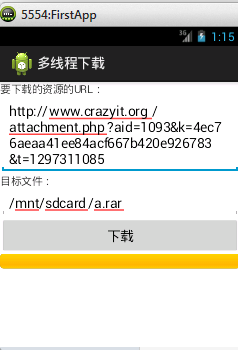
运行结果:
HttpConnection方式访问网络的更多相关文章
- android post 方式 访问网络 实例
android post 方式 访问网络 实例 因为Android4.0之后对使用网络有特殊要求,已经无法再在主线程中访问网络了,必须使用多线程访问的模式 该实例需要在android配置文件中添加 网 ...
- APN APN指一种网络接入技术,是通过手机上网时必须配置的一个参数,它决定了手机通过哪种接入方式来访问网络。
apn 锁定 本词条由“科普中国”百科科学词条编写与应用工作项目 审核 . APN指一种网络接入技术,是通过手机上网时必须配置的一个参数,它决定了手机通过哪种接入方式来访问网络. 对于手机用户来说,可 ...
- Android使用Http协议访问网络——HttpConnection
套路篇 使用HttpConnection访问网络一般有如下的套路: 1.获取到HttpConnection的实例,new出一个URL对象,并传入目标的网址,然后调用一下openConnection() ...
- ADO.NET 连接方式和非链接方式访问数据库
一.//连接方式访问数据库的主要步骤(利用DataReader对象实现数据库连接模式) 1.创建连接对象(连接字符串) SqlConnection con = new SqlConnection(Co ...
- .Net程序员安卓学习之路2:访问网络API
做应用型的APP肯定是要和网络交互的,那么本节就来实战一把Android访问网络API,还是使用上节的DEMO: 一.准备API: 一般都采用Json作为数据交换格式,目前各种语言均能输出Json串. ...
- Android 使用 HTTP 协议访问网络
正在看<第一行代码>,记录一下使用 HTTP 协议访问网络的内容吧! 在Android发送Http请求有两种方式,HttpURLConnection和HttpClient. 1.使用Htt ...
- 在VMware中为CentOS配置静态ip并可访问网络-Windows下的VMware
在VMware中为CentOS配置静态ip并可访问网络-Windows下的VMware 首先确保虚拟网卡(VMware Network Adapter VMnet8)是开启的,然后在windows的命 ...
- Java 网络编程(三) 创建和使用URL访问网络上的资源
链接地址:http://www.cnblogs.com/mengdd/archive/2013/03/09/2951877.html 创建和使用URL访问网络上的资源 URL(Uniform Reso ...
- Android访问网络
Android中访问网络用的是HttpClient的方式,即Apache提供的一个jar包.安卓中继承了改jar包,所以安卓adt中不需要专门import该jar,直接就可以使用. 以下是MainAc ...
随机推荐
- EBS运行快速安装的程序时,提示DISPLAY变量设置不对
EBS运行快速安装的程序时,系统提示如下: Rapid Install Wizard is validating your file system...... >> Wizard requ ...
- 浅谈My SQL引擎的对比
MySQL数 据库引擎取决于MySQL在安装的时候是如何被编译的.要添加一个新的引擎,就必须重新编译MYSQL.在缺省情况下,MYSQL支持三个引擎:ISAM.MYISAM和HEAP.另外两种类型IN ...
- win7无线网连接了,但是图标显示未连接
第一步: 打开控制面板,找到“管理工具”->“计算机管理” 第二步: 在控制台左边栏,选择“设备管理器”,然后在右侧展开“网络适配器” 第三步: 在每一个网络设备上点鼠标右键,然后选择“卸载”. ...
- TIJ——Chapter One:Introduction to Objects
///:~容我对这个系列美其名曰"读书笔记",其实shi在练习英文哈:-) Introduction to Objects Object-oriented programming( ...
- ruby初步学习中遇到的错误
print <<off This is the second way of creating here document ie. multiple line string; off 报错: ...
- linux第1天 fork exec 守护进程
概念方面 文件是对I/O设备的抽象表示.虚拟存储器是对主存和磁盘I/O设备的抽象表示.进程则是对处理器.主存和I/O设备的抽象表示 中断 早期是没有进程这个概念,当出现中断技术以后才出现进程这个概念 ...
- ansible自动化运维工具的安装与使用
运行环境 centOS6.6 ansible ansible的功能还是比较多的,博主只用它在集群上进行批量部署软件和维护的功能,其他不多做研究,有需要的话这篇文章会慢慢补充. ansible特点 轻量 ...
- FRM-92101解决办法
/u02/UAT/inst/apps/UAT_newerp3/logs/ora/10.1.3/opmn/forms_default_group_1/ http://blog.csdn.net/orth ...
- ThinkPHP讲解(七)——修改删除
修改数据 方式一:数组方式,直接将数据库里需要修改的内容进行修改 function Update() { //1.数组方式 $model=D("Info"); $attr=arra ...
- jquery tab键转换
<!DOCTYPE html PUBLIC "-//W3C//DTD XHTML 1.0 Transitional//EN" "http://www.w3.org/ ...