
使用命令行编译、打包、运行WordCount--不用eclipse
1)首先创建WordCount1023文件夹,然后在此目录下使用编辑器,例如vim编写WordCount源文件,并保存为WordCount.java文件
 /**

  *  Licensed under the Apache License, Version 2.0 (the "License");

  *  you may not use this file except in compliance with the License.

  *  You may obtain a copy of the License at

  *

  *      http://www.apache.org/licenses/LICENSE-2.0

  *

  *  Unless required by applicable law or agreed to in writing, software

  *  distributed under the License is distributed on an "AS IS" BASIS,

  *  WITHOUT WARRANTIES OR CONDITIONS OF ANY KIND, either express or implied.

  *  See the License for the specific language governing permissions and

  *  limitations under the License.

  */

 import java.io.IOException;

 import java.util.StringTokenizer;

 import org.apache.hadoop.conf.Configuration;

 import org.apache.hadoop.fs.Path;

 import org.apache.hadoop.io.IntWritable;

 import org.apache.hadoop.io.Text;

 import org.apache.hadoop.fs.FileSystem;

 import org.apache.hadoop.mapred.JobConf;

 import org.apache.hadoop.mapreduce.Job;

 import org.apache.hadoop.mapreduce.Mapper;

 import org.apache.hadoop.mapreduce.Reducer;

 import org.apache.hadoop.mapreduce.lib.input.FileInputFormat;

 import org.apache.hadoop.mapreduce.lib.output.FileOutputFormat;

 import org.apache.hadoop.util.GenericOptionsParser;

 public class WordCount {

   public static class TokenizerMapper

        extends Mapper<Object, Text, Text, IntWritable>{

     private final static IntWritable one = new IntWritable(1);

     private Text word = new Text();

     public void map(Object key, Text value, Context context

                     ) throws IOException, InterruptedException {

       StringTokenizer itr = new StringTokenizer(value.toString());

       while (itr.hasMoreTokens()) {

         word.set(itr.nextToken());

         context.write(word, one);

       }

     }

   }

   public static class IntSumReducer

        extends Reducer<Text,IntWritable,Text,IntWritable> {

     private IntWritable result = new IntWritable();

     public void reduce(Text key, Iterable<IntWritable> values,

                        Context context

                        ) throws IOException, InterruptedException {

       int sum = 0;

       for (IntWritable val : values) {

         sum += val.get();

       }

       result.set(sum);

       context.write(key, result);

     }

   }

   public static void main(String[] args) throws Exception {

     Configuration conf = new Configuration();

     //JobConf conf=new JobConf();

     //

     //conf.setJar("org.apache.hadoop.examples.WordCount.jar");

    // conf.set("fs.default.name", "hdfs://Master:9000/");

     //conf.set("hadoop.job.user","hadoop");

     //指定jobtracker的ip和端口号,master在/etc/hosts中可以配置

    // conf.set("mapred.job.tracker","Master:9001");

    String[] otherArgs = new GenericOptionsParser(conf, args).getRemainingArgs();

     if (otherArgs.length != 2) {

       System.err.println("Usage: wordcount <in> <out>");

       System.exit(2);

     }

     FileSystem hdfs =FileSystem.get(conf);

     Path findf=new Path(otherArgs[1]);

     boolean isExists=hdfs.exists(findf);

     System.out.println("exit?"+isExists);

     if(isExists)

     {

         hdfs.delete(findf, true);

         System.out.println("delete output");

     }

     Job job = new Job(conf, "word count");

     job.setJarByClass(WordCount.class);

     job.setMapperClass(TokenizerMapper.class);

     job.setCombinerClass(IntSumReducer.class);

     job.setReducerClass(IntSumReducer.class);

     job.setOutputKeyClass(Text.class);

     job.setOutputValueClass(IntWritable.class);

     FileInputFormat.addInputPath(job, new Path(otherArgs[0]));

     FileOutputFormat.setOutputPath(job, new Path(otherArgs[1]));

     System.exit(job.waitForCompletion(true) ? 0 : 1);

   }

 }
2)然后在WordCount1023目录下使用javac编译java源文件。

使用classpath添加源程序编译所需要的hadoop的两个jar包,然后是待编译的源程序的文件名。
编译成功之后产生三个class文件:
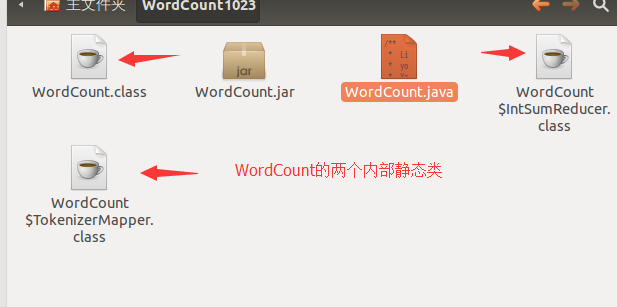
jar文件是一种压缩文件,可以将若干java的class文件压缩到一个jar文件中,如下只是将WordCount.class文件压缩到一个jar文件中。

然后将这个jar包提交到hadoop集群,运行出错:

错误提示:每天发现已经定义的类:即是WordCount的内部类TokenizerMapper。因为没有把这个类打到jar包内呀~~
重新打jar包:

使用*.class表示把所有以.class为后缀的打成一个jar包(其实也就是那三个class文件)。
可以通过表明清单(manifest)看到打入jar包的class文件。
再次运行就成功了:
 、
、
3)
hadoop程序当输出文件存在的时候会报错,所以本程序在内部检测输出文件是否存在,存在的话就删除。有三行代码需要详细解释。
String[] otherArgs = new GenericOptionsParser(conf, args).getRemainingArgs();
从命令行读取参数,命令行就是像hadoop提交作业使用的命令行。args读取的就是命令行末尾的数据记得输入路径和存放结果的输出路径,然后将其存放在字符串数组otherArgs中。
FileInputFormat.addInputPath(job, new Path(otherArgs[0]));
otherArgs[0]就是表示数据集输入路径的字符换。
FileOutputFormat.setOutputPath(job, new Path(otherArgs[1]));
otherArgs[1]就是表示结果输出路径的字符串。
联想到了eclipse中配置参数一项中配置输入输出路径那里,就明白了为什么eclipse不使用命令行也可以直接运行hadoop程序了。
使用命令行编译、打包、运行WordCount--不用eclipse的更多相关文章
- 使用命令行编译打包运行自己的MapReduce程序 Hadoop2.6.0
使用命令行编译打包运行自己的MapReduce程序 Hadoop2.6.0 网上的 MapReduce WordCount 教程对于如何编译 WordCount.java 几乎是一笔带过… 而有写到的 ...
- 基于命令行编译打包phonegap for android应用 分类: Android Phonegap 2015-05-10 10:33 73人阅读 评论(0) 收藏
也许你习惯了使用Eclipse编译和打包Android应用.不过,对于使用html5+js开发的phonegap应用,本文建议你抛弃Eclipse,改为使用命令行模式,绝对的快速和方便. 一直以来,E ...
- 如何使用命令行编译和运行java文件
相信大家现在一般都在使用IDE环境来开发运行java文件,但我觉得可以在命令行里面简单运行java文件,技多不压身. 接下来我来说一下编译和运行java文件: 第一步,首先下一个入门程序(注意:一定要 ...
- 加载依赖的jar包在命令行编译和运行java文件
在命令里编译和执行java文件,当应用程序需要需要依赖的jar包里面的class文件才能编译运行的时候,应该这样做: 1. 首先是编译过程,在命令行里面执行: (1) javac -classpath ...
- maven mvn 命令行 编译打包
* 配置好jdk * 下载安装maven http://maven.apache.org/download.cgi apache-maven-3.3.3-bin.zip * 解压到G:\apache- ...
- 如何使用命令行编译以及运行java文件
要想编译和运行java文件,很简单,只需要两个命令: (1) javac:作用:编译java文件:使用方法: javac Hello.java ,如果不出错的话,在与Hello.java 同一目录下会 ...
- java命令行编译和运行引用jar包的文件
经常遇到需要添加第三方jar文件的情况.在命令行状态下要加载外部的jar文件非常麻烦,很不好搞,在网上折腾了很久终于搞定了,在这里做个笔记: 2.运行:java -Djava.ext.dirs=./l ...
- 使用命令行编译和运行 c、Java和python程序
集成开发环境已经非常方便,从编写程序到执行程序看到结果,让我们不用关心中间的过程.但是使用原始的.命令的方式来将程序编译运行有的时候可能有些用,比如写个简答的程序,或者是身边没有集成工具的时候. C语 ...
- cmd命令行编译和运行java程序报错 NoClassDefFoundError
首先,当在运行java程序出现这个错误时,首先考虑是不是路径或者未指定正确的包名,例如当运行下面这个文件时: package cn.wgh.socket; public class HelloWorl ...
- JAVA命令行编译及运行
第一部分:单文件 一.背景目标文件HelloWorld.java package ccdate; public class HelloWorld { public static void main(S ...
随机推荐
- Python学习教程(learning Python)--3.3.3 Python逻辑关系表达式
在if分支判断语句里的条件判断语句不一定就是一个表达式,可以是多个(布尔)表达式的组合关系运算,这里如何使用更多的关系表达式构建出一个比较复杂的条件判断呢?这里需要再了解一下逻辑运算的基础知识.逻辑关 ...
- 编译mgiza的准备
cmake之前需要首先设置环境变量: export BOOST_LIBRARYDIR=$BOOST_ROOT/lib64export BOOST_ROOT=/home/noah/boost_1_57_ ...
- 【C#】使用C#将类序列化为XML
直接上代码: public static class XmlSerializer { public static void SaveToXml(string filePath, object sour ...
- 微软TTS尝试系列之开篇杂谈(仅思路)
第一次写博客,不知道如何下手,思路也乱,就先聊聊怎么进的园子吧,但愿不会浪费大家太多的宝贵时间>_<. 与博客园结缘应该是大三刚开始的时候.当时学校教务处想开发一个教务安排系统,为了省钱就 ...
- Lex+YACC详解
1. 简介 只要你在Unix环境中写过程序,你必定会邂逅神秘的Lex&YACC,就如GNU/Linux用户所熟知的Flex&Bison,这里的Flex就是由Vern Paxon实现的一 ...
- hdu 3530 Subsequence
题目连接 http://acm.hdu.edu.cn/showproblem.php?pid=3530 Subsequence Description There is a sequence of i ...
- iOS中MVC设计模式
在组织大型项目的代码文件时,我们常用MVC的思想.MVC的概念讲起来非常简单,就和对象(object)一样.但是理解和应用起来却非常困难.今天我们就简单总结一下MVC设计理念. MVC(Model V ...
- Objective-C面向对象(三)
1.类的继承 OC的继承是单继承,每个子类只有一个直接父类 1.1 继承的特点 OC继承的语法 @interface SubClass :SuperClass { //成员变量定义 } //方法定义部 ...
- 软件工程课后作业——四则运算Ⅲ(C++)
一.设计思路 题目:可以答题并判断对错,最后显示做对几道题. 在原有的基础上,又拓展了答题模块. 在结构体中添加了answer属性,把输入的答案与正确答案比较,若相等则计数加一. 二.源代码 (1)四 ...
- java7新特新(一) Try-with-resources (TWR)
Try-with-resources (TWR) 在处理IO的代码中,我们会使用大量的try...catch()...finally...语法,其中会在finally进行IO的close操作,写过py ...