
使用命令行编译、打包、运行WordCount--不用eclipse
1)首先创建WordCount1023文件夹,然后在此目录下使用编辑器,例如vim编写WordCount源文件,并保存为WordCount.java文件
 /**

  *  Licensed under the Apache License, Version 2.0 (the "License");

  *  you may not use this file except in compliance with the License.

  *  You may obtain a copy of the License at

  *

  *      http://www.apache.org/licenses/LICENSE-2.0

  *

  *  Unless required by applicable law or agreed to in writing, software

  *  distributed under the License is distributed on an "AS IS" BASIS,

  *  WITHOUT WARRANTIES OR CONDITIONS OF ANY KIND, either express or implied.

  *  See the License for the specific language governing permissions and

  *  limitations under the License.

  */

 import java.io.IOException;

 import java.util.StringTokenizer;

 import org.apache.hadoop.conf.Configuration;

 import org.apache.hadoop.fs.Path;

 import org.apache.hadoop.io.IntWritable;

 import org.apache.hadoop.io.Text;

 import org.apache.hadoop.fs.FileSystem;

 import org.apache.hadoop.mapred.JobConf;

 import org.apache.hadoop.mapreduce.Job;

 import org.apache.hadoop.mapreduce.Mapper;

 import org.apache.hadoop.mapreduce.Reducer;

 import org.apache.hadoop.mapreduce.lib.input.FileInputFormat;

 import org.apache.hadoop.mapreduce.lib.output.FileOutputFormat;

 import org.apache.hadoop.util.GenericOptionsParser;

 public class WordCount {

   public static class TokenizerMapper

        extends Mapper<Object, Text, Text, IntWritable>{

     private final static IntWritable one = new IntWritable(1);

     private Text word = new Text();

     public void map(Object key, Text value, Context context

                     ) throws IOException, InterruptedException {

       StringTokenizer itr = new StringTokenizer(value.toString());

       while (itr.hasMoreTokens()) {

         word.set(itr.nextToken());

         context.write(word, one);

       }

     }

   }

   public static class IntSumReducer

        extends Reducer<Text,IntWritable,Text,IntWritable> {

     private IntWritable result = new IntWritable();

     public void reduce(Text key, Iterable<IntWritable> values,

                        Context context

                        ) throws IOException, InterruptedException {

       int sum = 0;

       for (IntWritable val : values) {

         sum += val.get();

       }

       result.set(sum);

       context.write(key, result);

     }

   }

   public static void main(String[] args) throws Exception {

     Configuration conf = new Configuration();

     //JobConf conf=new JobConf();

     //

     //conf.setJar("org.apache.hadoop.examples.WordCount.jar");

    // conf.set("fs.default.name", "hdfs://Master:9000/");

     //conf.set("hadoop.job.user","hadoop");

     //指定jobtracker的ip和端口号,master在/etc/hosts中可以配置

    // conf.set("mapred.job.tracker","Master:9001");

    String[] otherArgs = new GenericOptionsParser(conf, args).getRemainingArgs();

     if (otherArgs.length != 2) {

       System.err.println("Usage: wordcount <in> <out>");

       System.exit(2);

     }

     FileSystem hdfs =FileSystem.get(conf);

     Path findf=new Path(otherArgs[1]);

     boolean isExists=hdfs.exists(findf);

     System.out.println("exit?"+isExists);

     if(isExists)

     {

         hdfs.delete(findf, true);

         System.out.println("delete output");

     }

     Job job = new Job(conf, "word count");

     job.setJarByClass(WordCount.class);

     job.setMapperClass(TokenizerMapper.class);

     job.setCombinerClass(IntSumReducer.class);

     job.setReducerClass(IntSumReducer.class);

     job.setOutputKeyClass(Text.class);

     job.setOutputValueClass(IntWritable.class);

     FileInputFormat.addInputPath(job, new Path(otherArgs[0]));

     FileOutputFormat.setOutputPath(job, new Path(otherArgs[1]));

     System.exit(job.waitForCompletion(true) ? 0 : 1);

   }

 }
2)然后在WordCount1023目录下使用javac编译java源文件。

使用classpath添加源程序编译所需要的hadoop的两个jar包,然后是待编译的源程序的文件名。
编译成功之后产生三个class文件:
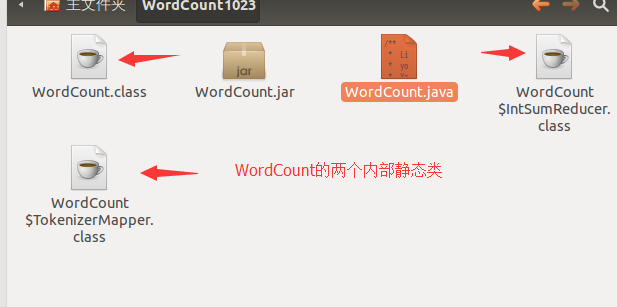
jar文件是一种压缩文件,可以将若干java的class文件压缩到一个jar文件中,如下只是将WordCount.class文件压缩到一个jar文件中。

然后将这个jar包提交到hadoop集群,运行出错:

错误提示:每天发现已经定义的类:即是WordCount的内部类TokenizerMapper。因为没有把这个类打到jar包内呀~~
重新打jar包:

使用*.class表示把所有以.class为后缀的打成一个jar包(其实也就是那三个class文件)。
可以通过表明清单(manifest)看到打入jar包的class文件。
再次运行就成功了:
 、
、
3)
hadoop程序当输出文件存在的时候会报错,所以本程序在内部检测输出文件是否存在,存在的话就删除。有三行代码需要详细解释。
String[] otherArgs = new GenericOptionsParser(conf, args).getRemainingArgs();
从命令行读取参数,命令行就是像hadoop提交作业使用的命令行。args读取的就是命令行末尾的数据记得输入路径和存放结果的输出路径,然后将其存放在字符串数组otherArgs中。
FileInputFormat.addInputPath(job, new Path(otherArgs[0]));
otherArgs[0]就是表示数据集输入路径的字符换。
FileOutputFormat.setOutputPath(job, new Path(otherArgs[1]));
otherArgs[1]就是表示结果输出路径的字符串。
联想到了eclipse中配置参数一项中配置输入输出路径那里,就明白了为什么eclipse不使用命令行也可以直接运行hadoop程序了。
使用命令行编译、打包、运行WordCount--不用eclipse的更多相关文章
- 使用命令行编译打包运行自己的MapReduce程序 Hadoop2.6.0
使用命令行编译打包运行自己的MapReduce程序 Hadoop2.6.0 网上的 MapReduce WordCount 教程对于如何编译 WordCount.java 几乎是一笔带过… 而有写到的 ...
- 基于命令行编译打包phonegap for android应用 分类: Android Phonegap 2015-05-10 10:33 73人阅读 评论(0) 收藏
也许你习惯了使用Eclipse编译和打包Android应用.不过,对于使用html5+js开发的phonegap应用,本文建议你抛弃Eclipse,改为使用命令行模式,绝对的快速和方便. 一直以来,E ...
- 如何使用命令行编译和运行java文件
相信大家现在一般都在使用IDE环境来开发运行java文件,但我觉得可以在命令行里面简单运行java文件,技多不压身. 接下来我来说一下编译和运行java文件: 第一步,首先下一个入门程序(注意:一定要 ...
- 加载依赖的jar包在命令行编译和运行java文件
在命令里编译和执行java文件,当应用程序需要需要依赖的jar包里面的class文件才能编译运行的时候,应该这样做: 1. 首先是编译过程,在命令行里面执行: (1) javac -classpath ...
- maven mvn 命令行 编译打包
* 配置好jdk * 下载安装maven http://maven.apache.org/download.cgi apache-maven-3.3.3-bin.zip * 解压到G:\apache- ...
- 如何使用命令行编译以及运行java文件
要想编译和运行java文件,很简单,只需要两个命令: (1) javac:作用:编译java文件:使用方法: javac Hello.java ,如果不出错的话,在与Hello.java 同一目录下会 ...
- java命令行编译和运行引用jar包的文件
经常遇到需要添加第三方jar文件的情况.在命令行状态下要加载外部的jar文件非常麻烦,很不好搞,在网上折腾了很久终于搞定了,在这里做个笔记: 2.运行:java -Djava.ext.dirs=./l ...
- 使用命令行编译和运行 c、Java和python程序
集成开发环境已经非常方便,从编写程序到执行程序看到结果,让我们不用关心中间的过程.但是使用原始的.命令的方式来将程序编译运行有的时候可能有些用,比如写个简答的程序,或者是身边没有集成工具的时候. C语 ...
- cmd命令行编译和运行java程序报错 NoClassDefFoundError
首先,当在运行java程序出现这个错误时,首先考虑是不是路径或者未指定正确的包名,例如当运行下面这个文件时: package cn.wgh.socket; public class HelloWorl ...
- JAVA命令行编译及运行
第一部分:单文件 一.背景目标文件HelloWorld.java package ccdate; public class HelloWorld { public static void main(S ...
随机推荐
- 第十七章 调试及安全性(In .net4.5) 之 程序诊断
1. 概述 生产环境中的程序,也是不能保证没有问题的.为了能方便的找出问题,.net提供了一些特性来进行程序诊断. 这些特性包括:logging.tracing .程序性能分析(profiling) ...
- SQL Server基础
一.常用命令 1.使用命令行开启SQL Server服务 获取管理员权限的命令行工具: net start mssqlserver 开启sql server服务 net restart mssqlse ...
- Windows Phone自定义控件 ProgressRing
前言 Windows Phone为开发者提供了很多原生控件,但在很多场景下我们需要对默认的功能或样式做一定的修改才能满足我们的需求,自定义控件应运而生.本文通过以自定义控件进度环(ProgressRi ...
- 企业该如何进行高效IT运维管理
企业该如何进行高效IT运维管理 在企业内部也是一样,当大量的生产和经营数据集中在数据中心,一旦人们与数据中心因为IT故障而失去联系,停滞的也许不是个人应用受阻这样简单的后果.我们谁也不想看到自己企业的 ...
- iOS 第三方开源库----->AFNetworking
AFNetworking AFNetworking是一个为 iOS 和 Mac OSX 制作的令人愉快的网络库,它建立在URL 装载系统框架的顶层,内置在Cocoa里,扩展了强有力的高级网络抽象.它 ...
- [quote ]ffmpeg, gstreamer, Raspberry Pi, Windows Desktop streaming
[quote ]ffmpeg, gstreamer, Raspberry Pi, Windows Desktop streaming http://blog.pi3g.com/2013/08/ffmp ...
- 我的VS2013中,用Ado.net给SQLParameter赋值的时候,当赋值null的时候,生成的sql语句是default
/// <summary> /// 增加一条数据 /// </summary> public bool Add(Model.WechatDocuments model) { S ...
- vim时,ctrl+s了一下,程序僵死了
刚刚在用vim的时候,按了ctrl+s,然后僵死了,ctrl+c.ctrl+d都没有反应. 不知怎么回事,差点就把它kill了,想探探究竟,网上查了一下,原来原来,这是个快捷键. ctrl+s 锁定屏 ...
- linux内核分析之fork()
从一个比较有意思的题开始说起,最近要找工作无意间看到一个关于unix/linux中fork()的面试题: #include<sys/types.h> #include<stdio.h ...
- 用 Android-X86 和 VirtualBox 玩安卓游戏
目前的系统是 Ubuntu 14.04,近日玩了玩 flash 版的<皇家禁卫军:前线>塔防游戏,还是想试试原生安卓游戏的表现.发现大概有两个选择: 各类安卓模拟器:官方SDK模拟器,bl ...