
DataGridView导出Excel
将DataGridView里面的数据,导出到表格里面去。
首先,需要添加三个引用

直接在解决方案里,右键添加引用,找到路径即可。然后再把这三个文件复制到项目的根目录下。
然后定义导出表格的函数:
    public static void DataGridViewToExcel(DataGridView dgv)

        {

            #region   验证可操作性

            //申明保存对话框

            SaveFileDialog dlg = new SaveFileDialog();

            //默然文件后缀

            dlg.DefaultExt = "xls ";

            //文件后缀列表

            dlg.Filter = "EXCEL文件(*.XLS)|*.xls ";

            //默然路径是系统当前路径

            dlg.InitialDirectory = Directory.GetCurrentDirectory();

            //打开保存对话框

            if (dlg.ShowDialog() == DialogResult.Cancel) return;

            //返回文件路径

            string fileNameString = dlg.FileName;

            //验证strFileName是否为空或值无效

            if (fileNameString.Trim() == " ")

            { return; }

            //定义表格内数据的行数和列数

            int rowscount = dgv.Rows.Count;

            int colscount = dgv.Columns.Count;

            //行数必须大于0

            if (rowscount <= )

            {

                MessageBox.Show("没有数据可供保存 ", "提示 ", MessageBoxButtons.OK, MessageBoxIcon.Information);

                return;

            }

            //列数必须大于0

            if (colscount <= )

            {

                MessageBox.Show("没有数据可供保存 ", "提示 ", MessageBoxButtons.OK, MessageBoxIcon.Information);

                return;

            }

            //行数不可以大于65536

            if (rowscount > )

            {

                MessageBox.Show("数据记录数太多(最多不能超过65536条),不能保存 ", "提示 ", MessageBoxButtons.OK, MessageBoxIcon.Information);

                return;

            }

            //列数不可以大于255

            if (colscount > )

            {

                MessageBox.Show("数据记录行数太多,不能保存 ", "提示 ", MessageBoxButtons.OK, MessageBoxIcon.Information);

                return;

            }

            //验证以fileNameString命名的文件是否存在,如果存在删除它

            FileInfo file = new FileInfo(fileNameString);

            if (file.Exists)

            {

                try

                {

                    file.Delete();

                }

                catch (Exception error)

                {

                    MessageBox.Show(error.Message, "删除失败 ", MessageBoxButtons.OK, MessageBoxIcon.Warning);

                    return;

                }

            }

            #endregion

            Excel.Application objExcel = null;

            Excel.Workbook objWorkbook = null;

            Excel.Worksheet objsheet = null;

            try

            {

                //申明对象

                objExcel = new Excel.Application();

                objWorkbook = objExcel.Workbooks.Add(Missing.Value);

                objsheet = (Excel.Worksheet)objWorkbook.ActiveSheet;

                //设置EXCEL不可见

                objExcel.Visible = false;

                //向Excel中写入表格的表头

                int displayColumnsCount = ;

                for (int i = ; i <= dgv.ColumnCount - ; i++)

                {

                    if (dgv.Columns[i].Visible == true)

                    {

                        objExcel.Cells[, displayColumnsCount] = dgv.Columns[i].HeaderText.Trim();

                        displayColumnsCount++;

                    }

                }

                //设置进度条

                //tempProgressBar.Refresh();

                //tempProgressBar.Visible   =   true;

                //tempProgressBar.Minimum=1;

                //tempProgressBar.Maximum=dgv.RowCount;

                //tempProgressBar.Step=1;

                //向Excel中逐行逐列写入表格中的数据

                for (int row = ; row <= dgv.RowCount - ; row++)

                {

                    //tempProgressBar.PerformStep();

                    displayColumnsCount = ;

                    for (int col = ; col < colscount; col++)

                    {

                        if (dgv.Columns[col].Visible == true)

                        {

                            try

                            {

                                objExcel.Cells[row + , displayColumnsCount] = dgv.Rows[row].Cells[col].Value.ToString().Trim();

                                displayColumnsCount++;

                            }

                            catch (Exception)

                            {

                            }

                        }

                    }

                }

                //隐藏进度条

                //tempProgressBar.Visible   =   false;

                //保存文件

                objWorkbook.SaveAs(fileNameString, Missing.Value, Missing.Value, Missing.Value, Missing.Value,

                        Missing.Value, Excel.XlSaveAsAccessMode.xlShared, Missing.Value, Missing.Value, Missing.Value,

                        Missing.Value, Missing.Value);

            }

            catch (Exception error)

            {

                MessageBox.Show(error.Message, "警告 ", MessageBoxButtons.OK, MessageBoxIcon.Warning);

                return;

            }

            finally

            {

                //关闭Excel应用

                if (objWorkbook != null) objWorkbook.Close(Missing.Value, Missing.Value, Missing.Value);

                if (objExcel.Workbooks != null) objExcel.Workbooks.Close();

                if (objExcel != null) objExcel.Quit();

                objsheet = null;

                objWorkbook = null;

                objExcel = null;

            }

            MessageBox.Show(fileNameString + "\n\n导出完毕! ", "提示 ", MessageBoxButtons.OK, MessageBoxIcon.Information);

        }
想导出表格的话,直接触发函数就行了,把datagridview扔进去。
  private void button1_Click(object sender, EventArgs e) //导出表格

               {

                   DataGridViewToExcel(dataGridView1);

               }
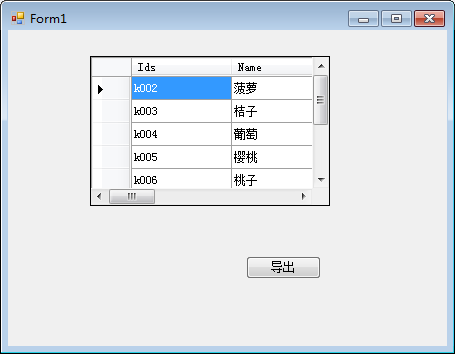
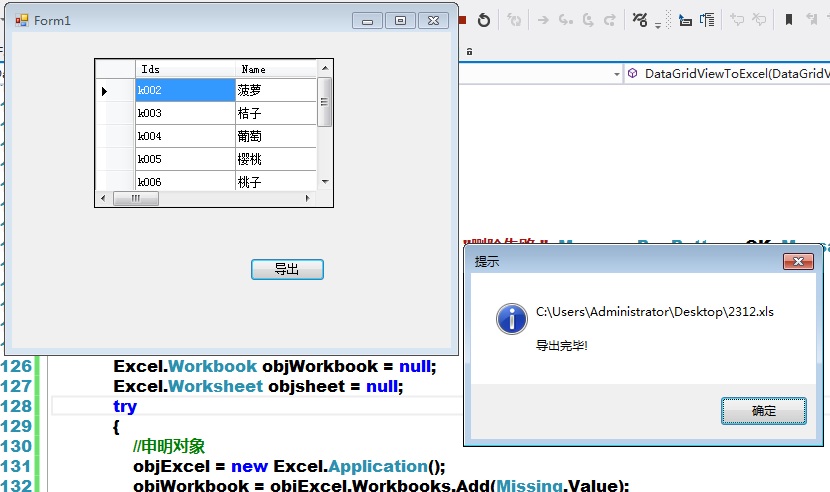
效果图:

DataGridView导出Excel的更多相关文章
- 从DataGridView导出Excel
从DataGridView导出Excel的两种情况,不多说,直接记录代码(新建类,直接引用传入参数). using System; using System.Collections.Generic; ...
- c# datagridview导出Excel文件 问题
今天vs2010c#开发做datagridview导出Excel文件时,发现一个问题,和大家探讨一下: 第一种方式:写流的方式 private void button_Excel_Click(obje ...
- 一个通用的DataGridView导出Excel扩展方法(支持列数据格式化)
假如数据库表中某个字段存放的值“1”和“0”分别代表“是”和“否”,要在DataGridView中显示“是”和“否”,一般用两种方法,一种是在sql中直接判断获取,另一种是在DataGridView的 ...
- C# DataGridView 导出 Excel(根据Excel版本显示选择不同后缀格式xls或xlsx)
/// <summary> /// DataGridView导出至Excel,解决问题:打开Excel文件格式与扩展名指定格式不一致 /// </summary> /// &l ...
- DataGridView 导出Excel (封装)
using System; using System.Collections.Generic; using System.Linq; using System.Text; using System.W ...
- C# DataGridView导出Excel
using Microsoft.Office.Interop.Excel; using Excel=Microsoft.Office.Interop.Excel; //这 ...
- winform datagridview 导出excel
using System;using System.Collections.Generic;using System.Text;using System.IO;using Microsoft.Offi ...
- 在窗体中把DataGridView中的数据导出Excel
//DataGridView导出Excel private void bt_Excl_Click(object sender, EventArgs e) { SaveFileDialog saveFi ...
- Winform 导出Excel
private void 导出excelToolStripMenuItem_Click(object sender, EventArgs e) { ) { var saveFileDialog1 = ...
随机推荐
- 2016年度 JavaScript 展望(上)
[编者按]本文作者为资深 Web 开发者 TJ VanToll, TJ 专注于移动端 Web 应用及其性能,是<jQuery UI 实践> 一书的作者. 本文系 OneAPM 工程师编译呈 ...
- ZOJ3550 Big Keng(三分)
题意:给定一个立体的图形,上面是圆柱,下面是圆台,圆柱的底面半径和圆台的上半径相等,然后体积的V时,问这个图形的表面积最小可以是多少.(不算上表面).一开始拿到题以为可以YY出一个结果,就认为它是圆锥 ...
- (转)排列算法 Permutation Generation
转自:http://www.cnblogs.com/dragonpig/archive/2010/01/21/1653680.html http://www.notesandreviews.com/p ...
- iOS搜索栏
百度云连接:http://pan.baidu.com/s/1pJLzDFX
- css系列-段落首字符下沉、缩进及特殊显示
<!doctype html> <html lang="en"> <head> <meta charset="UTF-8&quo ...
- DMS平台从.NET 1.1升级到.NET 4.0的升级步骤
1)复制新增的项目到4.0平台解决方案对应目录,添加到到解决方案中:2)合并公共文件(比如修改了FormMain主界面.基础类库.售后界面的修改)3)控件的修订(Dev少数属性可能需要手工调整为新的方 ...
- Android Activity 阻止软键盘自动弹出
在AndroidManifest.xml里面 选择那个acitivity, 把他的window soft input mode设置成stateHidden和 adjustUnspecified < ...
- hdu2023 求平均成绩 ~~很闲~~~
#include<iostream> #include<stdio.h> #include<math.h> #include<string.h> #in ...
- for语句中声明变量
在C语言中,局部变量应该在函数的可执行语句之前定义,但在C++中变量可在任何语句位置定义,只要允许程序语句的地方,都允许定义变量. 在C99标准中C同C++一样允许在for循环语句中定义变量.并且这个 ...
- java多线程知识点总结
1.线程调度知识:线程类Thread的了解,几个thread的方法.thread.sleep(),thread.join().(调用join方法的那个线程会立刻执行). object.wait()方法 ...