
简单翻译工具--必应词典第三方api使用方法
之前做过一个桌面翻译工具,桌面每日一句--桌面翻译工具(有道翻译,微软翻译,Google翻译) 获取金山每日一句,目前因为 金山每日一句页面改变导致每日一句功能失败,不过这工具自己用得最多的还是翻译功能,干脆把翻译独立出来。
另外,最近在逛知乎发现有人分享了必应词典的第三方api,所以顺道拿来完善,api作者分享页面:https://zhuanlan.zhihu.com/p/22421123
这个必应词典用起来很简单直接访问地址http://xtk.azurewebsites.net/BingDictService.aspx?Word=x x是待翻译的词语,返回json,最后就是解析json就行,解析jason用的是开源库:http://dynamicjson.codeplex.com/
直接贴代码:
 using System;

 using System.Collections.Generic;

 using System.IO;

 using System.Linq;

 using System.Net;

 using System.Text;

 using System.Threading.Tasks;

 using System.Web;

 using Codeplex.Data;

 namespace BingTranslate

 {

     public class BingDictApi

     {

         private static string GetSource(string PageUrl)

         {

             try

             {

                 WebRequest request = WebRequest.Create(PageUrl); //WebRequest.Create方法,返回WebRequest的子类HttpWebRequest

                 request.Timeout = ;//设置超时等待

                 WebResponse response = request.GetResponse(); //WebRequest.GetResponse方法,返回对 Internet 请求的响应

                 Stream resStream = response.GetResponseStream(); //WebResponse.GetResponseStream 方法,从 Internet 资源返回数据流。

                 Encoding enc = Encoding.GetEncoding("utf-8"); // 如果是乱码就改成 utf-8 / GB2312

                 StreamReader sr = new StreamReader(resStream, enc); //命名空间:System.IO。 StreamReader 类实现一个 TextReader (TextReader类,表示可读取连续字符系列的读取器),使其以一种特定的编码从字节流中读取字符。

                 string source = sr.ReadToEnd(); //输出(HTML代码),ContentHtml为Multiline模式的TextBox控件

                 resStream.Close();

                 //Console.Write(source);

                 sr.Close();

                 return source;

             }

             catch (Exception ex)

             {

                 Console.WriteLine(ex.Message);

                 return "";

             }

         }

         public BingDictobject Translate(string word)

         {

             BingDictobject dictobject = new BingDictobject();

             string encodedStr = HttpUtility.UrlEncode(word);

             string url = string.Format("http://xtk.azurewebsites.net/BingDictService.aspx?Word={0}", encodedStr);

             string text = GetSource(url);

             if (text.Contains("An error occurs."))

             {

                 return null;

             }

             var json = DynamicJson.Parse(text);

             dictobject.word = json.word;

             if (json.pronunciation())//判断属性是否存在

             {

                 var jsPronunciation = json.pronunciation;

                 if (jsPronunciation!= null)

                 {

                     Pronunciation pronunciation = new Pronunciation();

                     pronunciation.AmE = jsPronunciation.AmE;

                     pronunciation.AmEmp3 = jsPronunciation.AmEmp3;

                     pronunciation.BrE = jsPronunciation.BrE;

                     pronunciation.BrEmp3 = jsPronunciation.BrEmp3;

                     dictobject.pronunciation = pronunciation;

                 }

             }

             if (json.defs())

             {

                 var jsdef = json.defs;

                 if (jsdef!= null)

                 {

                     Def[] defs = jsdef;

                     dictobject.defs = defs;

                 }

             }

             if (json.sams())

             {

                 var jssam = json.sams;

                 if (jssam!=null)

                 {

                     Sam[] sams = jssam;

                     dictobject.sams = sams;

                 }

             }

             return dictobject;

         }

         public class BingDictobject

         {

             public string word { get; set; }

             public Pronunciation pronunciation { get; set; }

             public Def[] defs { get; set; }

             public Sam[] sams { get; set; }

         }

         public class Pronunciation

         {

             public string AmE { get; set; }

             public string AmEmp3 { get; set; }

             public string BrE { get; set; }

             public string BrEmp3 { get; set; }

         }

         public class Def

         {

             public string pos { get; set; }

             public string def { get; set; }

         }

         public class Sam

         {

             public string eng { get; set; }

             public string chn { get; set; }

             public string mp3Url { get; set; }

             public string mp4Url { get; set; }

         }

     }

 }
调用方法:
 using BingTranslate;

 namespace BingTranslateTest

 {

     class Program

     {

         static void Main(string[] args)

         {

             BingDictApi bing = new BingDictApi();

             bing.Translate("china");

         }

     }

 }
翻译效果:
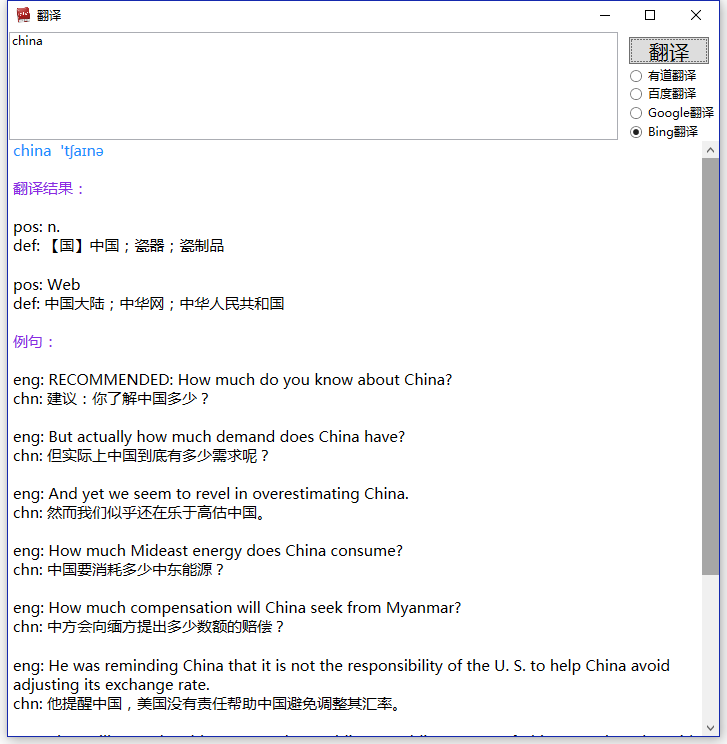
工具附带其它翻译api,不再一一说明,原理也很简单,想研究的可以使用反汇编工具查看
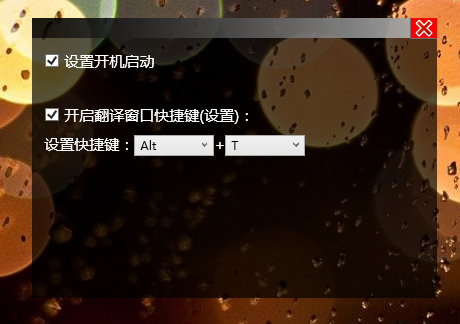
使用也很简单,喜欢的可以下载使用:
启动后,在图盘图标中调出设计界面,设置好快捷键(默认ctrl+T) 按快捷键就能调出翻译界面
简单翻译工具--必应词典第三方api使用方法的更多相关文章
- 微软必应词典客户端的案例分析——个人Week3作业
第一部分 调研,评测 Bug探索 Bug No1.高亮语义匹配错位 环境: windows8,使用必应词典版本PC版:3.5.0 重现步骤: 1. 搜索"funny face"这一 ...
- python实战===国内很简单实用的一些开源的api以及开源项目
原创 2017年03月25日 15:40:59 标签: api / 开源项目 / app / 免费接口 声明 以下所有 API 均由产品公司自身提供,本人皆从网络获取.获取与共享之行为或有侵犯产品 ...
- property - 必应词典 美['prɑpərti]英['prɒpə(r)ti] n.属性;财产;财产权;【戏】道具
英语 (已检测) 自动检测 阿拉伯语 自动检测 爱尔兰语 自动检测 爱沙尼亚语 自动检测 保加利亚语 自动检测 冰岛语 自动检测 波兰语 自动检测 波斯尼亚语(拉丁语) 自动检测 波斯语 自动检测 丹 ...
- 原生js简单调用百度翻译API实现的翻译工具
先来个在线demo: js翻译工具 或者百度搜索js简单调用百度翻译API工具(不过有个小小的界面显示bug,我想细心的人应该会发现) 或者直接前往该网址:js翻译工具 或者前往我的github:gi ...
- 基于百度翻译API开发属于自己的翻译工具
你是否每天使用着网页翻译工具?你是否遇到过这种情况,上网过程中遇到一个很长的单词但是又不能复制,要开两个浏览器,一个打开百度翻译,照着另一个网页输入单词?你安装了各种翻译软件后,又删除,只因忍受不了那 ...
- 用Python做一个简单的翻译工具
编程本身是跟年龄无关的一件事,不论你现在是十四五岁,还是四五十岁,如果你热爱它,并且愿意持续投入其中,必定会有所收获. 很多人学习python,不知道从何学起.很多人学习python,掌握了基本语法过 ...
- Q promise API简单翻译
详细API:https://github.com/kriskowal/q/wiki/API-Reference Q提供了promise的一种实现方式,现在在node中用的已经比较多了.因为没有中文的a ...
- 免费翻译API破解(简易翻译工具)
思路:选取有道翻译,用fiddler抓取接口请求信息,提取相关请求参数,破解加密部分. 主要请求数据: i :翻译文本 ts:时间戳 salt:ts +随机数 sign:加密信息,经过抓取信息,发现 ...
- 必应词典UWP版-开发小结
摘要 必应词典UWP版已经上线2周了!相信有不少用户都已经体验过了吧!得益于Win10全新.强大的API,新版词典在性能上.UI体验上都有了大幅的提升,今天,小编就为大家讲讲必应词典UWP开发的故事. ...
随机推荐
- Linux lsof命令 以及 恢复删除的文件
1.简介 lsof(list open files)是一个列出当前系统打开文件的工具.在linux环境下,任何事物都以文件的形式存在,通过文件不仅仅可以访问常规数据,还可以访问网络连接和硬件.所以如传 ...
- linux系统下修改文件夹目录权限
linux系统下修改文件夹目录权限 文件夹权限问题 Linux.Fedora.Ubuntu修改文件.文件夹权限的方法差不多.很多人开始接触Linux时都很头痛Linux的文件权限问题.这里告诉大家如何 ...
- thinkphp3.2与phpexcel带图片生成 完美案例
thinkphp3.2与phpexcel完美案例 // 导出exl public function look_down(){ $id = I('get.id'); $m = M ('offer_goo ...
- jQuery1.11源码分析(1)-----Sizzle源码概览[原创]
最近在啃jQuery1.11源码,上来就遇到Sizzle这个jQuery的大核心,虽然已经清楚了Sizzle的用途,先绕过去也没事,但明知山有虎偏向虎山行才是我们要做的. 本文面向的阅读对象:正在学习 ...
- Unity3D 之脚本架构,优雅地管理你的代码
本文参考雨松MOMO大神的帖子: 图片全部来自他的帖子(请允许我偷懒下) --------------------------------------------------------------- ...
- spark安装(实战)
sparksql+hive :http://lxw1234.com/archives/2015/06/294.htm 1,安装scala http://scala-lang.org/download/ ...
- linux下实现在程序运行时的函数替换(热补丁)
声明:以下的代码成果,是参考了网上的injso技术,在本文的最后会给出地址,同时非常感谢injso技术原作者的分享. 但是injso文章中的代码存在一些问题,所以后面出现的代码是经过作者修改和检测的. ...
- SQLite的时候判断语句是否纯在:出现RuntimeException
写SQLite的时候判断语句是否纯在: public boolean exist(long id) { String filter = FRIEND_KEY_ID + "=" + ...
- 如何设置phpMyAdmin自动登录和取消自动登录
如何设置phpMyAdmin自动登录? 首先在根目录找到config.sample.inc.php复制一份文件名改为config.inc.php(如果已经存在 config.inc.php 文件,则直 ...
- CentOS6.3 编译安装LAMP(2):编译安装 Apache2.2.25
所需源码包: /usr/local/src/Apache-2.2.25/httpd-2.2.25.tar.gz 编译安装 Apache2.2.25 #切换到源码目录 cd /usr/local/src ...