
MetaGPT( The Multi-Agent Framework):颠覆AI开发的革命性多智能体元编程框架
"MetaGPT( The Multi-Agent Framework):颠覆AI开发的革命性多智能体元编程框架"
一个多智能体元编程框架,给定一行需求,它可以返回产品文档、架构设计、任务列表和代码。这个项目提供了一种创新的方式来管理和执行项目,将需求转化为具体的文档和任务列表,使项目管理变得高效而智能。对于需要进行规划和协调的项目,这个框架提供了强大的支持.
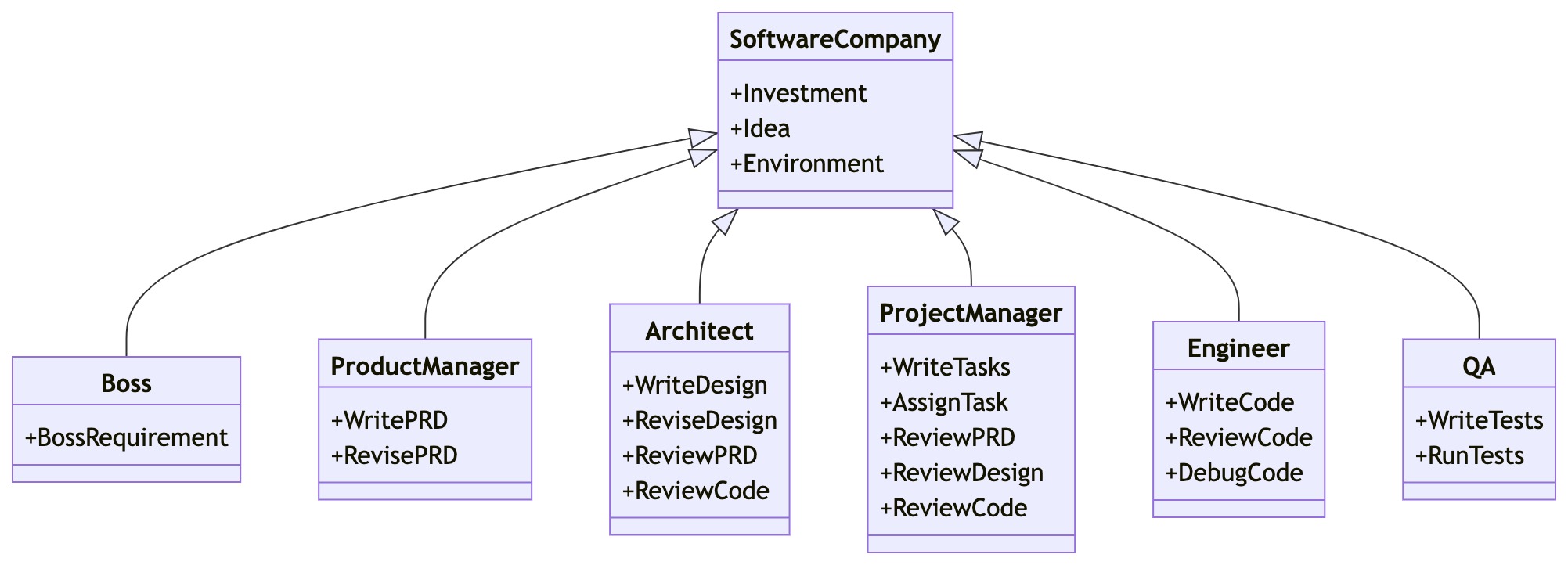
MetaGPT's 能力展示
https://github.com/geekan/MetaGPT/assets/34952977/34345016-5d13-489d-b9f9-b82ace413419
例如,如果你输入' python startup.py ' ' Design a RecSys like今日头条' ',你会得到很多输出,其中之一是data & api Design
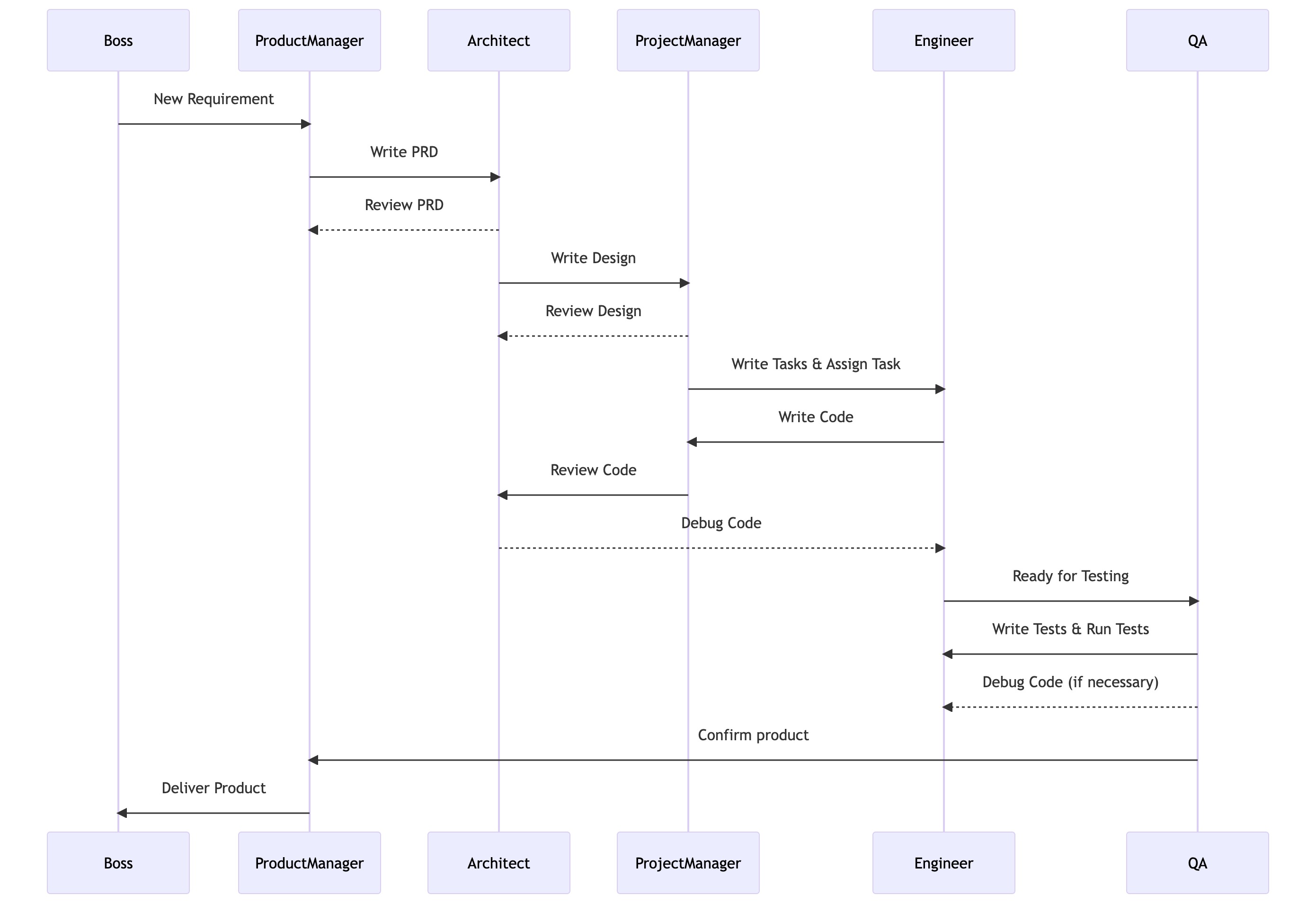
生成一个分析和设计示例的成本约为0.2美元(在GPT-4 API费用中),而生成一个完整项目的成本约为2.0美元。
1.安装
1.1 安装视频指南
- 常规安装
#Step 1: Ensure that NPM is installed on your system. Then install mermaid-js. (If you don't have npm in your computer, please go to the Node.js offical website to install Node.js https://nodejs.org/ and then you will have npm tool in your computer.)

npm --version

sudo npm install -g @mermaid-js/mermaid-cli

#Step 2: Ensure that Python 3.9+ is installed on your system. You can check this by using:

python --version

#Step 3: Clone the repository to your local machine, and install it.

git clone https://github.com/geekan/metagpt

cd metagpt

pip install -e.
Note:
If already have Chrome, Chromium, or MS Edge installed, you can skip downloading Chromium by setting the environment variable
PUPPETEER_SKIP_CHROMIUM_DOWNLOADtotrue.Some people are having issues installing this tool globally. Installing it locally is an alternative solution,
npm install @mermaid-js/mermaid-cli
don't forget to the configuration for mmdc in config.yml
PUPPETEER_CONFIG: "./config/puppeteer-config.json"

MMDC: "./node_modules/.bin/mmdc"
if
pip install -e.fails with error[Errno 13] Permission denied: '/usr/local/lib/python3.11/dist-packages/test-easy-install-13129.write-test', try instead runningpip install -e. --user将Mermaid图表转换为SVG、PNG和PDF格式。除了Node.js版本的mermaid - cli之外,你现在还可以选择使用Python版本的剧作家、pyppeteer或mermaid。
Playwright
- Install Playwright
pip install playwright
- Install the Required Browsers
to support PDF conversion, please install Chrominum.
playwright install --with-deps chromium
- modify
config.yaml
uncomment MERMAID_ENGINE from config.yaml and change it to
playwrightMERMAID_ENGINE: playwright
pyppeteer
- Install pyppeteer
pip install pyppeteer
- Use your own Browsers
pyppeteer alow you use installed browsers, please set the following envirment
export PUPPETEER_EXECUTABLE_PATH = /path/to/your/chromium or edge or chrome
please do not use this command to install browser, it is too old
pyppeteer-install
- modify
config.yaml
uncomment MERMAID_ENGINE from config.yaml and change it to
pyppeteerMERMAID_ENGINE: pyppeteer
mermaid.ink
- modify
config.yaml
uncomment MERMAID_ENGINE from config.yaml and change it to
inkMERMAID_ENGINE: ink
Note: this method does not support pdf export.
- modify
1.2 Docker安装指南
#Step 1: Download metagpt official image and prepare config.yaml

docker pull metagpt/metagpt:latest

mkdir -p /opt/metagpt/{config,workspace}

docker run --rm metagpt/metagpt:latest cat /app/metagpt/config/config.yaml > /opt/metagpt/config/key.yaml

vim /opt/metagpt/config/key.yaml # Change the config

#Step 2: Run metagpt demo with container

docker run --rm \

    --privileged \

    -v /opt/metagpt/config/key.yaml:/app/metagpt/config/key.yaml \

    -v /opt/metagpt/workspace:/app/metagpt/workspace \

    metagpt/metagpt:latest \

    python startup.py "Write a cli snake game"

#You can also start a container and execute commands in it

docker run --name metagpt -d \

    --privileged \

    -v /opt/metagpt/config/key.yaml:/app/metagpt/config/key.yaml \

    -v /opt/metagpt/workspace:/app/metagpt/workspace \

    metagpt/metagpt:latest

docker exec -it metagpt /bin/bash

$ python startup.py "Write a cli snake game"
The command docker run ... do the following things:
- Run in privileged mode to have permission to run the browser
- Map host directory
/opt/metagpt/configto container directory/app/metagpt/config - Map host directory
/opt/metagpt/workspaceto container directory/app/metagpt/workspace - Execute the demo command
python startup.py "Write a cli snake game"
1.3 构造自定义
#You can also build metagpt image by yourself.

git clone https://github.com/geekan/MetaGPT.git

cd MetaGPT && docker build -t metagpt:custom .
1.4 相关配置
- Configure your
OPENAI_API_KEYin any ofconfig/key.yaml / config/config.yaml / env - Priority order:
config/key.yaml > config/config.yaml > env
#Copy the configuration file and make the necessary modifications.

cp config/config.yaml config/key.yaml
| Variable Name | config/key.yaml | env |
|---|---|---|
| OPENAI_API_KEY # Replace with your own key | OPENAI_API_KEY: "sk-..." | export OPENAI_API_KEY="sk-..." |
| OPENAI_API_BASE # Optional | OPENAI_API_BASE: "https://<YOUR_SITE>/v1" | export OPENAI_API_BASE="https://<YOUR_SITE>/v1" |
2.相关教程
#Run the script

python startup.py "Write a cli snake game"

#Do not hire an engineer to implement the project

python startup.py "Write a cli snake game" --implement False

#Hire an engineer and perform code reviews

python startup.py "Write a cli snake game" --code_review True
After running the script, you can find your new project in the workspace/ directory.
- Preference of Platform or Tool
You can tell which platform or tool you want to use when stating your requirements.
python startup.py "Write a cli snake game based on pygame"
- 使用指南
NAME

    startup.py - We are a software startup comprised of AI. By investing in us, you are empowering a future filled with limitless possibilities.

SYNOPSIS

    startup.py IDEA <flags>

DESCRIPTION

    We are a software startup comprised of AI. By investing in us, you are empowering a future filled with limitless possibilities.

POSITIONAL ARGUMENTS

    IDEA

        Type: str

        Your innovative idea, such as "Creating a snake game."

FLAGS

    --investment=INVESTMENT

        Type: float

        Default: 3.0

        As an investor, you have the opportunity to contribute a certain dollar amount to this AI company.

    --n_round=N_ROUND

        Type: int

        Default: 5

NOTES

    You can also use flags syntax for POSITIONAL ARGUMENTS
2.1 快速开始
It is difficult to install and configure the local environment for some users. The following tutorials will allow you to quickly experience the charm of MetaGPT.
Try it on Huggingface Space
- 相关链接
https://github.com/geekan/MetaGPT/assets/2707039/5e8c1062-8c35-440f-bb20-2b0320f8d27d
3.更多推荐:终端LLM AI模型:mlc-llm
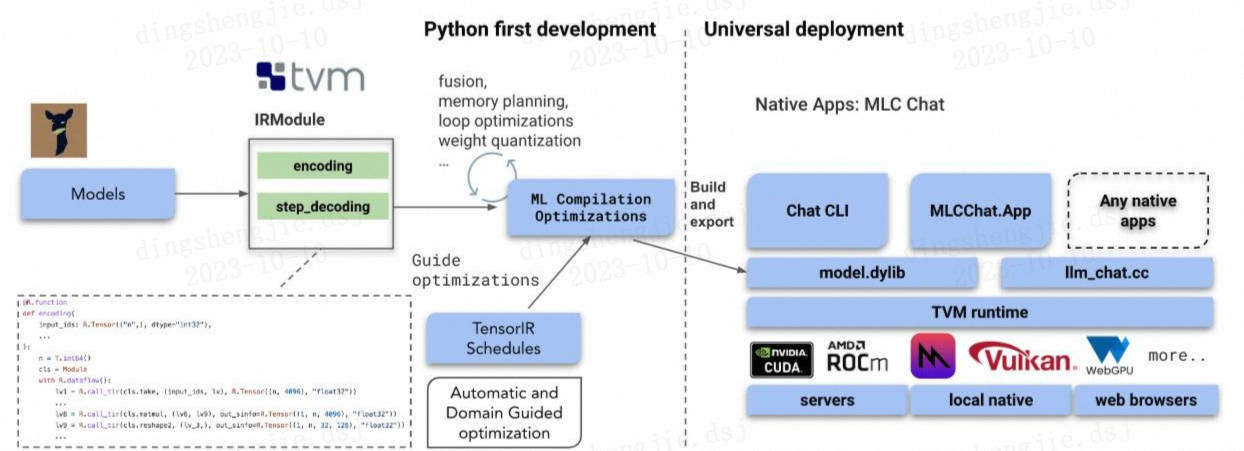
大型语言模型的机器学习编译(MLC LLM)是一种高性能的通用部署解决方案,允许使用带有编译器加速的本机api来本地部署任何大型语言模型。这个项目的使命是让每个人都能使用ML编译技术在每个人的设备上开发、优化和部署人工智能模型。
项目链接:https://github.com/mlc-ai/mlc-llm
更多优质内容请关注公号:汀丶人工智能;会提供一些相关的资源和优质文章,免费获取阅读。
MetaGPT( The Multi-Agent Framework):颠覆AI开发的革命性多智能体元编程框架的更多相关文章
- AI开发利器:HiLens Studio技术解读
摘要:传统的AI应用开发和部署意味着高成本和高门槛,借助HiLens Studio,AI应用开发和部署仅需要三步. 曾几何时, 在我们青春年少时, 当我们看到某篇AI的技术文章时, 心中总不免想要在一 ...
- 整整十年 - Agent Framework for TypeScript 2.0
十年前,我发布了 Agent Framework for .NET 2.0 今天,Agent 又开始了新的旅程, 这次支持的语言是 TypeScript 2.0 上需求:init函数只能被调用一次 废 ...
- 关于Eclipse Modeling Framework 实现模型驱动开发,第一部分
======================================EMF第二篇文章========================= 用 Eclipse Modeling Framework ...
- [转]Net Framework引路蜂地图开发示例
From:http://www.2cto.com/kf/201207/140421.html 引路蜂地图也提供对.Net Framework平台的支持,可以开发桌面地图应用,由于Mono C#的跨平台 ...
- 微软Connect(); 2017大会梳理:Azure、数据、AI开发工具
在今天召开的 Connect(); 2017 开发者大会上,微软宣布了 Azure.数据.AI 开发工具的内容.这是第一天的 Connect(); 2017 的主题演讲. 在开场视频中霍金又来了.你记 ...
- [AI开发]将深度学习技术应用到实际项目
本文介绍如何将基于深度学习的目标检测算法应用到具体的项目开发中,体现深度学习技术在实际生产中的价值,算是AI算法的一个落地实现.本文算法部分可以参见前面几篇博客: [AI开发]Python+Tenso ...
- [AI开发]centOS7.5上基于keras/tensorflow深度学习环境搭建
这篇文章详细介绍在centOS7.5上搭建基于keras/tensorflow的深度学习环境,该环境可用于实际生产.本人现在非常熟练linux(Ubuntu/centOS/openSUSE).wind ...
- [AI开发]Python+Tensorflow打造自己的计算机视觉API服务
"与其停留在概念理论层面,不如动手去实现一个简单demo ." ——鲁迅 没有源码都是耍流氓github 前言 目前提供AI开发相关API接口的公司有很多,国外如微软. ...
- java通过百度AI开发平台提取身份证图片中的文字信息
废话不多说,直接上代码... IdCardDemo.java package com.wulss.baidubce; import java.io.BufferedReader; import jav ...
- 干货分享:五大最适合学习AI开发的编程语言
AI(人工智能)为应用开发者开创了一个全新的可能性.通过利用机器学习或深度学习,您可以生成更好的用户配置文件.个性化设置和推荐,或者整合更智能的搜索.语音界面或智能助手,或者以其他数种方式改进您的应用 ...
随机推荐
- Nacos 1.2.1 集群搭建(一)环境准备
虚机准备.Nacos 文件准备.MySQL 5.7 安装 https://nacos.io/zh-cn/docs/cluster-mode-quick-start.html 根据官网要求,至少3个节点 ...
- 41. 干货系列从零用Rust编写负载均衡及代理,websocket与tcp的映射,WS与TCP互转
wmproxy wmproxy已用Rust实现http/https代理, socks5代理, 反向代理, 静态文件服务器,四层TCP/UDP转发,七层负载均衡,内网穿透,后续将实现websocket代 ...
- SpringBoot 项目实战 | 瑞吉外卖 Day03
该系列将记录一份完整的实战项目的完成过程,该篇属于第三天 案例来自B站黑马程序员Java项目实战<瑞吉外卖>,请结合课程资料阅读以下内容 该篇我们将完成以下内容: 公共字段自动填充 新添分 ...
- UVA - 1594 :Ducci Sequence (set应用)
给定n元组(a1,a2,...,an),ai均为整数,得到下一个序列为(|a1-a2|,|a2-a3|,...,|an-a1|),如此循环下去,必定会出现全零序列或重复序列. 现要求判断给定序列是全零 ...
- BZOJ 3450 - Tyvj1952 Easy (期望DP)
描述 某一天 WJMZBMR 在打 osu~~~ 但是他太弱逼了,有些地方完全靠运气:( 我们来简化一下这个游戏的规则: 有 \(n(n\le 300000)\) 次点击要做,成功了就是 o,失败了就 ...
- Codeforces 1092C Prefixes and Suffixes【字符串+思维】
题目链接:点这里 题意:理解错了题意导致WA好几发,QAQ暴击 题意是判断给你的2*n-2个字符串是前缀还是后缀,不是判断这个字符串的内容...我真的欲哭无泪,理解能力太菜了 思路:将两个n-1长的字 ...
- JAVA使用Session获取用户信息
JAVA使用Session获取用户信息 1. 在登录的Controller中将用户信息塞入Session //前端传入用户信息 @RequestMapping("/login") ...
- python使用sql批量插入数据+查看执行的语句+动态sql创建表+动态创建索引
class Test(): cursor = connection.cursor() data_to_insert = [] sql = "INSERT INTO test_t (id, n ...
- python测试小工具
2022年第三天,祝福大家元旦快乐,此测试工具在原基础上改进,增加一些新的功能,并去除了复杂的层级链接,架构目前比较简单,全部只使用了一个GridBagSizer布局器完成. 一.背景:主要解决软件测 ...
- liunx基础概述
一.liunx起源 1.1991,芬兰研究生Liunus Torvalds编写了liunx的代码,并上传到互联网 2.Liunx基于UNIX,但是有别与UNIX 3.Liunx的软件产品使用了社区开发 ...