
如何避免Git合并远程分支时出现可读性差的日志
问题及现象
当某一分支(假设为main)的本地仓库和远程仓库都基于同一个提交进行了修改,并分别创建了新的提交时,在本地执行git push origin main会提示先要执行git pull合并远程代码。
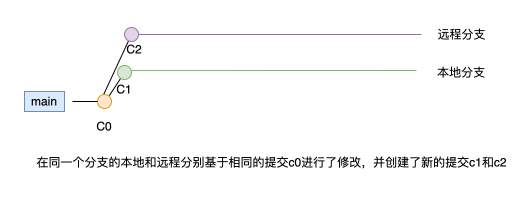
如下示例:
# 本地修改与远程仓库不一致时,推送代码到远程仓库时提示先要执行git pull操作

$ git push origin main

warning: redirecting to https://gitlab.com/zhangsan/testversion.git/

To http://gitlab.com/zhangsan/testversion.git

 ! [rejected]        main -> main (fetch first)

error: failed to push some refs to 'http://gitlab.com/zhangsan/testversion.git'

hint: Updates were rejected because the remote contains work that you do

hint: not have locally. This is usually caused by another repository pushing

hint: to the same ref. You may want to first integrate the remote changes

hint: (e.g., 'git pull ...') before pushing again.

hint: See the 'Note about fast-forwards' in 'git push --help' for details.
如果此时我们按照提示信息执行:git pull origin main,可能会发生2件事情:
(1)代码冲突,这个不一定会出现,如果本地修改跟远程仓库中的修改不在一个文件中,就不会出现冲突
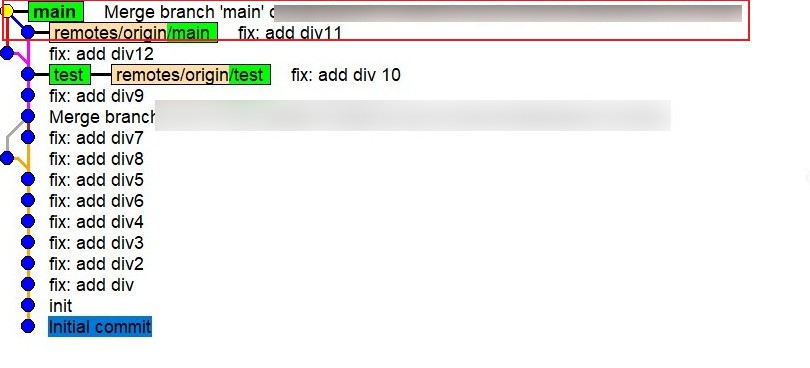
(2)在本地解决冲突(如果存在)后提交时会出现一个“Merge branch ...”的日志,看起来不友好,可读性非常差,同时分支的历史看起来也很乱
操作详情如下:
$ git pull origin main

warning: redirecting to https://gitlab.com/zhangsan/testversion.git/

remote: Enumerating objects: 5, done.

remote: Counting objects: 100% (5/5), done.

remote: Compressing objects: 100% (3/3), done.

remote: Total 3 (delta 2), reused 0 (delta 0), pack-reused 0

Unpacking objects: 100% (3/3), 307 bytes | 23.00 KiB/s, done.

From http://gitlab.com/zhangsan/testversion

 * branch            main       -> FETCH_HEAD

   f2576b1..4dc87e6  main       -> origin/main

Auto-merging index.html

CONFLICT (content): Merge conflict in index.html

Automatic merge failed; fix conflicts and then commit the result.
显然,出现了冲突,解决冲突并提交最新修改。
$ git commit -a

# 解决冲突后执行“git commit -a”时默认会生成一个“Merge branch...”日志,看起来并不友好

Merge branch 'main' of http://gitlab.com/zhangsan/testversion into main

# Conflicts:

#       index.html

#

# It looks like you may be committing a merge.

# If this is not correct, please run

#       git update-ref -d MERGE_HEAD

# and try again.

# Please enter the commit message for your changes. Lines starting

# with '#' will be ignored, and an empty message aborts the commit.

#

# On branch main

# Your branch and 'origin/main' have diverged,
# 提交后查看日志,这样的日志不友好,而且显得很乱

$ git log --oneline

ea5ceab (HEAD -> main) Merge branch 'main' of http://gitlab.com/zhangsan/testversion into main
分支历史看起来也有点乱:
原因分析及解决办法
之所以存在本地执行git push时提示需要先执行git pull合并远程代码,是因为在本地和远程分别基于一个相同的提交进行了修改,这与基于某个相同的提交创建2个新分支进行修改是一个道理。
实际上这种情况在实际开发中会经常遇到,比如:在开发新的功能时通常都是基于当前master最新的提交拉出一个新的分支进行修改并提交。假如张三和李四需要同时开发2个不同的需求,那么张三和李四都会基于master拉出新的开发分支进行修改,如果张三先开发并测试完毕就会将代码推送到远程master,等李四开发并测试需要推送到远程master时,执行git push操作一定会提示先要执行git pull拉取远程最新的代码进行合并。
为了避免出现合并日志不友好和分支历史不整洁的问题,在执行git pull时使用-r选项,即:git pull origin main -r,或者:git pull origin main --rebase。
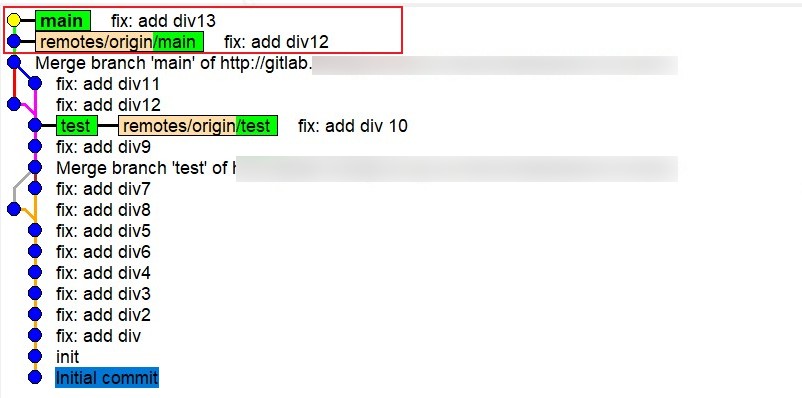
执行git pull origin main -r时与在本地执行git rebase的效果是一样的,解决好冲突之后需要执行git rebase --continue,这样就可以保持提交日志的可读性,也可以使得分支历史干净。
# 本地修改与远程不一致时执行“git pull origin main -r”提示存在冲突

$ git pull origin main -r

warning: redirecting to https://gitlab.com/zhangsan/testversion.git/

remote: Enumerating objects: 5, done.

remote: Counting objects: 100% (5/5), done.

remote: Compressing objects: 100% (3/3), done.

remote: Total 3 (delta 2), reused 0 (delta 0), pack-reused 0

Unpacking objects: 100% (3/3), 272 bytes | 10.00 KiB/s, done.

From http://gitlab.com/zhangsan/testversion

 * branch            main       -> FETCH_HEAD

   ea5ceab..6b252fe  main       -> origin/main

error: could not apply 90f947e... fix: add div13

Resolve all conflicts manually, mark them as resolved with

"git add/rm <conflicted_files>", then run "git rebase --continue".

You can instead skip this commit: run "git rebase --skip".

To abort and get back to the state before "git rebase", run "git rebase --abort".

Could not apply 90f947e... fix: add div13

Auto-merging index.html

CONFLICT (content): Merge conflict in index.html
手动解决冲突之后,先要执行git add命令添加修改过的文件,再次实行git rebase --continue合并冲突,此时不在会出现“Merge branch ...”这样的不友好日志。
$ git rebase --continue

fix: add div13

# Please enter the commit message for your changes. Lines starting

# with '#' will be ignored, and an empty message aborts the commit.

#

# interactive rebase in progress; onto 6b252fe

# Last command done (1 command done):

#    pick 90f947e fix: add div13

# No commands remaining.

# You are currently rebasing branch 'main' on '6b252fe'.

#

# Changes to be committed:

#       modified:   index.html

Successfully rebased and updated refs/heads/main.
此时再来看分支历史也非常简洁:
使用总结
1.尽快合并远程最新代码,为了确保这一点每次在本地修改之前都先执行一次git pull操作。
假设在本地分支b1上开发一个新的功能,尽快将远程master分支的代码拉取到本地并与本地b1分支做rebase操作,操作顺序可以总结为:
git checkout master

git pull origin master

git checkout b1

git rebase master
2.合并相同分支的远程代码时使用“-r”选项(git pull origin 分支名称 -r),保持提交日志的可读性和分支历史的简洁性。
3.git pull不带-r选项时本质上是:git fetch + git merge,带上-r选项时为:git fetch + git rebase。
【参考】
https://www.qikegu.com/docs/4381 Git – 拉取(git pull)时的冲突
如何避免Git合并远程分支时出现可读性差的日志的更多相关文章
- git 合并远程分支
假设远程分支 dev-by-wbw 本地分支dev-by-wgg 在本地新建一个与远程的分支dev-by-wbw相同(被合并的版本)的分支dev-by-wbw git checkout - b or ...
- git在本地分支上 git pull远程分支时,状况
git 在pull或者合并分支的时候有时会遇到这个界面.可以不管(直接下面3,4步),如果要输入解释的话就需要: 1.按键盘字母 i 进入insert模式 2.修改最上面那行黄色合并信息,可以不修改 ...
- git使用,多分支合并代码解决冲突,git删除远程分支,删除远程master默认分支方法
git使用,多分支合并代码解决冲突,git删除远程分支,删除远程master默认分支方法提交代码流程:1.先提交代码到自己分支上2.切换到devlop拉取代码合并到当前分支3.合并后有变动的推送到自己 ...
- git 合并本地分支到远程分支
第一种方法: git 快速合并本地分支到远程分支1.git branch -a 查看所有分支2.git checkout origin/分支名称3.git checkout 分支名称完成 ------ ...
- 删除本地git的远程分支和远程删除git服务器的分支【转】
转- 删除本地git的远程分支和远程删除git服务器的分支 在项目中使用git管理代码后,有些时候会创建很多不同名称的分支,以此区分各个分支代码功能. 而随着代码的合并,以前的分支就可能不再需要保存了 ...
- git对远程分支和tag的操作
技术 Git查看.删除.重命名远程分支和tag 11/17/2012zrong7条评论69,235 次查看 本站文章除注明转载外,均为本站原创或者翻译. 本站文章欢迎各种形式的转载,但请18岁以上的转 ...
- git 更新远程分支
使用git的时候,有时候会出现远端更新了一个分支,但是从本地想checkout一个远程分支时,会出现如下错误: fatal: git checkout: updating paths is incom ...
- 【Git】远程分支
[Git]远程分支 转载:https://www.cnblogs.com/yangchongxing/p/10239270.html 目录 ============================ 1 ...
- Git切换远程分支
1. 切换git远程分支,使用命令:git checkout -b 分支名称. 注意:切换远程分支一定要带伤-b 参数,只有切换本地分支的时候才不需要 -b参数,-b 的意思是 bas ...
- 180623、Git新建远程分支和删除
Git新建远程分支和删除 现在我在master分支上,工作目标是干净的,也没有需要commit的: $ git branch * master release $ git status On bran ...
随机推荐
- [转帖]构建 TiFlash 副本
https://docs.pingcap.com/zh/tidb/stable/create-tiflash-replicas#%E6%8C%89%E8%A1%A8%E6%9E%84%E5%BB%BA ...
- [转帖][大数据]ETL之增量数据抽取(CDC)
https://www.cnblogs.com/johnnyzen/p/12781942.html 目录 1 CDC 概念 1.1 定义 1.2 需求背景 1.3 考察指标 2 CDC 常见解决方案 ...
- [转帖]tidb 如何对 TiDB 进行 TPC-C 测试
https://docs.pingcap.com/zh/tidb/stable/benchmark-tidb-using-tpcc TPC-C 是一个对 OLTP(联机交易处理)系统进行测试的规范,使 ...
- [转帖]xsos - Summarize system info from sosreports
https://github.com/ryran/rsar I'M LOOKING FOR RSAR SCREEN SHOTS INTRO INSTALLATION EXAMPLES IN ACTIO ...
- C# WPF 开发一个 Emoji 表情查看软件
微软在发布 Windows 11 系统的时候,发布过一个开源的 Emoji 表情 fluentui-emoji .因为我经常需要里面的一些表情图片,在仓库一个个查找特别的不方便,所以我做了一个表情查看 ...
- go中context源码解读
context 前言 什么是context 为什么需要context呢 context底层设计 context的实现 几种context emptyCtx cancelCtx timerCtx val ...
- windows共享文件创建----局域网办公
一.共享文件设置 1.选择要共享的文件夹-----右键点击属性--------在上方选项栏选择共享----然后点击"高级共享" 2.勾选"共享此文件夹"---- ...
- 《字节码编程》PDF107页,11万字。既然市面缺少ASM、Javassist、Byte-buddy成体系的学习资料,那我来!
作者:小傅哥 博客:https://bugstack.cn - 汇总系列原创专题文章 沉淀.分享.成长,让自己和他人都能有所收获! 让人怪不好意思的,说是出书有点膨胀,毕竟这不是走出版社的流程,选题. ...
- linux(centos) 下搭建svn服务器
1. 使用yum安装svn yum -y install subversion 安装完成之后,验证安装结果 此命令会全自动安装svn服务器相关服务和依赖,安装完成会自动停止命令运行 若需查看svn安 ...
- python使用selenium控制已打开的Chrome浏览器
环境 Python3.11 selenium 4.9.0 Chrome 112.0.5615.138 步骤 为了便于和平常用的Chrome浏览区分,可以先创建一个专门用于开发的Chrome浏览器, 添 ...