
【django drf】 阶段练习
需求
1 有车型(CarModel),车厂(CarFactory),经销商(Distributor)三个表,一个车厂可以生产多种车型,一个经销商可以出售多种车型,一个车型可以有多个经销商出售

  车型:车型名,车型出厂价,车厂id

  车厂:车厂名,车厂地址,联系电话

  经销商:经销商名,地址,联系电话

2 有用户表,基于django内置user表,扩展mobile字段

3 编写登陆接口,jwt方式返回token,

	格式为{status:100,msg:登陆成功,token:safasdfa}

3 有管理员登陆后可以新增,删除车型,车厂,经销商

2 普通用户登陆可以查看车型(群查分页,单查)

	查车型:返回车型信息,车厂名字,经销商名字和电话

加分项:

用户注册接口

管理员有用户锁定,删除功能
settings.py
INSTALLED_APPS = [

    'django.contrib.admin',

    'django.contrib.auth',

    'django.contrib.contenttypes',

    'django.contrib.sessions',

    'django.contrib.messages',

    'django.contrib.staticfiles',

    'rest_framework',

    'rest_framework_jwt',

    'app01',

]

AUTH_USER_MODEL = 'app01.UserInfo'

import datetime

JWT_AUTH = {

    # 'JWT_RESPONSE_PAYLOAD_HANDLER': 'app01.utils.jwt_response_payload_handler',

    'JWT_EXPIRATION_DELTA': datetime.timedelta(days=7),

}
views.py
from django.contrib import auth

from rest_framework.generics import ListAPIView, RetrieveAPIView, CreateAPIView, UpdateAPIView, \

    DestroyAPIView

from rest_framework.viewsets import ViewSet, ViewSetMixin, GenericViewSet

from .permissions import AdminPermission

from .serializers import CarModelSerializer, CarFactorySerializer, DistributorSerializer

from .models import CarModel, CarFactory, Distributor, UserInfo

from rest_framework.decorators import action

from rest_framework_jwt.settings import api_settings

from rest_framework.response import Response

from .authenticate import JsonWebTokenAuthentication

from .page import CommonCursorPagination

jwt_payload_handler = api_settings.JWT_PAYLOAD_HANDLER

jwt_encode_handler = api_settings.JWT_ENCODE_HANDLER

# 车型

class CarModelView(ViewSetMixin, ListAPIView, RetrieveAPIView):

    serializer_class = CarModelSerializer

    queryset = CarModel.objects.all()

    authentication_classes = [JsonWebTokenAuthentication, ]

    pagination_class = CommonCursorPagination

class CarModelDetailView(ViewSetMixin, CreateAPIView, UpdateAPIView, DestroyAPIView):

    serializer_class = CarModelSerializer

    queryset = CarModel.objects.all()

    authentication_classes = [JsonWebTokenAuthentication, ]

    permission_classes = [AdminPermission, ]

    pagination_class = CommonCursorPagination

# 车厂

class CarFactoryView(ViewSetMixin, ListAPIView, RetrieveAPIView):

    serializer_class = CarFactorySerializer

    queryset = CarFactory.objects.all()

    authentication_classes = [JsonWebTokenAuthentication, ]

    pagination_class = CommonCursorPagination

class CarFactoryDetailView(ViewSetMixin, CreateAPIView, UpdateAPIView, DestroyAPIView):

    serializer_class = CarFactorySerializer

    queryset = CarFactory.objects.all()

    authentication_classes = [JsonWebTokenAuthentication, ]

    permission_classes = [AdminPermission, ]

    pagination_class = CommonCursorPagination

# 经销商

class DistributorView(ViewSetMixin, ListAPIView, RetrieveAPIView):

    serializer_class = DistributorSerializer

    queryset = Distributor.objects.all()

    authentication_classes = [JsonWebTokenAuthentication, ]

    pagination_class = CommonCursorPagination

class DistributorDetailView(ViewSetMixin, CreateAPIView, UpdateAPIView, DestroyAPIView):

    serializer_class = DistributorSerializer

    queryset = Distributor.objects.all()

    authentication_classes = [JsonWebTokenAuthentication, ]

    permission_classes = [AdminPermission, ]

    pagination_class = CommonCursorPagination

class LoginView(ViewSet):

    @action(methods=['POST'], detail=False)

    def login(self, request, *args, **kwargs):

        username = request.data.get('username')

        password = request.data.get('password')

        user = auth.authenticate(request, username=username, password=password)

        if user:

            # 登录成功,签发token

            # 通过user得到payload

            payload = jwt_payload_handler(user)

            # 通过payload得到token

            token = jwt_encode_handler(payload)

            return Response({'code': 1000, 'msg': '登录成功', 'token': token})

        else:

            return Response({'code': 1001, 'msg': '用户名或密码错误'})

# 注册接口

class RegisterView(ViewSet, CreateAPIView):

    @action(methods=['POST'], detail=False)

    def register(self, request, *args, **kwargs):

        username = request.data.get('username')

        password = request.data.get('password')

        user = UserInfo.objects.filter(username=username).first()

        if user:

            return Response({'code': 1000, 'msg': '用户名已存在'})

        else:

            UserInfo.objects.create_user(username=username, password=password)

            return Response({'code': 1001, 'msg': '注册成功'})
urls.py
from django.contrib import admin

from django.urls import path

from rest_framework.routers import SimpleRouter

from app01 import views

router = SimpleRouter()

# 车型

router.register('api/v1/car_model', views.CarModelView, 'car_model')

router.register('api/v1/car_model_admin', views.CarModelDetailView, 'car_model_admin')

# 车厂

router.register('api/v1/car_factory', views.CarFactoryView, 'car_factory')

router.register('api/v1/car_factory_admin', views.CarFactoryDetailView, 'car_factory_admin')

# 经销商

router.register('api/v1/distributor', views.DistributorView, 'distributor')

router.register('api/v1/distributor_admin', views.DistributorDetailView, 'distributor_admin')

# 登录

router.register('api/v1', views.LoginView, '')

# 注册

router.register('api/v1/user', views.RegisterView, 'user')

urlpatterns = [

    path('admin/', admin.site.urls),

]

urlpatterns += router.urls
serializers.py
from rest_framework import serializers

from .models import CarModel, CarFactory, Distributor

class CarModelSerializer(serializers.ModelSerializer):

    class Meta:

        model = CarModel

        fields = ['name', 'price', 'factory_detail', 'distributor_list', 'factory', 'distributors']

        extra_kwargs = {

            'factory_detail': {'read_only': True},

            'distributor_list': {'read_only': True},

            'factory': {'write_only': True},

            'distributors': {'write_only': True},

        }

class CarFactorySerializer(serializers.ModelSerializer):

    class Meta:

        model = CarFactory

        fields = ['name', 'address', 'phone']

class DistributorSerializer(serializers.ModelSerializer):

    class Meta:

        model = Distributor

        fields = ['name', 'address', 'phone']
permissions.py
from rest_framework.permissions import BasePermission

class AdminPermission(BasePermission):

    def has_permission(self, request, view):

        if request.user.is_superuser == 1:

            return True

        else:

            self.message = '您没有权限'

            return False
page.py
from rest_framework.pagination import CursorPagination

class CommonCursorPagination(CursorPagination):

    cursor_query_param = 'cursor'  # 查询参数

    page_size = 5  # 每页多少条

    ordering = 'id'  # 排序字段
authenticate.py
from rest_framework.authentication import BaseAuthentication

from rest_framework.exceptions import AuthenticationFailed

import jwt

from .models import UserInfo

from rest_framework_jwt.settings import api_settings

jwt_decode_handler = api_settings.JWT_DECODE_HANDLER

class JsonWebTokenAuthentication(BaseAuthentication):

    def authenticate(self, request):

        token = request.META.get('HTTP_TOKEN')

        if token:

            try:

                payload = jwt_decode_handler(token)

                user = UserInfo.objects.get(pk=payload.get('user_id'))

                return user, token

            except jwt.ExpiredSignature:

                raise AuthenticationFailed('token过期')

            except jwt.DecodeError:

                raise AuthenticationFailed('token认证失败')

            except jwt.InvalidTokenError:

                raise AuthenticationFailed('token无效')

            except Exception as e:

                raise AuthenticationFailed('未知异常')

        raise AuthenticationFailed('token没有传,认证失败')
model.py
from django.db import models

from django.db import models

from django.contrib.auth.models import AbstractUser

class UserInfo(AbstractUser):

    # 填写AbstractUser表中没有的字段

    phone = models.BigIntegerField(null=True)

class CarModel(models.Model):

    name = models.CharField(max_length=32)

    price = models.CharField(max_length=32)

    factory = models.ForeignKey(to='CarFactory', on_delete=models.CASCADE)

    distributors = models.ManyToManyField(to='Distributor')

    def factory_detail(self):

        return {'name': self.factory.name, 'address': self.factory.address, 'phone': self.factory.phone}

    def distributor_list(self):

        return [{'name': distr.name, 'address': distr.address, 'phone': distr.phone}

                for distr in self.distributors.all()]

class CarFactory(models.Model):

    name = models.CharField(max_length=32)

    address = models.TextField(max_length=32)

    phone = models.CharField(max_length=32)

class Distributor(models.Model):

    name = models.CharField(max_length=32)

    address = models.TextField(max_length=32)

    phone = models.CharField(max_length=32)
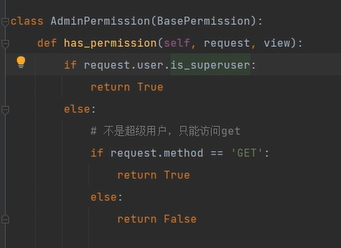
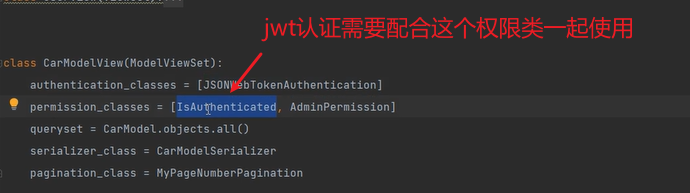
权限类判断请求方式
注意:
【django drf】 阶段练习的更多相关文章
- 解决Django + DRF:403 FORBIDDEN:CSRF令牌丢失或不正确,{"detail":"CSRF Failed: CSRF cookie not set."}
我有一个Android客户端应用程序尝试使用Django + DRF后端进行身份验证.但是,当我尝试登录时,我收到以下响应: 403: CSRF Failed: CSRF token missing ...
- django DRF理解
django restframework(DRF) 最近的开发过程当中,发现restframework的功能很强大,所以尝试解读了一下源码,写篇博客分享给大家,有错误的地方还请各位多多指出 视图部分 ...
- Django DRF 分页
Django DRF 分页 分页在DRF当中可以一共有三种,可以通过setttings设置,也可也通过自定义设置 PageNumberPagination 使用URL http://127.0.0.1 ...
- django drf 基础学习3
一 简述 这里来谈下一些基本原理 二 汇总 1 restful规范 1 根据method不同做不同的操作 request.method=' get(获取) 返回完整 ...
- django drf 基础学习2
DRF基本程序调用一 models初步编写 1 编写model.py from django.db import models 导入 class dbinfo(models.Model) ...
- django drf 基础学习1
一 环境配置 python3.5+ django2.0 pymysql二 安装 /usr/bin/python3 -m pip install django /usr/bin/pytho ...
- [django]drf知识点梳理-搜索
什么是搜索? 譬如http://127.0.0.1:8000/User/?username=maotai-0 可以检索出想要的. 自己实现原始的搜索 重写下get_queryset方法 class U ...
- Django + DRF + Elasticsearch 实现搜索功能
django使用haystack来调用Elasticsearch搜索引擎 如何使用django来调用Elasticsearch实现全文的搜索 Haystack为Django提供了模块化的搜索.它的特 ...
- django drf unique_together和UniqueTogetherValidator
联合唯一可以使用django中的unique_together,和DRF中的UniqueTogetherValidator->https://www.django-rest-framework. ...
- django drf JWT
建议使用djangorestframework-jwt或者djangorestframework_simplejwt,文档为 https://github.com/GetBlimp/django-re ...
随机推荐
- easyupload
打开界面就是一个文件上传 的界面 然后在bp试了很多种方法都没有成功,还是看了wp 这里需要利用到.use.ini那为什么不用.heaccess?好像这种方法被过滤了,当时我用的时候没有成功 这里的话 ...
- WebGL初接触
有感于在不少jd中看到关于WebGL的内容,想起来之前在高程中还没看完的canvas,就匆匆把剩余的一点看完了,高程中的内容还是皮毛,就属于很基础的.概念性的东西. WebGL 画布的3D上下文.不是 ...
- Acwing 180. 排书
给定 \(n\) 本书,编号为 1∼n. 在初始状态下,书是任意排列的. 在每一次操作中,可以抽取其中连续的一段,再把这段插入到其他某个位置. 我们的目标状态是把书按照 1∼n 的顺序依次排列. 求最 ...
- LOG日志系统
# coding=utf-8 import datetime import logging import os import sys from logging.handlers import Time ...
- 写代码不用"if"行不行,曾经的反 if 运动
如果在IT行业的时间够长的话,可能还记得大约10几年前,设计模式风靡一时的时候,有过一段反 "if" 的运动. 所谓的反"if"运动,其实是夸大了"i ...
- SQL Server 自动增长清零的方法
方法一: truncate table TableName 删除表中的所有的数据的同时,将自动增长清零.如果有外键参考这个表,这个方法会报错(即便主键表和外键表都已经没有数据),请参考方法2. 方法二 ...
- [c/c++][考研复习笔记]内部排序篇学习笔记
考研排序复习笔记 插入排序 #include<stdio.h> #include<stdlib.h> #define MaxSize 9 //折半插入排序 void ZBIns ...
- [ICPC2015WF] Tours
题目描述 The Arca Carania Mountain national park is opening up for tourist traffic. The national park ha ...
- ES集群搭建和Kibana管理集群
搭建实例 先复制2份解压后的完整目录,将里面的data和log删除. elasticsearch-6.8.23-node2 elasticsearch-6.8.23-node3 修改3个实例的配置文件 ...
- 如何对U盘的使用权限进行管控
对U盘的使用权限进行管控是保护企业信息安全的一项重要措施.以下是一些常见的方法,可帮助您有效管理和控制U盘的使用权限: 禁用U盘端口: 在公司计算机上禁用或限制USB端口的使用,特别是那些不需要使用U ...