
WinForm登录验证
概述:输错三次禁止登陆,15分钟后才能继续。
图示:
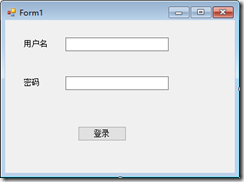
Form1代码:
using System;
using System.Configuration;
using System.Data.SqlClient;
using System.Windows.Forms;
namespace 登录验证项目
{
public partial class Form1 : Form
{
public Form1()
{
InitializeComponent();
}
private void button1_Click(object sender, EventArgs e)
{
//连接数据库
//将连接字符串写入配置文件中 string connStr = "sever=.;uid=sa;pwd=123456;database=demo";
这部分写在配置文件中
//<connectionStrings>
// <add name="SqlConn" connectionString="server=.;uid=sa;pwd=123456;database=LoginBlock"/>
//</connectionStrings>
//条添加引用引入configuration命名空间
string connStr = ConfigurationManager.ConnectionStrings["SqlConn"].ConnectionString;
using (SqlConnection conn = new SqlConnection(connStr))
{
using (SqlCommand cmd = conn.CreateCommand())
{
conn.Open();
//select 查询语句str
string str = @"SELECT [Uid]
,[Unm]
,[Pwd]
,[ErrorDate]
,[ErrorTimes]
FROM [Login_Block]
WHERE Unm='" + textBox1.Text.Trim()
+ "' and Pwd='" + textBox2.Text.Trim() + "' ";
cmd.CommandText = str;
// bool ishasdata=false;
//这里创建Login对象
Login login = null;
using (SqlDataReader reader = cmd.ExecuteReader())
{//判断是否有数据
#region MyRegion
//if (!reader.hasrows)
//{
// //修改错误时间,错误次数
//}
#endregion
#region MyRegion
if (reader.HasRows)
{
reader.Read();
}
#endregion
if (reader.Read())
{
login = new Login();
login.Uid = int.Parse(reader["Uid"].ToString());
login.Pwd = reader["Pwd"].ToString();
login.ErrorTimes = int.Parse(reader["ErrorTimes"].ToString());
login.Errordata = DateTime.Parse(reader["Errordate"].ToString());
}
// ishasdata = reader.HasRows;
}//花括号执行结束之前reader对象一直占用conn对象
if (login == null/*!ishasdata*/)
{
//修改 错误时间,错误次数 where UserName=txtUserName.Text
cmd.CommandText =
"update Login_Block set Errordate=getdate(), ErrorTimes=ErrorTimes+1 where Unm='" +
textBox1.Text.Trim() + "'";
cmd.ExecuteNonQuery();
//MessageBox.Show("用户名密码Error");
return;
}
//执行有数据的过程
if (login.ErrorTimes < 3 || DateTime.Now.Subtract(login.Errordata).Minutes > 15)
{
MessageBox.Show("登录成功!!");
cmd.CommandText = "update Login_Block set ErrorTimes=0,Errordate=getdate() where Uid=" + login.Uid;
cmd.ExecuteNonQuery();
}
else
{
MessageBox.Show("登录失败!账号被锁定");
}
}
}
}
}
}
Login类:
using System;
namespace 登录验证项目
{
public class Login
{
//[Uid],[Pwd],[ErrorTimes],[Errordata]
public int Uid { get; set; }
public string Unm { get; set; }
public string Pwd { get; set; }
public int ErrorTimes { get; set; }
public DateTime Errordata { get; set; }
}
}
数据库:
表:Login_Block
字段:
[Uid]
[Unm]
[Pwd]
[ErrorDate]
[ErrorTimes]
WinForm登录验证的更多相关文章
- ASP.NET MVC 登录验证
好久没写随笔了,这段时间没 什么事情,领导 一直没安排任务,索性 一直在研究代码,说实在的,这个登录都 搞得我云里雾里的,所以这次我可能也讲得不是 特别清楚,但是 我尽力把我知道的讲出来,顺便也对自 ...
- Shiro安全框架入门篇(登录验证实例详解与源码)
转载自http://blog.csdn.net/u013142781 一.Shiro框架简单介绍 Apache Shiro是Java的一个安全框架,旨在简化身份验证和授权.Shiro在JavaSE和J ...
- 练习:python 操作Mysql 实现登录验证 用户权限管理
python 操作Mysql 实现登录验证 用户权限管理
- AD域登录验证
AD域登录验证 作者:Grey 原文地址:http://www.cnblogs.com/greyzeng/p/5799699.html 需求 系统在登录的时候,需要根据用户名和密码验证连接域服务器进行 ...
- ASP.NET MVC4 Forms 登录验证
Web.config配置: 在<system.web>节下: <authentication mode="Forms"> <forms loginUr ...
- MVC前台页面做登录验证
最近接触了一个电商平台的前台页面,需要做一个登录验证,具体情况是:当用户想要看自己的订单.积分等等信息,就需要用户登录之后才能查询,那么在MVC项目中我们应该怎么做这个前台的验证呢? 1.我在Cont ...
- [MVC学习笔记]5.使用Controller来代替Filter完成登录验证(Session校验)
之前的学习中,在对Session校验完成登录验证时,通常使用Filter来处理,方法类似与前文的错误日志过滤,即新建Filter类继承ActionFilterAttribute类,重写On ...
- ThinkPHP之登录验证
验证方面写的不是很完整,正在完善当中 <?php /** * Created by dreamcms. * User: Administrator * Date: 2016/9/5 * Time ...
- ASP.NET MVC3 实现用户登录验证
自定义一个授权筛选器类,继承于AuthorizeAttribute: using System; using System.Web; using System.Web.Mvc; namespace M ...
随机推荐
- splay详解(三)
前言 上一节我们学习了splay所能解决的基本问题,这节我来讲一下splay怎么搞区间问题 实现 splay搞区间问题非常简单,比如我们要在区间$l,r$上搞事情,那么我们首先把$l$的前驱旋转到根节 ...
- SVN系列操作(一)
SVN是什么? SVN是Subversion的简称,是一个开放源代码的版本控制系统,常用于软件开发项目中,实现代码.文档等的历史版本保存.共享和权限管理. 进入SVN本地目录,第一步操作就是updat ...
- Win10操作系统下Oracle VM VirtualBox6.0加载磁盘提示“发现无效设置”的解决方法(包括“不能桥接网卡”问题的解决方法)
自从电脑换成Win10操作系统后,想借助VMBox处理一些事情,但是遇到了不能桥接网卡的问题,还以为是程序坏了,于是卸载重新安装,但是不行.接着又尝试在虚拟机里重新安装操作系统,还是不行. 然后百度了 ...
- 【阿里云】在 Windows Server 2016 下使用 FileZilla Server 安装搭建 FTP 服务
Windows Server 2016 下使用 FileZilla Server 安装搭建 FTP 服务 一.安装 Filezilla Server 下载最新版本的 Filezilla Server ...
- 在AndroidStudio上使用AddressSanitizer
在AndroidStudio上使用AddressSanitizer AddressSanitizer是Google主导的一个开源内存问题检测工具.现在也开始支持Android平台,且受Google推荐 ...
- Android为TV端助力 完全解析模拟遥控器按键
public class VirturlKeyPadCtr { private static Instrumentation mInstrumentation; public static void ...
- 使用cmd查看电脑连接过的wifi密码(二)
上次写了一个查看wifi的bat文件(https://www.cnblogs.com/feiquan/p/9823402.html),发现有个问题就没法保存到记事本,而且还要处理不同的系统语言,这次重 ...
- Jenkins自动化部署-----持续交付【转】
感谢之前带领过我的leader,让我能够知道什么是好的开发方法. 在很早之前就接触过敏捷开发.什么是敏捷开发,简单来说就是让软件可靠地,快速地发布出来的一种开发方法和技巧. 而敏捷开发中有许多的实践, ...
- django-debug-toolbar使用指南
好久没发新博客,凑个数... django-debug-toolbar 介绍 django-debug-toolbar 是一组可配置的面板,可显示有关当前请求/响应的各种调试信息,并在单击时显示有关面 ...
- CentOS 7 minimal配置网络连接及net-tools安装
在Virtual Box中安装好CentOS 7的minimal后,第一件事就是设置网络访问. 首先需要用 nmtui 命令进入 Network Manager,如下: 选择 Edit a conne ...