
The type 'Expression<>' is defined in an assembly that is not referenced.You must add a reference to assembly 'System.Core, Version=4.0.0.0, Culture=neutral, PublicKeyToken=b77a5c561934e089'.
在我将一个.net framework 4.0+mvc4+ef5的项目,升级到.net framework 4.6.1+mvc5+ef6之后,解决了所有的升级带来的问题,唯独在razor的cshtml页面中,所有关于Expression<>的引用的方法全都报错,例如System.Web.Mvc.Html空间下的一系列@Html.DisplayFor()等等。razor页面可以正常编译及运行,但是页面编辑时报错,智能感知也不能正常使用。 具体的提示就是“The type 'Expression<>' is defined in an assembly that is not referenced.You must add a reference to assembly 'System.Core, Version=4.0.0.0, Culture=neutral, PublicKeyToken=b77a5c561934e089'.”。
一、问题描述
在我将一个.net framework 4.0+mvc4+ef5的项目,升级到.net framework 4.6.1+mvc5+ef6之后,解决了所有的升级带来的问题,唯独在razor的cshtml页面中,所有关于Expression<>的引用的方法全都报错,例如System.Web.Mvc.Html空间下的一系列@Html.DisplayFor()等等。razor页面可以正常编译及运行,但是页面编辑时报错,智能感知也不能正常使用。
具体的提示就是“The type 'Expression<>' is defined in an assembly that is not referenced.You must add a reference to assembly 'System.Core, Version=4.0.0.0, Culture=neutral, PublicKeyToken=b77a5c561934e089'.”。
翻译过来就是“'Expression<>'类型在未被引用的程序集中定义。你必须添加对'System.Core, Version=4.0.0.0, Culture=neutral, PublicKeyToken=b77a5c561934e089'程序集的引用。”。
查询了baidu和google,网上的解决方案几乎千篇一律,甚至包括微软asp.net论坛的帖子
回答无非是nuget管理,web.config添加<dependentAssembly>,或项目引用之类的方案,经过尝试全都无效。
二、尝试解决
通过nuget根本管理不到System.Core这个基础dll。
通过项目引用添加也无济于事,如下图:
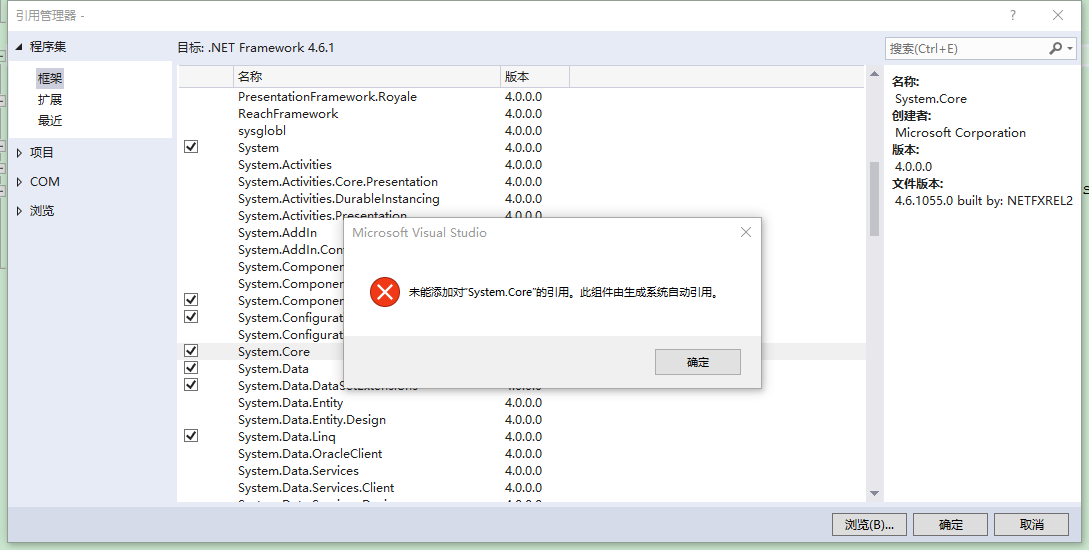
这个提示,启发了我。
“生成系统自动引用”,那么具体是在哪里管理配置的呢?无非就是web.config,.csproj这两个项目配置文件了。
看来是框架版本升级过程中,把system.core的引用搞丢了。
三、解决方案
重新建了一个mvc5项目,在web.config和.csproj两个文件中搜索system.core,结果发现确实是在.csproj文件中。
   <ItemGroup>

     <Reference Include="System.Core" />

 ...
真相大白了。原来这些系统自动引用的dll不在nuget/项目引用/web.config中管理,而是直接写在.csproj项目文件中。
于是,右键项目,卸载项目,编辑.csproj,加入system.core的引用<Reference Include="System.Core" />,重新加载项目。
再看cshtml视图页面,全都恢复正常了,问题解决。
四、补充(20190716)
一位同事在将系统改为Mono移植Linux的版本后,又出现了上面的问题,上面的方案解决无效,后来发现是web.config中的设置被修改了,少了配置 targetFramework="4.6.1"。
<system.web>

    <compilation debug="true" targetFramework="4.6.1" />

    <httpRuntime targetFramework="4.6.1" />

</system.web>
compilation是编译设置,在部署环境无须设置 targetFramework,debug 也可以设置成 false,但是开发环境需要设置targetFramework为对应版本,且debug为true。
顺带说下httpRuntime,httpRuntime是运行时,.Net 4.0 和 .Net 4.6.1 的运行时版本都是 .Net 4.0,所以改成4.0也可以,当服务器IIS只注册了.Net 4.0时,可以这样设置,以运行.Net 4.6.1的App。
--End
The type 'Expression<>' is defined in an assembly that is not referenced.You must add a reference to assembly 'System.Core, Version=4.0.0.0, Culture=neutral, PublicKeyToken=b77a5c561934e089'.的更多相关文章
- Could not load type 'System.ServiceModel.Activation.HttpModule' from assembly 'System.ServiceModel, Version=3.0.0.0, Culture=neutral, PublicKeyToken=b77a5c561934e089'
Could not load type 'System.ServiceModel.Activation.HttpModule' from assembly 'System.ServiceModel, ...
- System.TypeLoadException: Could not load type 'System.IO.Compression.CompressionLevel' from assembly 'System, Version=4.0.0.0, Culture=neutral, PublicKeyToken=b77a5c561934e089'.
1.提示错误信息: zipSystem.TypeLoadException: Could not load type 'System.IO.Compression.CompressionLevel' ...
- Could not load file or assembly 'System.Windows.Forms, Version=6.0.2.0, Culture=neutral, PublicKeyToken=b77a5c561934e089
项目升级后提示错误 System.IO.FileNotFoundException: Could not load file or assembly 'System.Windows.Forms, Ve ...
- 解决方法:Could not load file or assembly 'WebGrease, Version=1.5.1.25624, Culture=neutral, PublicKeyToken=31bf3856ad364e35' or one of its dependencies.
最近使用VS2015调试ASP.NET 程序遇到了该问题: 在网上找了很多方法都不能解决,最后自己解决了,方法如下: 在project -> NuGet管理中找到已安装的所有程序:将Web Op ...
- ASP.NET Core: You must add a reference to assembly mscorlib, version=4.0.0.0
ASP.NET Core 引用外部程序包的时候,有时会出现下面的错误: The type 'Object' is defined in an assembly that is not referenc ...
- Could not load type 'System.Reflection.AssemblySignatureKeyAttribute' from assembly 'mscorlib, Version=4.0.0.0, Culture=neutral, PublicKeyToken=b77a5c
错误: Could not load type 'System.Reflection.AssemblySignatureKeyAttribute' from assembly 'mscorlib, V ...
- Type 'Insus.NET.PictureObject' in Assembly 'App_Code, Version=0.0.0.0, Culture=neutral, PublicKeyToken=null' is not marked as serializable.
昨晚想实现一个功能,需要把一个对象存储于ViewState中去,但在运行时,出现下面的异常. Type 'Insus.NET.PictureObject' in Assembly 'App_Code, ...
- TypeLoadException: Could not load type 'Microsoft.AspNetCore.Mvc.Internal.IHttpResponseStreamWriterFactory' from assembly 'Microsoft.AspNetCore.Mvc.Core, Version=2.1.2.0 ...
今天调试 asp.net core 2.0 项目时遇到了如下错误: TypeLoadException: Could not load type 'Microsoft.AspNetCore.Mvc.I ...
- Orchard Core 版本冲突 The type 'FormTagHelper' exists in both 'Microsoft.AspNetCore.Mvc.TagHelpers, Version=2.1.1.0, Culture=neutral, PublicKeyToken=adb9793829ddae60' and...
最近老大让我看Orchard Core,这是一个CMS系统.可以先参考大佬的文章:https://www.cnblogs.com/shanyou/archive/2018/09/25/9700422. ...
随机推荐
- 3754. 【NOI2014】魔法森林(LCT)
Problem 给定一个\(n\)个结点,\(m\)条边的的无向图,每条边有两个权值\(ai,bi\). 现在从\(1\)出发,要到达\(n\),每次只能沿着\(ai\le A\)且\(bi\le B ...
- ECharts将折线变平滑和去掉点的属性
eries : [ { name:'your name', symbol:'none', //这句就是去掉点的 smooth:true, //这句就是让曲线变平滑的 type:'line', stac ...
- 重装系统windows10/8/7,绝对纯净版永久激活的详细步骤和固态硬盘找不到分区的原因
简介:重装系统有两种: 一种是在线重装,可实现电脑双系统或多系统,也可单系统(重装在另外一个盘,再去格式化系统盘),这种方式比较麻烦,前提电脑能开机使用,但是一般能启动使用也没人去重装系统,但是不需要 ...
- web故障排查常用命令
整理总结了一些常用分析网站的命令方便大家快速定位故障所在排除故障,最小化的减少故障给业务带来的影响. 端口连接类 1.查看TCP连接状态 netstat -nat |awk '{print $6}'| ...
- 手机端开发,基础设置1-body-fontsize
一.设计稿设计大小按照750设计. 二.单位使用rem,相对于body fontsize 相对大小计算. 三.假设750下,body fontsize 为100,为了方便计算. 四.通过设置当前设备 ...
- js 遍历集合删除元素
js 遍历集合删除元素 /** * 有效的方式 - 改变下标,控制遍历 */ for (var i = 0; i < arr.length; i++) { if (...) { arr.spli ...
- 使用Docker安装ELK系列(超简单)
root权限 docker版本:1.13.1 ELK版本:6.4.3 项目中均关闭X-Pack 一.安装Elasticsearch 新建elasticsearch目录,并再其下新建文件config/e ...
- Future of Future
innovation 革新 , <社会创新实验室 宣传片>的个人记录(有加戏便于我自己理解) 1. 清洁能源 => sustainable 家. 2. 老龄化 => 外出接 ...
- centos7.2下部署 python3
安装Python3 1.环境准备 yum -y install zlib-devel bzip2-devel openssl-devel ncurses-devel sqlite-devel read ...
- 【vue】函数式组件
在 2.5.0 及以上版本中,如果你使用了单文件组件,那么基于模板的函数式组件可以这样声明: <template functional> <div class="cell& ...