
The type 'Expression<>' is defined in an assembly that is not referenced.You must add a reference to assembly 'System.Core, Version=4.0.0.0, Culture=neutral, PublicKeyToken=b77a5c561934e089'.
在我将一个.net framework 4.0+mvc4+ef5的项目,升级到.net framework 4.6.1+mvc5+ef6之后,解决了所有的升级带来的问题,唯独在razor的cshtml页面中,所有关于Expression<>的引用的方法全都报错,例如System.Web.Mvc.Html空间下的一系列@Html.DisplayFor()等等。razor页面可以正常编译及运行,但是页面编辑时报错,智能感知也不能正常使用。 具体的提示就是“The type 'Expression<>' is defined in an assembly that is not referenced.You must add a reference to assembly 'System.Core, Version=4.0.0.0, Culture=neutral, PublicKeyToken=b77a5c561934e089'.”。
一、问题描述
在我将一个.net framework 4.0+mvc4+ef5的项目,升级到.net framework 4.6.1+mvc5+ef6之后,解决了所有的升级带来的问题,唯独在razor的cshtml页面中,所有关于Expression<>的引用的方法全都报错,例如System.Web.Mvc.Html空间下的一系列@Html.DisplayFor()等等。razor页面可以正常编译及运行,但是页面编辑时报错,智能感知也不能正常使用。
具体的提示就是“The type 'Expression<>' is defined in an assembly that is not referenced.You must add a reference to assembly 'System.Core, Version=4.0.0.0, Culture=neutral, PublicKeyToken=b77a5c561934e089'.”。
翻译过来就是“'Expression<>'类型在未被引用的程序集中定义。你必须添加对'System.Core, Version=4.0.0.0, Culture=neutral, PublicKeyToken=b77a5c561934e089'程序集的引用。”。
查询了baidu和google,网上的解决方案几乎千篇一律,甚至包括微软asp.net论坛的帖子
回答无非是nuget管理,web.config添加<dependentAssembly>,或项目引用之类的方案,经过尝试全都无效。
二、尝试解决
通过nuget根本管理不到System.Core这个基础dll。
通过项目引用添加也无济于事,如下图:
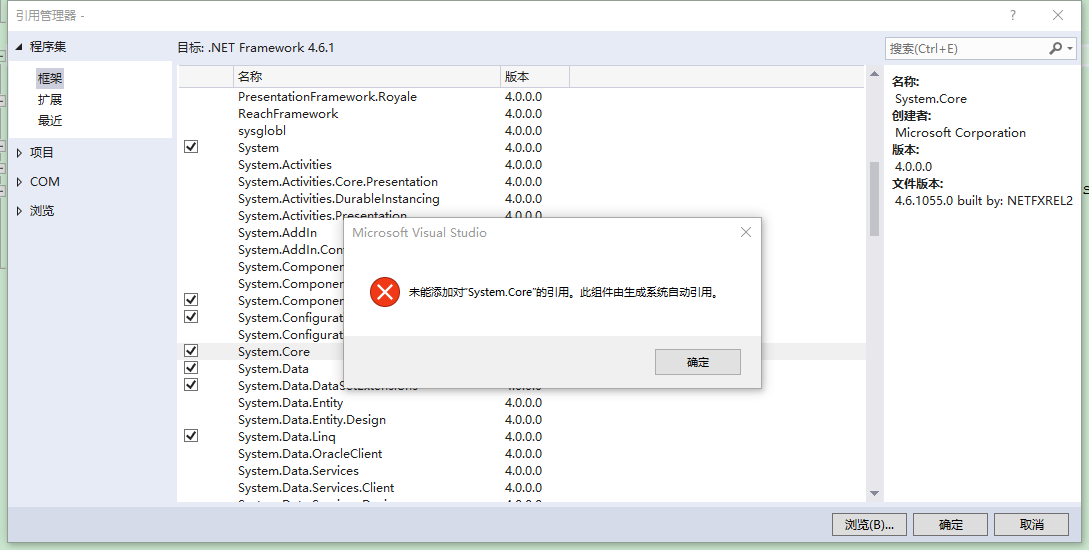
这个提示,启发了我。
“生成系统自动引用”,那么具体是在哪里管理配置的呢?无非就是web.config,.csproj这两个项目配置文件了。
看来是框架版本升级过程中,把system.core的引用搞丢了。
三、解决方案
重新建了一个mvc5项目,在web.config和.csproj两个文件中搜索system.core,结果发现确实是在.csproj文件中。
   <ItemGroup>

     <Reference Include="System.Core" />

 ...
真相大白了。原来这些系统自动引用的dll不在nuget/项目引用/web.config中管理,而是直接写在.csproj项目文件中。
于是,右键项目,卸载项目,编辑.csproj,加入system.core的引用<Reference Include="System.Core" />,重新加载项目。
再看cshtml视图页面,全都恢复正常了,问题解决。
四、补充(20190716)
一位同事在将系统改为Mono移植Linux的版本后,又出现了上面的问题,上面的方案解决无效,后来发现是web.config中的设置被修改了,少了配置 targetFramework="4.6.1"。
<system.web>

    <compilation debug="true" targetFramework="4.6.1" />

    <httpRuntime targetFramework="4.6.1" />

</system.web>
compilation是编译设置,在部署环境无须设置 targetFramework,debug 也可以设置成 false,但是开发环境需要设置targetFramework为对应版本,且debug为true。
顺带说下httpRuntime,httpRuntime是运行时,.Net 4.0 和 .Net 4.6.1 的运行时版本都是 .Net 4.0,所以改成4.0也可以,当服务器IIS只注册了.Net 4.0时,可以这样设置,以运行.Net 4.6.1的App。
--End
The type 'Expression<>' is defined in an assembly that is not referenced.You must add a reference to assembly 'System.Core, Version=4.0.0.0, Culture=neutral, PublicKeyToken=b77a5c561934e089'.的更多相关文章
- Could not load type 'System.ServiceModel.Activation.HttpModule' from assembly 'System.ServiceModel, Version=3.0.0.0, Culture=neutral, PublicKeyToken=b77a5c561934e089'
Could not load type 'System.ServiceModel.Activation.HttpModule' from assembly 'System.ServiceModel, ...
- System.TypeLoadException: Could not load type 'System.IO.Compression.CompressionLevel' from assembly 'System, Version=4.0.0.0, Culture=neutral, PublicKeyToken=b77a5c561934e089'.
1.提示错误信息: zipSystem.TypeLoadException: Could not load type 'System.IO.Compression.CompressionLevel' ...
- Could not load file or assembly 'System.Windows.Forms, Version=6.0.2.0, Culture=neutral, PublicKeyToken=b77a5c561934e089
项目升级后提示错误 System.IO.FileNotFoundException: Could not load file or assembly 'System.Windows.Forms, Ve ...
- 解决方法:Could not load file or assembly 'WebGrease, Version=1.5.1.25624, Culture=neutral, PublicKeyToken=31bf3856ad364e35' or one of its dependencies.
最近使用VS2015调试ASP.NET 程序遇到了该问题: 在网上找了很多方法都不能解决,最后自己解决了,方法如下: 在project -> NuGet管理中找到已安装的所有程序:将Web Op ...
- ASP.NET Core: You must add a reference to assembly mscorlib, version=4.0.0.0
ASP.NET Core 引用外部程序包的时候,有时会出现下面的错误: The type 'Object' is defined in an assembly that is not referenc ...
- Could not load type 'System.Reflection.AssemblySignatureKeyAttribute' from assembly 'mscorlib, Version=4.0.0.0, Culture=neutral, PublicKeyToken=b77a5c
错误: Could not load type 'System.Reflection.AssemblySignatureKeyAttribute' from assembly 'mscorlib, V ...
- Type 'Insus.NET.PictureObject' in Assembly 'App_Code, Version=0.0.0.0, Culture=neutral, PublicKeyToken=null' is not marked as serializable.
昨晚想实现一个功能,需要把一个对象存储于ViewState中去,但在运行时,出现下面的异常. Type 'Insus.NET.PictureObject' in Assembly 'App_Code, ...
- TypeLoadException: Could not load type 'Microsoft.AspNetCore.Mvc.Internal.IHttpResponseStreamWriterFactory' from assembly 'Microsoft.AspNetCore.Mvc.Core, Version=2.1.2.0 ...
今天调试 asp.net core 2.0 项目时遇到了如下错误: TypeLoadException: Could not load type 'Microsoft.AspNetCore.Mvc.I ...
- Orchard Core 版本冲突 The type 'FormTagHelper' exists in both 'Microsoft.AspNetCore.Mvc.TagHelpers, Version=2.1.1.0, Culture=neutral, PublicKeyToken=adb9793829ddae60' and...
最近老大让我看Orchard Core,这是一个CMS系统.可以先参考大佬的文章:https://www.cnblogs.com/shanyou/archive/2018/09/25/9700422. ...
随机推荐
- vscode笔记(一)- vscode自动生成文件头部注释和函数注释
VsCode 自动生成文件头部注释和函数注释 作者:狐狸家的鱼 本文链接:vscode自动生成文件头部注释和函数注释 GitHub:sueRimn 1.安装插件KoroFileHeader 2.设置 ...
- CF1155F Delivery Oligopoly
题意:给定简单无向图,求一个最小的边集使得这些点是边双,输出方案.n <= 14 解:考虑一个边双肯定是一条一条的链拼起来的.于是每次枚举一条链加上去就行了. 设fs表示点集s形成边双的最小边数 ...
- (二叉树 BFS) leetcode993. Cousins in Binary Tree
In a binary tree, the root node is at depth 0, and children of each depth knode are at depth k+1. Tw ...
- 一文了解Python的线程
问题 什么是线程? 如何创建.执行线程? 如何使用线程池ThreadPoolExecutor? 如何避免资源竞争问题? 如何使用Python中线程模块threading提供的常用工具? 目录 1. 什 ...
- 分布式协调服务Zookeeper扫盲篇
分布式协调服务Zookeeper扫盲篇 作者:尹正杰 版权声明:原创作品,谢绝转载!否则将追究法律责任. 身为运维工程师对kubernetes(k8s)可能比较熟,那么etcd(go语言实现)分布式协 ...
- 虚拟代理模式-Virtual Proxy(Java实现)
虚拟代理模式-Virtual Proxy 虚拟代理模式(Virtual PRoxy)会推迟真正所需对象实例化时间. 在需要真正的对象工作之前, 如果代理对象能够处理, 那么暂时不需要真正对象来出手. ...
- Telegraf+InfluxDB+Grafana搭建服务器监控平台
Telegraf+InfluxDB+Grafana搭建服务器监控平台 tags:网站 个人网站:https://wanghualong.cn/ 效果展示 本站服务器状态监控:https://statu ...
- 第31月第15天 -fembed-bitcode
1. 确保打包的时候使用的是fembed-bitcode, 而不是fembed-bitcode-maker fembed-bitcode-maker:只是简单的标记一下在archive出来的二进制中b ...
- Angular 动画
1.先做一个简单的例子 => 定义一个div 从open渐变成closed ts:定义一个触发器 openClose,有两个状态 open 和 closed,均有对应的样式,再定义装换函数 ...
- 004 使用scrapy框架爬虫
0. 建立housePro的scrapy爬虫框架 # 1. 在终端输入,建立housePro项目scrapy startproject housePro# 2. 进入houseProcd houseP ...