
Broadcast发送广播
一、知识介绍
1、【广播分类】
①有序广播:接收者A收到广播传递给B,B传给C,有序传递。任何一个环节都可以终止广播,也可以修改广播中携带的数据。
发送的方式:sendOrderedBroadcast(intent,receiverPermission);
【提示】①第二个参数是设置发送的权限,这里可以设为null
②接收有序广播是需要在intent-flter中设置priority,值越大则先执行,相同则按照注册顺序
②无序广播:一个广播发送者,向所有接收者同时发送广播,也就是ABC接收者都同时响应。
发送方式:sendBroadcast(intent)
2、【广播接收者】按是否常驻分类
①常驻型广播接收者:在androidManifest.xml中注册,只要应用程序没有被卸载就持续存在。
②非常驻型广播接收者:在java代码中注册,一般随Activity或者Service组件产生而产生,随他们销毁而销毁。生命周期比较短。使用的方法是registerReceiver(参数1:广播接收者实例,参数2:频道(意图过滤器));unregisterReceiver(广播接收者实例)
二、项目一【发送广播】
【步骤】
①定义一个广播接收者,自定义添加intent-fliter中的action name
②添加按钮,点击事件
③定义intent,设置action,发送广播
【项目结构】

【MyReceiver】
 import android.content.BroadcastReceiver;

 import android.content.Context;

 import android.content.Intent;

 import android.widget.Toast;

 public class MyReceiver extends BroadcastReceiver {

     @Override

     public void onReceive(Context context, Intent intent) {

         // TODO: This method is called when the BroadcastReceiver is receiving

         Toast.makeText(context, "收到广播", Toast.LENGTH_SHORT).show();

     }

 }
【AndroidManifest.xml】
 <receiver

             android:name=".receiver.MyReceiver"

             android:enabled="true"

             android:exported="true">

             <intent-filter>

                 <action android:name="com.example.MyApplication2.myreceiver" />

             </intent-filter>

         </receiver>
【activity_main.xml】
     <Button

        android:id="@+id/btn"

        android:text="发送广播"

        android:layout_width="match_parent"

        android:layout_height="wrap_content" />
【MainActivity】
 import android.content.Intent;

 import android.support.v7.app.AppCompatActivity;

 import android.os.Bundle;

 import android.view.View;

 import android.widget.Button;

 public class MainActivity extends AppCompatActivity {

     Button btn;

     @Override

     protected void onCreate(Bundle savedInstanceState) {

         super.onCreate(savedInstanceState);

         setContentView(R.layout.activity_main);

         btn = findViewById(R.id.btn);

         btn.setOnClickListener(new View.OnClickListener() {

             @Override

             public void onClick(View view) {

                 Intent intent = new Intent("com.example.MyApplication2.myreceiver");

                 sendBroadcast(intent);

             }

         });

     }

 }
【提示】发送广播intent设置的action要和广播接受者设置的action相同,这样广播接收者才能收到发送的广播
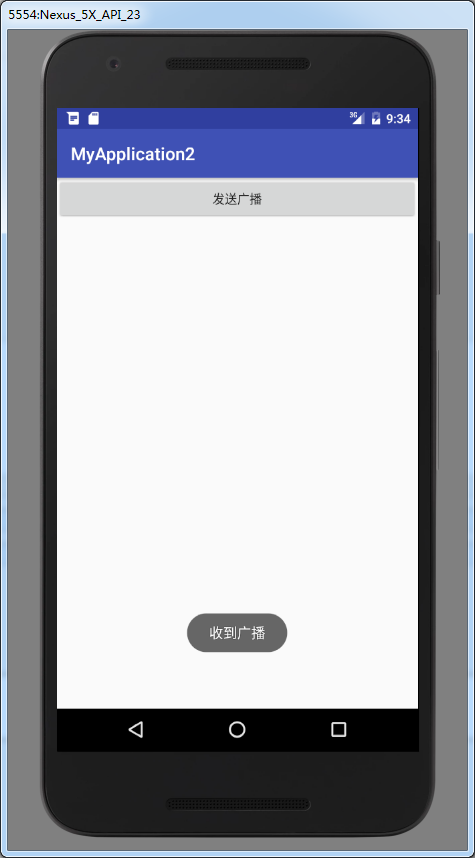
【效果】点击
二、项目二【发送有序广播】
【步骤】
①定义三个广播接收者,观察顺序
②添加按钮点击
③设置intent,发送有序广播
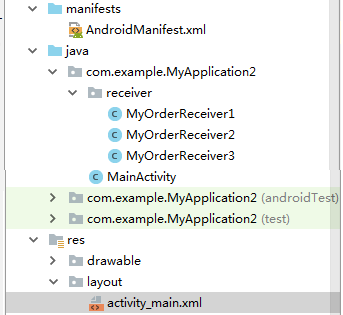
【项目结构】
【定义三个广播接收者并注册】
 <receiver

             android:name=".receiver.MyOrderReceiver1"

             android:enabled="true"

             android:exported="true">

             <intent-filter android:priority="1000">

                 <action android:name="com.example.MyApplication2.myreceiver" />

             </intent-filter>

         </receiver>

         <receiver

             android:name=".receiver.MyOrderReceiver2"

             android:enabled="true"

             android:exported="true">

             <intent-filter android:priority="100">

                 <action android:name="com.example.MyApplication2.myreceiver" />

             </intent-filter>

         </receiver>

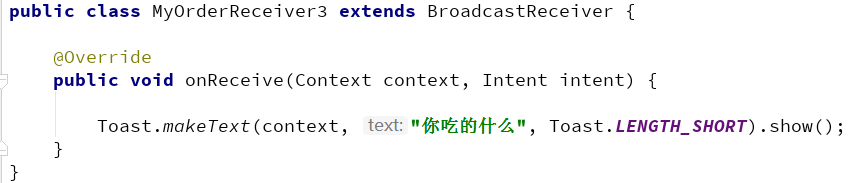
         <receiver

             android:name=".receiver.MyOrderReceiver3"

             android:enabled="true"

             android:exported="true">

             <intent-filter android:priority="10">

                 <action android:name="com.example.MyApplication2.myreceiver" />

             </intent-filter>

         </receiver>
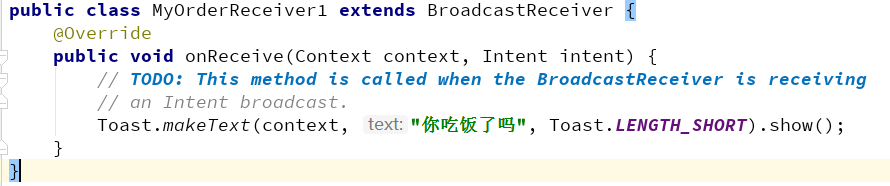
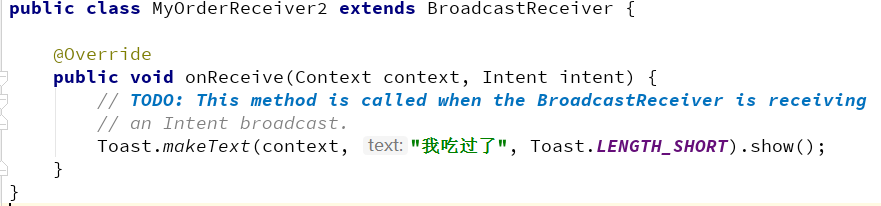
【提示】设置priority为不同的值,action name为相同的,接收同一个广播
【MainActivity】
         btn2 = findViewById(R.id.btn2);

         btn2.setOnClickListener(new View.OnClickListener() {

             @Override

             public void onClick(View view) {

                 Intent intent = new Intent("com.example.MyApplication2.myreceiver");

                 sendOrderedBroadcast(intent,null);

             }

         });
【效果】
点击按钮执行顺序


Broadcast发送广播的更多相关文章
- 在命令行中通过adb shell am broadcast发送广播通知
通过命令行执行adb shell am broadcast发送广播通知. adb shell am broadcast 后面的参数有:[-a <ACTION>][-d <DATA_U ...
- Android通过adb shell am broadcast发送广播 参数说明
通过命令行执行adb shell am broadcast发送广播通知. adb shell am broadcast 后面的参数有: <INTENT> specifications in ...
- [AX2012]发送广播邮件
AX 2012可以使用MAPI或者SMTP发送邮件,MAPI是客户端方法,需要outlook的协作,而SMTP则是服务器端方法,要求SMTP允许AOS服务器通过它中继.这里要讲的就是如何通过SMTP发 ...
- 通过 adb命令发送广播
我们经常用到模块设备发送广播,此处记录一下: 首先进入adb 使用命令: adb shell 发送广播 例: am broadcast -a action.com.custom.broadcast.q ...
- Android应用程序发送广播(sendBroadcast)的过程分析
文章转载至CSDN社区罗升阳的安卓之旅,原文地址:http://blog.csdn.net/luoshengyang/article/details/6744448 前面我们分析了Android应用程 ...
- linux中C语言发送广播报文
2. 指令的解决方法: oute add -net 255.255.255.255 netmask 255.255.255.255 dev eth0 metric 1 或者 route add -ho ...
- Android 两种注册、发送广播的区别
前言:前面文章记录了Service的使用,这次来记录另一个四个组件之一的BroadcastReceiver.主要介绍两种发送和注册广播的区别. BroadcastReceiver广播接收者用于接收系统 ...
- Ordered Broadcast有序广播
sendBroadcast()发生无序广播 sendOrderedBroadcast()发送有序广播 activity_main.xml <LinearLayout xmlns:android= ...
- Angular发送广播和接收广播
home.module.ts import {BroadcastService} from "../broadcast.service"; @NgModule({ imports: ...
随机推荐
- MySQL 千万级 数据库或大表优化
首先考虑如下因素: 1.数据的容量:1-3年内会大概多少条数据,每条数据大概多少字节: 2.数据项:是否有大字段,那些字段的值是否经常被更新: 3.数据查询SQL条件:哪些数据项的列名称经常出现在WH ...
- [Swift]LeetCode747. 至少是其他数字两倍的最大数 | Largest Number At Least Twice of Others
In a given integer array nums, there is always exactly one largest element. Find whether the largest ...
- [Swift]LeetCode804. 唯一摩尔斯密码词 | Unique Morse Code Words
International Morse Code defines a standard encoding where each letter is mapped to a series of dots ...
- [Swift]LeetCode942. 增减字符串匹配 | DI String Match
Given a string S that only contains "I" (increase) or "D" (decrease), let N = S. ...
- vue-cli中webpack配置详解
vue-cli是构建vue单页应用的脚手架,命令行输入vue init <template-name> <project-name>从而自动生成的项目模板,比较常用的模板有we ...
- Java破解图片防盗链
前言 今天想下载几张好看的壁纸,然后发现了一张是自己比较喜欢的额.然后点进去看看,WOW!好多好看的壁纸呀,于是我就起了贪念.哈哈!想把他们这一组图片打包下载,小白的方法就是一张一张下载,那样对于我们 ...
- Spring Boot 2.0 教程 | @ModelAttribute 注解
欢迎关注微信公众号: 小哈学Java 文章首发于个人网站: https://www.exception.site/springboot/spring-boot-model-attribute Spri ...
- .NET Core实战项目之CMS 第十四章 开发篇-防止跨站请求伪造(XSRF/CSRF)攻击处理
通过 ASP.NET Core,开发者可轻松配置和管理其应用的安全性. ASP.NET Core 中包含管理身份验证.授权.数据保护.SSL 强制.应用机密.请求防伪保护及 CORS 管理等等安全方面 ...
- 在.NET Core console application中使用User Secrets(用户机密)
微软很坑地只在Microsoft.NET.Sdk.Web中提供了VS项目右键菜单的"管理用户机密"/"Manage User Secrets"菜单项,在使用Mi ...
- web类协议脚本-飞机订票系统示例
以下是LR自带的飞机订票系统的Demo,希望能帮助大家. Action() { int iRand; int iTmp; char *strTmpA; char *strTmpB; char *str ...