
C#socket编程之实现一个简单的TCP通信
TCP(TransmissionControl Protocol)传输控制协议。
是一种可靠的、面向连接的协议(eg:打电话)、传输效率低全双工通信(发送缓存&接收缓存)、面向字节流。使用TCP的应用:Web浏览器;电子邮件、文件传输程序。
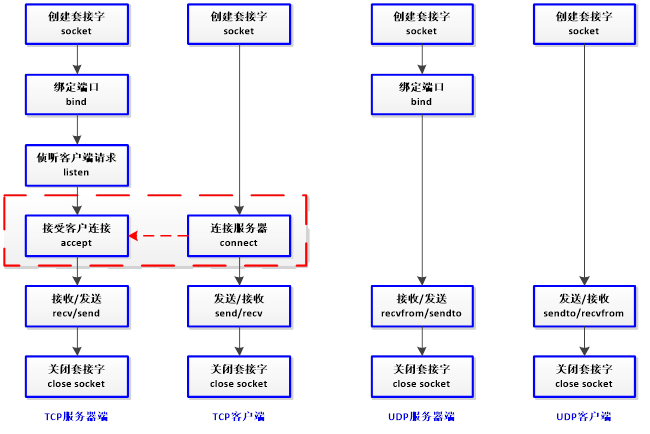
TCP编程的服务器端一般步骤是:
1、创建一个socket,用函数socket()。
2、设置socket属性。
3、绑定本机的IP地址、端口等信息到socket上,用函数bind()。
4、开启监听,用函数listen()。
5、接收客户端上来的连接,用函数accept()。
6、通过accept()返回相应客户端的socket建立专用的通信通道。
7、收发数据,用函数send()和recv(),或者read()和write()。
8、关闭网络连接。
9、关闭监听。
TCP编程的客户端一般步骤是:
1、创建一个socket,用函数socket()。
2、设置socket属性。
3、设置要连接的对方的IP地址和端口等属性。
4、连接服务器,用函数connect()。
5、收发数据,用函数send()和recv(),或者read()和write()。
6、关闭网络连接。
---------------------
作者:subin_iecas
来源:CSDN
原文:https://blog.csdn.net/subin_iecas/article/details/80289513
下面是一个简单的TCP的通信程序源码
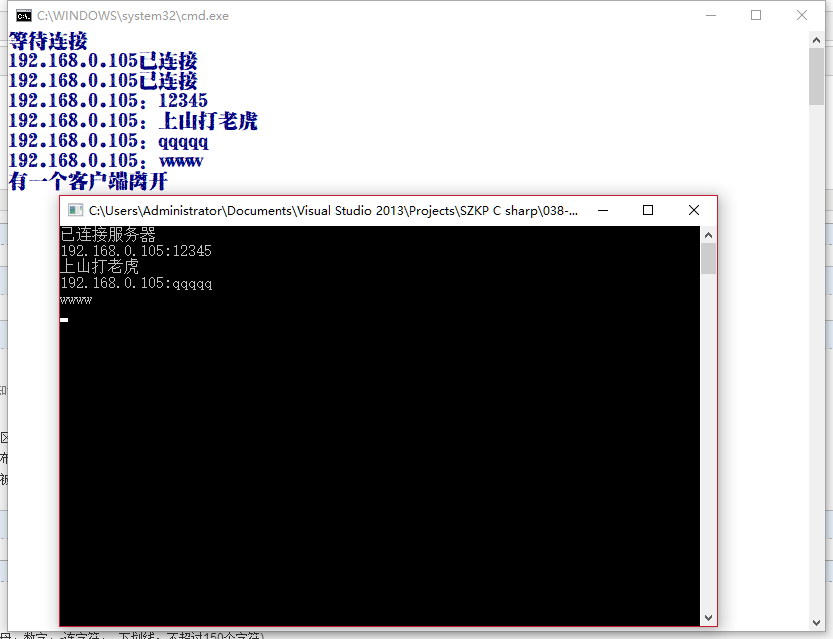
主要功能是模拟一个群聊,当多个客户端连接进来后,任意一个客户端发送的消息都将被服务器端接收并群发给所有客户端
服务器端:
 using System;

 using System.Collections.Generic;

 using System.Linq;

 using System.Text;

 using System.Threading.Tasks;

 using System.Net;

 using System.Net.Sockets;

 using System.Threading;

 namespace _037_test

 {

     class Program

     {

         static void Main(string[] args)

         {

             Server s = new Server("192.168.0.105", );

             s.Start();

         }

     }

 }
Program.CS
 using System;

 using System.Collections.Generic;

 using System.Linq;

 using System.Text;

 using System.Threading.Tasks;

 using System.Net;

 using System.Net.Sockets;

 using System.Threading;

 namespace _037_test

 {

     class Server

     {

         Socket serverSock;

         List<Socket> clientList = new List<Socket>();

         public Server(string ip, int port)

         {

             //创建socket套接字

             serverSock = new Socket(AddressFamily.InterNetwork, SocketType.Stream, ProtocolType.Tcp);

             //检测ip地址是否有误

             IPAddress ipAdd;

             if (!IPAddress.TryParse(ip, out ipAdd))

             {

                 Console.WriteLine("ip有误,服务器创建失败");

                 return;

             }

             //绑定ip地址和端口;

             IPEndPoint point = new IPEndPoint(ipAdd, port);

             serverSock.Bind(point);

             //无限监听接收

             serverSock.Listen();

         }

         public void Start()

         {

             Thread th = new Thread(AcceptClient);

             th.Start();

             SendToAll();

         }

         public void AcceptClient()

         {

             Console.WriteLine("等待连接");

             while (true)

             {

                 Socket client = serverSock.Accept();//等待接收用户的连接,并返回连接成功的用户

                 IPEndPoint clientPoint = client.RemoteEndPoint as IPEndPoint;//获取所连接的用户的ip

                 Console.WriteLine(clientPoint.Address+"已连接");

                 clientList.Add(client);

                 Thread clientT = new Thread(ReceiveMessage);

                 clientT.Start(client);

             }

         }

         public void SendToAll()

         {

             while (true)

             {

                 string message = "管理员:"+Console.ReadLine();

                 byte[] messageBytes = Encoding.Default.GetBytes(message);

                 for (int i = ; i < clientList.Count; i++)

                 {

                     try

                     {

                         clientList[i].Send(messageBytes);

                     }

                     catch (SocketException)

                     {

                         Console.WriteLine("有一个客户端下线");

                         clientList.RemoveAt(i);

                         i--;

                     }

                     catch (Exception e)

                     {

                         Console.WriteLine(e.Message);

                     }

                 }

             }

         }

         public void ReceiveMessage(object obj)

         {

             while (true)

             {

                 Socket client = obj as Socket;//将线程的start方法传入的obj转回socket类型

                 byte[] messageBytes = new byte[ * ];//数据容器

                 try

                 {

                     int num = client.Receive(messageBytes);//receive方法返回字节长度,并把内容存在传入的数组中

                     IPEndPoint clientPoint = client.RemoteEndPoint as IPEndPoint;//获取所连接的用户的ip

                     Console.WriteLine(clientPoint.Address+":" + Encoding.Default.GetString(messageBytes, , num));

                     //服务器端负责将从客户端收到的消息转发给所有客户端

                     string message = clientPoint.Address + ":" + Encoding.Default.GetString(messageBytes, , num);

                     foreach (var item in clientList)

                     {

                         if (item!=client)

                         {

                             item.Send(Encoding.Default.GetBytes(message));

                         }

                     }

                 }

                 catch (Exception)

                 {

                     Console.WriteLine("有一个客户端离开");

                     clientList.Remove(client);

                     break;

                 }

             }

         }

     }

 }
Server.CS
客户端:
 using System;

 using System.Collections.Generic;

 using System.Linq;

 using System.Text;

 using System.Threading.Tasks;

 using System.Net.Sockets;

 using System.Net;

 using System.Threading;

 namespace _038_test

 {

     class Program

     {

         static void Main(string[] args)

         {

             Client c = new Client("192.168.0.105", );

             c.Start();

         }

     }

 }
Program.CS
 using System;

 using System.Collections.Generic;

 using System.Linq;

 using System.Text;

 using System.Threading.Tasks;

 using System.Net.Sockets;

 using System.Net;

 using System.Threading;

 namespace _038_test

 {

     class Client

     {

         Socket clientSock;

         public Client(string ip, int port)

         {

             clientSock = new Socket(AddressFamily.InterNetwork, SocketType.Stream, ProtocolType.Tcp);

             try

             {

                 IPEndPoint point = new IPEndPoint(IPAddress.Parse(ip), port);

                 clientSock.Connect(point);

             }

             catch (Exception)

             {

                 Console.WriteLine("服务器没有开启");

                 return;

             }

             Console.WriteLine("已连接服务器");

         }

         public void Start()

         {

             Thread th = new Thread(SendMessage);

             th.Start();

             ReceiveMessage();

         }

         public void SendMessage()

         {

             try

             {

                 while (true)

                 {

                     string message = Console.ReadLine();

                     byte[] messageBytes = Encoding.Default.GetBytes(message);

                     clientSock.Send(messageBytes);

                 }

             }

             catch (Exception)

             {

                 Console.WriteLine("服务器断开");

                 return;

             }

         }

         public void ReceiveMessage()

         {

             try

             {

                 while (true)

                 {

                     byte[] messageBytes = new byte[ * ];

                     int num = clientSock.Receive(messageBytes);

                     Console.WriteLine(Encoding.Default.GetString(messageBytes, , num));

                 }

             }

             catch (Exception)

             {

                 Console.WriteLine("服务器断开");

                 return;

             }

         }

     }

 }
Client.CS
运行结果:

C#socket编程之实现一个简单的TCP通信的更多相关文章
- Linux socket编程示例(最简单的TCP和UDP两个例子)
一.socket编程 网络功能是Uinux/Linux的一个重要特点,有着悠久的历史,因此有一个非常固定的编程套路. 基于TCP的网络编程: 基于连接, 在交互过程中, 服务器和客户端要保持连接, 不 ...
- 利用JSP编程技术实现一个简单的购物车程序
实验二 JSP编程 一.实验目的1. 掌握JSP指令的使用方法:2. 掌握JSP动作的使用方法:3. 掌握JSP内置对象的使用方法:4. 掌握JavaBean的编程技术及使用方法:5. 掌握JSP ...
- 27、通过visual s'tudio 验证 SOCKET编程:搭建一个TCP服务器
本文就是在windows下进行socket编程,搭建一个TCP客户端. 在visual studio下编程,首先在windows下进行初始化(这点在linux下是不需要的): /* 初始化 Winso ...
- 一个简单的tcp代理实现
There are a number of reasons to have a TCP proxy in your tool belt, bothfor forwarding traffic to b ...
- 【实验 1-1】编写一个简单的 TCP 服务器和 TCP 客户端程序。程序均为控制台程序窗口。
在新建的 C++源文件中编写如下代码. 1.TCP 服务器端#include<winsock2.h> //包含头文件#include<stdio.h>#include<w ...
- Node.js实战14:一个简单的TCP服务器。
本文,将会展示如何用Nodejs内置的net模块开发一个TCP服务器,同时模拟一个客户端,并实现客户端和服务端交互. net模块是nodejs内置的基础网络模块,通过使用net,可以创建一个简单的tc ...
- Linux下的C Socket编程 -- server端的简单示例
Linux下的C Socket编程(三) server端的简单示例 经过前面的client端的学习,我们已经知道了如何创建socket,所以接下来就是去绑定他到具体的一个端口上面去. 绑定socket ...
- 【Java编程】建立一个简单的JDBC连接-Drivers, Connection, Statement and PreparedStatement
本blog提供了一个简单的通过JDBC驱动建立JDBC连接例程.并分别通过Statement和PreparedStatement实现对数据库的查询. 在下一篇blog中将重点比較Statement与P ...
- socket编程之中的一个:计算机网络基础
在開始学习网络之前先复习下计算机网络基础吧. 鲁迅说,天下文章一大抄.看你会炒不会炒,基础知识就抄抄书吧. 一 分层模型 1 为什么分层 为了简化网络设计的复杂性.通讯协议採用分层结构.各层协议之间既 ...
随机推荐
- 001-zookeeper 简介-paxos算法,zk简介,特点
一.概述 大数据体系概述 1.1.什么是zookeeper 是Google的Chubby一个开源的实现,是Hadoop的分布式协调服务 它包含一个简单的原语集,分布式应用程序可以基于他实现同步服务,配 ...
- [ML] 数据处理
可以不需要自己开发,使用CloudCompare的分割合并功能实现点云标注(labeling),生成点云训练集数据. (1)首先对点云中的物体进行分割,分割出一个一个的类别. (2)接着删除所有的SF ...
- Java 基础 多线程和线程池基础
一,多线程 1.1 多线程介绍 进程:进程指正在运行的程序.确切的来说,当一个程序进入内存运行,即变成一个进程,进程是处于运行过程中的程序,并且具有一定独立功能. 线程:线程是进程中的一个执行单元,负 ...
- table添加正确的样式
以前在做表格的时候,会在表格<table>标签中添加一些属性,来改变表格的样式,经常用到的有这几个 width 表格的宽度border 表格边框的宽度cellpadding 单元边沿与其 ...
- Jsoup解析XML
先导入jsoup.jar 包 方法1:不推荐,了解即可 方法 方法3: 后期学习主流
- 移除Excel工作表密码保护小工具含C#源代码
有朋友发了个Excel.xlsx文件给我,让我帮忙看看里面是怎么做出来的.打开审阅后发现,每个Excel工作表都添加了密码保护: 看不到里面的隐藏列和公式等等,感觉很神秘.于是研究了一下Excel文件 ...
- 关于Linux与Windows的在服务器的一些区别
我们平时说学习运维要依托于Linux系统,因为在服务器领域Linux基本取得了市场,那么Linux在服务器领域与Windows相比有哪些优势呢?我们来看下:我们选择服务器主要是成本,安全稳定,这两大方 ...
- Go 初体验 - 反射
首先,反射虽强大, 但不可乱用,会有性能损耗 直接上代码: 输出: 代码并不难理解,不做解释
- oracle - sqldeveloper 手动执行包 package的方法
比如建立一个包头如下: create or replace PACKAGE LSG_OBC_ORDERS_HK01_EC_PKG AS PROCEDURE LSG_OBC_HK01_main( err ...
- CentOS 7 Squid代理服务器正向代理-传统代理
Squid是Linux系统中最常用的一款开源代理服务软件,主要提供缓存加速和应用层过滤控制的功能,可以很好的实现HTTP.FTP.DNS查询以及SSL等应用的缓存代理 传统代理:普通的代理服务,多见于 ...