
easyUI使用datagrid-detailview.js实现多级级列表嵌套
转载请注明出处:
注意事项:
原本在谷歌浏览器进行示例测试的,url请求对应的json文件,效果一直显示不出来,换到谷歌和IE是可以正常显示的,
解决方法可参考:http://www.cnblogs.com/shunzdd/p/5585990.html
其中的请求url对应的json文件封装的数据格式如下:
相关属性可参考该博客:https://www.cnblogs.com/cnjava/archive/2013/01/21/2869876.html
附官网demo连接:http://www.jeasyui.net/extension/189.html
请求的json文件内容为:
{"total":28,"rows":[

    {"inv":"FI-SW-01","date":10.00,"name":"P","amount":16.50,"note":"Large","itemid":"EST-1"},

    {"inv":"K9-DL-01","date":12.00,"name":"P","amount":18.50,"note":"Spotted Adult Female","itemid":"EST-2"},

    {"inv":"RP-SN-01","date":12.00,"name":"P","amount":18.50,"note":"Venomless","itemid":"EST-3"},

    {"inv":"RP-LI-02","date":12.00,"name":"P","amount":18.50,"note":"Green Adult","itemid":"EST-5"},

    {"inv":"FL-DSH-01","date":12.00,"name":"P","amount":58.50,"note":"Tailless","itemid":"EST-6"},

    {"inv":"FL-DSH-01","date":12.00,"name":"P","amount":23.50,"note":"With tail","itemid":"EST-7"},

    {"inv":"FL-DLH-02","date":12.00,"name":"P","amount":93.50,"note":"Adult Female","itemid":"EST-8"},

    {"inv":"FL-DLH-02","date":12.00,"name":"P","amount":93.50,"note":"Adult Male","itemid":"EST-9"},

    {"inv":"RP-SN-01","date":12.00,"name":"P","amount":18.50,"note":"Rattleless","itemid":"EST-4"},

    {"inv":"AV-CB-01","date":92.00,"name":"P","amount":193.50,"note":"Adult Male","itemid":"EST-10"}

]}
 <html>

 <head>

     <meta http-equiv="Content-Type" content="text/html; charset=UTF-8">

     <title>jQuery EasyUI</title>

     <link rel="stylesheet" type="text/css" href="easyui.css">

     <link rel="stylesheet" type="text/css" href="icon.css">

     <script type="text/javascript" src="jquery.min.js"></script>

     <script type="text/javascript" src="jquery.easyui.min.js"></script>

     <script type="text/javascript" src="datagrid-detailview.js"></script>

 </head>

 <body>

     <h2>Expand row in DataGrid to show subgrid</h2>

     <div class="demo-info" style="margin-bottom:10px">

         <div class="demo-tip icon-tip"> </div>

         <div>Click the expand button to expand row and view subgrid.</div>

     </div>

     <!--<div id="dg" style="width:650px;height:250px"></div>-->

     <table id="dg"

     url="csdn1.json"

     title="收款管理"

     singleSelect="false" fitColumns="true">

     <thead>

         <tr>

             <th field="inv" width="80">部门</th>

             <th field="date" width="100">日期</th>

             <th field="name" align="right" width="80">名字</th>

             <th field="amount" align="right" width="80">数量</th>

             <th field="note" width="220">小计</th>

         </tr>

     </thead>

 </table>

 <script type="text/javascript">

     $(function(){

         $('#dg').datagrid({

             view: detailview,

             detailFormatter:function(index,row){//严重注意喔

                 return '<div"><table id="ddv-' + index + '" ></table></div>';

             },

             onExpandRow: function(index,row){//嵌套第一层,严重注意喔

                 var ddv = $(this).datagrid('getRowDetail',index).find('#ddv-'+index);//严重注意喔

                 ddv.datagrid({

                     view: detailview,

                     url:'csdn1.json',

                     autoRowHeight:true,

                     fitColumns:true,//改变横向滚动条

                     singleSelect:false,//去掉选中效果

                     rownumbers:true,

                     loadMsg:'',

 //                     height:'auto',

                     columns:[[

                         {field:'inv',title:'年份',width:100},

                         {field:'date',title:'应收',width:100},

                         {field:'name',title:'合同款',width:100},

                         {field:'amount',title:'已收',width:100},

                         {field:'note',title:'比例',width:100}

                     ]],

                     detailFormatter:function(index,row2){//严重注意喔

                         return '<div"><table id="ddv2-' + index + '" style=""></table></div>';

                     },

                     onExpandRow: function(index2,row2){//嵌套第二层,严重注意喔

                         var ddv2 = $(this).datagrid('getRowDetail',index2).find('#ddv2-'+index2);//严重注意喔

                         ddv2.datagrid({

                             view: detailview,

                             url:'csdn1.json',

                             autoRowHeight:true,

                             fitColumns:true,

                             singleSelect:false,

                             rownumbers:true,

                             loadMsg:'',

 //                             height:'auto',

                             columns:[[

                                 {field:'inv',title:'月份',width:100},

                                 {field:'date',title:'应收',width:100,align:'right'},

                                 {field:'name',title:'合同款',width:100,align:'right'},

                                 {field:'amount',title:'已收',width:100,align:'right'},

                                 {field:'note',title:'比例',width:100,align:'right'}

                             ]],

                             detailFormatter:function(index2,row3){//严重注意喔

                                 return '<div"><table id="ddv3-' + index2 + '" style=""></table></div>';

                             },

                             onExpandRow: function(index3,row3){//嵌套第三层,严重注意喔

                                 var ddv3 = $(this).datagrid('getRowDetail',index3).find('#ddv3-'+index3);//严重注意喔

                                 ddv3.datagrid({//严重注意喔 这里没有detailview了哈

                                     url:'csdn1.json',

                                     autoRowHeight:true,

                                     fitColumns:false,//

                                     singleSelect:false,

                                     rownumbers:true,

                                     loadMsg:'',

 //                                     height:'auto',

                                     columns:[[

                                         {field:'inv',title:'月份',width:230},

                                         {field:'date',title:'应收',width:230,align:'right'},

                                         {field:'name',title:'合同款',width:240,align:'right'},

                                         {field:'amount',title:'已收',width:240,align:'right'},

                                         {field:'note',title:'比例',width:240,align:'right'}

                                     ]],

                                     detailFormatter:function(index3,row){//严重注意喔

                                         return '<div style="padding:2px"><table id="ddv3-' + index3 + '"></table></div>';//严重注意喔

                                     },

                                     onResize:function(){//严重注意喔

                                         ddv2.datagrid('fixDetailRowHeight',index3);

                                             ddv.datagrid('fixDetailRowHeight',index2);

                                         $('#dg').datagrid('fixDetailRowHeight',index);

                                     },

                                     onLoadSuccess:function(){

                                         setTimeout(function(){//严重注意喔

                                             ddv2.datagrid('fixDetailRowHeight',index3);

                                             ddv2.datagrid('fixRowHeight',index3);

                                             ddv.datagrid('fixDetailRowHeight',index2);

                                             ddv.datagrid('fixRowHeight',index2);

                                             $('#dg').datagrid('fixDetailRowHeight',index);

                                             $('#dg').datagrid('fixRowHeight',index);

                                         },0);

                                     }

                                 });//严重注意喔

                                 ddv2.datagrid('fixDetailRowHeight',index);

                                 ddv.datagrid('fixDetailRowHeight',index);

                                 $('#dg').datagrid('fixDetailRowHeight',index);

                             },

                             onCollapseRow: function(index3,row3){//严重注意喔

                                 var ddv3 = $(this).datagrid('getRowDetail',index3).find('#ddv3-'+index3);

                                 ddv3.datagrid({

                                     onResize:function(){

                                         ddv2.datagrid('fixDetailRowHeight',index3);

                                         ddv.datagrid('fixDetailRowHeight',index2);

                                             $('#dg').datagrid('fixDetailRowHeight',index);

                                     }

                                 });//严重注意喔

                                 ddv2.datagrid('fixDetailRowHeight',index);

                                 ddv.datagrid('fixDetailRowHeight',index);

                                 $('#dg').datagrid('fixDetailRowHeight',index);

                             },

                             onResize:function(){//严重注意喔

                                 ddv.datagrid('fixDetailRowHeight',index2);

                                 $('#dg').datagrid('fixDetailRowHeight',index);

                             },

                             onLoadSuccess:function(){//严重注意喔

                                 setTimeout(function(){

                                     ddv.datagrid('fixDetailRowHeight',index2);

                                     ddv.datagrid('fixRowHeight',index2);

                                     $('#dg').datagrid('fixDetailRowHeight',index);

                                     $('#dg').datagrid('fixRowHeight',index);

                                 },0);

                             }

                         });//严重注意喔

                         ddv.datagrid('fixDetailRowHeight',index2);

                         $('#dg').datagrid('fixDetailRowHeight',index);

                     },

                     onCollapseRow: function(index2,row2){//严重注意喔

                         var ddv2 = $(this).datagrid('getRowDetail',index2).find('#ddv2-'+index2);

                         ddv2.datagrid({

                             onResize:function(){

                                 ddv.datagrid('fixDetailRowHeight',index2);

                                 $('#dg').datagrid('fixDetailRowHeight',index);

                             }

                         });//严重注意喔

                         ddv.datagrid('fixDetailRowHeight',index2);

                         $('#dg').datagrid('fixDetailRowHeight',index);

                     },

                     onResize:function(){

                         $('#dg').datagrid('fixDetailRowHeight',index);

                     },

                     onLoadSuccess:function(){

                         setTimeout(function(){

                             $('#dg').datagrid('fixDetailRowHeight',index);

                             $('#dg').datagrid('fixRowHeight',index);

                         },0);

                     }

                 });

                 $('#dg').datagrid('fixDetailRowHeight',index);

             }

         });

     });

 </script>

 </body>

 </html>
效果图如下:
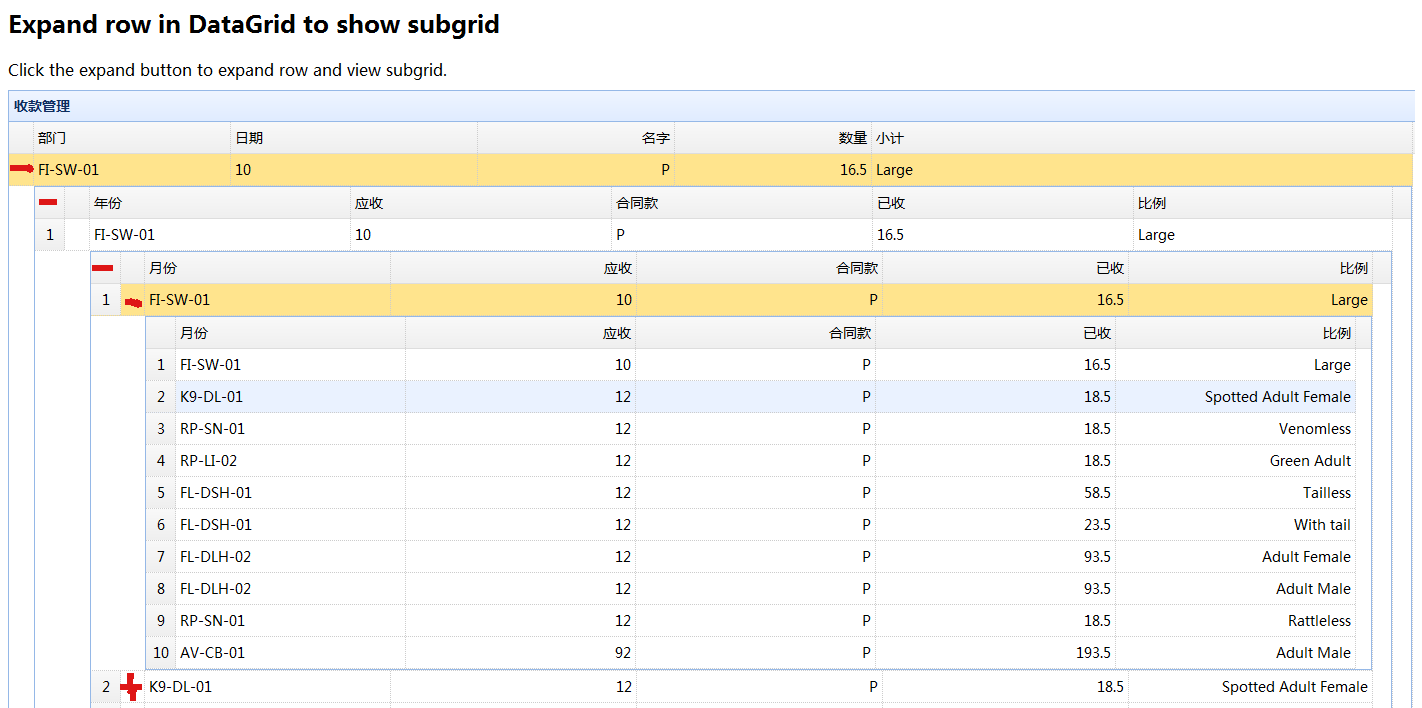
easyUI使用datagrid-detailview.js实现多级级列表嵌套的更多相关文章
- easyui的datagrid用js插入数据等编辑功能的实现
<!DOCTYPE html> <html> <head> <meta charset="UTF-8"> <title> ...
- jQuery EasyUI编辑DataGrid用combobox实现多级联动
我在项目中设计课程表的时候需要用到老师和分类之间的多级联动. 首先是一张效果图: 下面是实现的代码: <body> <script type="text/javascrip ...
- jquery easyui datagrid detailview groupview添加自定义视图view
var myview = $.extend({}, $.fn.datagrid.defaults.view, { onAfterRender: function (target) { $.fn.dat ...
- 按CTRL,SHIFT,ALT等键扩展easyui的datagrid多选实现
//------------------------------------------------------------------------------- // 当然页面文件中还需要引入的文件 ...
- easyUI使用datagrid-detailview.js实现二级列表嵌套
本文为博主原创,转载请注明: 在easyUI中使用datagrid-detailview.js可快速实现二级折叠列表,示例如下: 注意事项: 原本在谷歌浏览器进行示例测试的,url请求对应的json文 ...
- easyui的datagrid行的某一列添加链接
通过formatter方法给easyui 的datagrid 每行增加操作链接. 效果图 jsp代码: <th field="url" width="100&quo ...
- easyui的datagrid打印(转)
在使用easyui插件的时候,使用最多的应该是datagrid插件.有时候根据客户需求,可能需要将datagrid内容进行打印,这时候如果直接调用window.print,可能由于easyui的dat ...
- easyui使用datagrid时列名包含特殊字符导致表头与数据错位的问题
做一个用easyui的datagrid显示数据的功能时发现表格的列头与数据错位了,而且这个现象不总是能重现,一直没搞清楚原因.后来偶然在控制台看出了一点端倪: 推测表头或者单元格的class名应该是用 ...
- 利用Aspose.Cells完成easyUI中DataGrid数据的Excel导出功能
我准备在项目中实现该功能之前,google发现大部分代码都是利用一般处理程序HttpHandler实现的服务器端数据的Excel导出,但是这样存在的问题是ashx读取的数据一般都是数据库中视图的数据, ...
随机推荐
- Spring Boot Thmeleaf的语法 day04
一.Thmeleaf语法的使用 html格式的页面放在classpath:/templates/就会自动渲染. 1.在pom.xml导入 <dependency> <groupId& ...
- rpm和yum模拟安装
在更新安装包之前,我们可能会想做一个测试运行,换句话说,模拟而不是实际安装更新的包,以确定在安装之前是否有任何需要处理的问题. 以测试更新openssh2为例: yum update openssh2 ...
- SQL对照LinQ的基本语句
查询全表: string sql = "SELECT * FROM UserInfo"; var lamAll = db.UserInfo; var LinAll = from u ...
- jQuery toastr提示简单实现
注:在学校平时做的小项目跳页都是用 Response.Write写脚本弹窗并跳页,每次点击登录成功,注册成功......然后点击确定,太麻烦了,这次的项目老师说让用这个插件,所以就简单搞了一下! 实现 ...
- Schlumberger Petrel 2016.3 地震解释 油藏模拟
Schlumberger Petrel 2016.3 地震解释 油藏模拟世界上顶尖的三维地质建模软件,软件为用户提供的工具可以用于地震解释.地质建模.油藏数 值模拟等方面的使用,清晰的地质模型可以描述 ...
- ionic3 生命周期 之 ionViewWillLeave 坑
ionic3 生命周期 ionViewWillLeave,当页面关闭离开时 执行的事件, 从页面根部跳转 this.appCtrl.getRootNav().setRoot() 方法离开时是 不执行 ...
- OO第二次博客
过去三周里,我们完成了多线程电梯的程序设计与构造.这是我第一次接触多线程编程.我感觉最大的困难在于多个线程中的操作,谁先谁后,不是像以前写的单线程程序那样严格确定,所以心里常常会比较慌.尤其是因为多线 ...
- 配置成功java11后安装eclipse失败
前提是 1.java是成功配置的, 2.看清楚32bit,还是64bit,需要一致 THEN 方法一:去安装java11之前的版本,正确配置环境 方法二:java11中没有jre(不打紧).所以需要直 ...
- PHP 十万数字不同数组取最大的5个 (经典面试题topK) (原)
$arr = array(3,5,7,8,1,2,456,78,...101,2345,456); 类似上述数组,共有十万个元素,让我们取出TOP5,下面是我的解法,先上代码再讲解思路 functio ...
- jquery autocomplete 设置滚动条
加入样式 .ui-autocomplete{height:250px; overflow-y: scroll; overflow-x: hidden;}