
Spring Cloud重试机制与各组件的重试总结
SpringCloud重试机制配置
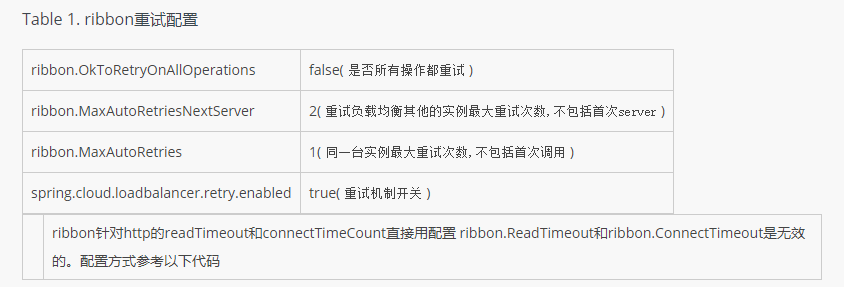
首先声明一点,这里的重试并不是报错以后的重试,而是负载均衡客户端发现远程请求实例不可到达后,去重试其他实例。
|
1
2
3
4
5
6
7
8
|
@Bean@LoadBalancedRestTemplate restTemplate() { HttpComponentsClientHttpRequestFactory httpRequestFactory = new HttpComponentsClientHttpRequestFactory(); httpRequestFactory.setReadTimeout(5000); httpRequestFactory.setConnectTimeout(5000); return new RestTemplate(httpRequestFactory);} |
feign重试机制
feign默认是通过自己包下的Retryer进行重试配置,默认是5次
|
1
2
3
4
5
6
7
8
9
10
11
12
13
14
15
16
17
18
19
20
21
22
23
24
25
26
27
28
29
30
31
32
33
34
35
|
package feign;import static java.util.concurrent.TimeUnit.SECONDS;/** * Cloned for each invocation to {@link Client#execute(Request, feign.Request.Options)}. * Implementations may keep state to determine if retry operations should continue or not. */public interface Retryer extends Cloneable { /** * if retry is permitted, return (possibly after sleeping). Otherwise propagate the exception. */ void continueOrPropagate(RetryableException e); Retryer clone(); public static class Default implements Retryer { private final int maxAttempts; private final long period; private final long maxPeriod; int attempt; long sleptForMillis; public Default() { this(100, SECONDS.toMillis(1), 5); } public Default(long period, long maxPeriod, int maxAttempts) { this.period = period; this.maxPeriod = maxPeriod; this.maxAttempts = maxAttempts; this.attempt = 1; } |
feign取消重试
|
1
2
3
4
|
@BeanRetryer feignRetryer() {return Retryer.NEVER_RETRY;} |
feign请求超时设置
|
1
2
3
4
5
6
7
|
@BeanRequest.Options requestOptions(ConfigurableEnvironment env){ int ribbonReadTimeout = env.getProperty("ribbon.ReadTimeout", int.class, 6000); int ribbonConnectionTimeout = env.getProperty("ribbon.ConnectTimeout", int.class, 3000); return new Request.Options(ribbonConnectionTimeout, ribbonReadTimeout);} |
Spring Cloud中各组件的重试
最近挺多童鞋问我如何配置Spring Cloud xxx组件的重试。本篇进行一个总结。
Spring Cloud中的重试机制应该说是比较混乱的,不同的版本有一定区别,实现也不大一样,好在Spring Cloud Camden之后已经基本稳定下来,Dalston中又进行了一些改进,详情暂且不表。
下面我们来详细探讨。
笔者使用的版本是 Spring Cloud Dalston SR4 ,同样适应于Edgware 以及更高版本,对于Dalston 此前的版本,本文不做讨论,大家可自行研究。
Ribbon+RestTemplate的重试
对于整合了Ribbon的RestTemplate,例如一个RestTemplate添加了@LoadBalanced 注解:
|
1
2
3
4
5
6
7
8
|
@Bean@LoadBalancedpublic RestTemplate restTemplate() { SimpleClientHttpRequestFactory simpleClientHttpRequestFactory = new SimpleClientHttpRequestFactory(); simpleClientHttpRequestFactory.setConnectTimeout(1000); simpleClientHttpRequestFactory.setReadTimeout(1000); return new RestTemplate(simpleClientHttpRequestFactory);} |
在此基础上,使用如下配置,即可实现重试:
|
1
2
3
4
5
6
7
8
9
10
11
12
|
spring: cloud: loadbalancer: retry: enabled: trueribbon: # 同一实例最大重试次数,不包括首次调用 MaxAutoRetries: 1 # 重试其他实例的最大重试次数,不包括首次所选的server MaxAutoRetriesNextServer: 2 # 是否所有操作都进行重试 OkToRetryOnAllOperations: false |
Feign的重试
Feign本身也具备重试能力,在早期的Spring Cloud中,Feign使用的是 feign.Retryer.Default#Default() ,重试5次。但Feign整合了Ribbon,Ribbon也有重试的能力,此时,就可能会导致行为的混乱。
Spring Cloud意识到了此问题,因此做了改进,将Feign的重试改为 feign.Retryer#NEVER_RETRY ,如需使用Feign的重试,只需使用Ribbon的重试配置即可。因此,对于Camden以及以后的版本,Feign的重试可使用如下属性进行配置:
|
1
2
3
4
|
ribbon: MaxAutoRetries: 1 MaxAutoRetriesNextServer: 2 OkToRetryOnAllOperations: false |
相关Issue可参考:https://github.com/spring-cloud/spring-cloud-netflix/issues/467
Zuul的重试
配置:
|
1
2
3
4
5
6
7
|
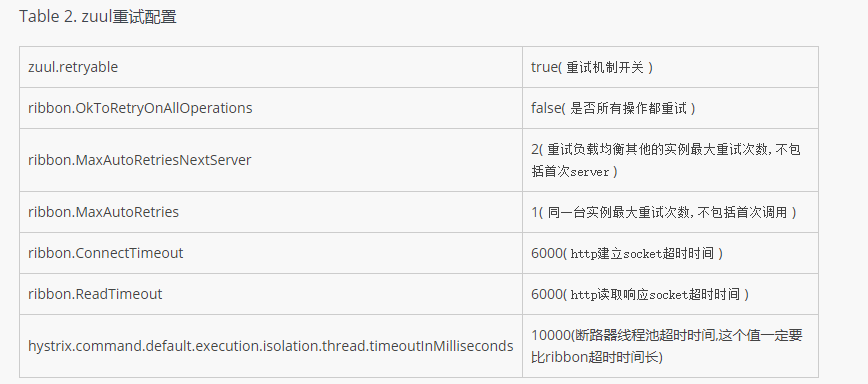
zuul: # 开启Zuul的重试 retryable: trueribbon: MaxAutoRetries: 1 MaxAutoRetriesNextServer: 2 OkToRetryOnAllOperations: false |
上面我们使用 zuul.retryable=true 对Zuul全局开启了重试,事实上,也可对指定路由开启/关闭重试:
|
1
|
zuul.routes.<routename>.retryable=true |
局部配置优先级更高。
基于HTTP响应码重试
|
1
2
3
|
clientName: ribbon: retryableStatusCodes: 404,502 |
注意点:
Hystrix的超时时间必须大于超时的时间,否则,一旦Hystrix超时,就没办法继续重试了。
一般来说,不建议将ribbon.OkToRetryOnAllOperations 设为true。因为一旦启用该配置,则表示重试任何操作,包括POST请求,而由于缓存了请求体,此时可能会影响服务器的资源。
总结
以上就是这篇文章的全部内容了,希望本文的内容对大家的学习或者工作具有一定的参考学习价值,如果有疑问大家可以留言交流,谢谢大家对脚本之家的支持。
Spring Cloud重试机制与各组件的重试总结的更多相关文章
- spring cloud要点简介及常用组件
spring cloud基于spring boot spring cloud是通过包装其他技术框架实现的,例如OSS组件,实现了一套通过基于注解.java配置和基于模板开发的微服务框架. spring ...
- Spring Cloud Zuul网关 Filter、熔断、重试、高可用的使用方式。
时间过的很快,写springcloud(十):服务网关zuul初级篇还在半年前,现在已经是2018年了,我们继续探讨Zuul更高级的使用方式. 上篇文章主要介绍了Zuul网关使用模式,以及自动转发机制 ...
- 【Spring Cloud】客户端负载均衡组件——Ribbon(三)
一.负载均衡 负载均衡技术是提高系统可用性.缓解网络压力和处理能力扩容的重要手段之一. 负载均衡可以分为服务器负载均衡和客户端负载均衡,服务器负载均衡由服务器实现,客户端只需正常访问:客户端负载均衡技 ...
- Spring Cloud 功能使用的层面组件(一)
来源:赤峰seo 实际上,Spring Cloud 是一个全家桶式的技术栈,它包含了很多组件.本文先从最核心的几个组件,也就是 Eureka.Ribbon.Feign.Hystrix.Zuul 入手 ...
- springcloud(十七):服务网关 Spring Cloud GateWay 熔断、限流、重试
上篇文章介绍了 Gataway 和注册中心的使用,以及 Gataway 中 Filter 的基本使用,这篇文章我们将继续介绍 Filter 的一些常用功能. 修改请求路径的过滤器 StripPrefi ...
- Spring Cloud(2)主要组件应用实例
SpringCloud SpringCloud 为开发人员提供了快速构建分布式系统的一些工具,包括配置管理.服务发现.断路器.路由.负载均衡.微代理.事件总线.全局锁.决策竞选.分布式会话等等.它运行 ...
- Spring Cloud 熔断机制 -- 断路器
Spring Cloud 入门教程(七): 熔断机制 -- 断路器 对断路器模式不太清楚的话,可以参看另一篇博文:断路器(Curcuit Breaker)模式,下面直接介绍Spring Cloud的断 ...
- Spring Cloud中五花八门的分布式组件我到底该怎么学
分布式架构的演进 在软件行业,一个应用服务随着功能越来越复杂,用户量越来越大,尤其是互联网行业流量爆发式的增长,导致我们需要不断的重构应用的结构来支撑庞大的用户量,最终从一个简单的系统主键演变成了一个 ...
- Spring Cloud(十一):Spring Cloud Zuul网关 Filter、熔断、重试、高可用的使用方式
上篇文章主要介绍了Zuul网关使用模式,以及自动转发机制,但其实Zuul还有更多的应用场景,比如:鉴权.流量转发.请求统计等等,这些功能都可以使用Zuul来实现. Zuul的核心 Filter是Zuu ...
随机推荐
- 领扣-209 长度最小的子数组 Minimum Size Subarray Sum MD
Markdown版本笔记 我的GitHub首页 我的博客 我的微信 我的邮箱 MyAndroidBlogs baiqiantao baiqiantao bqt20094 baiqiantao@sina ...
- Android -- 动态添加布局
在做项目的时候,遇到了scrollView与listView结合的使用,导致了滑动的混乱,但是有一个办法可以解决掉这个问题,就是手写listView的高度,还有另外一种方法,传送门:<Andro ...
- (队列的应用5.3.1)ZOJ 3210 A Stack or A Queue?根据进入结构的序列和离开结构的序列确定是stack还是queue)
/* * ZOJ_3210.cpp * * Created on: 2013年10月30日 * Author: Administrator */ #include <iostream> # ...
- php 中array_multisort排序,类似于对数据库中的记录依次按多列进行排序
array_multisort这个函数还是很有用的. ------------------------------------------------------------------------- ...
- [Grunt + AngularJS] Using ng-annotate for min-safe AngularJS
When you minify your code with a tool like Uglify, the resulting minified file will rename variables ...
- 解决 vs2010问题 error MSB8008: 指定的平台工具集(v110)未安装或无效
一次编译程序时.出现故障 >------ 已启动生成: 项目: PhotoStore, 配置: Debug Win32 ------ 1>生成启动时间为 2013-01-15 18:10: ...
- 裸裸的线段树(hdu 1754)
线段树的第一发. 哪天忘了还能够让自己找找回顾. 线段树操作: build : 建树. update:点改动: query:查询 Input 在每一个測试的第一行,有两个正整数 N 和 M ( 0& ...
- Service 生命周期
有了 Service 类我们如何启动他呢,有两种方法: • Context.startService() • Context.bindService() 1. 在同一个应用任何地方调用 start ...
- java.lang.IllegalArgumentException: taglib definition not consistent with specification version
web.xml报错 taglib标签错误,3.0要用jsp-config <jsp-config> <taglib> <taglib-uri>& ...
- codechef The Ball And Cups题解
The Ball And Cups At the end of a busy day, The Chef and his assistants play a game together. The ga ...