
Tetris
he Tetris game is one of the most popular computer games ever created. The original game was designed and programmed by a Russian programmer Alexey Pajitnov in 1985. Since then, Tetris is available on almost every computer platform in lots of variations.
Tetris is called a falling block puzzle game. In this game, we have seven different shapes calledtetrominoes: an S-shape, a Z-shape, a T-shape, an L-shape, a Line-shape, a MirroredL-shape, and a Square-shape. Each of these shapes is formed with four squares. The shapes are falling down the board. The object of the Tetris game is to move and rotate the shapes so that they fit as much as possible. If we manage to form a row, the row is destroyed and we score. We play the Tetris game until we top out.
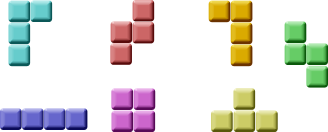 Figure: Tetrominoes
PyQt4 is a toolkit designed to create applications. There are other libraries which are targeted at creating computer games. Nevertheless, PyQt4 and other application toolkits can be used to create simple games.
Creating a computer game is a good way for enhancing programming skills.
The development
We do not have images for our Tetris game, we draw the tetrominoes using the drawing API available in the PyQt4 programming toolkit. Behind every computer game, there is a mathematical model. So it is in Tetris.
Some ideas behind the game:
- We use a
QtCore.QBasicTimer()to create a game cycle. - The tetrominoes are drawn.
- The shapes move on a square by square basis (not pixel by pixel).
- Mathematically a board is a simple list of numbers.
The code consists of four classes: Tetris, Board, Tetrominoe and Shape. The Tetris class sets up the game. The Board is where the game logic is written. The Tetrominoe class contains names for all tetris pieces and the Shape class contains the code for a tetris piece.
#!/usr/bin/python

# -*- coding: utf-8 -*-

"""

ZetCode PyQt4 tutorial

This is a Tetris game clone.

author: Jan Bodnar

website: zetcode.com

last edited: October 2013

"""

import sys, random

from PyQt4 import QtCore, QtGui

class Tetris(QtGui.QMainWindow):

    def __init__(self):

        super(Tetris, self).__init__()

        self.initUI()

    def initUI(self):

        self.tboard = Board(self)

        self.setCentralWidget(self.tboard)

        self.statusbar = self.statusBar()

        self.tboard.msg2Statusbar[str].connect(self.statusbar.showMessage)

        self.tboard.start()

        self.resize(180, 380)

        self.center()

        self.setWindowTitle('Tetris')

        self.show()

    def center(self):

        screen = QtGui.QDesktopWidget().screenGeometry()

        size = self.geometry()

        self.move((screen.width()-size.width())/2,

            (screen.height()-size.height())/2)

class Board(QtGui.QFrame):

    msg2Statusbar = QtCore.pyqtSignal(str)

    BoardWidth = 10

    BoardHeight = 22

    Speed = 300

    def __init__(self, parent):

        super(Board, self).__init__(parent)

        self.initBoard()

    def initBoard(self):

        self.timer = QtCore.QBasicTimer()

        self.isWaitingAfterLine = False

        self.curX = 0

        self.curY = 0

        self.numLinesRemoved = 0

        self.board = []

        self.setFocusPolicy(QtCore.Qt.StrongFocus)

        self.isStarted = False

        self.isPaused = False

        self.clearBoard()

    def shapeAt(self, x, y):

        return self.board[(y * Board.BoardWidth) + x]

    def setShapeAt(self, x, y, shape):

        self.board[(y * Board.BoardWidth) + x] = shape

    def squareWidth(self):

        return self.contentsRect().width() / Board.BoardWidth

    def squareHeight(self):

        return self.contentsRect().height() / Board.BoardHeight

    def start(self):

        if self.isPaused:

            return

        self.isStarted = True

        self.isWaitingAfterLine = False

        self.numLinesRemoved = 0

        self.clearBoard()

        self.msg2Statusbar.emit(str(self.numLinesRemoved))

        self.newPiece()

        self.timer.start(Board.Speed, self)

    def pause(self):

        if not self.isStarted:

            return

        self.isPaused = not self.isPaused

        if self.isPaused:

            self.timer.stop()

            self.msg2Statusbar.emit("paused")

        else:

            self.timer.start(Board.Speed, self)

            self.msg2Statusbar.emit(str(self.numLinesRemoved))

        self.update()

    def paintEvent(self, event):

        painter = QtGui.QPainter(self)

        rect = self.contentsRect()

        boardTop = rect.bottom() - Board.BoardHeight * self.squareHeight()

        for i in range(Board.BoardHeight):

            for j in range(Board.BoardWidth):

                shape = self.shapeAt(j, Board.BoardHeight - i - 1)

                if shape != Tetrominoe.NoShape:

                    self.drawSquare(painter,

                        rect.left() + j * self.squareWidth(),

                        boardTop + i * self.squareHeight(), shape)

        if self.curPiece.shape() != Tetrominoe.NoShape:

            for i in range(4):

                x = self.curX + self.curPiece.x(i)

                y = self.curY - self.curPiece.y(i)

                self.drawSquare(painter, rect.left() + x * self.squareWidth(),

                    boardTop + (Board.BoardHeight - y - 1) * self.squareHeight(),

                    self.curPiece.shape())

    def keyPressEvent(self, event):

        if not self.isStarted or self.curPiece.shape() == Tetrominoe.NoShape:

            super(Board, self).keyPressEvent(event)

            return

        key = event.key()

        if key == QtCore.Qt.Key_P:

            self.pause()

            return

        if self.isPaused:

            return

        elif key == QtCore.Qt.Key_Left:

            self.tryMove(self.curPiece, self.curX - 1, self.curY)

        elif key == QtCore.Qt.Key_Right:

            self.tryMove(self.curPiece, self.curX + 1, self.curY)

        elif key == QtCore.Qt.Key_Down:

            self.tryMove(self.curPiece.rotateRight(), self.curX, self.curY)

        elif key == QtCore.Qt.Key_Up:

            self.tryMove(self.curPiece.rotateLeft(), self.curX, self.curY)

        elif key == QtCore.Qt.Key_Space:

            self.dropDown()

        elif key == QtCore.Qt.Key_D:

            self.oneLineDown()

        else:

            super(Board, self).keyPressEvent(event)

    def timerEvent(self, event):

        if event.timerId() == self.timer.timerId():

            if self.isWaitingAfterLine:

                self.isWaitingAfterLine = False

                self.newPiece()

            else:

                self.oneLineDown()

        else:

            super(Board, self).timerEvent(event)

    def clearBoard(self):

        for i in range(Board.BoardHeight * Board.BoardWidth):

            self.board.append(Tetrominoe.NoShape)

    def dropDown(self):

        newY = self.curY

        while newY > 0:

            if not self.tryMove(self.curPiece, self.curX, newY - 1):

                break

            newY -= 1

        self.pieceDropped()

    def oneLineDown(self):

        if not self.tryMove(self.curPiece, self.curX, self.curY - 1):

            self.pieceDropped()

    def pieceDropped(self):

        for i in range(4):

            x = self.curX + self.curPiece.x(i)

            y = self.curY - self.curPiece.y(i)

            self.setShapeAt(x, y, self.curPiece.shape())

        self.removeFullLines()

        if not self.isWaitingAfterLine:

            self.newPiece()

    def removeFullLines(self):

        numFullLines = 0

        rowsToRemove = []

        for i in range(Board.BoardHeight):

            n = 0

            for j in range(Board.BoardWidth):

                if not self.shapeAt(j, i) == Tetrominoe.NoShape:

                    n = n + 1

            if n == 10:

                rowsToRemove.append(i)

        rowsToRemove.reverse()

        for m in rowsToRemove:

            for k in range(m, Board.BoardHeight):

                for l in range(Board.BoardWidth):

                        self.setShapeAt(l, k, self.shapeAt(l, k + 1))

        numFullLines = numFullLines + len(rowsToRemove)

        if numFullLines > 0:

            self.numLinesRemoved = self.numLinesRemoved + numFullLines

            self.msg2Statusbar.emit(str(self.numLinesRemoved))

            self.isWaitingAfterLine = True

            self.curPiece.setShape(Tetrominoe.NoShape)

            self.update()

    def newPiece(self):

        self.curPiece = Shape()

        self.curPiece.setRandomShape()

        self.curX = Board.BoardWidth / 2 + 1

        self.curY = Board.BoardHeight - 1 + self.curPiece.minY()

        #print self.curY

        if not self.tryMove(self.curPiece, self.curX, self.curY):

            self.curPiece.setShape(Tetrominoe.NoShape)

            self.timer.stop()

            self.isStarted = False

            self.msg2Statusbar.emit("Game over")

    def tryMove(self, newPiece, newX, newY):

        for i in range(4):

            x = newX + newPiece.x(i)

            y = newY - newPiece.y(i)

            if x < 0 or x >= Board.BoardWidth or y < 0 or y >= Board.BoardHeight:

                return False

            if self.shapeAt(x, y) != Tetrominoe.NoShape:

                return False

        self.curPiece = newPiece

        self.curX = newX

        self.curY = newY

        self.update()

        return True

    def drawSquare(self, painter, x, y, shape):

        colorTable = [0x000000, 0xCC6666, 0x66CC66, 0x6666CC,

                      0xCCCC66, 0xCC66CC, 0x66CCCC, 0xDAAA00]

        color = QtGui.QColor(colorTable[shape])

        painter.fillRect(x + 1, y + 1, self.squareWidth() - 2,

            self.squareHeight() - 2, color)

        painter.setPen(color.light())

        painter.drawLine(x, y + self.squareHeight() - 1, x, y)

        painter.drawLine(x, y, x + self.squareWidth() - 1, y)

        painter.setPen(color.dark())

        painter.drawLine(x + 1, y + self.squareHeight() - 1,

            x + self.squareWidth() - 1, y + self.squareHeight() - 1)

        painter.drawLine(x + self.squareWidth() - 1,

            y + self.squareHeight() - 1, x + self.squareWidth() - 1, y + 1)

class Tetrominoe(object):

    NoShape = 0

    ZShape = 1

    SShape = 2

    LineShape = 3

    TShape = 4

    SquareShape = 5

    LShape = 6

    MirroredLShape = 7

class Shape(object):

    coordsTable = (

        ((0, 0),     (0, 0),     (0, 0),     (0, 0)),

        ((0, -1),    (0, 0),     (-1, 0),    (-1, 1)),

        ((0, -1),    (0, 0),     (1, 0),     (1, 1)),

        ((0, -1),    (0, 0),     (0, 1),     (0, 2)),

        ((-1, 0),    (0, 0),     (1, 0),     (0, 1)),

        ((0, 0),     (1, 0),     (0, 1),     (1, 1)),

        ((-1, -1),   (0, -1),    (0, 0),     (0, 1)),

        ((1, -1),    (0, -1),    (0, 0),     (0, 1))

    )

    def __init__(self):

        self.coords = [[0,0] for i in range(4)]

        self.pieceShape = Tetrominoe.NoShape

        self.setShape(Tetrominoe.NoShape)

    def shape(self):

        return self.pieceShape

    def setShape(self, shape):

        table = Shape.coordsTable[shape]

        for i in range(4):

            for j in range(2):

                self.coords[i][j] = table[i][j]

        self.pieceShape = shape

    def setRandomShape(self):

        self.setShape(random.randint(1, 7))

    def x(self, index):

        return self.coords[index][0]

    def y(self, index):

        return self.coords[index][1]

    def setX(self, index, x):

        self.coords[index][0] = x

    def setY(self, index, y):

        self.coords[index][1] = y

    def minX(self):

        m = self.coords[0][0]

        for i in range(4):

            m = min(m, self.coords[i][0])

        return m

    def maxX(self):

        m = self.coords[0][0]

        for i in range(4):

            m = max(m, self.coords[i][0])

        return m

    def minY(self):

        m = self.coords[0][1]

        for i in range(4):

            m = min(m, self.coords[i][1])

        return m

    def maxY(self):

        m = self.coords[0][1]

        for i in range(4):

            m = max(m, self.coords[i][1])

        return m

    def rotateLeft(self):

        if self.pieceShape == Tetrominoe.SquareShape:

            return self

        result = Shape()

        result.pieceShape = self.pieceShape

        for i in range(4):

            result.setX(i, self.y(i))

            result.setY(i, -self.x(i))

        return result

    def rotateRight(self):

        if self.pieceShape == Tetrominoe.SquareShape:

            return self

        result = Shape()

        result.pieceShape = self.pieceShape

        for i in range(4):

            result.setX(i, -self.y(i))

            result.setY(i, self.x(i))

        return result

def main():

    app = QtGui.QApplication([])

    tetris = Tetris()

    sys.exit(app.exec_())

if __name__ == '__main__':

    main()
The game is simplified a bit so that it is easier to understand. The game starts immediately after it is launched. We can pause the game by pressing the p key. The Space key will drop the tetris piece instantly to the bottom. The game goes at constant speed, no acceleration is implemented. The score is the number of lines that we have removed.
self.tboard = Board(self)

self.setCentralWidget(self.tboard)
An instance of the Board class is created and set to be the central widget of the application.
self.statusbar = self.statusBar()

self.tboard.msg2Statusbar[str].connect(self.statusbar.showMessage)
We create a statusbar where we will display messages. We will display three possible messages: the number of lines already removed, the paused message, or the game over message. The msg2Statusbaris a custom signal that is implemented in the Board class. The showMessage() is a built-in method that displays a message on a statusbar.
self.tboard.start()
This line initiates the game.
class Board(QtGui.QFrame):

    msg2Statusbar = QtCore.pyqtSignal(str)

...
A custom signal is created. The msg2Statusbar is a signal that is emitted when we want to write a message or the score to the statusbar.
BoardWidth = 10

BoardHeight = 22

Speed = 300
These are Board's class variables. The BoardWidth and the BoardHeight define the size of the board in blocks. The Speed defines the speed of the game. Each 300 ms a new game cycle will start.
...

self.curX = 0

self.curY = 0

self.numLinesRemoved = 0

self.board = []

...
In the initBoard() method we initialize some important variables. The self.board variable is a list of numbers from 0 to 7. It represents the position of various shapes and remains of the shapes on the board.
def shapeAt(self, x, y):

    return self.board[(y * Board.BoardWidth) + x]
The shapeAt() method determines the type of a shape at a given block.
def squareWidth(self):

    return self.contentsRect().width() / Board.BoardWidth
The board can be dynamically resized. As a consequence, the size of a block may change. ThesquareWidth() calculates the width of the single square in pixels and returns it. The Board.BoardWidth is the size of the board in blocks.
for i in range(Board.BoardHeight):

    for j in range(Board.BoardWidth):

        shape = self.shapeAt(j, Board.BoardHeight - i - 1)

        if shape != Tetrominoe.NoShape:

            self.drawSquare(painter,

                rect.left() + j * self.squareWidth(),

                boardTop + i * self.squareHeight(), shape)
The painting of the game is divided into two steps. In the first step, we draw all the shapes, or remains of the shapes that have been dropped to the bottom of the board. All the squares are remembered in the self.board list variable. The variable is accessed using the shapeAt() method.
if self.curPiece.shape() != Tetrominoe.NoShape:

    for i in range(4):

        x = self.curX + self.curPiece.x(i)

        y = self.curY - self.curPiece.y(i)

        self.drawSquare(painter, rect.left() + x * self.squareWidth(),

            boardTop + (Board.BoardHeight - y - 1) * self.squareHeight(),

            self.curPiece.shape())
The next step is the drawing of the actual piece that is falling down.
elif key == QtCore.Qt.Key_Right:

    self.tryMove(self.curPiece, self.curX + 1, self.curY)
In the keyPressEvent() method we check for pressed keys. If we press the right arrow key, we try to move the piece to the right. We say try because the piece might not be able to move.
elif key == QtCore.Qt.Key_Up:

    self.tryMove(self.curPiece.rotateLeft(), self.curX, self.curY)
The Up arrow key will rotate the falling piece to the left.
elif key == QtCore.Qt.Key_Space:

    self.dropDown()
The Space key will drop the falling piece instantly to the bottom.
elif key == QtCore.Qt.Key_D:

    self.oneLineDown()
Pressing the d key, the piece will go one block down. It can be used to accellerate the falling of a piece a bit.
def tryMove(self, newPiece, newX, newY):

    for i in range(4):

        x = newX + newPiece.x(i)

        y = newY - newPiece.y(i)

        if x < 0 or x >= Board.BoardWidth or y < 0 or y >= Board.BoardHeight:

            return False

        if self.shapeAt(x, y) != Tetrominoe.NoShape:

            return False

    self.curPiece = newPiece

    self.curX = newX

    self.curY = newY

    self.update()

    return True
In the tryMove() method we try to move our shapes. If the shape is at the edge of the board or is adjacent to some other piece, we return False. Otherwise we place the current falling piece to a new position.
def timerEvent(self, event):

    if event.timerId() == self.timer.timerId():

        if self.isWaitingAfterLine:

            self.isWaitingAfterLine = False

            self.newPiece()

        else:

            self.oneLineDown()

    else:

        super(Board, self).timerEvent(event)
In the timer event, we either create a new piece after the previous one was dropped to the bottom or we move a falling piece one line down.
def clearBoard(self):

    for i in range(Board.BoardHeight * Board.BoardWidth):

        self.board.append(Tetrominoe.NoShape)
The clearBoard() method clears the board by setting Tetrominoe.NoShape at each block of the board.
def removeFullLines(self):

    numFullLines = 0

    rowsToRemove = []

    for i in range(Board.BoardHeight):

        n = 0

        for j in range(Board.BoardWidth):

            if not self.shapeAt(j, i) == Tetrominoe.NoShape:

                n = n + 1

        if n == 10:

            rowsToRemove.append(i)

    rowsToRemove.reverse()

    for m in rowsToRemove:

        for k in range(m, Board.BoardHeight):

            for l in range(Board.BoardWidth):

                    self.setShapeAt(l, k, self.shapeAt(l, k + 1))

    numFullLines = numFullLines + len(rowsToRemove)

 ...
If the piece hits the bottom, we call the removeFullLines() method. We find out all full lines and remove them. We do it by moving all lines above the current full line to be removed one line down. Notice that we reverse the order of the lines to be removed. Otherwise, it would not work correctly. In our case we use a naive gravity. This means that the pieces may be floating above empty gaps.
def newPiece(self):

    self.curPiece = Shape()

    self.curPiece.setRandomShape()

    self.curX = Board.BoardWidth / 2 + 1

    self.curY = Board.BoardHeight - 1 + self.curPiece.minY()

    if not self.tryMove(self.curPiece, self.curX, self.curY):

        self.curPiece.setShape(Tetrominoe.NoShape)

        self.timer.stop()

        self.isStarted = False

        self.msg2Statusbar.emit("Game over")
The newPiece() method creates randomly a new tetris piece. If the piece cannot go into its initial position, the game is over.
class Tetrominoe(object):

    NoShape = 0

    ZShape = 1

    SShape = 2

    LineShape = 3

    TShape = 4

    SquareShape = 5

    LShape = 6

    MirroredLShape = 7
The Tetrominoe class holds names of all possible shapes. We have also a NoShape for an empty space.
The Shape class saves information about a tetris piece.
class Shape(object):

    coordsTable = (

        ((0, 0),     (0, 0),     (0, 0),     (0, 0)),

        ((0, -1),    (0, 0),     (-1, 0),    (-1, 1)),

        ...

    )

...
The coordsTable tuple holds all possible coordinate values of our etris pieces. This is a template from which all pieces take their coordinate values.
self.coords = [[0,0] for i in range(4)]
Upon creation we create an empty coordinates list. The list will save the coordinates of the tetris piece.
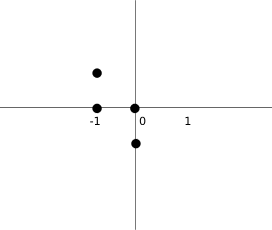 Figure: Coordinates
The above image will help understand the coordinate values a bit more. For example, the tuples (0, -1), (0, 0), (-1, 0), (-1, -1) represent a Z-shape. The diagram illustrates the shape.
def rotateLeft(self):

    if self.pieceShape == Tetrominoe.SquareShape:

        return self

    result = Shape()

    result.pieceShape = self.pieceShape

    for i in range(4):

        result.setX(i, self.y(i))

        result.setY(i, -self.x(i))

    return result
The rotateLeft() method rotates a piece to the left. The square does not have to be rotated. That is why we simply return the reference to the current object. A new piece is created and its coordinates are set to the ones of the rotated piece.
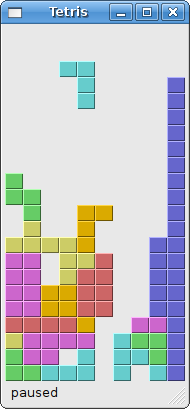 Figure: Tetris
Tetris的更多相关文章
- x01.Tetris: 俄罗斯方块
最强大脑有个小孩玩俄罗斯方块游戏神乎其技,那么,就写一个吧,玩玩而已. 由于逻辑简单,又作了一些简化,所以代码并不多. using System; using System.Collections.G ...
- 拓扑排序 - 并查集 - Rank of Tetris
Description 自从Lele开发了Rating系统,他的Tetris事业更是如虎添翼,不久他遍把这个游戏推向了全球. 为了更好的符合那些爱好者的喜好,Lele又想了一个新点子:他将制作一个全球 ...
- HDU1760 A New Tetris Game NP态
A New Tetris Game Time Limit: 3000/1000 MS (Java/Others) Memory Limit: 32768/32768 K (Java/Others ...
- HDU 1811 Rank of Tetris(拓扑排序+并查集)
题目链接: 传送门 Rank of Tetris Time Limit: 1000MS Memory Limit: 32768 K Description 自从Lele开发了Rating系统, ...
- ACM: hdu 1811 Rank of Tetris - 拓扑排序-并查集-离线
hdu 1811 Rank of Tetris Time Limit:1000MS Memory Limit:32768KB 64bit IO Format:%I64d & % ...
- hdu 1811 Rank of Tetris (并查集+拓扑排序)
Rank of Tetris Time Limit: 1000/1000 MS (Java/Others) Memory Limit: 32768/32768 K (Java/Others)To ...
- A New Tetris Game
时间限制(普通/Java):1000MS/10000MS 运行内存限制:65536KByte 总提交: 40 测试通过: 12 描述 曾经,Lele和他姐姐最喜欢,玩得最 ...
- TETRIS 项目开发笔记
java学习一个月了,没有什么进展,期间又是复习Linux,又是看Android,瞻前顾后,感觉自己真的是贪得无厌, 学习的东西广而不精,所以写出的文章也就只能泛泛而谈.五一小长假,哪里都没有去,也不 ...
- 用Shell实现俄罗斯方块代码(Tetris.sh)
本代码来源于网络: 文件下载地址:http://files.cnblogs.com/files/DreamDrive/Tetris.sh #!/bin/bash # Tetris Game # 10. ...
- Rank of Tetris HDU--1881
Rank of Tetris Time Limit: 1000/1000 MS (Java/Others) Memory Limit: 32768/32768 K (Java/Others)To ...
随机推荐
- [JSOI2007]文本生成器 --- AC自动机 + DP
[JSOI2007]文本生成器 题目描述: JSOI交给队员ZYX一个任务,编制一个称之为“文本生成器”的电脑软件:该软件的使用者是一些低幼人群,他们现在使用的是GW文本生成器v6版. 该软件可以随机 ...
- [BZOJ5109][LOJ #6252][P4061][CodePlus 2017 11月赛]大吉大利,今晚吃鸡!(最短路+拓扑排序+传递闭包+map+bitset(hash+压位))
5109: [CodePlus 2017]大吉大利,晚上吃鸡! Time Limit: 30 Sec Memory Limit: 1024 MBSubmit: 107 Solved: 57[Sub ...
- Java编程思想学习(五)----第5章:初始化与清理
随着计算机革命的发展,“不安全”的编程方式已逐渐成为编程代价高昂的主因之一. C++引入了构造嚣(constructor)的概念,这是一个在创建对象时被自动调用的特殊方法.Java中也采用了构造器,并 ...
- ACM -- 算法小结(九)DP之Humble numbers
DP -- Humble numbers //一开始理解错题意了,题意是是说一些只有唯一一个质因数(质因数只包括2,3,5,7)组成的数组,请找出第n个数是多少 //无疑,先打表,否则果断 ...
- Java容器-引用数据类型排序+TreeSet、TreeMap底层实现
目录 1.冒泡排序的实现 2.比较接口(普通数据类型.引用数据类型) 普通数据类型:冒泡排序 引用数据类型:包装类(Integer.String.Character.Date) 自定义类型:实体类:i ...
- IDA IDC Tutorials: Additional Auto-Commenting
https://www.hex-rays.com/products/ida/support/tutorials/idc/autocomment.shtml This program creates a ...
- Spring JavaConfig @Import实例
一般来说, 需要按模块或类别 分割Spring XML bean文件 成多个小文件, 使事情更容易维护和模块化. 例如, <beans xmlns="http://www.spring ...
- centos7 yum安装配置redis 并设置密码
原文:https://www.cnblogs.com/fanlinglong/p/6635828.html centos7 yum安装配置redis 并设置密码 1.设置Redis的仓库地址 yum ...
- Tor Browser(洋葱浏览器)——一款使你匿名上网的浏览器
第一次知道Tor是在有关斯诺登的新闻报道中. 简单说Tor是一款是你匿名访问网络的的软件.用户通过Tor可以在因特网上进行匿名交流. 为了实现匿名目的,Tor把分散在全球的计算机集合起来形成一个加密回 ...
- [Linux] git send-email的使用
1. git send-email is included in an individual package, named "git-email":$ sudo apt-get i ...