
TRF7970A IC Communication Interface


General Introduction
The communication interface to the reader can be configured in two ways:
with a eight line parallel interface (D0:D7) plus DATA_CLK, or
with a three or four wire Serial Peripheral Interface (SPI).
The SPI interface uses traditional Master Out/Slave In (MOSI), Master In/Slave Out (MISO), IRQ, and DATA_CLK lines.
The SPI can be operated with or without using the Slave Select line.
These communication modes are mutually exclusive; that is, only one mode can be used at a time in the application.
When the SPI interface is selected, the unused I/O_2, I/O_1, and I/O_0 pins must be hard-wired as shown in Table 5-9.
At power up, the TRF7970A samples the status of these three pins and then enters one of the possible SPI modes.
The TRF7970A always behaves as the slave device, and the microcontroller (MCU) behaves as the master device.
The MCU initiates all communications with the TRF7970A, and the TRF7970A makes use of the Interrupt Request (IRQ) pin
in both parallel and SPI modes to prompt the MCU for servicing attention.
Communication is initialized by a start condition, which is expected to be followed by an Address/Command word (Adr/Cmd).
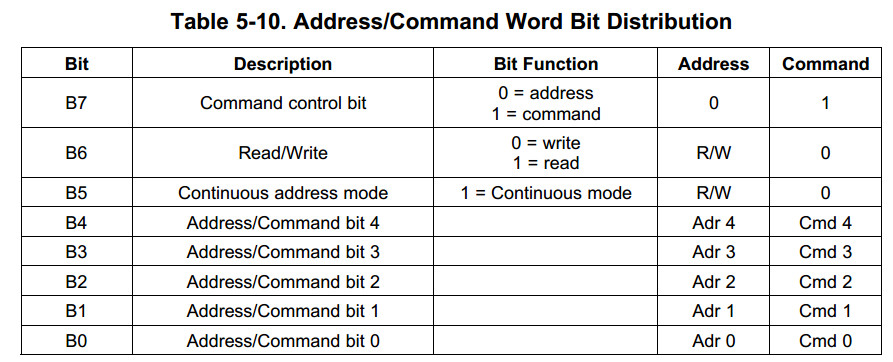
The Adr/Cmd word is 8 bits long, and its format is shown in Table 5-10.
The MSB (bit 7) determines if the word is to be used as a command or as an address.
The last two columns of Table 5-10 show the function of the separate bits if either address or command is written.
Data is expected once the address word is sent.
In continuous-address mode (Cont. mode = 1), the first data that follows the address is written (or read) to (from) the given address.
For each additional data, the address is incremented by one.
Continuous mode can be used to write to a block of control registers in a single stream without changing the address;
for example, setup of the predefined standard control registers from the MCU non-volatile memory to the reader.
In non-continuous address mode (simple addressed mode), only one data word is expected after the address.
Address Mode is used to write or read the configuration registers or the FIFO. When writing more than 12 bytes to the FIFO,
the Continuous Address Mode should be set to 1.
The Command Mode is used to enter a command resulting in reader action
(for example, initialize transmission, enable reader, and turn reader on or off).
Examples of expected communications between an MCU and the TRF7970A are shown in the following sections.
The IRQ line is indeed the interrupt back to the MCU to indicate something has occurred. The reading of the IRQ status register is then the pointer to the logic of what to do next. For example, after transmitting out a command sequence to a tag, you will get an IRQ which needs to be serviced by reading the IRQ status register (which clears the IRQ), then most likely you would have an 0x80, telling you that the transmission was successful (we call EOTX (end of transmit) IRQ)...then you would next get an IRQ, which would for example be 0x40, indicating an EORX (end of recieve) has occured, then you would read the FIFO status for # of bytes to clock out, then read the FIFO for the data...you can see in the data sheet the descriptions of the IRQ register and and some examples, too. (see the TRF7970A DS, section 5.9.xx)
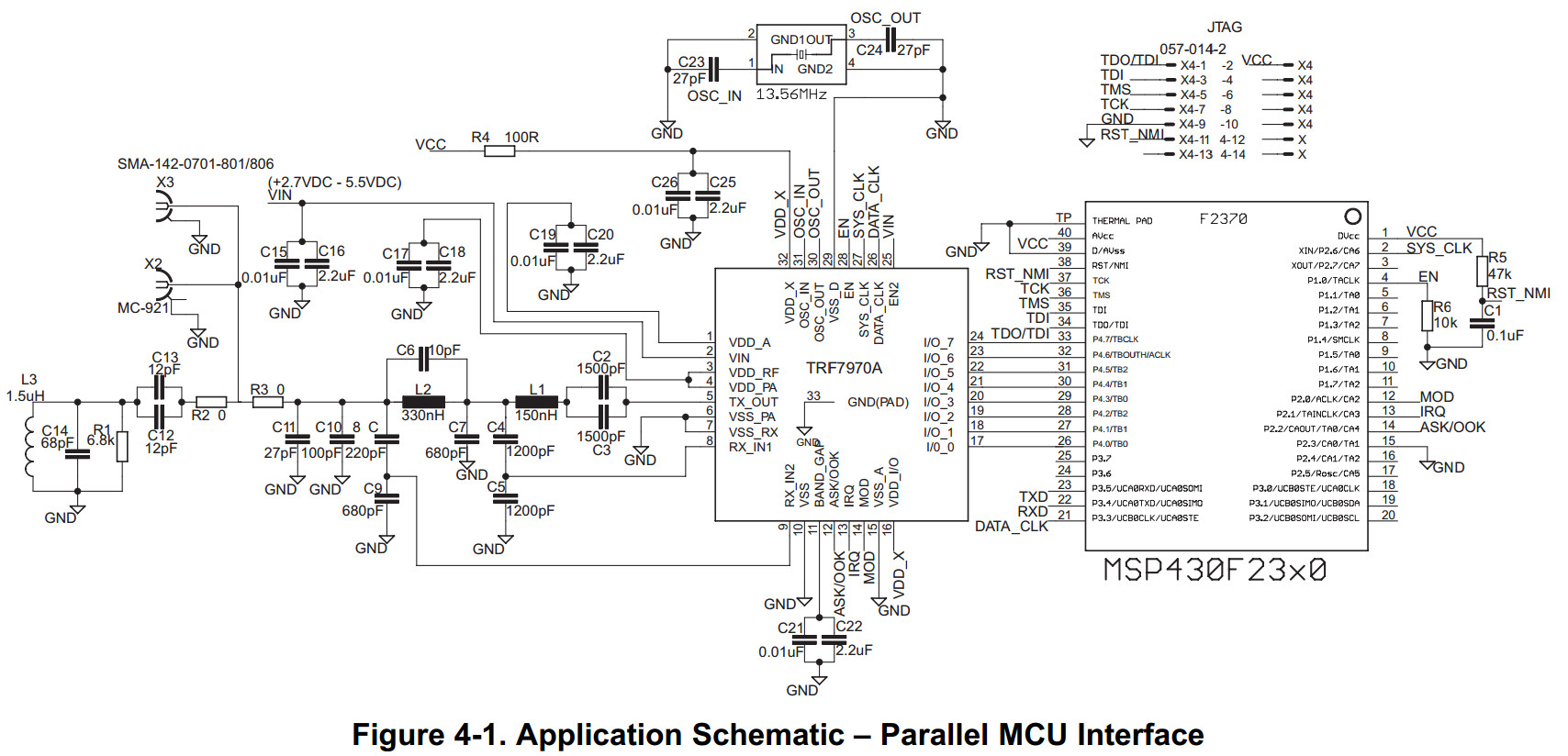
The ASK/OOK line in your case most likely can just be pulled to GND or you can connect it to a GPIO on your MCU like we have it shown in the reference schematics. MOD same thing, unless you are using any Mifare Classic tags, then you would need control of the MOD pin for Direct Mode 0, so then it would need to be connected to a GPIO.
Usually we are recommending connecting EN line to a GPIO, with a pulldown (needs to see low to high transition) so you can have control of some of the power modes...EN2 can also be connected to a GPIO or pulled high or low, depending on your need for even lower power consumption.
Correct about I/O_0, I/O_1 and I/O_2 being at GND potential for SPI w/o SS.
If it helps here is a schematic of SPI with SS, which you can modify for your own usage, since you say you want to do without SS. (I/O_3 and I/O_5 are connected in this drawing as well, and this is for Special Direct Mode, which you may or may not need, depending on which tags you are trying to use here - normally not needed, just FYI)
7183.TRF7970A_SPI_MSP430F2370_dongle_sch.pdf

TRF7970A IC Communication Interface的更多相关文章
- USB组合设备 Interface Association Descriptor (IAD)
Communication Device Class,简称CDCUSB Compound Device,USB复合设备USB Composite Device,USB组合设备 摘要USB复合设备 Co ...
- (转)什么是CDC类(Communication Device Class)
全文地址:http://justmei.blog.163.com/blog/static/1160998532010321112522467/ 什么是CDC类 (Communication Devic ...
- Chrysler -- CCD (Chrysler Collision Detection) Data Bus
http://articles.mopar1973man.com/general-cummins/34-engine-system/81-ccd-data-bus CCD (Chrysler Coll ...
- 实验室项目.md
1 嵌入式操作系统 为什么要用嵌入式操作系统 普通的单片机编程:程序(软件)--单片机硬件: 嵌入式操作系统开发:程序(软件)--操作系统--嵌入式硬件(包括单片机等); 我们平时普通所学的单片机编程 ...
- Linux内核配置选项
http://blog.csdn.net/wdsfup/article/details/52302142 http://www.manew.com/blog-166674-12962.html Gen ...
- Smart internet of things services
A method and apparatus enable Internet of Things (IoT) services based on a SMART IoT architecture by ...
- Indexing Sensor Data
In particular embodiments, a method includes, from an indexer in a sensor network, accessing a set o ...
- 深入linux kernel内核配置选项
============================================================================== 深入linux kernel内核配置选项 ...
- Fedora 24中的日志管理
Introduction Log files are files that contain messages about the system, including the kernel, servi ...
随机推荐
- 012 public等关键字可见性
public: 具有最大的访问权限,可以访问任何一个在classpath下的类.接口.异常等.它往往用于对外的情况,也就是对象或类对外的一种接口的形式. protected: 主要的作用就是用来保护子 ...
- learnyounode 题解
//第三题 var fs =require('fs')var path=process.argv[2]fs.readFile(path,function(err,data){ var lines=da ...
- 深度学习方法(十一):卷积神经网络结构变化——Google Inception V1-V4,Xception(depthwise convolution)
欢迎转载,转载请注明:本文出自Bin的专栏blog.csdn.net/xbinworld. 技术交流QQ群:433250724,欢迎对算法.机器学习技术感兴趣的同学加入. 上一篇讲了深度学习方法(十) ...
- angular.js 验证码注册登录
css部分 header{ height: 50px; line-height: 50px; display: flex; } .callback{ text-align: left; display ...
- bzoj1941 hdu5992
看了青岛赛区的题简单学了一下kd,感觉这东西还是挺厉害的 一般kd树找最近点对最坏是O(n),但是随机情况下跑得还是很快的 kd树是一棵BST,但是每一层的关键字不同 一般写法是按照每一维轮流来,这一 ...
- DotNetOpenAuth实践之WCF资源服务器配置
系列目录: DotNetOpenAuth实践系列(源码在这里) 上一篇我们写了一个OAuth2的认证服务器,我们也获取到access_token,那么这个token怎么使用呢,我们现在就来揭开 一般获 ...
- C# 6.0 新特性 (一)
概述 尽管 C# 6.0 尚未完成,但现在这些功能正处于接近完成的关键时刻.自 2014 年 5 月发布文章“C# 6.0 语言预览版”(msdn.microsoft.com/magazine/dn6 ...
- Canvas进阶——制作小游戏【贪吃蛇】
今天呢,主要和小伙伴们分享一下一个贪吃蛇游戏从构思到实现的过程~因为我不是很喜欢直接PO代码,所以只copy代码的童鞋们请出门左转不谢. 按理说canvas与其应用是老生常谈了,可我在准备阶段却搜索不 ...
- 五、oracle 表管理
一.表名和列名的命名规则1).必须以字母开头2).长度不能超过30个字符3).不能使用oracle的保留字4).只能使用如下字符 a-z,a-z,0-9,$,#等 二.数据类型1).字符类char 长 ...
- 11.Spark Streaming源码解读之Driver中的ReceiverTracker架构设计以及具体实现彻底研究
上篇文章详细解析了Receiver不断接收数据的过程,在Receiver接收数据的过程中会将数据的元信息发送给ReceiverTracker: 本文将详细解析ReceiverTracker的的架构 ...