
idea maven新建struts2项目
环境:
IDEA
java1.8
struts2-core 2.5.18

一路下一步,名字自己随便填,
项目建好后修改pom.xml文件,加入struts2-core

添加tomcat:

+号添加web
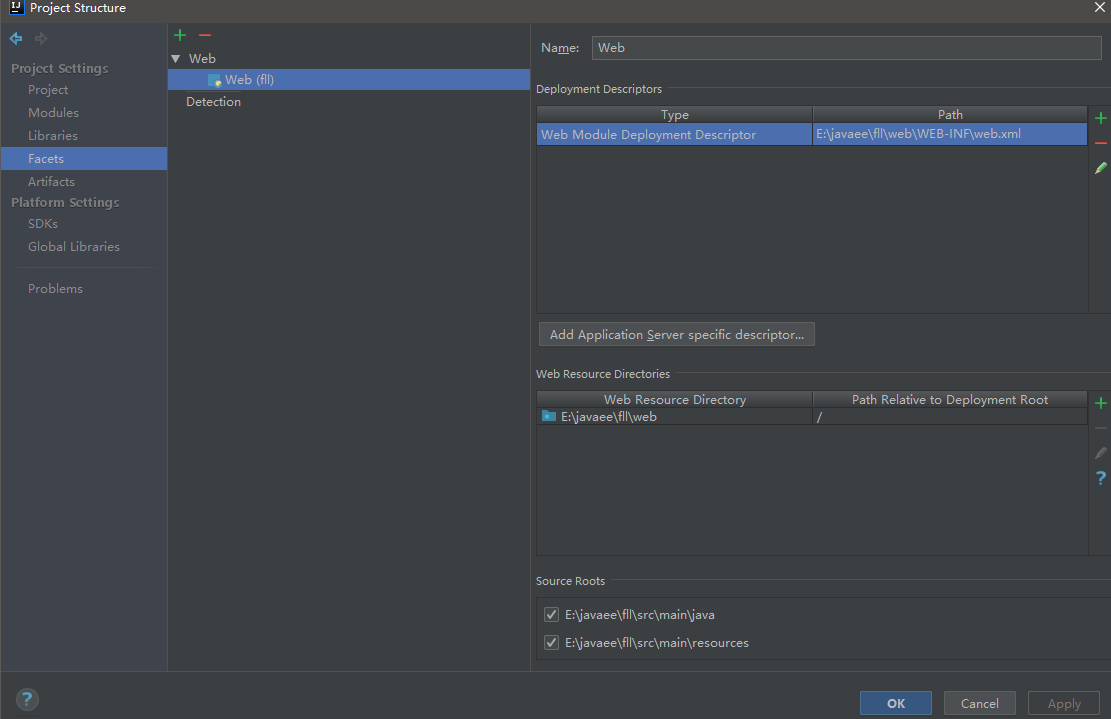
添加tomcat

在resources下新建struts.xml
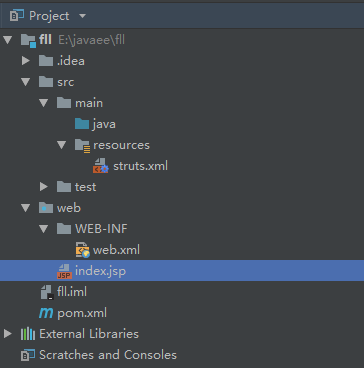
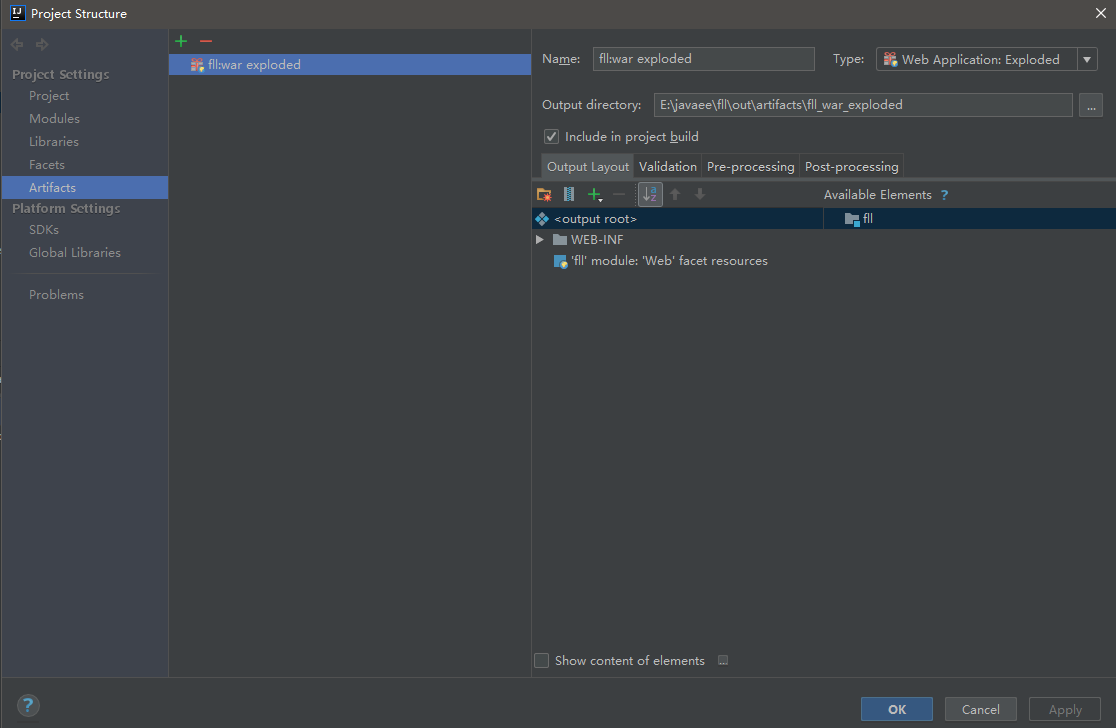
如果出现错误,Exception starting filter struts2
java.lang.ClassNotFoundException: org.apache.struts2.dispatcher.filter.StrutsPrepareAndExecuteFilter
手动删除再添加这个,然后修改tomcat的设置。
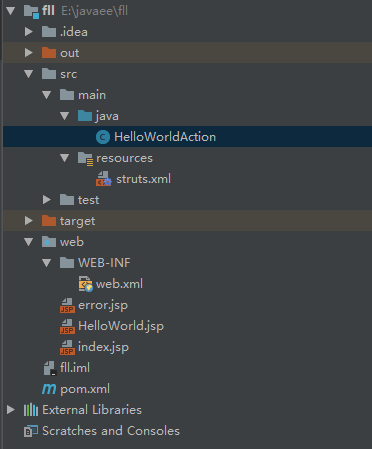
运行举例:
public class HelloWorldAction {

    private String name;

    public String execute() throws Exception {

        if (getName().equals("") || getName() == null)

            return "error";

        return "success";

    }

    public String getName() {

        return name;

    }

    public void setName(String name) {

        this.name = name;

    }

}
HelloWorldAction.java
<?xml version="1.0" encoding="UTF-8"?>

<!DOCTYPE struts PUBLIC

        "-//Apache Software Foundation//DTD Struts Configuration 2.5//EN"

        "http://struts.apache.org/dtds/struts-2.5.dtd">

<struts>

    <constant name="struts.enable.DynamicMethodInvocation" value="true" />

    <package name="default" extends="struts-default">

        <default-action-ref name="index" />

        <action name="index" >

            <result name="success">/index.jsp</result>

        </action>

        <action name="hello" class="HelloWorldAction" method="execute">

            <result name="success">/HelloWorld.jsp</result>

            <result name="error">/Error.jsp</result>

        </action>

    </package>

</struts>
struts.xml
<?xml version="1.0" encoding="UTF-8"?>

<web-app xmlns="http://xmlns.jcp.org/xml/ns/javaee"

         xmlns:xsi="http://www.w3.org/2001/XMLSchema-instance"

         xsi:schemaLocation="http://xmlns.jcp.org/xml/ns/javaee http://xmlns.jcp.org/xml/ns/javaee/web-app_4_0.xsd"

         version="4.0">

    <filter>

        <filter-name>struts2</filter-name>

        <filter-class>

            org.apache.struts2.dispatcher.filter.StrutsPrepareAndExecuteFilter

        </filter-class>

    </filter>

    <filter-mapping>

        <filter-name>struts2</filter-name>

        <url-pattern>/*</url-pattern>

    </filter-mapping>

    <welcome-file-list>

        <welcome-file>index.html</welcome-file>

        <welcome-file>index.htm</welcome-file>

        <welcome-file>index.jsp</welcome-file>

        <welcome-file>default.html</welcome-file>

        <welcome-file>default.htm</welcome-file>

        <welcome-file>default.jsp</welcome-file>

    </welcome-file-list>

</web-app>
web.xml
<%--

  Created by IntelliJ IDEA.

  User: Flyuz

  Date: 2018/12/19

  Time: 20:22

  To change this template use File | Settings | File Templates.

--%>

<%@ page language="java" contentType="text/html; charset=UTF-8" pageEncoding="UTF-8" %>

<%@ taglib prefix="s" uri="/struts-tags" %>

<!DOCTYPE html>

<html>

<head>

    <title>Hello World</title>

</head>

<body>

<h1>Hello World Struts2</h1>

<form action="hello">

    <label for="name">Please enter your name</label><br/>

    <input type="text" name="name"/>

    <input type="submit" value="Enter"/>

</form>

</body>

</html>
index.jsp
<%--

  Created by IntelliJ IDEA.

  User: Flyuz

  Date: 2018/12/19

  Time: 20:26

  To change this template use File | Settings | File Templates.

--%>

<%@ page language="java" contentType="text/html; charset=UTF-8" pageEncoding="UTF-8"%>

<%@ taglib prefix="s" uri="/struts-tags" %>

<!DOCTYPE html>

<html>

<head>

    <meta http-equiv="Content-Type" content="text/html; charset=UTF-8">

    <title>Hello World</title>

</head>

<body>

Hello World, Welcome! <s:property value="name"/>

</body>

</html>
HelloWorld.jsp
idea maven新建struts2项目的更多相关文章
- Eclipse下Maven新建Web项目index.jsp报错完美解决(war包)
Eclipse下Maven新建Web项目步骤 1. 2. 3. 4. 5. 问题描述 最近用eclipse新建了一个maven项目,结果刚新建完成index.jsp页面就报错了,先把错误信息贴出来看看 ...
- maven新建web项目提示The superclass "javax.servlet.http.HttpServlet" was not found on the Java Build Path
maven新建web项目提示The superclass "javax.servlet.http.HttpServlet" was not found on the Java Bu ...
- Maven的学习资料收集--(五)使用Maven构建Struts2项目
在前两篇博客中,使用Maven构建了Web项目,在这篇博客中写一下,怎样构建一个简单的Struts2项目. 在准备过程中发现,要使用好Maven,个人觉得要好好利用这两个网站: http://mvnr ...
- 用Maven新建Web项目时报错
在cmd下,用mvn命令 mvn archetype:create -DgroupId=org.seckill -DartifactId=seckill -DarchetypeArtifactId=m ...
- Maven构建Struts2项目
1.添加Struts2依赖 这里主需要在pom.xml中添加一个struts-core的依赖即可: <project xmlns="http://maven.apache.org/PO ...
- Maven3路程(四)用Maven创建Struts2项目
采用struts版本:struts-2.3.8 一.创建一个web项目 参考前面文章,项目名:maven-struts-demo. 二.配置pom.xml文件添加struts2依赖 <proje ...
- JAVA学习4:用Maven创建Struts2项目
采用struts版本:struts-2.3.8 一.创建一个web项目 参考前面文章,项目名:maven-struts-demo. 二.配置pom.xml文件添加struts2依赖 <pro ...
- Maven新建webapp项目index.jsp报错
最近用eclipse新建了一个maven项目,结果刚新建完成index.jsp页面就报错了,先把错误信息贴出来看看 后来就找资料,结果发现两种解决办法,希望可以帮助用得上的人! 第一种:直接在pom. ...
- eclipse maven新建springMVC项目(原创)
1.配置eclipse maven 2.新建maven项目 3.新建src/main/java,更新pom <project xmlns="http://maven.apache.or ...
随机推荐
- 编译boost.log模块遇到的一些问题
线上日志用到的是日志库,在全局有一个锁,导致在高并发的时候,容易因为锁竞争问题导致时延.在某些情况下,会因为同一个用户,同时访问某个变量,导致读写冲突使线上服务整体core掉(考虑到请求的间隔,为了应 ...
- 前端开发之JavaScript基础篇二
主要内容: 1.流程控制条件语句和switch语句 2.for循环和while循环 3.Break语句和Continue语句 4.数组和数组常用方法 5.函数 6.对象 一.流程控制条件语句和swit ...
- linux进阶与hadoop
Linux进阶命令: find . | ls --help | more grep ll | grep 1.txt grep -ri BASH 1.txt grep -ri BASH ...
- unity自带寻路Navmesh入门教程
http://liweizhaolili.blog.163.com/blog/static/16230744201271161310135/ http://liweizhaolili.blog.163 ...
- OpenNebula 4.0 Beta 新特性介绍
http://blog.chinaunix.net/uid-20940095-id-3561376.html 2013年3月26号,OpenNebula社区发布了OpenNebula 4.0 Beta ...
- tomcat安装后,双击start.bat闪退的问题
1.jdk环境变量没有配 解决方案:我的电脑-属性-高级-环境变量,新增下面三个环境变量: ①JAVA_HOME=C:\Program Files\Java\jdk1.7.0_09(就是你jdk安装的 ...
- Python监控日志程序-乾颐堂
一个简易的日志监控的脚本,功能如下:1.windows环境2.当匹配日志关键字时会发出声音,匹配的关键字不同,播放的声音不同3.能做到实时响应 注意:是在win环境下哦 直接上代码吧 1 2 3 4 ...
- Python2.7.9 编码问题
最近学一学网络爬虫,遇到第一件头疼的事情就是编码问题, 看了很多教程讲得不清楚, 现在整理一下,希望以后查看方便一些 使用 sys.getdefaultencoding() 查看Python的 ...
- windows下配置Groovy
windows下配置Groovy环境的教程网上很容易搜到,我参考的是这篇文章,安装过程一切顺利,然而在cmd中运行Groovy -v命令时返回ERROR: JAVA_HOME is set to an ...
- C#编程之程序集和反射
这里我又唠叨几句,大家在学习的时候,如看书或者看视频时觉得非常爽,因为感觉基本都看得懂也都挺容易的,其实看懂是一回事,你自己会动手做出来是一回事,自己能够说出来又是另一回事了.应该把学到的东西变成自己 ...