
Linux之sshd服务
---恢复内容开始---
---恢复内容结束---
一、linux中对服务管理与控制(以sshd为例)
1.什么是服务
可以用来给客户提供相关操作,对自己没有什么好处
2.用什么控制服务
系统初始化进程可以对服务进行相应的控制
3.当前系统初始化进程是什么
systemd ##系统初始化进程
pstree ##显示系统中的进程树
4.进程控制命令
ssh -------->sshd(ssh用为客户端,主要进行服务器端的连接;sshd用为服务器端)
systemctl ##服务控制命令
systemctl stop sshd ##关闭服务
systemctl restart sshd ##重启服务
systemctl reload sshd ##重新加载服务配置
systemctl enable sshd ##设定服务开机启动
systemctl disable sshd ##设定服务开机不启动
systemctl list-units ##列出已经开启服务当前状态
systemctl list-dependencies ##列出服务的倚赖
systemctl set-default multi-user.target ##设定系统启动级别为多用户模式(无图形)
systemctl set-default graphical.target ##设定系统启动级别为图形模式
注意:也可以使用init 5使界面图形化当使用关闭sshd关闭服务的时候 ,sshd状态会发生改变(此时状态为dead),此时不可以进行连接
- 使用开启命令的时候,状态为running

- 默认情况下,sshd服务是开机时自启动的,也可以进行设置。以下设置sshd为开机不是自动启动

重启后,不可以使用ssh服务
- 使用命令设置sshd服务开机为自启动(开机后就可以直接进行登)
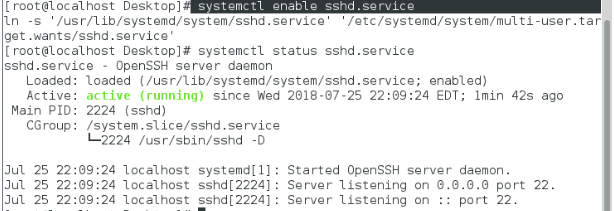
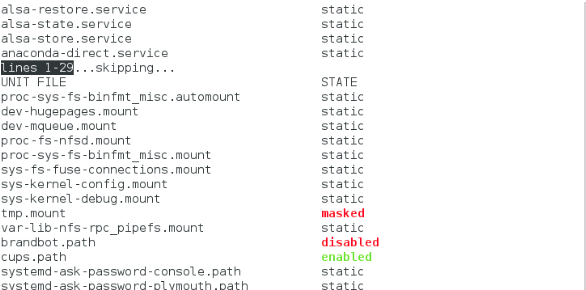
- 使用命令systemctl list-unit-files 来列出所有服务开机启动的状态 (disable,enable,static)
若想对外开启服务,可以使用systemctl start ssh来开启服务接口。
对于服务来说,是不可以关闭的;若修改了配置文件,只能通过systemctl restart sshd进行重新启动。
二、sshd服务
1.sshd介绍
sshd为secure shell的简称;可以通过网络在主机中开机shell的服务
连接方式(在客户端):ssh username@ip #文本模式
ssh -X username@ip #可以在链接成功后开启图形界面
注意:
第一次链接陌生主机是要建立认证文件,然后会询问是否建立,需要输入yes
再次链接此台主机时,因为已经生成~/.ssh/know_hosts文件所以不需要再次输入yes
远程复制: 格式 scp file root@id:dir(文件的上传)
scp root@if:/dir file(文件的下载)
- 示例:把177主机下/mnt/file1文件上传到 172.25.254.97主机的/root/Desktop/目录下:
[root@localhost mnt]# ls niu/
file1 file2 file3 file4 file5
[root@localhost mnt]# scp niu/file1 root@172.25.254.97:/root/Desktop/
file1 100% 0 0.0KB/s 00:00
此时可以在97主机下的桌面上看到file1:
[root@localhost Desktop]# ls
file1
- 示例:把97主机桌面下的file文件下载到177主机的/mnt/目录下:
file 100% 0 0.0KB/s 00:00
此时可以在177主机上/mnt/目录下可以看到file文件
file niu root@172.25.254.97
2.sshd 的key认证
【1】生成认证KEY
生成密钥的命令:ssh-keygen
[root@localhost ~]# ls -a
. .bash_logout .config Downloads Music Templates
.. .bash_profile .cshrc .esd_auth Pictures Videos
anaconda-ks.cfg .bashrc Desktop .ICEauthority Public .viminfo
.bash_history .cache Documents .local .tcshrc
[root@localhost ~]# ssh-keygen
Generating public/private rsa key pair.
Enter file in which to save the key (/root/.ssh/id_rsa):
Created directory '/root/.ssh'.
Enter passphrase (empty for no passphrase):
Enter same passphrase again:
Your identification has been saved in /root/.ssh/id_rsa.
Your public key has been saved in /root/.ssh/id_rsa.pub.
The key fingerprint is:
8c:23:ee:39:11:6b:e6:af:a3:76:b1:00:a5:6e:d1:d3 root@localhost
The key's randomart image is:
+--[ RSA 2048]----+
| |
| . |
| o. . |
|o. o.E o |
|... ooo S |
| o..*. . |
|. =.+ |
| ..*. |
| ..o+=. |
+-----------------+
【2】加密服务
使用命令:ssh-copy-id -i /root/.ssh/id_rsa.pub root@id
[root@localhost .ssh]# ls
id_rsa id_rsa.pub
The authenticity of host '172.25.254.97 (172.25.254.97)' can't be established.
ECDSA key fingerprint is eb:24:0e:07:96:26:b1:04:c2:37:0c:78:2d:bc:b0:08.
Are you sure you want to continue connecting (yes/no)? yes
/usr/bin/ssh-copy-id: INFO: attempting to log in with the new key(s), to filter out any that are already installed
/usr/bin/ssh-copy-id: INFO: 1 key(s) remain to be installed -- if you are prompted now it is to install the new keys
root@172.25.254.97's password:
Number of key(s) added: 1
Now try logging into the machine, with: "ssh 'root@172.25.254.97'"
and check to make sure that only the key(s) you wanted were added.
authorized_keys id_rsa id_rsa.pub known_hosts
(此时authorized_keys文件,生成代表97主机加密成功;id-rsa为钥匙,id_rsa.pub为锁)
【3】分发钥匙
使用命令: scp /root/.ssh/id_rsa root@id:/root/.ssh/
authorized_keys id_rsa id_rsa.pub known_hosts
[root@localhost .ssh]# scp id_rsa root@172.25.254.177:/root/.ssh/
The authenticity of host '172.25.254.177 (172.25.254.177)' can't be established.
ECDSA key fingerprint is eb:24:0e:07:96:26:b1:04:c2:37:0c:78:2d:bc:b0:08.
Are you sure you want to continue connecting (yes/no)? yes
Warning: Permanently added '172.25.254.177' (ECDSA) to the list of known hosts.
root@172.25.254.177's password:
id_rsa 100% 1679 1.6KB/s 00:00
**在177主机下进行验证:
id_rsa known_hosts
【4】测试
在客户主机中(172.25.254.177)输入命令:ssh root@172.25.254.97
Last login: Wed Jul 25 23:10:43 2018
此时不需要进行root用户的登陆,直接连接成功
3.sshd的安全设定
PasswordAuthentication yes|no ##是否允许用户通过登陆系统的密码做sshd的认证,(在78行也可登录其他用户密码)
PermitRootLogin yes|no ##是否允许root用户通过sshd服务的认证(48行)
Allowusers student westos ##设定用户白名单,白名单出现默认不再名单中的用户不能使用sshd
Denyusers westos ##设定用户黑名单,黑名单出现默认不再名单中的用户可以使用sshd
注意:在服务端修改文件的配置:vim /etc/ssh/sshd_config
配置完成之后要重启服务:systemctl restart sshd.service
Linux之sshd服务的更多相关文章
- linux初学者-sshd服务
linux初学者-sshd服务 在linux系统操作中,经常需要连接其他的主机,连接其他主机的服务是openssh-server,它的功能是让远程主机可以通过网络访问sshd服务,开始一个安全s ...
- Linux中Sshd服务配置文件优化版本(/etc/ssh/sshd_config)
Linux中Sshd服务配置文件优化版本(/etc/ssh/sshd_config) # $OpenBSD: sshd_config,v 1.93 2014/01/10 05:59:19 djm Ex ...
- Linux系统 SSHD服务安全优化方案
# 1. 修改默认端口 #Port 22 # 2. 修改监听协议,只监听某个或某些网络协议 #AddressFamily any AddressFamily inet # 3. 修改ssh只监听内 ...
- Linux中的sshd服务
Linux中的sshd服务,主要用于pst终端,远程连接到linux服务中 看sshd服务状态 service sshd status 停止sshd服务 service sshd stop 启动ssh ...
- Linux系统的ssh与sshd服务
当主机中开启openssh服务,那么就对外开放了远程连接的接口 ssh为openssh服务的客户端,sshd为openssh服务的服务端 远程管理工具ssh具有数据加密传输.网络开销小以及应用平台范围 ...
- 《linux就该这么学》第十一节课: 第九章,网卡绑定与sshd服务
8.4.服务的访问控制列表 TCPwrappers是RHEL7中默认启用的流量监控程序,能够对服务做出允许或拒绝. TCPwrappers服务由两个文件控制: /etc/hosts.allow ...
- Linux系统管理命令-systemctl 和 sshd 服务
一系统服务管理命令systemctl 开启一个服务 : systemctl start sshd 关闭一个服务: systemctl stop sshd 查看一个服务的状态: systemctl st ...
- Linux中设置服务自启动的三种方式
有时候我们需要Linux系统在开机的时候自动加载某些脚本或系统服务 主要用三种方式进行这一操作: ln -s 在/etc/rc.d/rc*.d目录中建立/e ...
- Linux设置SFTP服务用户目录权限
我们有时会遇到这样的需求,限制一个Linux用户,让他只能在指定的目录下进行添加.修改.删除操作,并且只能使用sftp登录服务器,不能用ssh操作.这些可以通过配置sftp服务实现. 提供sftp服务 ...
随机推荐
- Android事件处理下(按键、触摸屏和滚动球的一些实现细节)
http://www.cnblogs.com/andtt/articles/2145563.html 对于按键事件,调用mDevices[i]->layoutMap->map进行映射.映射 ...
- HCNP学习笔记之PXE原理详解及实践
一.PXE简介 PXE(preboot execute environment,预启动执行环境)是由Intel公司开发的最新技术,工作于Client/Server的网络模式,支持工作站通过网络从远端服 ...
- 索引原理-btree索引与hash索引的区别
btree索引与hash索引的区别,之前不清楚,mark一下. Hash索引结构的特殊性,其检索效率非常高,索引的检索可以一次定位,不像B-Tree索引需要从根节点到枝节点,最后才能访问到页节点这样多 ...
- 20135320赵瀚青LINUX第五周学习笔记
赵瀚青原创作品转载请注明出处<Linux内核分析>MOOC课程http://mooc.study.163.com/course/USTC-1000029000 概述 按照刘老师的周从三个角 ...
- linux下增加useradd提示existing lock file /etc/subgid.lock without a PID
# useradd git -g git useradd: existing lock file /etc/subgid.lock without a PID useradd: cannot lock ...
- 从U盘安装linux(前人踩坑后人乘凉)
今天踩了一个大坑,网上的教程从u盘安装linux少了一个关键步骤导致我挣扎了两个小时 废话不多说,开始需要准备一些东西 1.从官网下载一个Ubuntu 10.04的镜像 2.一个大于等于1G的支持启动 ...
- php入门(二)
PHP字符串变量: 1.PHP strlen() 函数 <?php $str1="abcd"; $str2="efgh"; $str=$str1.$str ...
- 机器学习经典书籍&论文
原文地址:http://blog.sina.com.cn/s/blog_7e5f32ff0102vlgj.html 入门书单 1.<数学之美>PDF6 作者吴军大家都很熟悉.以极为通俗的语 ...
- ADO.net笔记
1.DbConnectionConnection对象也称为数据库连接对象,Connection对象的功能是负责对数据源的连接.所有Connection对象的基类都是DbConnection类.Conn ...
- JavaScript_正则表达式
[规则]开头结尾 "^The":表示所有以"The"开始的字符串("There","The cat"等): ...