
15.Update Documents-官方文档摘录
1.插入数据
db.inventory.insertMany( [

   { item: "canvas", qty: 100, size: { h: 28, w: 35.5, uom: "cm" }, status: "A" },

   { item: "journal", qty: 25, size: { h: 14, w: 21, uom: "cm" }, status: "A" },

   { item: "mat", qty: 85, size: { h: 27.9, w: 35.5, uom: "cm" }, status: "A" },

   { item: "mousepad", qty: 25, size: { h: 19, w: 22.85, uom: "cm" }, status: "P" },

   { item: "notebook", qty: 50, size: { h: 8.5, w: 11, uom: "in" }, status: "P" },

   { item: "paper", qty: 100, size: { h: 8.5, w: 11, uom: "in" }, status: "D" },

   { item: "planner", qty: 75, size: { h: 22.85, w: 30, uom: "cm" }, status: "D" },

   { item: "postcard", qty: 45, size: { h: 10, w: 15.25, uom: "cm" }, status: "A" },

   { item: "sketchbook", qty: 80, size: { h: 14, w: 21, uom: "cm" }, status: "A" },

   { item: "sketch pad", qty: 95, size: { h: 22.85, w: 30.5, uom: "cm" }, status: "A" }

]);
2 更新语句$set
db.inventory.updateOne(

{item:"paper"},

{

    $set:{"size.uom":"cm",status:"P"},

    $currentDate:{lastModified:true}

    }

)
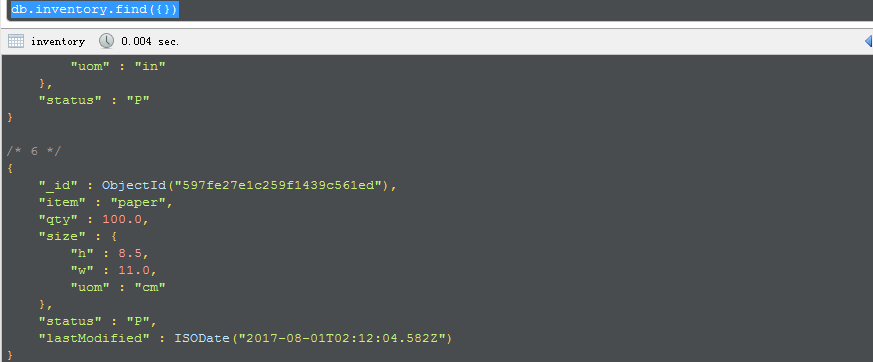
可以看到,如果没有的字段,则新增进去,同时修改了对应修改的内容
3 更新多条
db.inventory.updateMany(

   { "qty": { $lt: 50 } },

   {

     $set: { "size.uom": "in", status: "P" },

     $currentDate: { lastModified: true }

   }

)
4 替换
db.inventory.replaceOne(

   { item: "paper" },

   { item: "paper", instock: [ { warehouse: "A", qty: 60 }, { warehouse: "B", qty: 40 } ] }

)
This page provides examples of how to update documents in using the following methods in the mongo shell:
db.collection.updateOne(<filter>, <update>, <options>)db.collection.updateMany(<filter>, <update>, <options>)db.collection.replaceOne(<filter>, <replacement>, <options>)
The examples on this page use the inventory collection. To create and/or populate the inventorycollection, run the following:
db.inventory.insertMany( [

   { item: "canvas", qty: 100, size: { h: 28, w: 35.5, uom: "cm" }, status: "A" },

   { item: "journal", qty: 25, size: { h: 14, w: 21, uom: "cm" }, status: "A" },

   { item: "mat", qty: 85, size: { h: 27.9, w: 35.5, uom: "cm" }, status: "A" },

   { item: "mousepad", qty: 25, size: { h: 19, w: 22.85, uom: "cm" }, status: "P" },

   { item: "notebook", qty: 50, size: { h: 8.5, w: 11, uom: "in" }, status: "P" },

   { item: "paper", qty: 100, size: { h: 8.5, w: 11, uom: "in" }, status: "D" },

   { item: "planner", qty: 75, size: { h: 22.85, w: 30, uom: "cm" }, status: "D" },

   { item: "postcard", qty: 45, size: { h: 10, w: 15.25, uom: "cm" }, status: "A" },

   { item: "sketchbook", qty: 80, size: { h: 14, w: 21, uom: "cm" }, status: "A" },

   { item: "sketch pad", qty: 95, size: { h: 22.85, w: 30.5, uom: "cm" }, status: "A" }

]);
You can run the operation in the web shell below:
Update Documents in a Collection
To update a document, MongoDB provides update operators, such as $set, to modify field values.
To use the update operators, pass to the update methods an update document of the form:
{

  <update operator>: { <field1>: <value1>, ... },

  <update operator>: { <field2>: <value2>, ... },

  ...

}
Some update operators, such as $set, will create the field if the field does not exist. See the individual update operator reference for details.
Update a Single Document
The following example uses the db.collection.updateOne() method on the inventory collection to update the first document where item equals "paper":
db.inventory.updateOne(

   { item: "paper" },

   {

     $set: { "size.uom": "cm", status: "P" },

     $currentDate: { lastModified: true }

   }

)
The update operation:
- uses the
$setoperator to update the value of thesize.uomfield to"cm"and the value of thestatusfield to"P", - uses the
$currentDateoperator to update the value of thelastModifiedfield to the current date. IflastModifiedfield does not exist,$currentDatewill create the field. See$currentDatefor details.
Update Multiple Documents
New in version 3.2.
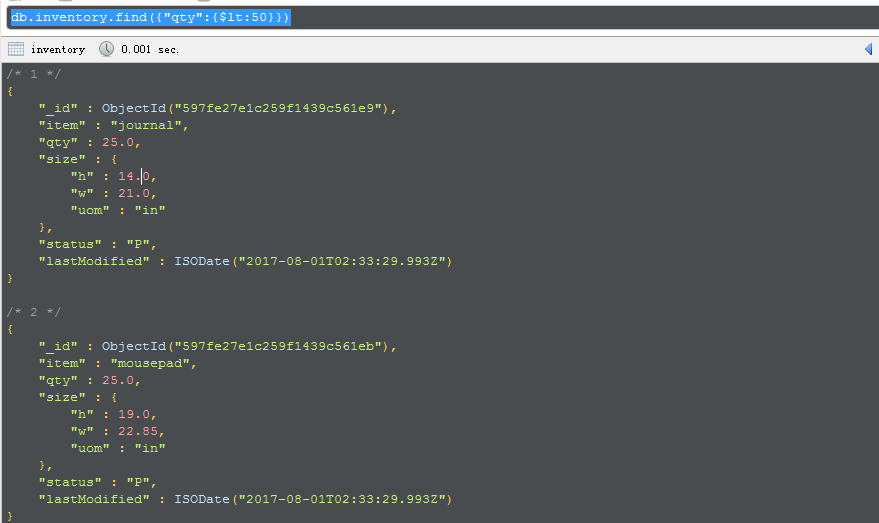
The following example uses the db.collection.updateMany() method on the inventory collection to update all documents where qty is less than 50:
db.inventory.updateMany(

   { "qty": { $lt: 50 } },

   {

     $set: { "size.uom": "in", status: "P" },

     $currentDate: { lastModified: true }

   }

)
The update operation:
- uses the
$setoperator to update the value of thesize.uomfield to"in"and the value of thestatusfield to"P", - uses the
$currentDateoperator to update the value of thelastModifiedfield to the current date. IflastModifiedfield does not exist,$currentDatewill create the field. See$currentDatefor details.
Replace a Document
To replace the entire content of a document except for the _id field, pass an entirely new document as the second argument to db.collection.replaceOne().
When replacing a document, the replacement document must consist of only field/value pairs; i.e. do not include update operators expressions.
The replacement document can have different fields from the original document. In the replacement document, you can omit the _id field since the _id field is immutable; however, if you do include the _id field, it must have the same value as the current value.
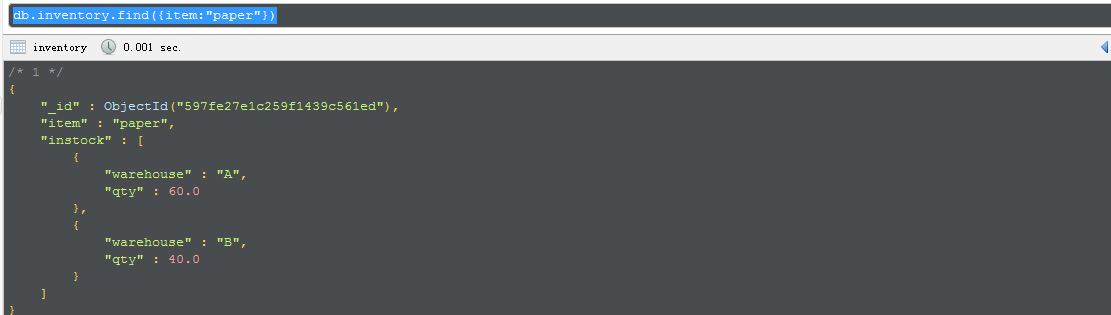
The following example replaces the first document from the inventory collection that matches the filteritem equals "paper":
db.inventory.replaceOne(

   { item: "paper" },

   { item: "paper", instock: [ { warehouse: "A", qty: 60 }, { warehouse: "B", qty: 40 } ] }

)
Behavior
Atomicity
All write operations in MongoDB are atomic on the level of a single document. For more information on MongoDB and atomicity, see Atomicity and Transactions.
_id Field
Once set, you cannot update the value of the _id field nor can you replace an existing document with a replacement document that has a different _id field value.
Document Size
When performing update operations that increase the document size beyond the allocated space for that document, the update operation relocates the document on disk.
Field Order
MongoDB preserves the order of the document fields following write operations except for the following cases:
- The
_idfield is always the first field in the document. - Updates that include
renamingof field names may result in the reordering of fields in the document.
Changed in version 2.6: Starting in version 2.6, MongoDB actively attempts to preserve the field order in a document. Before version 2.6, MongoDB did not actively preserve the order of the fields in a document.
Upsert Option
If updateOne(), updateMany(), or replaceOne() includes upsert : true and no documents match the specified filter, then the operation creates a new document and inserts it. If there are matching documents, then the operation modifies or replaces the matching document or documents.
For details on the new document created, see the individual reference pages for the methods.
Write Acknowledgement
With write concerns, you can specify the level of acknowledgement requested from MongoDB for write operations. For details, see Write Concern.
| [1] | You can use the DBQuery.shellBatchSize to change the number of iteration from the default value 20. SeeWorking with the mongo Shell for more information. |
15.Update Documents-官方文档摘录的更多相关文章
- Cocos Creator 加载和切换场景(官方文档摘录)
Cocos Creator 加载和切换场景(官方文档摘录) 在 Cocos Creator 中,我们使用场景文件名( 可以不包含扩展名)来索引指代场景.并通过以下接口进行加载和切换操作: cc.dir ...
- ng的概念层次(官方文档摘录)
官方文档是这么说的: You write Angular applications by: composing HTML templates with Angularized markup, writ ...
- Cocos Creator 使用计时器(官方文档摘录)
在 Cocos Creator 中,我们为组件提供了方便的计时器,这个计时器源自于 Cocos2d-x 中的 cc.Scheduler,我们将它保留在了 Cocos Creator 中并适配了基于组件 ...
- Cocos Creator 生命周期回调(官方文档摘录)
Cocos Creator 为组件脚本提供了生命周期的回调函数.用户通过定义特定的函数回调在特定的时期编写相关 脚本.目前提供给用户的声明周期回调函数有: onLoad start update la ...
- angular 模板语法(官方文档摘录)
https://angular.cn/guide/template-syntax {{}} 和"" 如果嵌套,{{}}里面求完值,""就是原意 <h3&g ...
- Qt元类型(MetaType)注册入门(附一些官方文档的关键摘录)
昨天调试项目时,突然发现如下消息: QObject::connect: Cannot queue arguments of type 'ERROR_LEVEL' (Make sure 'ERROR_L ...
- Sqoop 使用详解(内含对官方文档的解析)
Sqoop 是 Cloudera 公司创造的一个数据同步工具,现在已经完全开源了. 目前已经是 hadoop 生态环境中数据迁移的首选,另外还有 ali 开发的 DataX 属于同类型工具,由于社区的 ...
- Spring Data Commons 官方文档学习
Spring Data Commons 官方文档学习 -by LarryZeal Version 1.12.6.Release, 2017-07-27 为知笔记版本在这里,带格式. Table o ...
- Spring 4 官方文档学习(十一)Web MVC 框架
介绍Spring Web MVC 框架 Spring Web MVC的特性 其他MVC实现的可插拔性 DispatcherServlet 在WebApplicationContext中的特殊的bean ...
- [翻译]PyMongo官方文档
PyMongo官方文档翻译 周煦辰 2016-06-30 这是本人翻译的PyMongo官方文档.现在网上分(抄)享(袭)的PyMongo博客文章很多,一方面这些文章本就是抄袭的,谈不上什么格式美观,另 ...
随机推荐
- mysql学习笔记1---mysql ERROR 1045 (28000): 错误解决办法(续:深入分析)
在命令行输入mysql -u root –p,输入密码,或通过工具连接数据库时,经常出现下面的错误信息,详细该错误信息很多人在使用MySQL时都遇到过. ERROR 1045 (28000): Acc ...
- Qt之QThreadPool和QRunnable
简述 QRunnable 是所有 runnable 对象的基类,而 QThreadPool 类用于管理 QThreads 集合. QRunnable 类是一个接口,用于表示一个任务或要执行的代码,需要 ...
- hdu6143 Killer Names 容斥+排列组合
/** 题目:hdu6143 Killer Names 链接:http://acm.hdu.edu.cn/showproblem.php?pid=6143 题意:有m种字符(可以不用完),组成两个长度 ...
- web服务器优化的一些思路
作为一个新手(并不是菜鸟,而是像我们这样的学生),维护一个网站往往是一个很头疼的问题,尤其是动态网站,更尤其是用java写的网站. 当网站的吞吐量很小的时候你会发现服务器根本不需要维护,因为几乎没有延 ...
- openresty package.path require 报错
在文件中 package.path = '/usr/local/share/lua/5.1/?.lua;/usr/local/openresty/lualib/resty/?.lua;' packag ...
- heartbeat 心跳技术
转自:http://blog.csdn.net/keda8997110/article/details/8349049 heartbeat 心跳技术原理: heartbeat (Linux-HA)的工 ...
- malloc 函数本身并不识别要申请的内存是什么类型
malloc 函数本身并不识别要申请的内存是什么类型,它只关心内存的总字节数.我 们通常记不住 int, float 等数据类型的变量的确切字节数. 例如 int 变量在 16 位系统 下是 2 个字 ...
- storm的集群安装与配置
storm集群安装 机器:(storm及zookeeper都是这3台机器) 192.168.80.20 192.168.80.21 192.168.80.22 须要准备的软件有: zookeeper( ...
- php如何互换一个数组的首尾元素 中间不变 首尾互换
群里有人提出一个问题 如何互换一个数组的首尾元素 中间不变 首尾互换 代码如下: <?php $array=array(1,2,3,4,5,6,7,8,9,10); $first=array_s ...
- 修改UE4的deriveddatacache目录位置,扩大C盘空间
按照默认安装目录,UE4会装在C盘 C:\Program Files\Epic Games\UE_4.15 DerivedDataCache缓存目录在 C:\Users\你的用户名\AppData\L ...