
2023-03-05:ffmpeg推送本地视频至lal流媒体服务器(以RTMP为例),请用go语言编写。
2023-03-05:ffmpeg推送本地视频至lal流媒体服务器(以RTMP为例),请用go语言编写。
答案2023-03-05:
使用 github.com/moonfdd/ffmpeg-go 库。
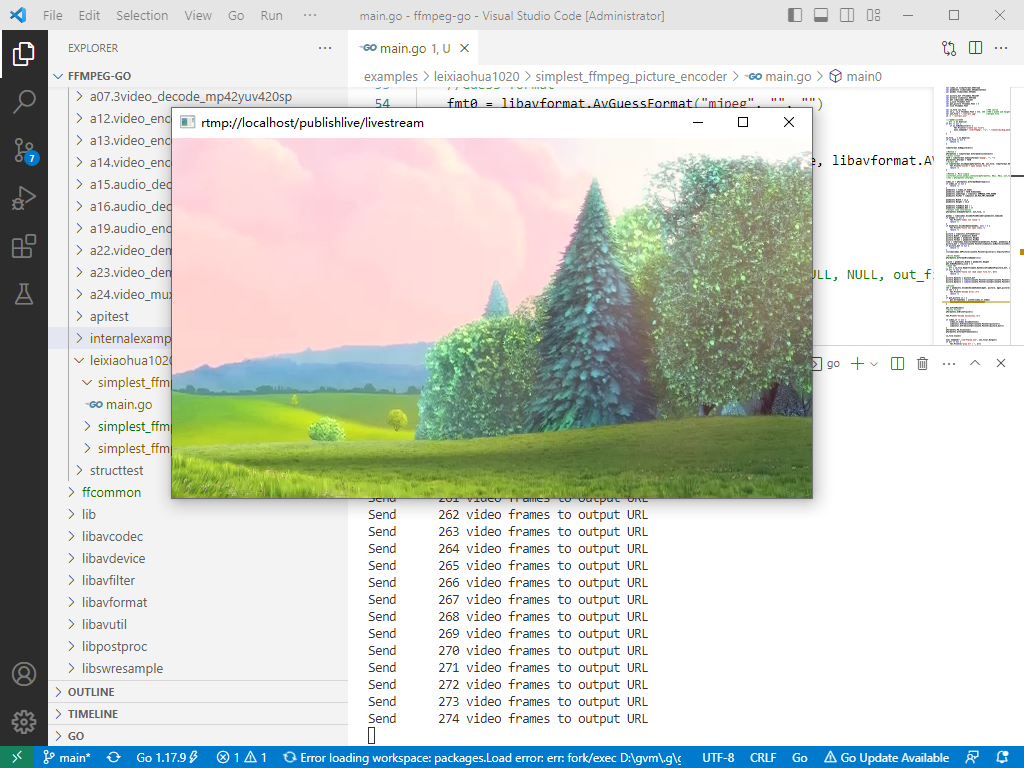
先启动lal流媒体服务器软件,然后再执行命令:
go run ./examples/leixiaohua1020/simplest_ffmpeg_streamer/main.go
参考了雷霄骅的最简单的基于FFmpeg的推流器(推送RTMP),代码用golang编写。代码如下:
// https://github.com/leixiaohua1020/simplest_ffmpeg_streamer/blob/master/simplest_ffmpeg_streamer/simplest_ffmpeg_streamer.cpp

package main

import (

	"fmt"

	"os"

	"os/exec"

	"time"

	"github.com/moonfdd/ffmpeg-go/ffcommon"

	"github.com/moonfdd/ffmpeg-go/libavcodec"

	"github.com/moonfdd/ffmpeg-go/libavformat"

	"github.com/moonfdd/ffmpeg-go/libavutil"

)

func main0() (ret ffcommon.FInt) {

	var ofmt *libavformat.AVOutputFormat

	//Input AVFormatContext and Output AVFormatContext

	var ifmt_ctx, ofmt_ctx *libavformat.AVFormatContext

	var pkt libavcodec.AVPacket

	var in_filename, out_filename string

	var i ffcommon.FInt

	var videoindex ffcommon.FInt = -1

	var frame_index ffcommon.FInt = 0

	var start_time ffcommon.FInt64T = 0

	var err error

	//in_filename  = "cuc_ieschool.mov";

	//in_filename  = "cuc_ieschool.mkv";

	//in_filename  = "cuc_ieschool.ts";

	//in_filename  = "cuc_ieschool.mp4";

	//in_filename  = "cuc_ieschool.h264";

	in_filename = "./out/cuc_ieschool.flv" //输入URL(Input file URL)

	//in_filename  = "shanghai03_p.h264";

	_, err = os.Stat(in_filename)

	if err != nil {

		if os.IsNotExist(err) {

			fmt.Println("create flv file")

			exec.Command("./lib/ffmpeg", "-i", "./resources/big_buck_bunny.mp4", "-vcodec", "copy", "-acodec", "copy", in_filename).Output()

		}

	}

	out_filename = "rtmp://localhost/publishlive/livestream" //输出 URL(Output URL)[RTMP]

	//out_filename = "rtp://233.233.233.233:6666";//输出 URL(Output URL)[UDP]

	libavformat.AvRegisterAll()

	//Network

	libavformat.AvformatNetworkInit()

	//Input

	ret = libavformat.AvformatOpenInput(&ifmt_ctx, in_filename, nil, nil)

	if ret < 0 {

		fmt.Printf("Could not open input file.")

		goto end

	}

	ret = ifmt_ctx.AvformatFindStreamInfo(nil)

	if ret < 0 {

		fmt.Printf("Failed to retrieve input stream information")

		goto end

	}

	for i = 0; i < int32(ifmt_ctx.NbStreams); i++ {

		if ifmt_ctx.GetStream(uint32(i)).Codec.CodecType == libavutil.AVMEDIA_TYPE_VIDEO {

			videoindex = i

			break

		}

	}

	ifmt_ctx.AvDumpFormat(0, in_filename, 0)

	//Output

	libavformat.AvformatAllocOutputContext2(&ofmt_ctx, nil, "flv", out_filename) //RTMP

	//avformat_alloc_output_context2(&ofmt_ctx, NULL, "mpegts", out_filename);//UDP

	if ofmt_ctx == nil {

		fmt.Printf("Could not create output context\n")

		ret = libavutil.AVERROR_UNKNOWN

		goto end

	}

	ofmt = ofmt_ctx.Oformat

	for i = 0; i < int32(ifmt_ctx.NbStreams); i++ {

		//Create output AVStream according to input AVStream

		in_stream := ifmt_ctx.GetStream(uint32(i))

		out_stream := ofmt_ctx.AvformatNewStream(in_stream.Codec.Codec)

		if out_stream == nil {

			fmt.Printf("Failed allocating output stream\n")

			ret = libavutil.AVERROR_UNKNOWN

			goto end

		}

		//Copy the settings of AVCodecContext

		ret = libavcodec.AvcodecCopyContext(out_stream.Codec, in_stream.Codec)

		if ret < 0 {

			fmt.Printf("Failed to copy context from input to output stream codec context\n")

			goto end

		}

		out_stream.Codec.CodecTag = 0

		if ofmt_ctx.Oformat.Flags&libavformat.AVFMT_GLOBALHEADER != 0 {

			out_stream.Codec.Flags |= libavcodec.AV_CODEC_FLAG_GLOBAL_HEADER

		}

	}

	//Dump Format------------------

	ofmt_ctx.AvDumpFormat(0, out_filename, 1)

	//Open output URL

	if ofmt.Flags&libavformat.AVFMT_NOFILE == 0 {

		ret = libavformat.AvioOpen(&ofmt_ctx.Pb, out_filename, libavformat.AVIO_FLAG_WRITE)

		if ret < 0 {

			fmt.Printf("Could not open output URL '%s'", out_filename)

			goto end

		}

	}

	//Write file header

	ret = ofmt_ctx.AvformatWriteHeader(nil)

	if ret < 0 {

		fmt.Printf("Error occurred when opening output URL\n")

		goto end

	}

	start_time = libavutil.AvGettime()

	for {

		var in_stream, out_stream *libavformat.AVStream

		//Get an AVPacket

		ret = ifmt_ctx.AvReadFrame(&pkt)

		if ret < 0 {

			break

		}

		//FIX:No PTS (Example: Raw H.264)

		//Simple Write PTS

		if pkt.Pts == libavutil.AV_NOPTS_VALUE {

			//Write PTS

			time_base1 := ifmt_ctx.GetStream(uint32(videoindex)).TimeBase

			//Duration between 2 frames (us)

			calc_duration := int64(libavutil.AV_TIME_BASE / libavutil.AvQ2d(ifmt_ctx.GetStream(uint32(videoindex)).RFrameRate))

			//Parameters

			pkt.Pts = int64(float64(frame_index) * float64(calc_duration) / (libavutil.AvQ2d(time_base1) * libavutil.AV_TIME_BASE))

			pkt.Dts = pkt.Pts

			pkt.Duration = int64(float64(calc_duration) / (libavutil.AvQ2d(time_base1) * libavutil.AV_TIME_BASE))

		}

		//Important:Delay

		if pkt.StreamIndex == uint32(videoindex) {

			time_base := ifmt_ctx.GetStream(uint32(videoindex)).TimeBase

			time_base_q := libavutil.AVRational{1, libavutil.AV_TIME_BASE}

			pts_time := libavutil.AvRescaleQ(pkt.Dts, time_base, time_base_q)

			now_time := libavutil.AvGettime() - start_time

			if pts_time > now_time {

				libavutil.AvUsleep(uint32(pts_time - now_time))

			}

		}

		in_stream = ifmt_ctx.GetStream(pkt.StreamIndex)

		out_stream = ofmt_ctx.GetStream(pkt.StreamIndex)

		/* copy packet */

		//Convert PTS/DTS

		pkt.Pts = libavutil.AvRescaleQRnd(pkt.Pts, in_stream.TimeBase, out_stream.TimeBase, libavutil.AV_ROUND_NEAR_INF|libavutil.AV_ROUND_PASS_MINMAX)

		pkt.Dts = libavutil.AvRescaleQRnd(pkt.Dts, in_stream.TimeBase, out_stream.TimeBase, libavutil.AV_ROUND_NEAR_INF|libavutil.AV_ROUND_PASS_MINMAX)

		pkt.Duration = libavutil.AvRescaleQ(pkt.Duration, in_stream.TimeBase, out_stream.TimeBase)

		pkt.Pos = -1

		//Print to Screen

		if pkt.StreamIndex == uint32(videoindex) {

			fmt.Printf("Send %8d video frames to output URL\n", frame_index)

			frame_index++

		}

		//ret = av_write_frame(ofmt_ctx, &pkt);

		ret = ofmt_ctx.AvInterleavedWriteFrame(&pkt)

		if ret < 0 {

			fmt.Printf("Error muxing packet\n")

			break

		}

		pkt.AvFreePacket()

	}

	//Write file trailer

	ofmt_ctx.AvWriteTrailer()

end:

	libavformat.AvformatCloseInput(&ifmt_ctx)

	/* close output */

	if ofmt_ctx != nil && ofmt.Flags&libavformat.AVFMT_NOFILE == 0 {

		ofmt_ctx.Pb.AvioClose()

	}

	ofmt_ctx.AvformatFreeContext()

	if ret < 0 && ret != libavutil.AVERROR_EOF {

		fmt.Printf("Error occurred.\n")

		return -1

	}

	return 0

}

func main() {

	os.Setenv("Path", os.Getenv("Path")+";./lib")

	ffcommon.SetAvutilPath("./lib/avutil-56.dll")

	ffcommon.SetAvcodecPath("./lib/avcodec-58.dll")

	ffcommon.SetAvdevicePath("./lib/avdevice-58.dll")

	ffcommon.SetAvfilterPath("./lib/avfilter-56.dll")

	ffcommon.SetAvformatPath("./lib/avformat-58.dll")

	ffcommon.SetAvpostprocPath("./lib/postproc-55.dll")

	ffcommon.SetAvswresamplePath("./lib/swresample-3.dll")

	ffcommon.SetAvswscalePath("./lib/swscale-5.dll")

	genDir := "./out"

	_, err := os.Stat(genDir)

	if err != nil {

		if os.IsNotExist(err) {

			os.Mkdir(genDir, 0777) //  Everyone can read write and execute

		}

	}

	go func() {

		time.Sleep(1000)

		exec.Command("./lib/ffplay.exe", "rtmp://localhost/publishlive/livestream").Output()

		if err != nil {

			fmt.Println("play err = ", err)

		}

	}()

	main0()

}
2023-03-05:ffmpeg推送本地视频至lal流媒体服务器(以RTMP为例),请用go语言编写。的更多相关文章
- ffmpeg推送,EasyDarwin转发,vlc播放 实现整个RTSP直播
部署EasyDarwin流媒体服务器 ffmpeg推送摄像机视频到EasyDarwin VLC播放 第一步:部署EasyDarwin流媒体服务器 EasyDarwin的部署过程我们就不再赘述了,在Ea ...
- git推送本地分支到远程分支
场景 有时候我们开发需要开一个分支,这样可以有效的并行开发. 开分支有两种方式: 一种是在远程开好分支,本地直接拉下来; 一种是本地开好分支,推送到远程. 远程先开好分支然后拉到本地 git chec ...
- iOS 疑难杂症 — — 推送本地国际化 loc-key 本地化失败的问题
声明 欢迎转载,但请保留文章原始出处:) 博客园:http://www.cnblogs.com 农民伯伯: http://over140.cnblogs.com 正文 一.准备 推送本地国际化官方 ...
- git推送本地分支到远端 以及删除远端分支的 命令
git推送本地分支到远端 当前处于master分支,尝试用了git push origin warning: push.default is unset; its implicit value is ...
- Git for Windows之推送本地版本库到远程仓库
Git for Windows之基础环境搭建与基础操作中介绍了Git基本环境的构建与基本的操作.生成了一个本地git版本库,本文将介绍如何将这个版本库推送到远程仓库(码云,github也可以). 1. ...
- git推送本地仓库到github
总结一下,方便后人,也方便自己查阅.直接写步骤 一.本地创建一个文件夹,在里面写项目的文件(* .php/*.js.....). git本地操作: 1 . cd /path/to/project ...
- git 分支管理 推送本地分支到远程分支等
1.创建本地分支 local_branch git branch local_branch 2.创建本地分支local_branch 并切换到local_branch分支 git checkout - ...
- ffmpeg推送RTSP直播流到EasyDarwin报错问题的修复
在之前的博客<ffmpeg推送,EasyDarwin转发,vlc播放 实现整个RTSP直播>中,我们介绍了如何采用ffmpeg进行RTSP推送,实现EasyDarwin直播分发的功能,近期 ...
- EasyCamera海康摄像机向EasyDarwin云平台推送音视频数据的缓存设计
本文转自EasyDarwin团队成员Alex的博客:http://blog.csdn.net/cai6811376 EasyCamera在向EasyDarwin云平台推送音视频数据时,有时一个I帧会很 ...
- git 推送本地项目到远程库
git 推送本地项目到远程库 1@DESKTOP-3H9092J MINGW64 /e/mozq/00store/01/SmartCard_MS $ git init Initialized empt ...
随机推荐
- 通过cpolar内网穿透 https://blog.csdn.net/CpolarLisa/article/details/128148698
远程办公:通过cpolar内网穿透,远程桌面控制家里公司内网电脑_Cpolar Lisa的博客-CSDN博客 https://blog.csdn.net/CpolarLisa/article/deta ...
- 共享USB打印机设置方法
打印机共享 一.准备 所有计算机在同一个网段. 所有计算机在同一个工作组,组名可以自定义,默认WORKGROUP. 使用超级管理员用户,目的是为了激活guest用户.验证之后可以不需要此前提. 二.主 ...
- Unidbgrid自动调整列宽
UniDBGrid1 -> ClientEvents -> ExtEvents [Ext.data.Store[store] ] add store.load fn: function s ...
- Drf_序列化and反序列化基础
序列化类 from rest_framework import serializers class BookSerializer(serializers.Serializer): # 要序列化的字段 ...
- gorm操作sqlite3,高并发读写如何避免锁库?
1. 场景 这两天一直被这个sqlit3困扰,起因是项目中需要有这样一个中间,中间件承担着API角色和流量转发的角色,需要接收来自至少300个agent的请求数据,和健康检测的请求. 所以当即想到用g ...
- 你的梦想家居「GitHub 热点速览」
上周推荐的 ChatGPT 版小爱,不知道有哪些小伙伴回去尝试接入了呢?本周依旧由 2 个不错的 ChatGPT 延伸项目,一个是比 DeepL.Grammarly 更懂你的划词翻译 openai-t ...
- obs推流核心流程分析
前置步骤和录屏是一样的,见我的上一篇文章 https://www.cnblogs.com/billin/p/17219558.html bool obs_output_actual_start(obs ...
- 依图在实时音视频中语音处理的挑战丨RTC Dev Meetup
前言 「语音处理」是实时互动领域中非常重要的一个场景,在声网发起的「RTC Dev Meetup丨语音处理在实时互动领域的技术实践和应用」 活动中,来自百度.寰宇科技和依图的技术专家,围绕该话题进行了 ...
- Python3.10 的开发环境的搭建
安装 下载 Python3.10 或者其他版本:Download Python | Python.org 如果 Windows 操作系统下载,默认是下载 64 位操作系统的 exe 安装包:pytho ...
- DSLinux介绍
本发行版 名字叫 Damn Small Linux 整个磁盘大小是40多M, 相对于如今几十G起步的操作系统(对, 就是你Windows), 确实太tm小了 Kernel版本是2.4.26, 2004 ...