
把Mybatis Generator生成的代码加上想要的注释
作者:王建乐
1 前言
在日常开发工作中,我们经常用Mybatis Generator根据表结构生成对应的实体类和Mapper文件。但是Mybatis Generator默认生成的代码中,注释并不是我们想要的,所以一般在Generator配置文件中,会设置不自动生成注释。带来的问题就是自动生成代码之后,我们还要自己去类文件中把注释加上,如果生成的类较少还好,如果有生成很多类文件,自己加注释是一件繁琐的工作。
通过重写Mybatis Generator的CommentGenerator接口,可以方便地生成自己想要的注释,减少重复工作。
2 使用Java方式执行Mybatis Generator
2.1 IDEA中新建Maven项目
pom.xml中引入jar包
<?xml version="1.0" encoding="UTF-8"?>

<project xmlns="http://maven.apache.org/POM/4.0.0"

xmlns:xsi="http://www.w3.org/2001/XMLSchema-instance"

xsi:schemaLocation="http://maven.apache.org/POM/4.0.0 http://maven.apache.org/xsd/maven-4.0.0.xsd">

<modelVersion>4.0.0</modelVersion>

<groupId>org.example</groupId>

<artifactId>MyGenerator</artifactId>

<version>1.0-SNAPSHOT</version>

<properties>

<maven.compiler.source>8</maven.compiler.source>

<maven.compiler.target>8</maven.compiler.target>

</properties>

<dependencies>

<dependency>

<groupId>mysql</groupId>

<artifactId>mysql-connector-java</artifactId>

<version>8.0.16</version>

</dependency>

<dependency>

<groupId>org.mybatis.generator</groupId>

<artifactId>mybatis-generator-core</artifactId>

<version>1.3.7</version>

</dependency>

</dependencies>

</project>
2.2 创建generatorConfig.xml
随便找个目录放,我放在src/main/resources目录下
<?xml version="1.0" encoding="UTF-8"?>

<!DOCTYPE generatorConfiguration PUBLIC

"-//mybatis.org//DTD MyBatis Generator Configuration 1.0//EN"

"http://mybatis.org/dtd/mybatis-generator-config_1_0.dtd">

<generatorConfiguration>

<context id="mysql" defaultModelType="hierarchical" targetRuntime="MyBatis3Simple" >

<!-- 生成的 Java 文件的编码 -->

<property name="javaFileEncoding" value="UTF-8"/>

<!-- 格式化 Java 代码 -->

<property name="javaFormatter" value="org.mybatis.generator.api.dom.DefaultJavaFormatter"/>

<!-- 格式化 XML 代码 -->

<property name="xmlFormatter" value="org.mybatis.generator.api.dom.DefaultXmlFormatter"/>

<commentGenerator>

<property name="suppressAllComments" value="false" />

</commentGenerator>

<!-- 配置数据库连接 -->

<jdbcConnection driverClass="com.mysql.cj.jdbc.Driver"

connectionURL="URL"

userId="user" password="password">

<!-- 设置 useInformationSchema 属性为 true -->

<property name="useInformationSchema" value="true" />

</jdbcConnection>

<!-- 生成实体的位置 -->

<javaModelGenerator targetPackage="com.jd.bulk"

targetProject="src/main/java">

<property name="enableSubPackages" value="true"/>

</javaModelGenerator>

<!-- 生成 Mapper XML 的位置 -->

<sqlMapGenerator targetPackage="com.jd.bulk"

targetProject="src/main/resources">

<property name="enableSubPackages" value="true"/>

</sqlMapGenerator>

<!-- 生成 Mapper 接口的位置 -->

<javaClientGenerator type="XMLMAPPER"

targetPackage="com.jd.bulk"

targetProject="src/main/java">

<property name="enableSubPackages" value="true"/>

</javaClientGenerator>

<!-- 设置数据库的表名和实体类名 -->

<table tableName="worker" domainObjectName="Worker"/>

</context>

</generatorConfiguration>
2.3 创建main方法,运行Generator
public class Generator {

public static void main(String[] args) throws Exception {

List<String> warnings = new ArrayList<>(2);

ConfigurationParser cp = new ConfigurationParser(warnings);

File configFile = new File("src/main/resources/generatorConfig.xml");

Configuration config = cp.parseConfiguration(configFile);

DefaultShellCallback callback = new DefaultShellCallback(true);

MyBatisGenerator = new MyBatisGenerator(config, callback, warnings);

myBatisGenerator.generate(null);

}

}
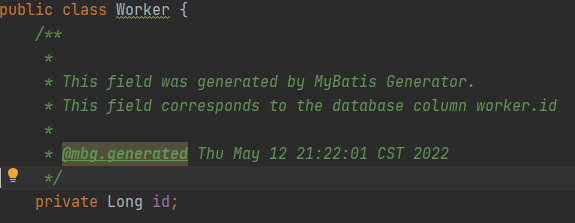
运行main方法,生成默认注释如下,并不是我们想要的注释,所以一般会配置为注释不生成:
2.4 实现CommentGenerator接口
重写以下方法,自定义注释
public class MySQLCommentGenerator implements CommentGenerator {

private final Properties properties;

public MySQLCommentGenerator() {

properties = new Properties();

}

@Override

public void addConfigurationProperties(Properties properties) {

// 获取自定义的 properties

this.properties.putAll(properties);

}

/**

* 重写给实体类加的注释

*/

@Override

public void addModelClassComment(TopLevelClass topLevelClass, IntrospectedTable introspectedTable) {

String author = properties.getProperty("author");

String dateFormat = properties.getProperty("dateFormat", "yyyy-MM-dd");

SimpleDateFormat dateFormatter = new SimpleDateFormat(dateFormat);

// 获取表注释

String remarks = introspectedTable.getRemarks();

topLevelClass.addJavaDocLine("/**");

topLevelClass.addJavaDocLine(" * " + remarks);

topLevelClass.addJavaDocLine(" *");

topLevelClass.addJavaDocLine(" * @author " + author);

topLevelClass.addJavaDocLine(" * @date " + dateFormatter.format(new Date()));

topLevelClass.addJavaDocLine(" */");

}

/**

* 重写给实体类字段加的注释

*/

@Override

public void addFieldComment(Field field, IntrospectedTable introspectedTable, IntrospectedColumn introspectedColumn) {

// 获取列注释

String remarks = introspectedColumn.getRemarks();

field.addJavaDocLine("/**");

field.addJavaDocLine(" * " + remarks);

field.addJavaDocLine(" */");

}

/**

* 重写给实体类get方法加的注释

*/

@Override

public void addGetterComment(Method method, IntrospectedTable introspectedTable, IntrospectedColumn introspectedColumn) {

// 获取表注释

String remarks = introspectedColumn.getRemarks();

method.addJavaDocLine("/**");

method.addJavaDocLine(" * " + method.getName());

method.addJavaDocLine(" */");

}
2.5 修改generatorConfig.xml配置
将generatorConfig.xml文件中的commentGenerator做如下修改,type属性选择自己的实现类
<commentGenerator type="com.generator.MySQLCommentGenerator">

<property name="author" value="Your Name"/>

<property name="dateFormat" value="yyyy/MM/dd"/>

</commentGenerator>
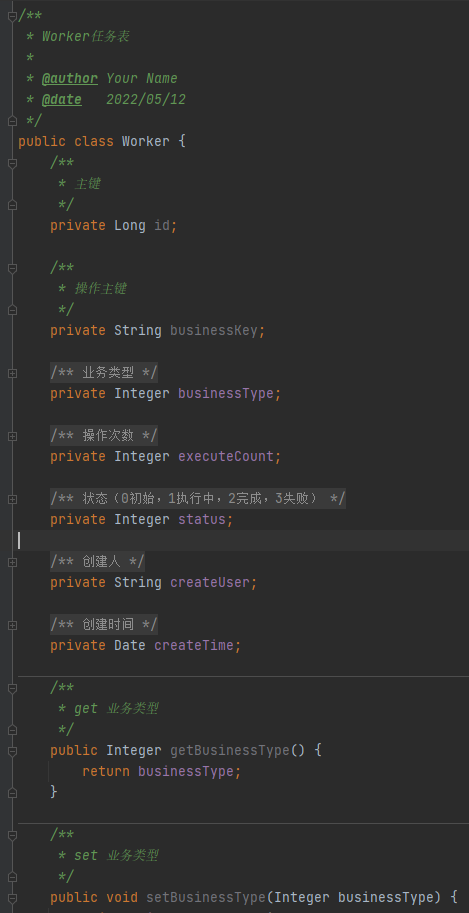
运行main方法,生成注释如下:
3 使用Maven方式执行Mybatis Generator
Pom.xml文件中增加以下配置,需要引入generator插件时,依赖实现CommentGenerator接口的jar包,要先把自己的jar包install到本地仓库。
否则会报com.generator.MySQLCommentGenerator找不到,其他配置同上。
<build>

<defaultGoal>compile</defaultGoal>

<plugins>

<plugin>

<groupId>org.mybatis.generator</groupId>

<artifactId>mybatis-generator-maven-plugin</artifactId>

<version>1.4.0</version>

<configuration>

<configurationFile>src/main/resources/generatorConfig.xml</configurationFile>

<verbose>true</verbose>

<overwrite>true</overwrite>

</configuration>

<dependencies>

<!-- 其他的数据库,需要修改依赖 -->

<dependency>

<groupId>mysql</groupId>

<artifactId>mysql-connector-java</artifactId>

<version>8.0.16</version>

</dependency>

<!-- 引用实现CommentGenerator接口的jar包 -->

<dependency>

<groupId>org.example</groupId>

<artifactId>MyGenerator</artifactId>

<version>1.0-SNAPSHOT</version>

</dependency>

</dependencies>

</plugin>

</plugins>
4 源码分析
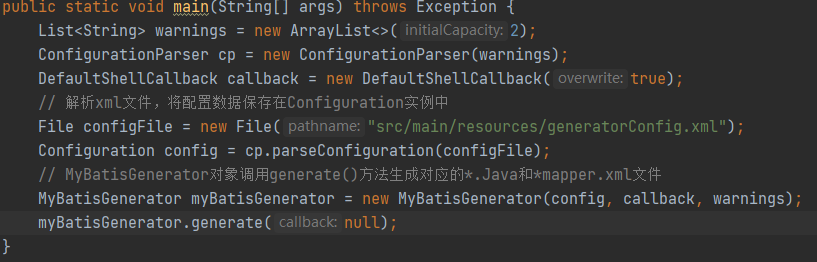
查看执行Mybatis Generator的main方法,主要分为两部分,解析指定的配置文件与调用生成java文件和Mapper文件的方法
4.1 解析指定的xml配置文件
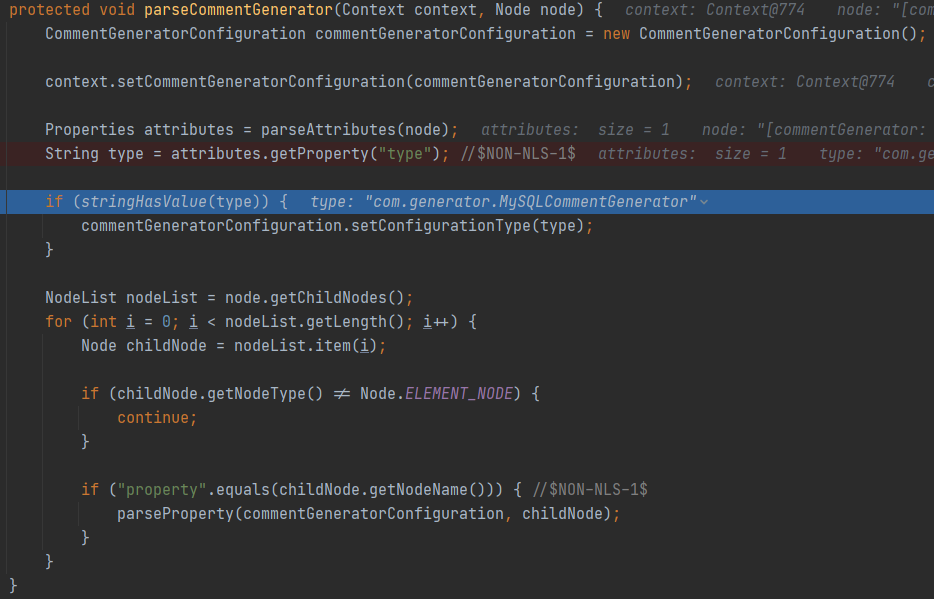
跟踪解析xml文件的方法cp.parseConfiguration(configFile)发现,底层以Document形式读取xml文件,根据标签名解析各标签属性,保存到Configuration实例中。
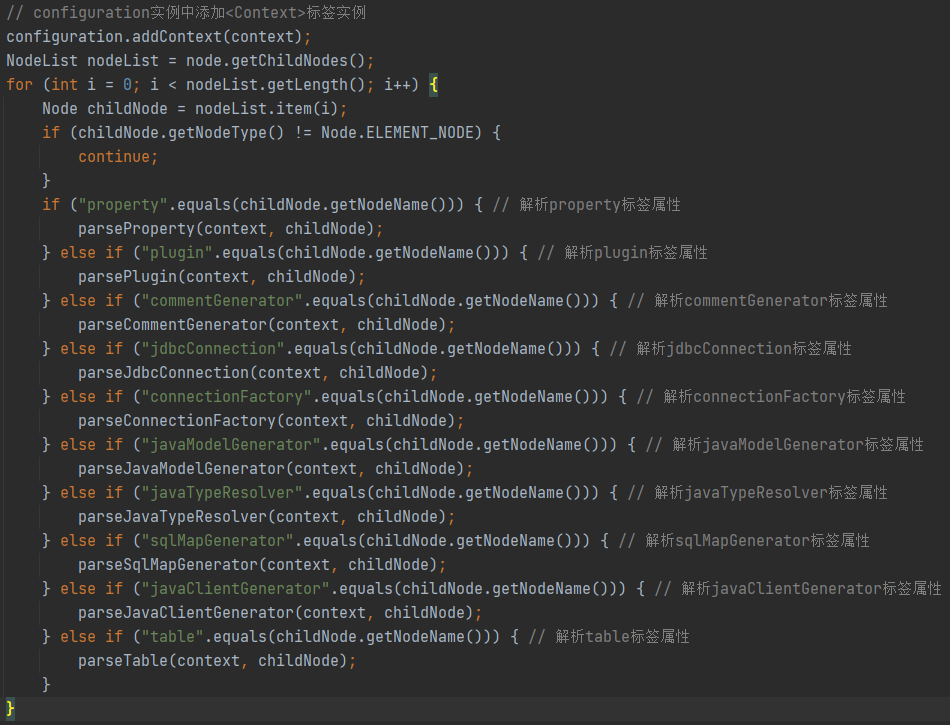
其中解析commentGenerator标签的方法parseCommentGenerator(context, childNode)中,会获取commentGenerator标签的type属性值,也就是自定义的”com.generator.MySQLCommentGenerator”类,放到Context实例中。
4.2 调用生成java文件和Mapper文件的方法
xml配置文件解析完成,得到Configuration实例,后面生成文件的工作都会从Configuration实例中获取所需数据。生成文件的方法主要步骤为:1.连接数据库,查询表信息与列信息,2.生成文件内容,3.写入生成文件。
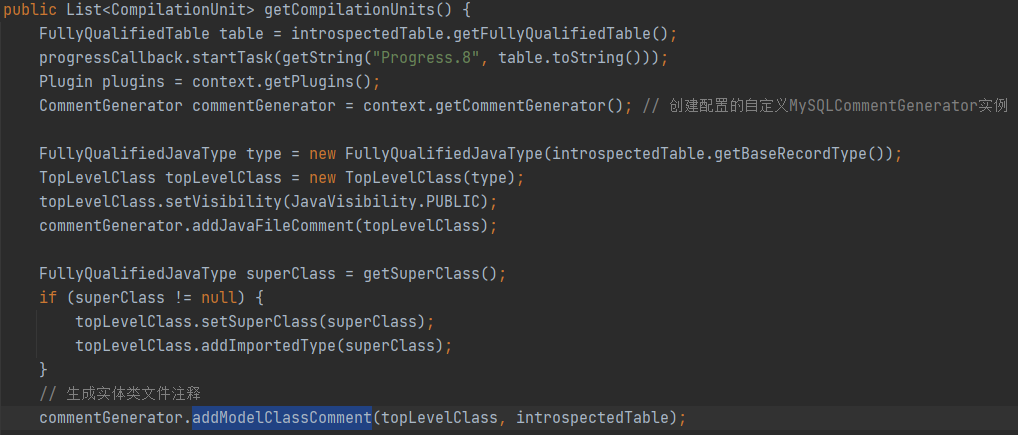
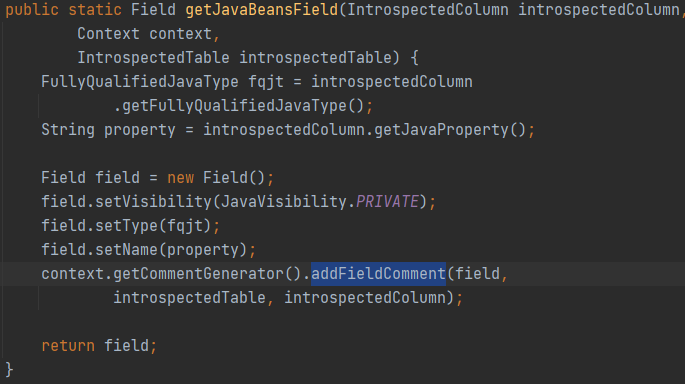
其中生成文件内容时,会根据Context的type属性反射创建MySQLCommentGenerator实例,然后调用自定义的生成注释方法。
如:生成实体类文件的注释,调用addModelClassComment方法
生成字段注释,调用addFieldComment方法
生成Get方法注释,调用addGetterComment方法
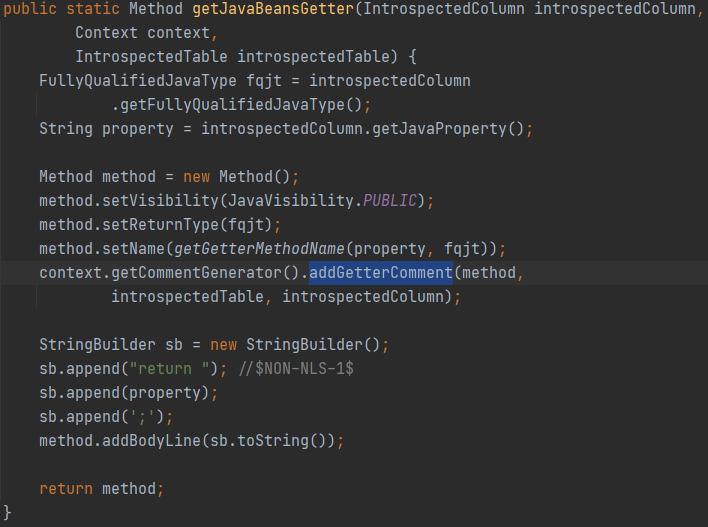
在调用addModelClassComment,addFieldComment,addGetterComment等生成注释的方法时,执行的都是MySQLCommentGenerator类的方法,这样就实现了生成自定义注释的功能。
5 总结
通过使用自定义实现CommentGenerator接口,让自动生成的代码加上我们想要的注释,可以省去自己加注释的麻烦。
与一般使用Mybatis Generator生成代码的方式一样,多实现个接口即可。
使用Maven方式运行时,需要在pom.xml引入插件时,依赖自己jar包。
把Mybatis Generator生成的代码加上想要的注释的更多相关文章
- mybatis Generator生成代码及使用方式
本文原创,转载请注明:http://www.cnblogs.com/fengzheng/p/5889312.html 为什么要有mybatis mybatis 是一个 Java 的 ORM 框架,OR ...
- mybatis自动生成java代码
SSM框架没有DB+Record模式,写起来特别费劲,只能用下面的方法勉强凑合. 上图中,*.jar为下载的,src为新建的空白目录,.xml配置如下. <?xml version=" ...
- MyBatis Generator生成DAO——序列化
MyBatis Generator生成DAO 的时候,生成的类都是没有序列化的. 还以为要手工加入(開始是手工加入的),今天遇到分页的问题,才发现生成的时候能够加入插件. 既然分页能够有插件.序列化是 ...
- 【记录】Mybatis Generator生成数据对象Date/TimeStamp 查询时间格式化
Mybatis Generator是很好的工具帮助我们生成表映射关联代码,最近博主遇到一个问题,找了很久才解决, 就是用Mybatis Generator生成实体类的时候,Date 时间无法格式化输出 ...
- 使用MyBatis Generator自动创建代码
SSM框架--使用MyBatis Generator自动创建代码 1. 目录说明 使用自动生成有很多方式,可以在eclipse中安装插件,但是以下将要介绍的这种方式我认为很轻松,最简单,不需要装插件, ...
- MyBatis Generator自动创建代码
MyBatis Generator自动创建代码 1.首先在eclipse上安装mybatis插件 2.创建一个mavenWeb项目. 3.在resource中写入一个xml,一定要与我得同名 < ...
- 利用org.mybatis.generator生成实体类
springboot+maven+mybatis+mysql 利用org.mybatis.generator生成实体类 1.添加pom依赖: 2.编写generatorConfig.xml文件 ( ...
- MyBatis Generator 生成的example 使用 and or 简单混合查询
MyBatis Generator 生成的example 使用 and or 简单混合查询 参考博客:https://www.cnblogs.com/kangping/p/6001519.html 简 ...
- Maven下用MyBatis Generator生成文件
使用Maven命令用MyBatis Generator生成MyBatis的文件步骤如下: 1.在mop文件内添加plugin <build> <finalName>KenShr ...
- SpringBoot(十一):springboot2.0.2下配置mybatis generator环境,并自定义字段/getter/settetr注释
Mybatis Generator是供开发者在mybatis开发时,快速构建mapper xml,mapper类,model类的一个插件工具.它相对来说对开发者是有很大的帮助的,但是它也有不足之处,比 ...
随机推荐
- 【面试题】JS第七种数据类型Symbol详解
JS第七种数据类型Symbol详解 点击打开视频讲解更加详细 一.什么是Symbol? Symbol是ES6中引入的一种新的基本数据类型,用于表示一个独一无二的值.它是JavaScript中的第 七种 ...
- Openstack Neutron : LBaaS v2
目录 - LBaaS v2 - 负载均衡概念 - 服务器池 Pool - 监听器 Listener - L7 转发策略 l7 policy - 负载均衡算法 Algorithms - 健康监测 Mon ...
- 使用 Win2D 实现融合效果
1. 融合效果 在 CSS 中有一种实现融合效果的技巧,使用模糊滤镜(blur)叠加对比度滤镜(contrast)使两个接近的元素看上去"粘"在一起,如下图所示: 博客园的 Cho ...
- 【学习笔记】GBDT算法和XGBoost
前言 这一篇内容我学了足足有五个小时,不仅仅是因为内容难以理解, 更是因为前面CART和提升树的概念和算法本质没有深刻理解,基本功不够就总是导致自己的理解会相互在脑子里打架,现在再回过头来,打算好好总 ...
- Traefik2.X 版本 中 URL Rewrite 的使用
文章转载自:https://mp.weixin.qq.com/s?__biz=MzU4MjQ0MTU4Ng==&mid=2247484594&idx=1&sn=becbe567 ...
- 清理rook-ceph
官方步骤文档:https://rook.io/docs/rook/v1.8/ceph-teardown.html 请注意需要清理的以下资源: rook-ceph namespace: The Rook ...
- python推导式特殊用法
字典推导式 >>> dic = {x: x**2 for x in (2, 4, 6)} >>> dic {2: 4, 4: 16, 6: 36} >> ...
- docker相关总结
Docker 的相关使用记录 一.安装docker linux环境使用yum命令安装docker 第一步:确保自己的虚拟机没有安装过docker,如果安装过的需要将原先的docker进行卸载,命令如下 ...
- 复现CVE-2022-10270(向日葵远程代码执行漏洞)
警告 请勿使用本文提到的内容违反法律.本文不提供任何担保. 漏洞描述 向日葵是一款免费的,集远程控制电脑手机.远程桌面连接.远程开机.远程管理.支持内网穿透的一体化远程控制管理工具软件.CNVD披露了 ...
- MySQL数据库-数据表(上)
数据表的基本操作. MySQL 数据库支持多种数据类型,大致可以分为 3 类:数值类型.日期和时间类型.字符串(字符)类型. (1)数值类型 数值类型用于存储数字型数据,这些类型包括整数类型(TINY ...