
利用apache ftpserver搭建ftp服务器
操作环境:
win2012r2 x64 datacenter
Apache FtpServer 1.2.0
Java SE Development Kit 8u333
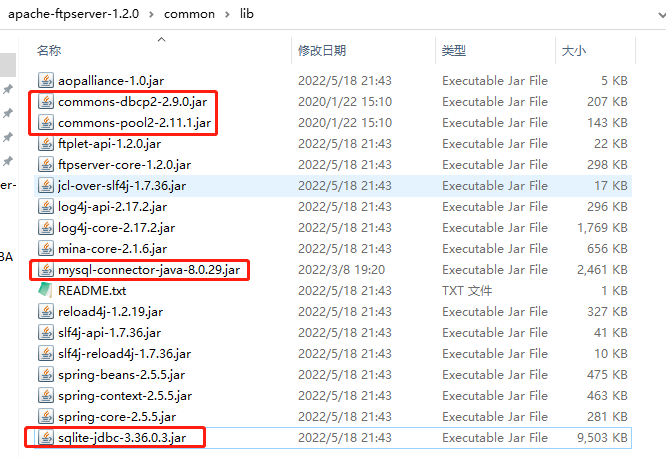
commons-dbcp2-2.9.0.jar
commons-pool2-2.11.1.jar
mysql server 8.0.29
mysql-connector-java-8.0.29.jar
sqlite
sqlite-jdbc-3.36.0.3.jar
如下图:
一、usermanager采用文件形式管理xml示例如下
<?xml version="1.0" encoding="UTF-8"?>

  <!--

    Licensed to the Apache Software Foundation (ASF) under one or more

    contributor license agreements. See the NOTICE file distributed with

    this work for additional information regarding copyright ownership.

    The ASF licenses this file to you under the Apache License, Version

    2.0 (the "License"); you may not use this file except in compliance

    with the License. You may obtain a copy of the License at

    http://www.apache.org/licenses/LICENSE-2.0 Unless required by

    applicable law or agreed to in writing, software distributed under the

    License is distributed on an "AS IS" BASIS, WITHOUT WARRANTIES OR

    CONDITIONS OF ANY KIND, either express or implied. See the License for

    the specific language governing permissions and limitations under the

    License.

  -->

<server xmlns="http://mina.apache.org/ftpserver/spring/v1"

  xmlns:xsi="http://www.w3.org/2001/XMLSchema-instance"

  xsi:schemaLocation="

     http://mina.apache.org/ftpserver/spring/v1 https://mina.apache.org/ftpserver-project/ftpserver-1.0.xsd

     "

  id="myServer">

  <listeners>

    <nio-listener name="default" port="21">

        <ssl>

                <keystore file="./res/ftpserver.jks" password="password" />

            </ssl>

    </nio-listener>

  </listeners>

  <file-user-manager file="./res/conf/users.properties" />

</server>
二、usermanager采用mysql数据库管理用户时,ftpd-mysql.xml示例如下
目前数据库管理用户时采用的明文存储,salted和md5的方式没有测试成功,如有测试成功的朋友请指导一下。
<?xml version="1.0" encoding="UTF-8"?>

<!-- Licensed to the Apache Software Foundation (ASF) under one or more contributor

    license agreements. See the NOTICE file distributed with this work for additional

    information regarding copyright ownership. The ASF licenses this file to

    you under the Apache License, Version 2.0 (the "License"); you may not use

    this file except in compliance with the License. You may obtain a copy of

    the License at http://www.apache.org/licenses/LICENSE-2.0 Unless required

    by applicable law or agreed to in writing, software distributed under the

    License is distributed on an "AS IS" BASIS, WITHOUT WARRANTIES OR CONDITIONS

    OF ANY KIND, either express or implied. See the License for the specific

    language governing permissions and limitations under the License. -->

<server xmlns="http://mina.apache.org/ftpserver/spring/v1"

    xmlns:xsi="http://www.w3.org/2001/XMLSchema-instance" xmlns:beans="http://www.springframework.org/schema/beans"

    xsi:schemaLocation="

           http://www.springframework.org/schema/beans

           http://www.springframework.org/schema/beans/spring-beans-2.5.xsd

           http://mina.apache.org/ftpserver/spring/v1

           http://mina.apache.org/ftpserver/ftpserver-1.0.xsd

           "

    id="myServer">

    <listeners>

        <nio-listener name="default" port="21">

            <ssl>

                <keystore file="./res/ftpserver.jks" password="password" />

            </ssl>

        </nio-listener>

    </listeners>

    <db-user-manager encrypt-passwords="clear">

        <data-source>

            <beans:bean class="org.apache.commons.dbcp2.BasicDataSource">

                <beans:property name="driverClassName" value="com.mysql.jdbc.Driver" />

                <beans:property name="url" value="jdbc:mysql://localhost/ftpserver" />

                <beans:property name="username" value="root" />

                <beans:property name="password" value="123456" />

            </beans:bean>

        </data-source>

        <insert-user>INSERT INTO FTP_USER (userid, userpassword,

            homedirectory, enableflag, writepermission, idletime, uploadrate,

            downloadrate) VALUES ('{userid}', '{userpassword}',

            '{homedirectory}',

            {enableflag}, {writepermission}, {idletime},

            {uploadrate},

            {downloadrate})

        </insert-user>

        <update-user>UPDATE FTP_USER SET

            userpassword='{userpassword}',homedirectory='{homedirectory}',enableflag={enableflag},writepermission={writepermission},idletime={idletime},uploadrate={uploadrate},downloadrate={downloadrate}

            WHERE userid='{userid}'

        </update-user>

        <delete-user>DELETE FROM FTP_USER WHERE userid = '{userid}'

        </delete-user>

        <select-user>SELECT userid, userpassword, homedirectory,

            enableflag, writepermission, idletime, uploadrate, downloadrate,

            maxloginnumber, maxloginperip FROM

            FTP_USER WHERE userid = '{userid}'

        </select-user>

        <select-all-users>

            SELECT userid FROM FTP_USER ORDER BY userid

        </select-all-users>

        <is-admin>SELECT userid FROM FTP_USER WHERE userid='{userid}'

            AND

            userid='admin'

        </is-admin>

        <authenticate>SELECT userpassword from FTP_USER WHERE

            userid='{userid}'

        </authenticate>

    </db-user-manager>

</server>注意:org.apache.commons.dbcp2.BasicDataSource,看最新的commons.dbcp命名空间和1.x版本有区别
三、usermanager采用Sqlite数据库管理用户时,ftpd-sqlite.xml示例如下
<?xml version="1.0" encoding="UTF-8"?>

<!-- Licensed to the Apache Software Foundation (ASF) under one or more contributor

    license agreements. See the NOTICE file distributed with this work for additional

    information regarding copyright ownership. The ASF licenses this file to

    you under the Apache License, Version 2.0 (the "License"); you may not use

    this file except in compliance with the License. You may obtain a copy of

    the License at http://www.apache.org/licenses/LICENSE-2.0 Unless required

    by applicable law or agreed to in writing, software distributed under the

    License is distributed on an "AS IS" BASIS, WITHOUT WARRANTIES OR CONDITIONS

    OF ANY KIND, either express or implied. See the License for the specific

    language governing permissions and limitations under the License. -->

<server xmlns="http://mina.apache.org/ftpserver/spring/v1"

    xmlns:xsi="http://www.w3.org/2001/XMLSchema-instance" xmlns:beans="http://www.springframework.org/schema/beans"

    xsi:schemaLocation="

           http://www.springframework.org/schema/beans

           http://www.springframework.org/schema/beans/spring-beans-2.5.xsd

           http://mina.apache.org/ftpserver/spring/v1

           http://mina.apache.org/ftpserver/ftpserver-1.0.xsd

           "

    id="myServer">

    <listeners>

        <nio-listener name="default" port="21">

            <ssl>

                <keystore file="./res/ftpserver.jks" password="password" />

            </ssl>

        </nio-listener>

    </listeners>

    <db-user-manager encrypt-passwords="clear">

        <data-source>

            <beans:bean class="org.apache.commons.dbcp2.BasicDataSource">

                <beans:property name="driverClassName" value="org.sqlite.JDBC" />

                <beans:property name="url" value="jdbc:sqlite:ftp.db" />

            </beans:bean>

        </data-source>

        <insert-user>INSERT INTO FTP_USER (userid, userpassword,

            homedirectory, enableflag, writepermission, idletime, uploadrate,

            downloadrate) VALUES ('{userid}', '{userpassword}',

            '{homedirectory}',

            {enableflag}, {writepermission}, {idletime},

            {uploadrate},

            {downloadrate})

        </insert-user>

        <update-user>UPDATE FTP_USER SET

            userpassword='{userpassword}',homedirectory='{homedirectory}',enableflag={enableflag},writepermission={writepermission},idletime={idletime},uploadrate={uploadrate},downloadrate={downloadrate}

            WHERE userid='{userid}'

        </update-user>

        <delete-user>DELETE FROM FTP_USER WHERE userid = '{userid}'

        </delete-user>

        <select-user>SELECT userid, userpassword, homedirectory,

            enableflag, writepermission, idletime, uploadrate, downloadrate,

            maxloginnumber, maxloginperip FROM

            FTP_USER WHERE userid = '{userid}'

        </select-user>

        <select-all-users>

            SELECT userid FROM FTP_USER ORDER BY userid

        </select-all-users>

        <is-admin>SELECT userid FROM FTP_USER WHERE userid='{userid}'

            AND

            userid='admin'

        </is-admin>

        <authenticate>SELECT userpassword from FTP_USER WHERE

            userid='{userid}'

        </authenticate>

    </db-user-manager>

</server>注意:commons的jar包还保留着,多了个操作sqlitejdbc的jar包,下载地址:GitHub - xerial/sqlite-jdbc: SQLite JDBC Driver
四、解决ftpd.exe在64位windows系统启动失败的问题
需下载tomcat包,目前测试的这个版本可行tomcat-7 v7.0.109 (apache.org)
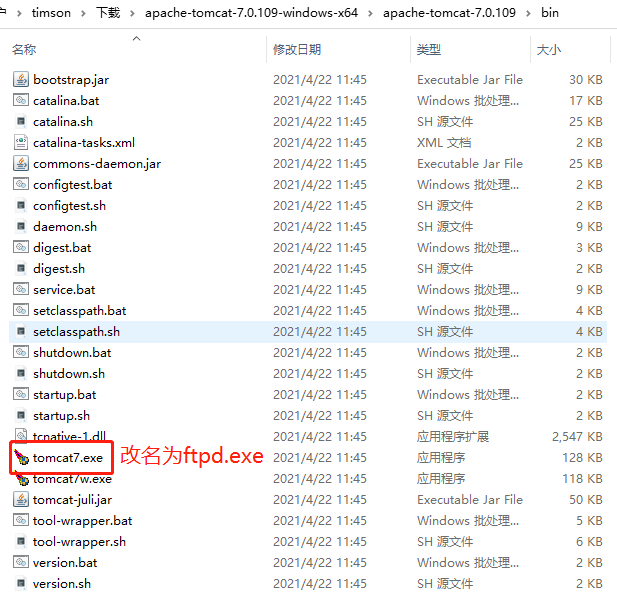
放入apache ftpserver bin目录里替换原有的ftpd.exe
这样安装为服务的时候就可以正常启动了
五、python操作sqlite的ftp.db管理(增加删除)用户
自己搞了个python脚本,采用了sqlalchemy来操作数据库
from sqlalchemy import create_engine

from sqlalchemy import MetaData,Table,Column,Boolean,Integer,String

import os

engine=create_engine('sqlite:///ftp.db')

conn=engine.connect()

metadata=MetaData()

ftpusers=Table('FTP_USER',metadata,

    Column('userid',String(64),primary_key=True),

    Column('userpassword',String(64),nullable=False),

    Column('homedirectory',String(128),nullable=False),

    Column('enableflag',Boolean(),default=True),

    Column('writepermission',Boolean(),default=True),

    Column('idletime',Integer(),default=0),

    Column('uploadrate',Integer(),default=0),

    Column('downloadrate',Integer(),default=0),

    Column('maxloginnumber',Integer(),default=0),

    Column('maxloginperip',Integer(),default=0)

)

metadata.create_all(engine)

def addgeneraluser():

	deluser = ftpusers.delete().where(ftpusers.c.userid=="nic")

	rs = conn.execute(deluser)

	dirname="./files/alluser"

	if not os.path.exists(dirname):

		os.mkdir(dirname)

	ins=ftpusers.insert().values(

		userid="nic",

		userpassword="123321",

		homedirectory=dirname,

		writepermission=0,

		maxloginnumber=1

	)

	result=conn.execute(ins)

def addadmin():

	deladmin = ftpusers.delete().where(ftpusers.c.userid=="admin")

	rs = conn.execute(deladmin)

	ins=ftpusers.insert().values(

		userid="admin",

		userpassword="123456",

		homedirectory="./files",

		writepermission=1

	)

	result=conn.execute(ins)

def getusers():

	sel=ftpusers.select()

	rs=conn.execute(sel)

	print(rs.fetchall())

addgeneraluser()

getusers()
可以方便的增加用户了,generaluser只读权限只能同时登录一个,admin权限可读写,不限制。
利用apache ftpserver搭建ftp服务器的更多相关文章
- 使用Apache FtpServer搭建FTP服务器 [FlashFXP]
<server xmlns="http://mina.apache.org/ftpserver/spring/v1" xmlns:xsi="http://www.w ...
- 使用apache ftpserver搭建ftp服务器
作为一个javaer,遇到任何问题,先查一下java中的解决方案.地球上的许多事情,在java中都能找到完美的解决方案.之前搭建ftp服务器使用的是vsftpd,现在可以把它卸掉了,它以服务的形式运行 ...
- 利用Serv-U搭建FTP服务器
以前在学校的时候,学校的整个宿舍楼都是在一个局域网中,经常有人用个人电脑搭个网站或者FTP啊什么的,主要是进行一些影视资源的传播活动.不乏 有些资源充沛的有志青年利用业余时间翻译某岛国影视资源,利用局 ...
- Python黑科技:6行代码轻松搭建FTP服务器
Python 黑科技 六行代码轻松搭建个人FTP服务器 什么是FTP服务器? FTP (File Transfer Protocol) 是一个用于客户端与服务器之间文件的协议.利用FTP我们就能做到在 ...
- 在Ubuntu下搭建FTP服务器的方法
由于整个学校相当于一个大型局域网,相互之间传送数据非常快,比如要共享个电影,传点资料什么的. 所以我们可以选择搭建一个FTP服务器来共享文件. 那么问题来了,有的同学会问,我们既然在一个局域网内,直接 ...
- pyftpdlib 搭建FTP服务器
学会socket之后,就可以使用应用层的协议了,比如FTP,HTTP等,不过一般这些应用层都会有现成的模块,学不学socket都无所谓,这是python的方便之处.这里搭建FTP服务器使用的就是pyf ...
- Jenkins结合.net平台综合应用之使用FileZilla搭建ftp服务器
上一节我们讲解了如何编译web项目,web项生成以后我们是手动复制到iis目录下的,这显然不符合devops初衷,这里我们讲解如何利用ftp协议把文件传到远程服务器的iis目录下. 这一讲分两部分一部 ...
- CentOS6.5下搭建ftp服务器(三种认证模式:匿名用户、本地用户、虚拟用户)
CentOS 6.5下搭建ftp服务器 vsftpd(very secure ftp daemon,非常安全的FTP守护进程)是一款运行在Linux操作系统上的FTP服务程序,不仅完全开源而且免费,此 ...
- Linux中搭建FTP服务器
FTP工作原理 (1)FTP使用端口 [root@localhost ~]# cat /etc/services | grep ftp ftp-data 20/tcp #数据链路:端口20 ftp 2 ...
随机推荐
- AGENS算法
3.2 层次方法 下图,上面是从左到右由5个簇逐渐合并成1个簇的过程,下面是从右到左由一个簇逐渐分裂成5个簇的过程 AGENS算法 最后面一句话是重点,假设有<A,B>,<C,D&g ...
- stylus css tooltips 工具提示
tooltips 纯css工具提示 bubbles-tooltips 查看效果 演示 安装 npm install tooltips --save 使用 在 gulp 中使用 gulp var gul ...
- Angular2入门系列(五)———— 路由参数设置
Angular2入门系列(五)---- 路由参数设置路由配置: { path: '', component: CarProFile, children: [ { path: 'add', compon ...
- APICloud首款全功能集成开发工具重磅发布,彰显云端一体理念
近日,APICloud重磅推出首款云端一体的全功能集成开发工具--APICloud Studio 2.为了更深入了解这款开发工具的特性及优势,APICloud CTO 邹达针对几个核心问题做出了解答. ...
- Web缓存总结
web缓存作用 减少网络带宽消耗降低服务器压力减少网络延迟,加快页面打开速度 Web缓存的类型 数据库数据缓存:为了提供查询的性能,会将查询后的数据放到内存中进行缓存,下次查询时,直接从内存缓存直接返 ...
- 【babel+小程序】记“编写babel插件”与“通过语法解析替换小程序路由表”的经历
话不多说先上图,简要说明一下干了些什么事.图可能太模糊,可以点svg看看 背景 最近公司开展了小程序的业务,派我去负责这一块的业务,其中需要处理的一个问题是接入我们web开发的传统架构--模块化开发. ...
- Codepen 每日精选(2018-4-16)
按下右侧的"点击预览"按钮可以在当前页面预览,点击链接可以打开原始页面. 内容切换的交互效果https://codepen.io/jcoulterde... 报价卡片的交互效果ht ...
- 快速安装 kafka 集群
前言 最近因为工作原因,需要安装一个 kafka 集群,目前网络上有很多相关的教程,按着步骤来也能完成安装,只是这些教程都显得略微繁琐.因此,我写了这篇文章帮助大家快速完成 kafka 集群安装. ...
- 惠普电脑win10系统中WLAN不见了
原文链接:笔记本电脑win10系统中WLAN不见了 怎么解决? - 知乎 (zhihu.com)
- 【Android开发】【布局】各种TabLayout样式
Demo