
SpringBoot SpringSecurity 介绍(基于内存的验证)
SpringBoot 集成 SpringSecurity + MySQL + JWT 附源码,废话不多直接盘
SpringBoot已经为用户采用默认配置,只需要引入pom依赖就能快速启动Spring Security。
目的:验证请求用户的身份,提供安全访问
优势:基于Spring,配置方便,减少大量代码
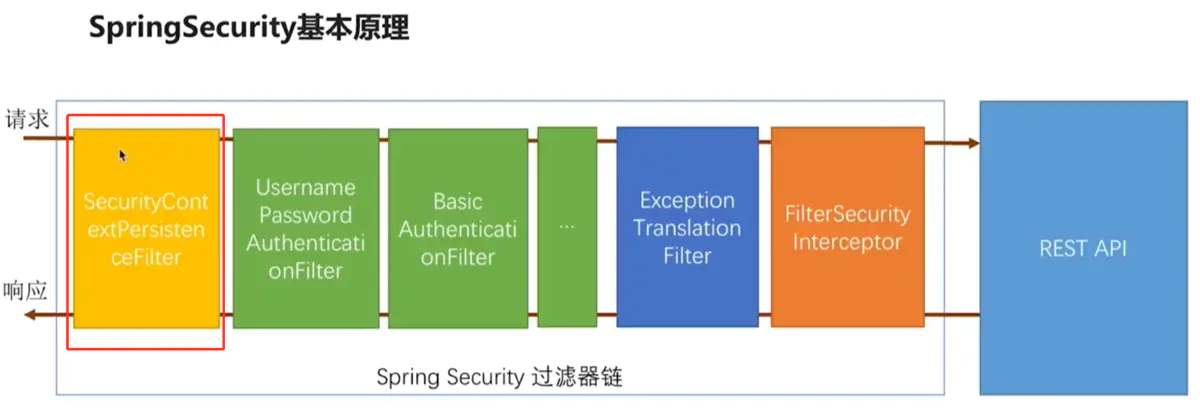
内置访问控制方法
permitAll()表示所匹配的 URL 任何人都允许访问。authenticated()表示所匹配的 URL 都需要被认证才能访问。anonymous()表示可以匿名访问匹配的 URL 。和 permitAll() 效果类似,只是设置为 anonymous() 的 url 会执行 filter 链中denyAll()表示所匹配的 URL 都不允许被访问。rememberMe()被“remember me”的用户允许访问 这个有点类似于很多网站的十天内免登录,登陆一次即可记住你,然后未来一段时间不用登录。fullyAuthenticated()如果用户不是被 remember me 的,才可以访问。也就是必须一步一步按部就班的登录才行。
角色权限判断
hasAuthority(String)判断用户是否具有特定的权限,用户的权限是在自定义登录逻辑hasAnyAuthority(String ...)如果用户具备给定权限中某一个,就允许访问hasRole(String)如果用户具备给定角色就允许访问。否则出现 403hasAnyRole(String ...)如果用户具备给定角色的任意一个,就允许被访问hasIpAddress(String)如果请求是指定的 IP 就运行访问。可以通过 request.getRemoteAddr() 获取 ip 地址
引用 Spring Security
Pom 文件中添加
<dependency>

   <groupId>org.springframework.boot</groupId>

   <artifactId>spring-boot-starter-security</artifactId>

</dependency>
点击查看POM代码
<?xml version="1.0" encoding="UTF-8"?>

<project xmlns="http://maven.apache.org/POM/4.0.0"

         xmlns:xsi="http://www.w3.org/2001/XMLSchema-instance"

         xsi:schemaLocation="http://maven.apache.org/POM/4.0.0 http://maven.apache.org/xsd/maven-4.0.0.xsd">

    <parent>

        <artifactId>vipsoft-parent</artifactId>

        <groupId>com.vipsoft.boot</groupId>

        <version>1.0-SNAPSHOT</version>

    </parent>

    <modelVersion>4.0.0</modelVersion>

    <artifactId>vipsoft-security</artifactId>

    <version>1.0-SNAPSHOT</version>

    <dependencies>

        <dependency>

            <groupId>cn.hutool</groupId>

            <artifactId>hutool-all</artifactId>

            <version>5.3.7</version>

        </dependency>

        <dependency>

            <groupId>org.springframework.boot</groupId>

            <artifactId>spring-boot-starter-security</artifactId>

        </dependency>

        <dependency>

            <groupId>org.springframework.boot</groupId>

            <artifactId>spring-boot-starter-web</artifactId>

        </dependency>

        <dependency>

            <groupId>org.springframework.boot</groupId>

            <artifactId>spring-boot-starter-test</artifactId>

            <scope>test</scope>

            <exclusions>

                <exclusion>

                    <groupId>org.junit.vintage</groupId>

                    <artifactId>junit-vintage-engine</artifactId>

                </exclusion>

            </exclusions>

        </dependency>

    </dependencies>

    <build>

        <plugins>

            <plugin>

                <groupId>org.springframework.boot</groupId>

                <artifactId>spring-boot-maven-plugin</artifactId>

            </plugin>

        </plugins>

    </build>

</project>
运行后会自动生成 password 默认用户名为: user
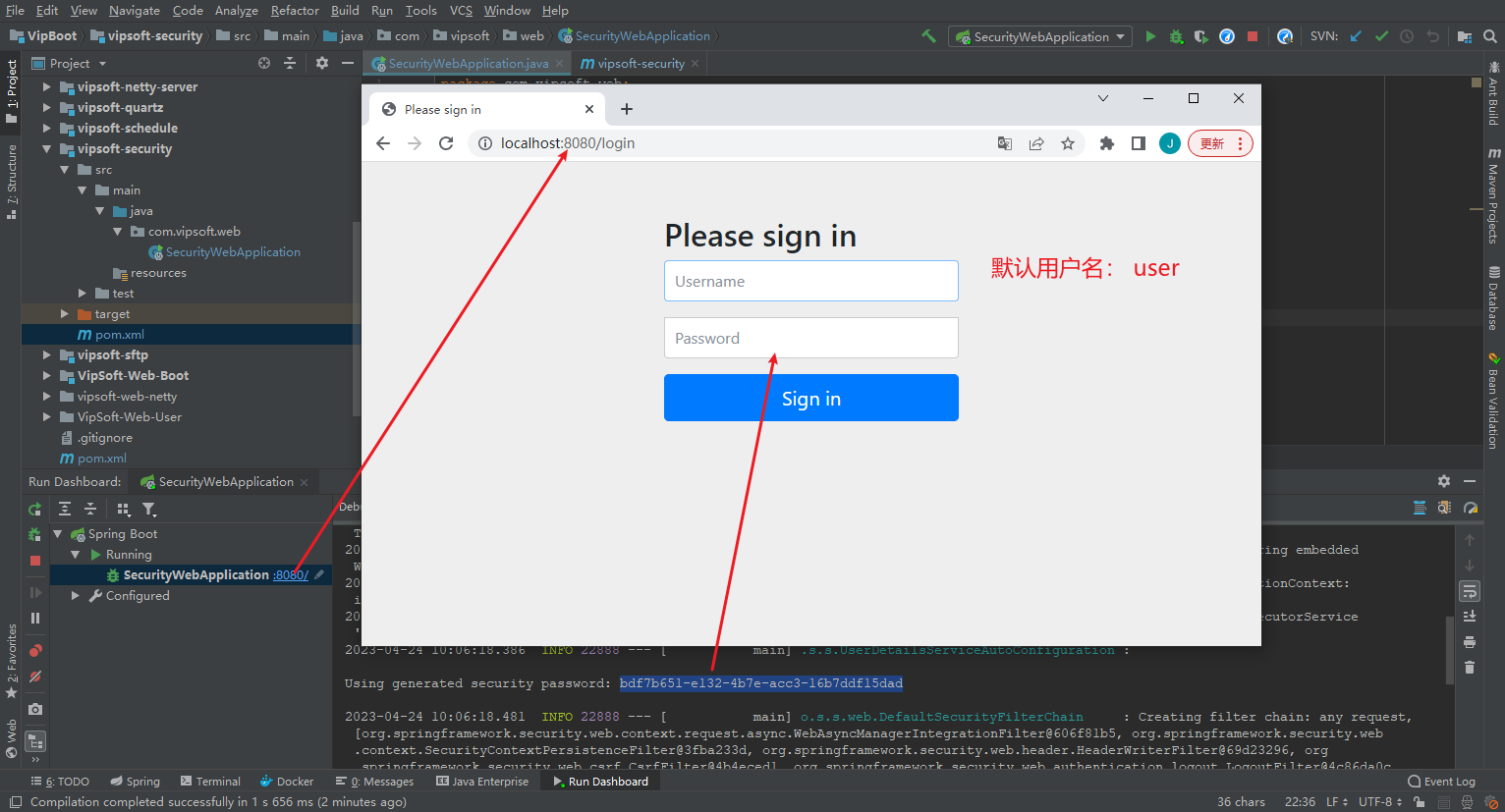
默认配置每次都启动项目都会重新生成密码,同时用户名和拦截请求也不能自定义,在实际应用中往往需要自定义配置,因此接下来对Spring Security进行自定义配置。
配置 Spring Security (入门)
在内存中(简化环节,了解逻辑)配置两个用户角色(admin和user),设置不同密码;
同时设置角色访问权限,其中admin可以访问所有路径(即/*),user只能访问/user下的所有路径。
自定义配置类,实现WebSecurityConfigurerAdapter接口,WebSecurityConfigurerAdapter接口中有两个用到的 configure()方法,其中一个配置用户身份,另一个配置用户权限:
配置用户身份的configure()方法:
SecurityConfig
package com.vipsoft.web.config;

import org.springframework.context.annotation.Configuration;

import org.springframework.security.config.annotation.authentication.builders.AuthenticationManagerBuilder;

import org.springframework.security.config.annotation.method.configuration.EnableGlobalMethodSecurity;

import org.springframework.security.config.annotation.web.builders.HttpSecurity;

import org.springframework.security.config.annotation.web.configuration.EnableWebSecurity;

import org.springframework.security.config.annotation.web.configuration.WebSecurityConfigurerAdapter;

import org.springframework.security.crypto.bcrypt.BCryptPasswordEncoder;

import org.springframework.security.crypto.password.PasswordEncoder;

@Configuration

@EnableWebSecurity

@EnableGlobalMethodSecurity(prePostEnabled = true)

public class SecurityConfig extends WebSecurityConfigurerAdapter {

    /**

     * 配置用户身份的configure()方法

     *

     * @param auth

     * @throws Exception

     */

    @Override

    protected void configure(AuthenticationManagerBuilder auth) throws Exception {

        PasswordEncoder passwordEncoder = new BCryptPasswordEncoder();

        //简化操作,将用户名和密码存在内存中,后期会存放在数据库、Redis中

        auth.inMemoryAuthentication()

                .passwordEncoder(passwordEncoder)

                .withUser("admin")

                .password(passwordEncoder.encode("888"))

                .roles("ADMIN")

                .and()

                .withUser("user")

                .password(passwordEncoder.encode("666"))

                .roles("USER");

    }

    /**

     * 配置用户权限的configure()方法

     * @param http

     * @throws Exception

     */

    @Override

    protected void configure(HttpSecurity http) throws Exception {

        http.authorizeRequests()

                //配置拦截的路径、配置哪类角色可以访问该路径

                .antMatchers("/user").hasAnyRole("USER")

                .antMatchers("/*").hasAnyRole("ADMIN")

                //配置登录界面,可以添加自定义界面, 没添加则用系统默认的界面

                .and().formLogin();

    }

}
添加接口测试用
package com.vipsoft.web.controller;

import org.springframework.security.access.prepost.PreAuthorize;

import org.springframework.web.bind.annotation.GetMapping;

import org.springframework.web.bind.annotation.RestController;

@RestController

public class DefaultController {

    @GetMapping("/")

    @PreAuthorize("hasRole('ADMIN')")

    public String demo() {

        return "Welcome";

    }

    @GetMapping("/user/list")

    @PreAuthorize("hasAnyRole('ADMIN','USER')")

    public String getUserList() {

        return "User List";

    }

    @GetMapping("/article/list")

    @PreAuthorize("hasRole('ADMIN')")

    public String getArticleList() {

        return "Article List";

    }

}

SpringBoot SpringSecurity 介绍(基于内存的验证)的更多相关文章
- SpringSecurity实战记录(一)开胃菜:基于内存的表单登录小Demo搭建
Ps:本次搭建基于Maven管理工具的版本,Gradle版本可以通过gradle init --type pom命令在pom.xml路径下转化为Gradle版本(如下图) (1)构建工具IDEA In ...
- Spark 介绍(基于内存计算的大数据并行计算框架)
Spark 介绍(基于内存计算的大数据并行计算框架) Hadoop与Spark 行业广泛使用Hadoop来分析他们的数据集.原因是Hadoop框架基于一个简单的编程模型(MapReduce),它支持 ...
- SpringBoot使用SpringSecurity搭建基于非对称加密的JWT及前后端分离的搭建
SpringBoot使用SpringSecurity搭建基于非对称加密的JWT及前后端分离的搭建 - lhc0512的博客 - CSDN博客 https://blog.csdn.net/lhc0512 ...
- 高性能、高容错、基于内存的开源分布式存储系统Tachyon的简单介绍
Tachyon是什么? Tachyon是一个高性能.高容错.基于内存的开源分布式存储系统,并具有类Java的文件API.插件式的底层文件系统.兼容Hadoop MapReduce和Apache Spa ...
- Impala基于内存的SQL引擎的详细介绍
一.简介 1.概述 Impala是Cloudera公司推出,提供对HDFS.Hbase数据的高性能.低延迟的交互式SQL查询功能. •基于Hive使用内存计算,兼顾数据仓库.具有实时.批处理.多并发等 ...
- SpringBoot + SpringSecurity + Quartz + Layui实现系统权限控制和定时任务
1. 简介 Spring Security是一个功能强大且易于扩展的安全框架,主要用于为Java程序提供用户认证(Authentication)和用户授权(Authorization)功能. ...
- SpringBoot + SpringSecurity + Mybatis-Plus + JWT + Redis 实现分布式系统认证和授权(刷新Token和Token黑名单)
1. 前提 本文在基于SpringBoot整合SpringSecurity实现JWT的前提中添加刷新Token以及添加Token黑名单.在浏览之前,请查看博客: SpringBoot + Sp ...
- #研发解决方案介绍#基于ES的搜索+筛选+排序解决方案
郑昀 基于胡耀华和王超的设计文档 最后更新于2014/12/3 关键词:ElasticSearch.Lucene.solr.搜索.facet.高可用.可伸缩.mongodb.SearchHub.商品中 ...
- RDD:基于内存的集群计算容错抽象(转)
原文:http://shiyanjun.cn/archives/744.html 该论文来自Berkeley实验室,英文标题为:Resilient Distributed Datasets: A Fa ...
- 基于easyui的验证扩展
基于easyui的验证扩展 ##前言 自己做项目也有好几年的时间了,一直没有时间整理自己的代码,趁春节比较闲,把自己以前的代码整理了一篇.这是基于easyui1.2.6的一些验证扩展,2012年就开始 ...
随机推荐
- 基于工业4g网关的危化品运输车监控方案
工业的发展立足于各种各样原材料的加工和应用,而其中就包括一些油料.化学品和易燃易爆货物,针对此类货物的运输,需要着重关注其安全性和稳定性,否则就容易造成严重的人身和财产损失.得益于物联网技术的发展,现 ...
- 【Airtest相关】收集一些Airtest的介绍
1.项目简介 ui自动化一直是个让人头疼的事,主要是因为系统兼容性难度较大和开发维护成本比较高, 以前使用过appium,通用性比较差,并且开发有一定的基础才行,更难以忍受的是后期的维护成本:然后接触 ...
- 配置环境变量在history中显示时间
1.1.临时显示(断电丢失) 配置变量HISTTIMEFORMAT,加入"%F %T ". 示例: [root@CentOS8 ~]# HISTTIMEFORMAT='%F %T ...
- Shell脚本之while read line的用法
Shell脚本之while read line的用法 while read line do - done < file read通过输入重定向,把file的第一行所有的内容赋值给变量line,循 ...
- FWT/快速沃尔什变换 入门指南
来学点好玩的. 引入 我们也许学过,\(FFT\) 可以解决一类卷积: \[C_i=\sum^{k+j=i} A_iB_j \] 现在我们稍微变一下式子: \[C_i=\sum^{i=k \And j ...
- 用 Go 剑指 Offer 09. 用两个栈实现队列
用两个栈实现一个队列.队列的声明如下,请实现它的两个函数 appendTail 和 deleteHead ,分别完成在队列尾部插入整数和在队列头部删除整数的功能.(若队列中没有元素,deleteHea ...
- 最强绘图AI:一文搞定Midjourney(附送咒语)
最强绘图AI:一文搞定Midjourney(附送咒语) Midjourney官网:https://www.midjourney.com 简介 Midjourney是目前效果最棒的AI绘图工具.访问Mi ...
- 标准正态分布表—R语言
正态分布是最重要的一种概率分布.正态分布概念是由德国的数学家和天文学家Moivre于1733年首次提出的,但由于德国数学家Gauss率先将其应用于天文学家研究,故正态分布又叫高斯分布.高斯这项工作对后 ...
- [MAUI 项目实战] 手势控制音乐播放器(三): 动画
@ 目录 吸附动画 确定位置 平移动画 回弹动画 使用自定义缓动函数 多重动画 点击动画 项目地址 上一章节我们创建了手势容器控件PanContainer,它对拖拽物进行包装并响应了平移手势和点击手势 ...
- 2.@Param()注解
前言 在咋们的mapper层中,@Param()注解是很常见的,它是专门服务于SQL相关联的mapper接口,它有两个功能:1)多参数传值,2)取别名,替换传值 1.取别名,替换传值 1.1 代码演示 ...