
android使用---->常用组件1
在TextView中创建空心文字

<TextView

    android:layout_width="wrap_content"

    android:layout_height="wrap_content"

    android:layout_centerInParent="true"

    android:shadowColor="@color/colorAccent"

    android:shadowDx="0"

    android:shadowDy="0"

    android:shadowRadius="15"

    android:text="Hello, I love you"

    android:textColor="#fff"

    android:textSize="52sp" />
android:shadowRadius用于设置阴影的模糊程度,该值越大,阴影越模糊。
在TextView中实现上文下图的布局
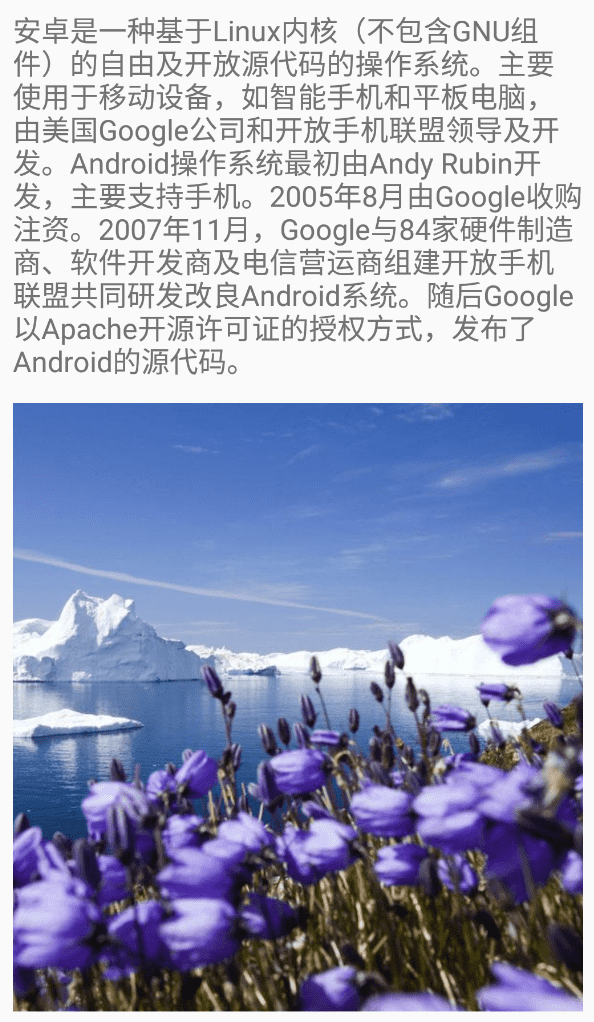
<TextView

    android:layout_width="match_parent"

    android:layout_height="wrap_content"

    android:drawableBottom="@mipmap/bg"

    android:drawablePadding="16dp"

    android:text="@string/long_text"

    android:textSize="20sp" />
除了上述的drawableBottom, TextView还提供了drawableEnd, drawableLeft, drawableRight等属性设置图片在文字的位置,另外drawablePadding用于设置文本与图像之间的间距。
在TextView中为文本添加超链接

- resource添加链接文本
<string name="link_text">Link is here. <a href="https://www.baidu.com/">百度一下</a></string>
- 添加Textview
<TextView

    android:id="@+id/tv_link"

    android:layout_width="match_parent"

    android:layout_height="wrap_content"

    android:text="@string/link_text"

    android:textSize="20sp" />
- 在onCreate方法里面设置movementMethod
tv_link.movementMethod = LinkMovementMethod.getInstance()
禁止在EditText中插入非法文字
- 定义EditView
<EditText

    android:id="@+id/et_money"

    android:layout_width="match_parent"

    android:layout_height="wrap_content"

    android:autofillHints="edit"

    android:hint="@string/edit_hint"

    android:inputType="numberDecimal"

    android:textSize="20sp" />
- 添加InputFilter类,定义过滤规则
package com.huhx.wusq.activity

import android.text.InputFilter

import android.text.Spanned

class InputFilterMinMax(min: Float, max: Float) : InputFilter {

    private var min: Float = 0.0F

    private var max: Float = 0.0F

    init {

        this.min = min

        this.max = max

    }

    override fun filter(source: CharSequence, start: Int, end: Int, dest: Spanned, dstart: Int, dend: Int): CharSequence? {

        try {

            val input = (dest.subSequence(0, dstart).toString() + source + dest.subSequence(dend, dest.length)).toFloat()

            if (isInRange(min, max, input))

                return null

        } catch (nfe: NumberFormatException) {

        }

        return ""

    }

    private fun isInRange(a: Float, b: Float, c: Float): Boolean {

        return if (b > a) c in a..b else c in b..a

    }

}
- 在onCreate方法中设置EditView的filters属性
et_money.filters = arrayOf<InputFilter>(InputFilterMinMax(0.0F, 20.0F))
使用AutoCompleteTextView实现自动提示
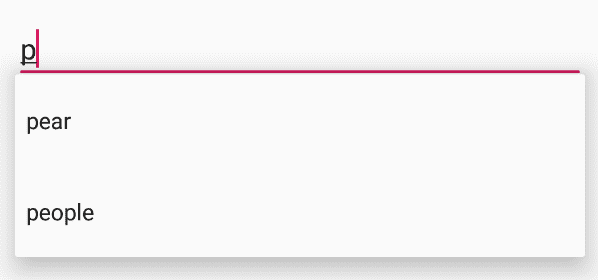
- 添加AutoCompleteTextView
<AutoCompleteTextView

    android:id="@+id/actv_search"

    android:layout_width="match_parent"

    android:layout_height="wrap_content"

    android:completionThreshold="1"

    android:hint="@string/auto_complete_hint"

    android:inputType="text"

    android:textSize="20sp" />
completionThreshold为1,表示输入第一个字符时触发自动提示。
- 在onCreate中设置AutoCompleteTextView的adapter
class MainActivity : AppCompatActivity() {

    private val myArray = arrayOf("apple", "watermelon", "orange", "pear", "cat", "dog", "fish", "people")

    override fun onCreate(savedInstanceState: Bundle?) {

        super.onCreate(savedInstanceState)

        setContentView(R.layout.main_activity)

        val adapter = ArrayAdapter<String>(this, android.R.layout.simple_dropdown_item_1line, myArray)

        actv_search.setAdapter(adapter)

    }

}
在EditText右端设置输入提示内容和图标
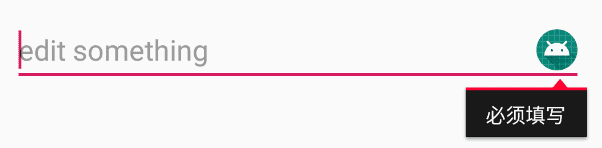
- 添加EditView
<EditText

    android:id="@+id/et_message"

    android:layout_width="match_parent"

    android:layout_height="wrap_content"

    android:autofillHints="edit"

    android:hint="@string/edit_hint"

    android:inputType="text"

    android:textSize="20sp" />
- 在onCreate中设置EditView的属性
val drawable = resources.getDrawable(R.mipmap.ic_launcher, theme)

drawable.setBounds(0, 0, 72, 72)

et_message.setError("必须填写", drawable)
android使用---->常用组件1的更多相关文章
- android开发常用组件【持续更新中。。。】
UI相关 图片 Android-Universal-Image-Loader:com.nostra13.universalimageloader:异步加载.缓存.显示图片 ImageLoader:co ...
- android开发常用组件(库)推荐
版本兼容:官方 support 全家桶 网络请求:Android-Async-Http.Retrofit.OkHttp.Volley图片加载:Glide 和 Universal-Image-Loade ...
- Android常用组件
UI相关 图片 Android-Universal-Image-Loader:com.nostra13.universalimageloader:异步加载.缓存.显示图片 ImageLoader:co ...
- Android常用组件【转】
UI相关 图片 Android-Universal-Image-Loader:com.nostra13.universalimageloader:异步加载.缓存.显示图片 ImageLoader:co ...
- React Native常用组件在Android和IOS上的不同
React Native常用组件在Android和IOS上的不同 一.Text组件在两个平台上的不同表现 1.1 height与fontSize 1.1.1只指定font,不指定height 在这种情 ...
- Android常用组件Broadcast介绍
一.Broadcast简介 Broadcast是Android的四大组件之一.可分为: 1.普通广播 发送一个广播,所有监听该广播的广播接收者都可以监听到改广播. 2.异步广播 当处理完之后的Inte ...
- Android中Intent组件详解
Intent是不同组件之间相互通讯的纽带,封装了不同组件之间通讯的条件.Intent本身是定义为一个类别(Class),一个Intent对象表达一个目的(Goal)或期望(Expectation),叙 ...
- Android之桌面组件AppWidget
转载:Android之桌面组件App Widget初探 Android开发应用除了程序应用,还有App Widget应用.好多人会开发程序应用而不会开发App Widget应用.本帖子就是帮助大家学习 ...
- 详解 Android 的 Activity 组件
Activity 的生命周期 和 J2ME 的 MIDlet 一样,在 android 中,Activity 的生命周期交给系统统一管理.与 MIDlet 不同的是安装在 android 中的所有的 ...
- 第18讲- UI常用组件之EditText
第18讲UI常用组件之EditText 三.文本输入框EditText EditTex类继承自TextView.EditText是接受用户输入信息的最重要控件.在html当中,相当于<input ...
随机推荐
- SQL 之 SQL server 中 遇到字段的值为null 遇到的坑
SQL server 中,如果查询或筛选的条件中,某字段的值为NULL,如何处理?又有哪些坑需要避免呢? 直接上坑 : NULL 与其他任何类型进行逻辑判断: [解释]: NULL表示值未知,和空字符 ...
- 出现SocketTimeoutException后一直无法在连接服务器
在做接入sdk功能的时候,经常出现一个问题,内网向外网服务器建立连接并发送数据经常会报SocketTimeoutException这个错误,且一旦出现便大几率再也连不上了.修改之前的代码为: publ ...
- JDBC与JPA--初学JPA
最近工程中用到JPA,头一次接触,踩了不少坑.刚好复习到JDBC,发现JPA用起来真是很简单.就对比一下这两者的区别 总结:JDBC是更接近数据库SQL的抽象,使用时依然使用的是SQL.优点是靠近 ...
- 使用 nvm 管理 node.js 版本
简介 在实际的前端开发过程中,可能会经常遇见 node.js 的版本问题,不同的项目需要使用不同的 node.js 版本. 直接安装的话,只能安装和使用 node.js 的一个版本.可以使用 nvm ...
- seleniumUI自动化学习记录
2019.2.9 尝试了一个启动浏览器并打开指定网址的程序: 这里首先要注意的就是浏览器的版本和selenium jar包的版本必须符合才行,不然会报错 2019.9.16 必须要下载相应的chrom ...
- 文献学习——A Deep Dive into Conflict Generating Decisions
A Deep Dive into Conflict Generating Decisions Md. Solimul Chowdhury, Martin Müller, Jia-Huai You:A ...
- 项目:表格打印(字符图网格进阶、rjust、列表中最长的字符串长度)
项目要求:编写一个名为 printTable()的函数,它接受字符串的列表的列表,将它显示在组织良好的表格中,每列右对齐. tableData = [['apples', 'oranges', 'ch ...
- P2504 聪明的猴子
题目描述 在一个热带雨林中生存着一群猴子,它们以树上的果子为生.昨天下了一场大雨,现在雨过天晴,但整个雨林的地表还是被大水淹没着,部分植物的树冠露在水面上.猴子不会游泳,但跳跃能力比较强,它们仍然可以 ...
- 「进阶」缓解眼睛疲劳,防蓝光保护视力,关爱健康!- CareUEyes
软件官网地址:https://care-eyes.com/ 显示 对于显示页面来说 8 个模式下面都有对应的介绍说明,不再介绍.笔者建议软件调节之前,先退出软件,用系统自带的亮度调节,进入电源选项中进 ...
- PHP 中if的多种写法
第一种 最普遍的写法 if(condition){ 代码块1 }else{ 代码块2 } 第二种 if(condition) 代码行1;else 代码行2;end; 第三种 if(condition) ...