
使用 Spring Cloud LoadBalancer 实现客户端负载均衡
使用 Spring Cloud LoadBalancer 实现客户端负载均衡
作者:Grey
原文地址:
博客园:使用 Spring Cloud LoadBalancer 实现客户端负载均衡
CSDN:使用 Spring Cloud LoadBalancer 实现客户端负载均衡
背景
在Spring Cloud G 版发布时提到,
Spring Cloud Netflix 那套组件很多都进入了维护期,如下表所示
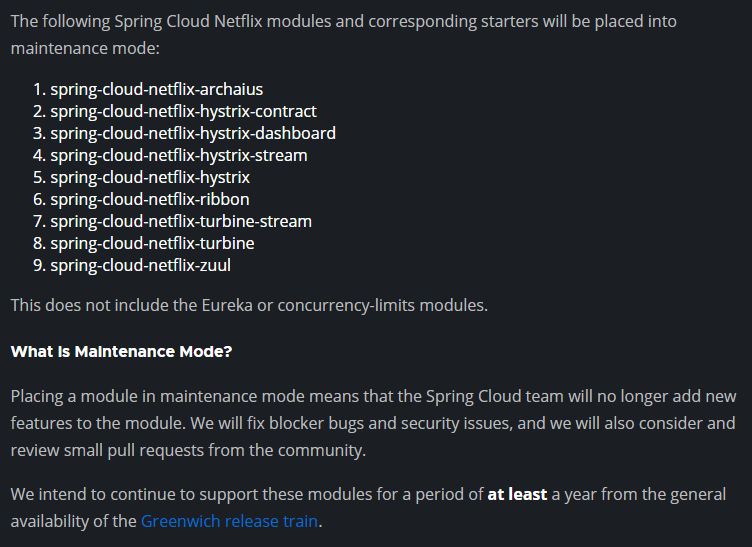
同时,针对一些组件,Spring 官方给出了一些替代方案
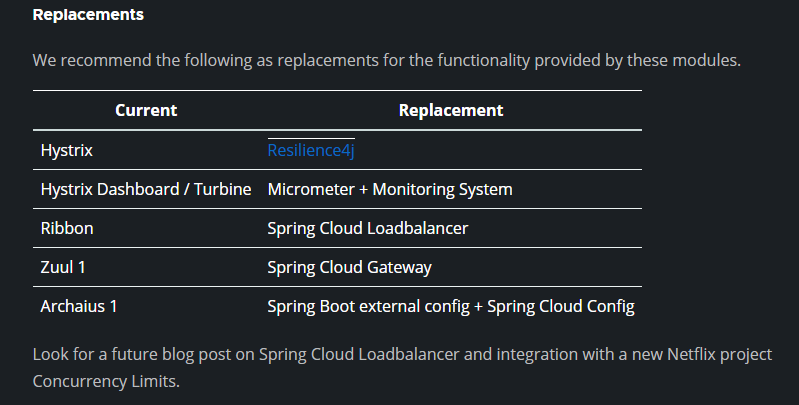
针对 spring-cloud-ribbon 这个负载均衡组件,Spring 官方提出的替换解决方案是 Spring Cloud Loadbalancer。本文主要通过一个示例介绍了 Spring Cloud Loadbalancer 的基础使用。
环境
JDK 1.8+
Maven 3.5+
Spring Boot 版本:2.7.5
Spring Cloud 版本:2021.0.5
项目结构和说明
- spring-cloud-loadbalanced-usage:父项目名称
- server : 服务端端模块
- src/
- pom.xml
- client : 客户端模块
- src/
- pom.xml
- pom.xml:父项目 pom 配置
- server : 服务端端模块
流程
整个过程如下示例图

注:Spring Cloud Loadbalancer 是在客户端实现负载均衡策略。
代码说明
服务端主要暴露一个服务,未做特殊配置
    @GetMapping("/greeting")

    public String greet() {

        log.info("Access /greeting");

        int randomNum = rand.nextInt(greetings.size());

        return greetings.get(randomNum);

    }
客户端的核心配置如下,主要是针对负载均衡配置:
package git.snippet.client.config;

import org.springframework.cloud.client.DefaultServiceInstance;

import org.springframework.cloud.client.ServiceInstance;

import org.springframework.cloud.client.loadbalancer.LoadBalanced;

import org.springframework.cloud.loadbalancer.annotation.LoadBalancerClient;

import org.springframework.cloud.loadbalancer.core.ServiceInstanceListSupplier;

import org.springframework.context.annotation.Bean;

import org.springframework.context.annotation.Configuration;

import org.springframework.context.annotation.Primary;

import org.springframework.web.reactive.function.client.WebClient;

import reactor.core.publisher.Flux;

import java.util.Arrays;

import java.util.List;

@Configuration

@LoadBalancerClient(name = "server")

public class WebClientConfig {

    @LoadBalanced

    @Bean

    WebClient.Builder webClientBuilder() {

        return WebClient.builder();

    }

    @Bean

    @Primary

    ServiceInstanceListSupplier serviceInstanceListSupplier() {

        return new ServiceInstanceListSupplier() {

            @Override

            public String getServiceId() {

                return "server";

            }

            @Override

            public Flux<List<ServiceInstance>> get() {

                return Flux.just(Arrays.asList(

                        new DefaultServiceInstance(getServiceId() + "1", getServiceId(), "localhost", 8090, false),

                        new DefaultServiceInstance(getServiceId() + "2", getServiceId(), "localhost", 9092, false),

                        new DefaultServiceInstance(getServiceId() + "3", getServiceId(), "localhost", 9999, false)));

            }

        };

    }

}
其中 @LoadBalancerClient(name = "server") 指定了 服务端的名称;
getServiceId()指定了服务端的服务 ID;
serviceInstanceListSupplier()方法中列出了三个服务端实例的地址;
new DefaultServiceInstance(getServiceId() + "1", getServiceId(), "localhost", 8090, false)

new DefaultServiceInstance(getServiceId() + "2", getServiceId(), "localhost", 9092, false)

new DefaultServiceInstance(getServiceId() + "3", getServiceId(), "localhost", 9999, false)
有了这个配置,在客户端的 Controller 中,做如下注入即可
package git.snippet.client.controller;

import org.springframework.cloud.client.loadbalancer.reactive.ReactorLoadBalancerExchangeFilterFunction;

import org.springframework.web.bind.annotation.RequestMapping;

import org.springframework.web.bind.annotation.RequestParam;

import org.springframework.web.bind.annotation.RestController;

import org.springframework.web.reactive.function.client.WebClient;

import reactor.core.publisher.Mono;

@RestController

public class HiController {

    private final WebClient.Builder loadBalancedWebClientBuilder;

    private final ReactorLoadBalancerExchangeFilterFunction lbFunction;

    public HiController(WebClient.Builder loadBalancedWebClientBuilder, ReactorLoadBalancerExchangeFilterFunction lbFunction) {

        this.loadBalancedWebClientBuilder = loadBalancedWebClientBuilder;

        this.lbFunction = lbFunction;

    }

    @RequestMapping("/hi")

    public Mono<String> hi(@RequestParam(value = "name", defaultValue = "Mary") String name) {

        return loadBalancedWebClientBuilder.build().get().uri("http://server/greeting").retrieve().bodyToMono(String.class).map(greeting -> String.format("%s, %s!", greeting, name));

    }

    @RequestMapping("/hello")

    public Mono<String> hello(@RequestParam(value = "name", defaultValue = "John") String name) {

        return WebClient.builder().filter(lbFunction).build().get().uri("http://server/greeting").retrieve().bodyToMono(String.class).map(greeting -> String.format("%s, %s!", greeting, name));

    }

}
启动并测试
首先启动 server,注意:
启动 server 的时候,需要启动多实例,且每个实例要定义 VM options
实例一定义 VM options 为 -Dserver.port=8090;
实例二定义 VM options 为 -Dserver.port=9092;
实例三定义 VM options 为 -Dserver.port=9999。
如果使用 IDEA Intellij,配置方式如下

三个 Server 启动后,接下来启动 client,运行 ClientApplication,启动完毕后,多次访问: http://localhost:8888/hi
可以通过每个 server 实例的运行日志,查看到每个实例都轮流获取到了请求,实现了负载均衡。
完整代码
见:spring-cloud-loadbalancer-usage
参考文档
Spring Cloud Greenwich.RELEASE is now available
Client-Side Load-Balancing with Spring Cloud LoadBalancer
使用 Spring Cloud LoadBalancer 实现客户端负载均衡的更多相关文章
- 服务注册发现Eureka之三:Spring Cloud Ribbon实现客户端负载均衡(客户端负载均衡Ribbon之三:使用Ribbon实现客户端的均衡负载)
在使用RestTemplate来消费spring boot的Restful服务示例中,我们提到,调用spring boot服务的时候,需要将服务的URL写死或者是写在配置文件中,但这两种方式,无论哪一 ...
- Spring Cloud Ribbon实现客户端负载均衡
1.构建microservice-consumer-movie-ribbon项目,在pom.xml中引入ribbon依赖 在引入Eureka依赖的时候,默认里面含有ribbon依赖 2.添加@Load ...
- Spring Cloud 客服端负载均衡 Ribbon
一.简介 Spring Cloud Ribbon 是一个基于Http和TCP的客服端负载均衡工具,它是基于Netflix Ribbon实现的.它不像服务注册中心.配置中心.API网关那样独立部署, ...
- Spring Cloud - 切换Ribbon的负载均衡模式
Spring Cloud Ribbon是一个基于HTTP和TCP的客户端负载均衡工具,它基于Netflix Ribbon实现.通过Spring Cloud的封装,可以让我们轻松地将面向服务的REST模 ...
- 2.【Spring Cloud Alibaba】实现负载均衡-Ribbon
负载均衡的两种方式 如何实现负载均衡 目前已经实现让A总能找到B,如何实现负载均衡 负载均衡的两种方式 服务器端负载均衡 客户端负载均衡 使用Ribbo实现负载均衡 Ribbon是什么 ==Netfl ...
- Spring Cloud微服务Ribbon负载均衡/Zuul网关使用
客户端负载均衡,当服务节点出现问题时进行调节或是在正常情况下进行 服务调度.所谓的负载均衡,就是当服务提供的数量和调用方对服务进行 取舍的调节问题,在spring cloud中是通过Ribbon来解决 ...
- 4.Spring Cloud初相识--------Feign负载均衡
前言: 在上一节里,我们学习了ribbon的使用. 我们了解到ribbon是一个客户端负载均衡机制. 而我们今天要讲的Feign呢,也是一款客户端负载均衡机制. 或者这样说,Feign封装了ribbo ...
- 撸一撸Spring Cloud Ribbon的原理-负载均衡策略
在前两篇<撸一撸Spring Cloud Ribbon的原理>,<撸一撸Spring Cloud Ribbon的原理-负载均衡器>中,整理了Ribbon如何通过负载均衡拦截器植 ...
- Spring Cloud Gateway Ribbon 自定义负载均衡
在微服务开发中,使用Spring Cloud Gateway做为服务的网关,网关后面启动N个业务服务.但是有这样一个需求,同一个用户的操作,有时候需要保证顺序性,如果使用默认负载均衡策略,同一个用户的 ...
- 【Spring Cloud学习之三】负载均衡
环境 eclipse 4.7 jdk 1.8 Spring Boot 1.5.2 Spring Cloud 1.2 主流的负载均衡技术有nginx.LVS.HAproxy.F5,Spring Clou ...
随机推荐
- ASP.NET Core 6框架揭秘实例演示[34]:缓存整个响应内容
我们利用ASP.NET开发的大部分API都是为了对外提供资源,对于不易变化的资源内容,针对某个维度对其实施缓存可以很好地提供应用的性能.<内存缓存与分布式缓存的使用>介绍的两种缓存框架(本 ...
- ABAQUS和UG许可证冲突问题的解决方案
前段时间重新安装了ABAQUS,更新到了2020版本后,发现NX UG怎么突然打不开了,搜索一下,发现是两个许可证有冲突.找了很多解决方案,主要归纳为以下两种: 方法一:Lmtools修改法 先说结论 ...
- 全局索引与分区索引对于SQL性能影响的比较
KingbaseES 提供了对于分区表 global index 的支持.global index 不仅提供了对于唯一索引功能的改进(无需包含分区键),而且在性能上相比非global index (l ...
- Linux云主机安全入侵排查步骤
导语 经常有用户报障系统被植入恶意程序,如挖矿软件.ddos攻击病毒.syn映射攻击病毒等,可以按照以下流程为用户排查入侵病毒类型: 一.定位病毒进程 对于用户反馈云主机性能卡顿,CPU和内存占用较高 ...
- ClangFormat配置备份
{ # 语言 Language: Cpp, # 水平对齐表达式的操作数 AlignOperands: true, # 不对包含头文件进行排序 SortIncludes: false, # 对齐注释 A ...
- 利用C库函数time()打印当前系统动态时间
引入日期和时间头文件 #include<time.h> 用time_t定义一个存储时间的变量获取时间(以秒为单位) time_t t; time (&t); //获取1970年以来 ...
- Python数据科学手册-Pandas数据处理之简介
Pandas是在Numpy基础上建立的新程序库,提供了一种高效的DataFrame数据结构 本质是带行标签 和 列标签.支持相同类型数据和缺失值的 多维数组 增强版的Numpy结构化数组 行和列不在只 ...
- UEC++ 接口
词义广泛,用来陈述功能,选项,与其他程序结构进行沟通的方式.接口抽象出了交互结构,提供了两个未知逻辑交互的便捷性.对于编程中,如何更好的设计低耦合程序起到了至关重要的作用.设计者可以在互不关心的情况下 ...
- 【学习笔记】注意力机制(Attention)
前言 这一章看啥视频都不好使,啃书就完事儿了,当然了我也没有感觉自己学的特别扎实,不过好歹是有一定的了解了 注意力机制 由于之前的卷积之类的神经网络,选取卷积中最大的那个数,实际上这种行为是没有目的的 ...
- 使用 Docker 安装 Elastic Stack 8.0 并开始使用
文章转载自:https://mp.weixin.qq.com/s/fLnIzbbqYfILS6uCvGctXw 运行 Elasticsearch docker network create elast ...