
winform —— 连接数据库SQL Server 2008
using System.Data.SqlClient;命名空间
sqlconnection:数据连接类
sqlcommand:数据库操作类
sqldatareader:读取
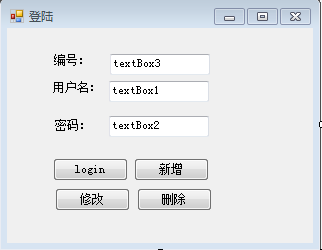
 using System;

 using System.Collections.Generic;

 using System.ComponentModel;

 using System.Data;

 using System.Data.SqlClient;

 using System.Drawing;

 using System.Linq;

 using System.Text;

 using System.Windows.Forms;

 namespace WindowsFormsApplication7

 {

     public partial class Form1 : Form

     {

         public Form1()

         {

             InitializeComponent();

         }

         private void button1_Click(object sender, EventArgs e)

         {

             string username = textBox1.Text;

             string upass = textBox2.Text;

             //第一步:连接到数据库

             SqlConnection conn = new SqlConnection("server=.;database=data1220;user=sa;pwd=");

             conn.Open();

             //第二步:写执行语句

             SqlCommand cmd = conn.CreateCommand();//通过conn创建sqlcommand对象

             cmd.CommandText = "select *from users where uname='"+username+"' and upass='"+upass+"'";

             SqlDataReader dr = cmd.ExecuteReader();//执行查询,返回sqldatareader对象

             if (dr.Read())

             {

                 MessageBox.Show("登陆成功!");

             }

             else

             {

                 MessageBox.Show("登陆失败!");

             }

             conn.Close();

         }

         private void button2_Click(object sender, EventArgs e)

         {

             //添加数据到数据库

             string username = textBox1.Text;

             string upass = textBox2.Text;

             //第一步:连接到数据库

             SqlConnection conn = new SqlConnection("server=.;database=data1220;user=sa;pwd=");

             conn.Open();

             SqlCommand cmd = conn.CreateCommand();

             cmd.CommandText = "insert into users values('"+username+"','"+upass+"')";

             int count= cmd.ExecuteNonQuery();//增删改

             if (count > )

             {

                 MessageBox.Show("添加成功!");

             }

             else

             {

                 MessageBox.Show("添加失败!");

             }

             conn.Close();

         }

         private void button3_Click(object sender, EventArgs e)

         {

             string code = textBox3.Text;

             string uname = textBox1.Text;

             string upass = textBox2.Text;

             //第一步:连接到数据库

             SqlConnection conn = new SqlConnection("server=.;database=data1220;user=sa;pwd=");

             conn.Open();

             SqlCommand cmd = conn.CreateCommand();

             cmd.CommandText = "update users set uname='"+uname+"',upass='"+upass+"' where code="+code;

             int count=cmd.ExecuteNonQuery();

             if (count > )

             {

                 MessageBox.Show("修改成功!");

             }

             else

             {

                 MessageBox.Show("修改失败!");

             }

             conn.Close();

         }

         private void button4_Click(object sender, EventArgs e)

         {

             string code = textBox3.Text;

             SqlConnection conn = new SqlConnection("server=.;database=data1220;user=sa;pwd=");

             conn.Open();

             SqlCommand cmd = conn.CreateCommand();

             cmd.CommandText = "delete from users where code="+code;

             cmd.ExecuteNonQuery();

             conn.Close();

         }

         private void Form1_Load(object sender, EventArgs e)

         {

         }

     }

 }
winform —— 连接数据库SQL Server 2008的更多相关文章
- 使用变量向SQL Server 2008中插入数据
QT通过ODBC连接数据库SQL Server 2008,进行数据插入时遇到的问题: 先把数据存入变量中,如何使用变量进行插入?插入语句该怎么写? QSqlQuery query(db); query ...
- SQL Server 2008 R2安装图解教程
一.下载SQL Server 2008 R2安装文件 cn_sql_server_2008_r2_enterprise_x86_x64_ia64_dvd_522233.iso 二.将安装文件刻录成光盘 ...
- 有关eclipse连接SQL Server 2008的问题
1.首先,提供一个链接http://blog.163.com/jackie_howe/blog/static/19949134720122261121214/ 这个链接有详细更改SQL Server ...
- sql server 2008 R2 配置开启远程访问
- SQL SERVER 2008/2012/2012R2/2014 设置开启远程连接(sa配置)
本文方案适用于Microsoft Sql Server 2008/2012/2012 r2/2014版本,以下简称MSSQLSERVER. MSSQL默认是不允许远程连接,并且禁用sa账户的.如果想要 ...
- SQL Server 2008设置 开启远程连接
SQL Server 2008默认是不允许远程连接的,sa帐户默认禁用的, 如果想要在本地用SSMS连接远程服务器上的SQL Server 2008,需要做两个部分的配置: 1,SQL Server ...
- SQL Server 2008 R2如何开启数据库的远程连接
SQL Server 2008 R2如何开启数据库的远程连接 SQL Server 2005以上版本默认是不允许远程连接的,如果想要在本地用SSMS连接远程服务器上的SQL Server 2008,远 ...
- Sql Server 2008开发版(Developer Edition)过期升级企业版(Enterprise Edition)失败后安装学习版(Express Edition)
最近一个多月,甚是悠哉,无事可做.上线的网站系统也没接到客户的反馈,反而觉得无聊之极了.上周五早上,一上QQ,就收到客户发来消息,管理平台无法登陆了.心里一惊,立马开始查找故障原因.翻看了系统日志,提 ...
- SQL Server 2008 开启数据库的远程连接
转载: 陈萌_1016----有道云笔记 SQL Server 2008默认是不允许远程连接的,如果想要在本地用SSMS连接远程服务器上的SQL Server 2008,远程连接数据库.需要做两个部 ...
随机推荐
- C++文件
参考: C++文件读写详解(ofstream,ifstream,fstream):http://blog.csdn.net/kingstar158/article/details/6859379 fs ...
- Lucene学习总结之四:Lucene索引过程分析
对于Lucene的索引过程,除了将词(Term)写入倒排表并最终写入Lucene的索引文件外,还包括分词(Analyzer)和合并段(merge segments)的过程,本次不包括这两部分,将在以后 ...
- C# 连接 数据库的时候 出现 程序出现异常"尝试读取或写入受保护的内存这通常指示其他内存已损坏" 错误
今天调试程序的时候出现了毫无征兆的就出现了如标题所述 的错误,我之前的程序 都运行的好好的,网上 找了 好多帖子 ,都是没有找到解决方案,最后 一个问一个同事 不知道他在哪儿找到了一个解决方案,说是 ...
- mac下 WebStorm下主题包安装
mac下: 主题包 1.mac下,点击桌面,使用shift+command+G 输入:~/Library/Preferences 前往(mac查找安装目录的方法,因为默认这些文件夹是隐藏的),进入We ...
- QT中的OpcDa 客户端 实现
前段时间开发Windows下的设备端软件接触到了OPC DA,虽然现在有了更强大的OPC UA,但是为了兼容一些老的设备,不得不硬着头皮去啃这个老掉牙的已经过时了的技术.本来只是想粗略了解一下,简单写 ...
- 安装mysqlsla性能分析工具
开启mysql慢查询日志 vi /etc/my.cnf slow-query-log = on #开启MySQL慢查询功能 slow_query_log_file = /data/mysql/127 ...
- linux下安装pdf
官方下载地址:http://www.foxitsoftware.cn/downloads/ 问题:下载官方包以后解压,双击不能打开,也没有任何提示. 用teminal 来打开foxitreader,t ...
- ASP.NET Ajax In Action!
创建XMLHTTPRequest 代码 Code highlighting produced by Actipro CodeHighlighter (freeware)http://www.CodeH ...
- mysql innodb_double_write特性
知识储备: 1.mysql 的crasy recovery 是通过redo log 和undo log 来完成的: 2.redo log 和undo log的记录的是对页面的物理操作:如在1024号p ...
- What is an http upgrade?
HTTP Upgrade is used to indicate a preference or requirement to switch to a different version of HTT ...