
RESTful API实现
RESTful API实现
ASP.NET Core Web API 开发-RESTful API实现
REST 介绍:
符合REST设计风格的Web API称为RESTful API。
具象状态传输(英文:Representational State Transfer,简称REST)是Roy Thomas Fielding博士于2000年在他的博士论文 "Architectural Styles and the Design of Network-based Software Architectures" 中提出来的一种万维网软件架构风格。
目前在三种主流的Web服务实现方案中,因为REST模式与复杂的SOAP和XML-RPC相比更加简洁,越来越多的web服务开始采用REST风格设计和实现。例如,Amazon.com提供接近REST风格的Web服务执行图书查询;雅虎提供的Web服务也是REST风格的。
符合REST设计风格的Web API称为RESTful API。它从以下三个方面资源进行定义:
直观简短的资源地址:URI,比如:http://example.com/resources/。
传输的资源:Web服务接受与返回的互联网媒体类型,比如:JSON,XML,YAML等。
对资源的操作:Web服务在该资源上所支持的一系列请求方法(比如:POST,GET,PUT或DELETE)。PUT和DELETE方法是幂等方法。GET方法是安全方法(不会对服务器端有修改,因此当然也是幂等的)。
不像基于SOAP的Web服务,RESTful Web服务并没有“正式”的标准。这是因为REST是一种架构,而SOAP只是一个协议。虽然REST不是一个标准,但大部分RESTful Web服务实现会使用HTTP、URI、JSON和XML等各种标准。
实现举例
例如,一个简单的网络商店应用,列举所有商品,
GET http://www.store.com/products呈现某一件商品,
GET http://www.store.com/product/12345下单购买,
POST http://www.store.com/order

<purchase-order>

  <item> ... </item>

</purchase-order>
常用的HTTP动词有下面五个(括号里是对应的SQL命令)
- GET(SELECT):从服务器取出资源(一项或多项)。
- POST(CREATE):在服务器新建一个资源。
- PUT(UPDATE):在服务器更新资源(客户端提供改变后的完整资源)。
- PATCH(UPDATE):在服务器更新资源(客户端提供改变的属性)。
- DELETE(DELETE):从服务器删除资源。
下面我们就来在ASP.NET Core Web API 中实现。
例子以用户为例,对用户的各个更改分别对应不同的HTTP 动词。
首先我们创建一个ASP.NET Core Web API 应用。可以参考之前博文: http://www.cnblogs.com/linezero/p/5497472.html
然后我们添加EF Core,来操作数据库。EF Core 教程:http://www.cnblogs.com/linezero/p/EntityFrameworkCore.html
首先我们来新建一个类 User.cs
    public class User

    {

        public int Id { get; set; }

        public string UserName { get; set; }

        public string Password { get; set; }

    }
然后添加EF Core引用及创建DataContext.cs,并做配置。
EF Core 1.0 已经发布了,所以引用及配置都可以更新一下。
Install-Package Microsoft.EntityFrameworkCore.Sqlite
配置对应做更新
Install-Package Microsoft.EntityFrameworkCore.Tools –Pre
  "tools": {

    "Microsoft.EntityFrameworkCore.Tools": "1.0.0-preview2-final",
最后使用dotnet ef 命令来创建数据库。
  dotnet ef migrations add MyFirstMigration

  dotnet ef database update
下面就来正式Web API 的开发。
这里我们添加一个Web API 控制器 UsersController 。
会默认为我们生成GET POST PUT DELETE 对应的方法。这里我们就来具体实现。
UsersController.cs

    [Route("api/[controller]")]

    public class UsersController : Controller

    {

        private DataContext Context;

        public UsersController(DataContext _context)

        {

            Context = _context;

        }

        // GET: api/users

        [HttpGet]

        public IActionResult Get()

        {

            return Ok(Context.Users.ToList());

        }

        // GET api/users/5

        [HttpGet("{id}")]

        public IActionResult Get(int id)

        {

            var _user = Context.Users.FirstOrDefault(r => r.Id == id);

            if (_user == null)

                return NotFound();

            return Ok(_user);

        }

        // POST api/users

        [HttpPost]

        public IActionResult Post([FromBody]User user)

        {

            Context.Add(user);

            Context.SaveChanges();

            return Created($"api/users/{user.Id}",user);

        }

        // PUT api/users/5

        [HttpPut("{id}")]

        public IActionResult Put(int id, [FromBody]User user)

        {

            var _user = Context.Users.FirstOrDefault(r => r.Id == id);

            if (_user == null)

                return NotFound();

            _user.UserName = user.UserName;

            _user.Password = user.Password;

            Context.Update(_user);

            Context.SaveChanges();

            return Created($"api/users/{_user.Id}", _user);

        }

        // DELETE api/users/5

        [HttpDelete("{id}")]

        public IActionResult Delete(int id)

        {

            var _user = Context.Users.FirstOrDefault(r => r.Id == id);

            if (_user == null)

                return NotFound();

            Context.Remove(_user);

            Context.SaveChanges();

            return NoContent();

        }

    }
实现好以后,我们使用Chrome 应用 ARC 来调试。
增加-》Post:
{"Id":1,"UserName":"LineZero","PassWord":"123456"}
http://localhost:5000/api/users
多个查询-》Get:
http://localhost:5000/api/users
单个查询-》Get(int id):
http://localhost:5000/api/users/1
修改-》Put:
{"UserName":"LineZeroASPNETCore","PassWord":"123456789"}
http://localhost:5000/api/users/1
删除-》Delete:
http://localhost:5000/api/users/1
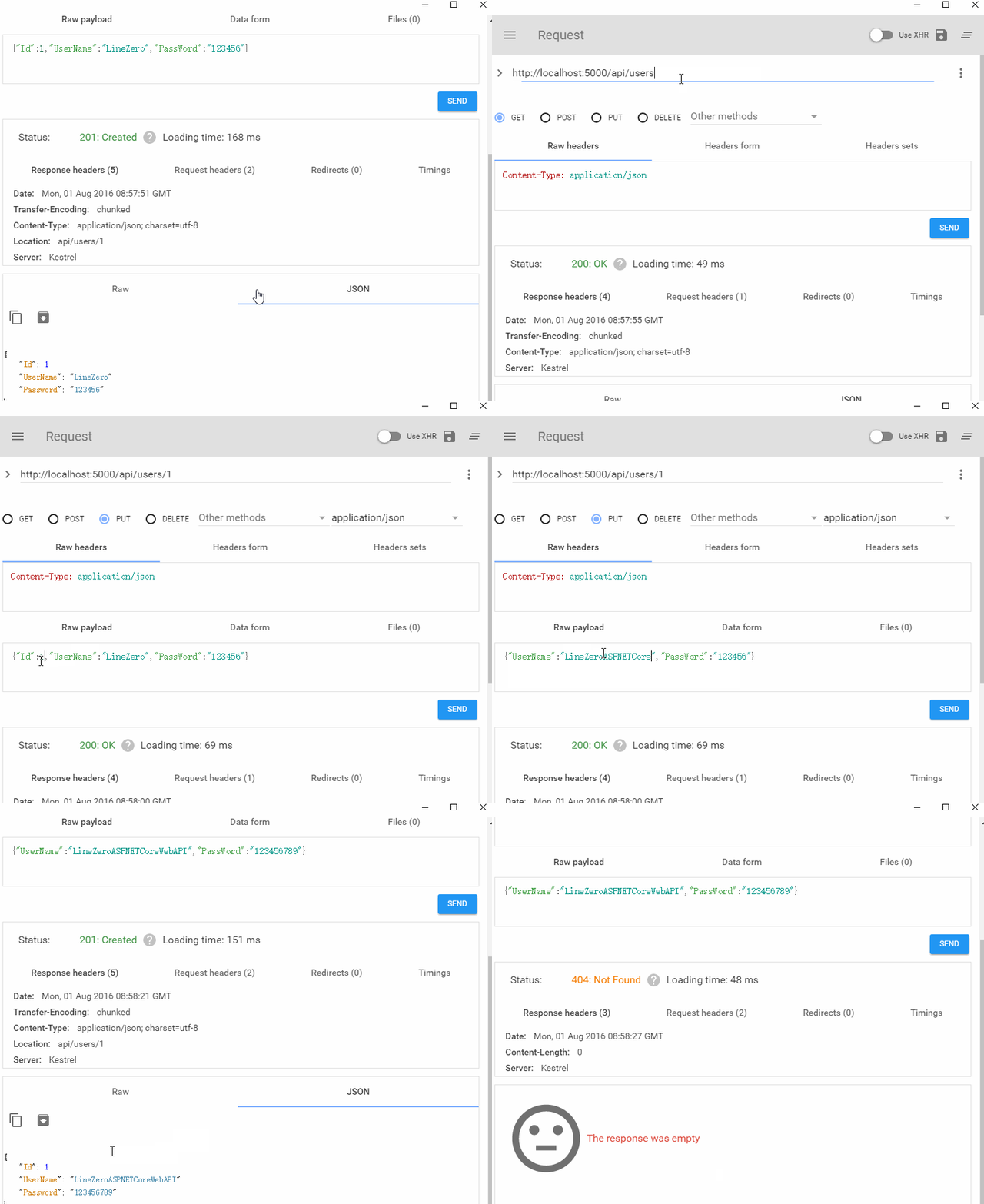
对应的Http 操作也都实现了。数据库相关操作也在代码里。
对于ASP.NET Core Web API REST 风格的一种代码实现。
ASP.NET Core Web API 默认JSON序列化的话,会将属性名自动转化为小写,这里我们只需要一句配置即可解决。
        public void ConfigureServices(IServiceCollection services)

        {

            // Add framework services.

            services.AddMvc().AddJsonOptions(r=>r.SerializerSettings.ContractResolver= new Newtonsoft.Json.Serialization.DefaultContractResolver());

        }
本文示例代码:https://github.com/linezero/Blog/tree/master/ASPNETCoreAPI
参考链接:
https://zh.wikipedia.org/wiki/REST
http://www.ruanyifeng.com/blog/2014/05/restful_api.html
RESTful API实现的更多相关文章
- (转载) RESTful API 设计指南
作者: 阮一峰 日期: 2014年5月22日 网络应用程序,分为前端和后端两个部分.当前的发展趋势,就是前端设备层出不穷(手机.平板.桌面电脑.其他专用设备......). 因此,必须有一种统一的机制 ...
- Node.js实现RESTful api,express or koa?
文章导读: 一.what's RESTful API 二.Express RESTful API 三.KOA RESTful API 四.express还是koa? 五.参考资料 一.what's R ...
- Restful Api 最佳实践
Web APIs has become an very important topic in the last year. We at M-Way Solutions are working ever ...
- 基于轻量型Web服务器Raspkate的RESTful API的实现
在上一篇文章中,我们已经了解了Raspkate这一轻量型Web服务器,今天,我们再一起了解下如何基于Raspkate实现简单的RESTful API. 模块 首先让我们了解一下"模块&quo ...
- RESTful Api 身份认证安全性设计
REST是一种软件架构风格.RESTful Api 是基于 HTTP 协议的 Api,是无状态传输.它的核心是将所有的 Api 都理解为一个网络资源.将所有的客户端和服务器的状态转移(动作)封装到 H ...
- 深入理解 RESTful Api 架构
转自https://mengkang.net/620.html 一些常见的误解 不要以为 RESTful Api 就是设计得像便于 SEO 的伪静态,例如一个 Api 的 URL 类似于 http: ...
- 使用Flask设计带认证token的RESTful API接口[翻译]
上一篇文章, 使用python的Flask实现一个RESTful API服务器端 简单地演示了Flask实的现的api服务器,里面提到了因为无状态的原则,没有session cookies,如果访问 ...
- RESTful API 设计指南
转自:http://www.ruanyifeng.com/blog/2014/05/restful_api.html 网络应用程序,分为前端和后端两个部分.当前的发展趋势,就是前端设备层出不穷(手机. ...
- RESTful API URI 设计的一些总结
非常赞的四篇文章: Resource Naming Best Practices for Designing a Pragmatic RESTful API 撰写合格的 REST API JSON 风 ...
- Restful API
http://www.ruanyifeng.com/blog/2011/09/restful 参考资料:-------以网络为基础的应用软件的架构设计. Restful API的设计与实践 字数218 ...
随机推荐
- 网易2014校园招聘杭州Java笔试题
10) ABC http://soft.chinabyte.com/os/56/12516056.shtml 11) BD. 12) AC. http://blog.sina.com.cn/s/blo ...
- win7 Oracle 11g安装及安装中遇到的问题
根据自己的系统从oracle官方下载安装包,官方地址:http://www.oracle.com/index.html win7的oracle 11g 安装包(2个): http://223.20.2 ...
- windows平台使用Microsoft Visual C++ Compiler for Python 2.7编译python扩展
在windows平台上安装python c extension的扩展包是件很痛苦的事情,一般通过安装vc/vs系列来编译C扩展,不过安装包都比较大.或者通过mingw编译,不过有时会在兼容性上出现点问 ...
- Azure File文件共享(6):使用Python开发
Azure文件共享服务提供了多种方式的访问接口,包括Powershell,.Net, Java, Python等等,本章主要介绍如何使用Python来访问Azure File存储. 关于Python环 ...
- C# 编写服务 Windows service
1.编写服务教程 http://jingyan.baidu.com/article/ea24bc395e16f8da62b331e7.html 这里不多说了. 给大家一个连接,上面有详细的教程,下面说 ...
- Linux远程桌面
发现windows下有个VNC viewer.据说是跨平台的. sudo apt-cache search VNC | grep VNC了一下.发现有一个gvncviewer的包,然后apt-get ...
- ListView.setOnItemClickListener无效
如果ListView中的单个Item的view中存在checkbox,button等view,会导致ListView.setOnItemClickListener无效, 事件会被子View捕获到,Li ...
- POJ 2533 Longest Ordered Subsequence - from lanshui_Yang
题目大意:求一个数列的最长上升子序列(严格上升). 解题思路: 方法一:O(n^2) dp[i]:表示处理到第i个位置,序列的最长上升子序列末尾为i的长度: a[]数组存储原序列 dp[i] = ma ...
- 括号匹配问题(C++、堆栈)
原文地址:http://www.cppblog.com/GUO/archive/2010/09/12/126483.html /* 括号匹配问题,比较经典,利用堆栈来实现(摘自internet) 1. ...
- hdu 2079 选课时间_母函数
题意:需要学够n学分,有k个情况(x学分,y个相同学分的课) 解法:套母函数模板 #include <iostream> #include<cstdio> using name ...