
Asp.Net请求处理机制中IsApiRuntime解析
今天看了web请求的生命周期,看完了还有些不懂,就是用反编译工具,查看封装内库的内部实现。
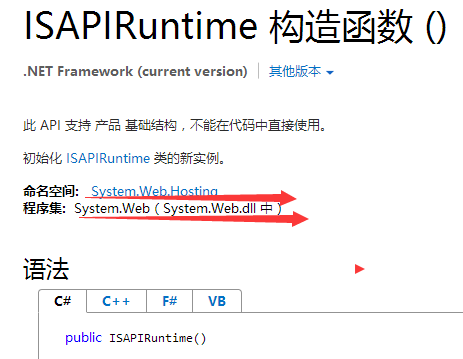
从计算机内部查到web.dll,使用反编译工具打开
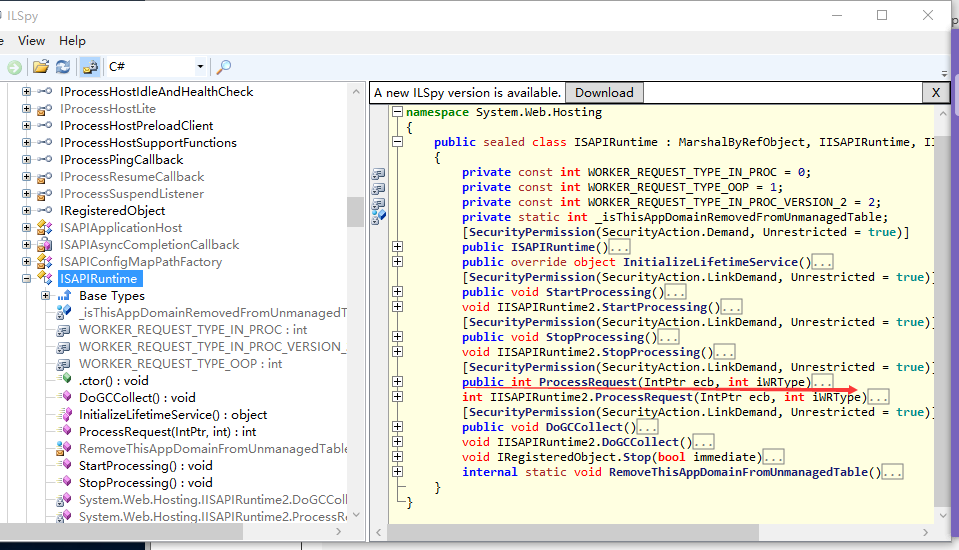
打开后
public int ProcessRequest(IntPtr ecb, int iWRType)

        {

            IntPtr intPtr = IntPtr.Zero;

            if (iWRType == )

            {

                intPtr = ecb;

                ecb = UnsafeNativeMethods.GetEcb(intPtr);

            }
            //首先创建ISAPIWorkerRequest,将请求报文封装在内,调用CreateWorkerRequest方法来实现,

            ISAPIWorkerRequest iSAPIWorkerRequest = null;

            int result;

            try

            {

                bool useOOP = iWRType == ;

                iSAPIWorkerRequest = ISAPIWorkerRequest.CreateWorkerRequest(ecb, useOOP);

                iSAPIWorkerRequest.Initialize();

                string appPathTranslated = iSAPIWorkerRequest.GetAppPathTranslated();

                string appDomainAppPathInternal = HttpRuntime.AppDomainAppPathInternal;

                if (appDomainAppPathInternal == null || StringUtil.EqualsIgnoreCase(appPathTranslated, appDomainAppPathInternal))

                {
                    //调用ProcessRequestNoDemand方法,并将封装的请求报文传入进去

                    HttpRuntime.ProcessRequestNoDemand(iSAPIWorkerRequest);

                    result = ;

                }

                else

                {

                    HttpRuntime.ShutdownAppDomain(ApplicationShutdownReason.PhysicalApplicationPathChanged, SR.GetString("Hosting_Phys_Path_Changed", new object[]

                    {

                        appDomainAppPathInternal,

                        appPathTranslated

                    }));

                    result = ;

                }

            }

            catch (Exception ex)

            {

                try

                {

                    WebBaseEvent.RaiseRuntimeError(ex, this);

                }

                catch

                {

                }

                if (iSAPIWorkerRequest == null || !(iSAPIWorkerRequest.Ecb == IntPtr.Zero))

                {

                    throw;

                }

                if (intPtr != IntPtr.Zero)

                {

                    UnsafeNativeMethods.SetDoneWithSessionCalled(intPtr);

                }

                if (ex is ThreadAbortException)

                {

                    Thread.ResetAbort();

                }

                result = ;

            }

            return result;

        }
在CreateWorkerRequest内部,根据不同的IIS版本创建不同的对象

// System.Web.Hosting.ISAPIWorkerRequest

internal static ISAPIWorkerRequest CreateWorkerRequest(IntPtr ecb, bool useOOP)
{

    ISAPIWorkerRequest result;

    if (useOOP)

    {

        EtwTrace.TraceEnableCheck(EtwTraceConfigType.DOWNLEVEL, IntPtr.Zero);

        if (EtwTrace.IsTraceEnabled(, ))

        {

            EtwTrace.Trace(EtwTraceType.ETW_TYPE_APPDOMAIN_ENTER, ecb, Thread.GetDomain().FriendlyName, null, false);

        }

        result = new ISAPIWorkerRequestOutOfProc(ecb);

    }

    else

    {

        int num = UnsafeNativeMethods.EcbGetVersion(ecb) >> ;

        if (num >= )

        {

            EtwTrace.TraceEnableCheck(EtwTraceConfigType.IIS7_ISAPI, ecb);

        }

        else

        {

            EtwTrace.TraceEnableCheck(EtwTraceConfigType.DOWNLEVEL, IntPtr.Zero);

        }

        if (EtwTrace.IsTraceEnabled(, ))

        {

            EtwTrace.Trace(EtwTraceType.ETW_TYPE_APPDOMAIN_ENTER, ecb, Thread.GetDomain().FriendlyName, null, true);

        }

        if (num >= )

        {

            result = new ISAPIWorkerRequestInProcForIIS7(ecb);

        }

        else

        {

            if (num == )

            {

                result = new ISAPIWorkerRequestInProcForIIS6(ecb);

            }

            else

            {

                result = new ISAPIWorkerRequestInProc(ecb);

            }

        }

    }

    return result;

}
进入ProcessRequestNoDemand内部
// System.Web.HttpRuntime

internal static void ProcessRequestNoDemand(HttpWorkerRequest wr)

{

    RequestQueue requestQueue = HttpRuntime._theRuntime._requestQueue;

    wr.UpdateInitialCounters();

    if (requestQueue != null)

    {

        wr = requestQueue.GetRequestToExecute(wr);

    }

    if (wr != null)

    {

        HttpRuntime.CalculateWaitTimeAndUpdatePerfCounter(wr);

        wr.ResetStartTime();
       //调用ProcessRequestNow方法,并将封装的请求报文传入

        HttpRuntime.ProcessRequestNow(wr);

    }

}
// System.Web.HttpRuntime

internal static void ProcessRequestNow(HttpWorkerRequest wr)

{

    HttpRuntime._theRuntime.ProcessRequestInternal(wr);

}
进入ProcessRequestInternal方法内部
// System.Web.HttpRuntime

private void ProcessRequestInternal(HttpWorkerRequest wr)

{

    Interlocked.Increment(ref this._activeRequestCount);

    if (this._disposingHttpRuntime)

    {

        try

        {

            wr.SendStatus(, "Server Too Busy");

            wr.SendKnownResponseHeader(, "text/html; charset=utf-8");

            byte[] bytes = Encoding.ASCII.GetBytes("<html><body>Server Too Busy</body></html>");

            byte[] expr_45 = bytes;

            wr.SendResponseFromMemory(expr_45, expr_45.Length);

            wr.FlushResponse(true);

            wr.EndOfRequest();

        }

        finally

        {

            Interlocked.Decrement(ref this._activeRequestCount);

        }

        return;

    }

    HttpContext httpContext;

    try

    {
    //根据请求报文创建HttpContext对象,如果创建出错误就会返回404
     httpContext = new HttpContext(wr, false);

    }

    catch

    {

        try

        {

            wr.SendStatus(, "Bad Request");

            wr.SendKnownResponseHeader(, "text/html; charset=utf-8");

            byte[] bytes2 = Encoding.ASCII.GetBytes("<html><body>Bad Request</body></html>");

            byte[] expr_A5 = bytes2;

            wr.SendResponseFromMemory(expr_A5, expr_A5.Length);

            wr.FlushResponse(true);

            wr.EndOfRequest();

            return;

        }

        finally

        {

            Interlocked.Decrement(ref this._activeRequestCount);

        }

    }

    wr.SetEndOfSendNotification(this._asyncEndOfSendCallback, httpContext);

    HostingEnvironment.IncrementBusyCount();

    try

    {

        try

        {
            //将第一次请求设置为false

            this.EnsureFirstRequestInit(httpContext);

        }

        catch

        {

            if (!httpContext.Request.IsDebuggingRequest)

            {

                throw;

            }

        }
        //初始化Response

        httpContext.Response.InitResponseWriter();
        //根据HttpApplicationFactory创建Application实例

        IHttpHandler applicationInstance = HttpApplicationFactory.GetApplicationInstance(httpContext);

        if (applicationInstance == null)

        {

            throw new HttpException(SR.GetString("Unable_create_app_object"));

        }

        if (EtwTrace.IsTraceEnabled(, ))

        {

            EtwTrace.Trace(EtwTraceType.ETW_TYPE_START_HANDLER, httpContext.WorkerRequest, applicationInstance.GetType().FullName, "Start");

        }

        if (applicationInstance is IHttpAsyncHandler)

        {

            IHttpAsyncHandler httpAsyncHandler = (IHttpAsyncHandler)applicationInstance;

            httpContext.AsyncAppHandler = httpAsyncHandler;

            httpAsyncHandler.BeginProcessRequest(httpContext, this._handlerCompletionCallback, httpContext);

        }

        else

        {

            applicationInstance.ProcessRequest(httpContext);

            this.FinishRequest(httpContext.WorkerRequest, httpContext, null);

        }

    }

    catch (Exception e)

    {

        httpContext.Response.InitResponseWriter();

        this.FinishRequest(wr, httpContext, e);

    }

}
//进入EnsureFirstRequestInit
// System.Web.HttpRuntime

private void EnsureFirstRequestInit(HttpContext context)

{

    if (this._beforeFirstRequest)

    {

        bool flag = false;

        try

        {

            Monitor.Enter(this, ref flag);

            if (this._beforeFirstRequest)

            {

               //设置第一次请求为false

                this._firstRequestStartTime = DateTime.UtcNow;

                this.FirstRequestInit(context);

                this._beforeFirstRequest = false;

                context.FirstRequest = true;

            }

        }

        finally

        {

            if (flag)

            {

                Monitor.Exit(this);

            }

        }

    }

}
Application中有26个方法,从上到下有19个请求管道事件
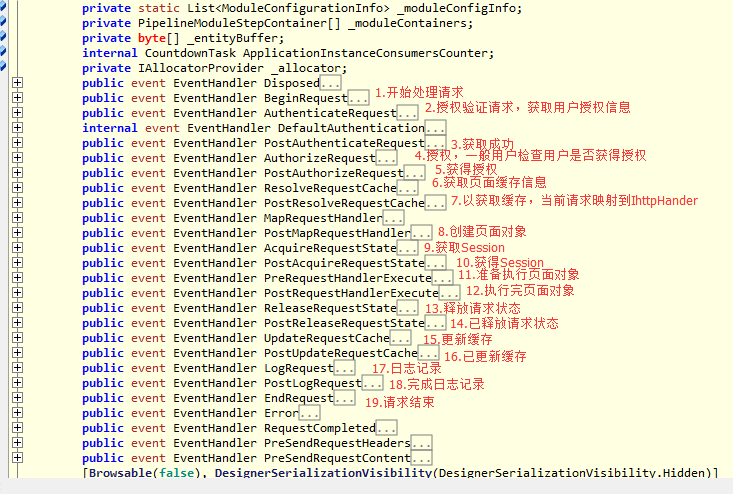
1.熟悉请求管道实现程序运行的全过程:
(1):BeginRequest: 开始处理请求。当ASP.NET运行时接收到新的HTTP请求的时候引发这个事件
(2):AuthenticateRequest授权验证请求,获取用户授权信息。当ASP.NET 运行时准备验证用户身份的时候引发这个事件
(3):PostAuthenticateRequest获取成功
(4): AunthorizeRequest 授权,一般来检查用户是否获得权限。当ASP.NET运行时准备授权用户访问资源的时候引发这个事件
(5):PostAuthorizeRequest:获得授权
(6):ResolveRequestCache:获取页面缓存结果
(7):PostResolveRequestCache 已获取缓存
(8):PostMapRequestHandler 创建页面对象
(9):AcquireRequestState 获取Session-----先判断当前页面对象是否实现了IRequiresSessionState接口,如果实现了,则从浏览器发来的请求报文体中获得SessionID,并到服务器的Session池中获得对应的Session对象,最后赋值给HttpContext的Session属性
(10)PostAcquireRequestState 获得Session
(11)PreRequestHandlerExecute:准备执行页面对象执行页面对象的ProcessRequest方法。在ASP.NET开始执行HTTP请求的处理程序之前引发这个事件。在这个事件之后,ASP.NET 把该请求转发给适当的HTTP处理程序。
(12)PostRequestHandlerExecute 执行完页面对象了。在HTTP处理程序结束执行的时候引发这个事件
(13)ReleaseRequestState 释放请求状态
(14)PostReleaseRequestState 已释放请求状态
(15)UpdateRequestCache 更新缓存
(16)PostUpdateRequestCache 已更新缓存
(17)LogRequest 日志记录
(18)PostLogRequest 已完成日志
(19)EndRequest 完成。把响应内容发送到客户端之前引发这个事件。
转载一篇比较详细的生命周期文章:http://www.cnblogs.com/Cwj-XFH/p/6752177.html
Asp.Net请求处理机制中IsApiRuntime解析的更多相关文章
- 从Nginx的Web请求处理机制中剖析多进程、多线程、异步IO
Nginx服务器web请求处理机制 从设计架构来说,Nginx服务器是与众不同的.不同之处一方面体现在它的模块化设计,另一方面,也是最重要的一方面,体现在它对客户端请求的处理机制上. Web服务器和客 ...
- asp.net请求响应模型原理随记回顾
asp.net请求响应模型原理随记回顾: 根据一崇敬的讲师总结:(会存在些错误,大家可以做参考) 1.-当在浏览器输入url后,客户端会将请求根据http协议封装成为http请求报文.并通过主sock ...
- Asp.Net请求响应过程
Asp.Net请求响应过程 在之前,我们写了自己的Asp.Net框架,对整个流程有了一个大概的认识.这次我们来看一下Asp.Net整个请求处理过程是怎么样的. 浏览器封装请求报文,发送请求到达服务器, ...
- [译] ASP.NET 生命周期 – ASP.NET 请求生命周期(二)
ASP.NET 请求生命周期 全局应用类也可以用来跟踪每个独立请求的生命周期,包括请求从 ASP.NET 平台传递到 MVC 框架.ASP.NET 框架会创建一个定义在 Global.asax 文件中 ...
- NET/ASP.NET Routing路由(深入解析路由系统架构原理)(转载)
NET/ASP.NET Routing路由(深入解析路由系统架构原理) 阅读目录: 1.开篇介绍 2.ASP.NET Routing 路由对象模型的位置 3.ASP.NET Routing 路由对象模 ...
- ASP.Net请求小周期
另一篇另篇2 ASP.NET请求处理全过程 一个ASP.NET请求过程中,从浏览器中发出一个Web请求 到 这个请求被响应并显示在浏览器中的过程中究竟会发生哪些不同的事件,当我们进入这个事件之旅时,我 ...
- ASP.NET请求过程-从源码角度研究MVC路由、Handler、控制器
路由常用对象 RouteBase 用作表示 ASP.NET 路由的所有类的基类. 就是路由的一个基础抽象类. // // 摘要: // 用作表示 ASP.NET 路由的所有类的基类. [ ...
- ASP.NET请求过程-Handler
什么事Handler asp.net程序所有的请求都是handler处理的.以前的webform我们访问的地址是xxxxx.aspx地址,其实他也会到一个handler(我们写的业务代码都在handl ...
- 【深入ASP.NET原理系列】--ASP.NET请求管道、应用程序生命周期、整体运行机制
微软的程序设计和相应的IDE做的很棒,让人很快就能有生产力..NET上手容易,生产力很高,但对于一个不是那么勤奋的人,他很可能就不再进步了,没有想深入下去的动力,他不用去理解整个框架和环境是怎么执行的 ...
随机推荐
- Quartz.NET 2.0 作业调度框架使用
Quartz.NET是一个开源的作业调度框架,是 OpenSymphony 的 Quartz API 的.NET移植,它用C#写成,可用于winform和asp.net应用中.它提供了巨大的灵活性而不 ...
- SharePoint 2013 WebPart属性面板配置
为WebPart添加右侧的属性面板,方便将来对于WebPart的配置,我们只需要在CustomWebPart.cs文件里面,声明一下变量即可: private string url = string. ...
- nutch2.3命令参数解析
nutch中可执行的命令列表 [root@ewanalysis ~]# nutch Usage: nutch COMMAND where COMMAND is one of: inject injec ...
- Oracle 性能优化 — 统计数据收集[Z]
ORACLE优化器的优化方式有两大类,即基于规则的优化方式(Rule-Based Optimization,简称为RBO)和基于代价的优化方式(Cost-Based Optimization,简称为C ...
- 在什么情况下使用exist和in
http://www.itpub.net/thread-406784-4-1.htmlYou Asked (Jump to Tom's latest followup) Tom: can you gi ...
- JAVA G1收集器 第11节
JAVA G1收集器 第11节 上两章我们讲了新生代和年老代的收集器,那么这一章的话我们就要讲一个收集范围涵盖整个堆的收集器——G1收集器. 先讲讲G1收集器的特点,他也是个多线程的收集器,能够充分利 ...
- Netty4.X 学习(一)
Server: import io.netty.buffer.ByteBuf; import io.netty.channel.ChannelHandlerContext; import io.net ...
- 编写程序输入一个5x5的矩阵,将最大元素与中心元素交换,并按行列对齐输出。
编写程序输入一个5x5的矩阵,将最大元素与中心元素交换,并按行列对齐输出. 题目描述 编写程序输入一个5x5的矩阵,将最大元素与中心元素交换,并按行列对齐输出. 输入描述 编写程序输入一个5x5的矩阵 ...
- Linux学习之域名解析命令
(1) /etc/hosts :记录hostname对应的ip地址 /etc/resolv.conf :设置DNS服务器的ip地址 /etc/host.conf :指定域名解析的顺序(是从本地的hos ...
- 纯CSS 贴底部的布局(兼容各个浏览器包括IE6)
<!DOCTYPE html PUBLIC "-//W3C//DTD XHTML 1.0 Strict//EN" "http://www.w3.org/TR/xht ...