
<Yarn> <Capacity Scheduler> <Source Code>
Yarn capacity scheduler
- 首先要知道, [Attention: RM有两个组件,其中Scheduler完全就只是负责资源的分配;ApplicationsManager则负责接受application,选取ApplicationMaster,监控重启AM。]
- CapacityScheduler的优点就是灵活,集群的利用率高;缺点也是由其灵活性造成的,因为CapacityScheduler不支持抢占式调度,必须等上一个任务主动释放资源。

- 可以看出,只要提交的app数没有达到上限,就能够一直提交app到集群,只是这些app会处于accepted的状态,一直pending,直到ResourceManager给它分配资源。
- 因此Scheduler实际上是会不断地schedule,然后分配资源给那些集群,在具体分配的时候,在queue内部可能会考虑优先级,然后结合FIFO。
AsyncScheduleThread
- 在CapacityScheduler内部有个AsyncScheduleThread 这个异步Scheduler线程会不断地调schedule(cs)方法。
schedule(cs)
- // Schedule on all nodes by starting at a random point.
- static void schedule(CapacityScheduler cs)
- // first randomize the start point
- Collection<FiCaSchedulerNode> nodes = cs.getAllNodes().values() // get all the nodes in the cluster
- for each node: cs.allocateContainersToNode(node)
- // assign new containers... 1. check for reserved apps(for reservation see here and here. ) 2. schedule if there are no reservations
- if reservedContainer != null
- get the reserved apps according to reservedContainers
- // try to fulfill the reservation
- LeafQueue queue = ((LeafQueue) reservedApplication.getQueue();
- CSAssignment assignment = queue.assignContainers(clusterResource, node, false); // assignContainers(Resource clusterResource, FiCaSchedulerNode node, boolean needToUnreserve);
- // if our queue cannot access this node, just return
- // check for reserved resources
- TBD...
- // try to schedule more if there are no reservations to fulfill
- if (node.getReservedContainer() == null)
- if (calculator.computeAvailableContainers(node.getAvailableResource(), minimumAllocation) > 0), then // computeAvailableContainers(Resource available, Resource required), as for DominantResourceCalculator, return the min ratio of mem & vcores.
- assignContainers(clusterResource, node, false) // assignContainers(Resource clusterResource, FiCaSchedulerNode node)
- // if our queue cannot access this node, just return
- // check for reserved resources // TBD...
- // try to assign containers to apps in order
- for (FoCaSchedulerApp application: activeApplications)
- if (SchedulerAppUtils.isBlacklisted(application, node, LOG) // check if this resource is on blacklist, i.e. cannot run the app in this node/rack
- // schedule in priority order, this is the priority of the resourceRequest of this app
- for (Priority priority : application.getPriorities())
- ResourceRequest anyRequest = application.getResourceRequest(priority, ResourceRequest.ANY)
- Resource required = anyRequest.getCapacity()
- Set<String> requestedNodeLabels = getRequestLabelSetByExpression(anyRequest.getNodeLabelExpression());
- // compute user-limit & set headroom.
- Resource userLimit = computeUserLimitAndSetHeadroom(application, clusterResource, required, requestedNodeLabels)
- // compute user limit respect requested labels
- // TODO: need consider headroom respect labels also
- Resource userLimit = computeUserLimit(application, clusterResource, required, queueUser, requestedLabels)
- // our current capacity: equal to the max(required, queue-capacity) if we're running below capacity, equal to (usedResources + required) if running over capacity.
- // if we have labels to request(choose to use the first one).
- // else if no label on request, just use absolute capacity as capacity for nodes without label.
- // TBD...
- // max avail capacity needs to take into account usage by ancestor-siblings which are greater than their base
- // calculate absoluteMaxAvailCapacity: my max avail is min(my max capacity, unused from my parent by my siblings if they are beyond their base capacity)
- // then calculate queueMaxCap using absoluteMaxAvailCapacity
- // check canAssignToThisQueue
- // consider the intersection of queue-canAccessLabels and node-labels, if any of the label beyond queue limit, we cannot allocate on this node.
- // check user limit
- application.addSchedulingOpportunity(priority);
- // try to schedule...
- TBD...
- assignContainers(clusterResource, node, false) // assignContainers(Resource clusterResource, FiCaSchedulerNode node)
- if (calculator.computeAvailableContainers(node.getAvailableResource(), minimumAllocation) > 0), then // computeAvailableContainers(Resource available, Resource required), as for DominantResourceCalculator, return the min ratio of mem & vcores.
- FYI:
/**
 * Headroom is:
 *    min(
 *        min(userLimit, queueMaxCap) - userConsumed,
 *        queueMaxCap - queueUsedResources
 *       )
 *
 * ( which can be expressed as,
 *  min (userLimit - userConsumed, queuMaxCap - userConsumed,
 *    queueMaxCap - queueUsedResources)
 *  )
 *
 * given that queueUsedResources >= userConsumed, this simplifies to
 *
 * >> min (userlimit - userConsumed,   queueMaxCap - queueUsedResources) <<
 *
 */
addApplication
首先在CapacityScheduler随意找了个方法
synchronized addApplication(ApplicationAttemptedId applicationAttemptId, String queueName, String user)
- sanity check
- queue == null
- !queue instanceof LeafQueue
- Represents an application from the viewpoint of the scheduler. (Each running app in the RM corresponds to one instance of the FiCaScheduler class)
- FiCaSchedulerApp SchedulerApp = new FiCaSchedulerApp(applicationAttemptId, user, queue, queue.getActiveUserManager(), rmContext);
- ActiveUsersManager tracks users in the system. (An active user is defined as someone with outstanding resource requests.)
- rmContext is the context of the RM.
- submit to the queue
- try: queue.submitApplication(SchedulerApp, user, queueName)
- check queue ACLs
- synchronized(this)
- check if the queue is accepting jobs: if (getState() != QueueState.RUNNING) throw Exception
- check submission limits for queues:
- if (getNumApplications() >= getMaxApplications()) throw Exception
- check submission limits for the user on this queue
- addApplication(applictaion, user)
- user.submitApplication() : pendingApp ++; // accepted
- activateApplications():
- for each pending apps:
- check queue limit & user limit again (same as above)
- activateApplication(): --pendingApp; ++activeApp;
- for each pending apps:
- metrics.submitApp(userName, attempId): // each queue has a metrics which is an instance of QueueMetrics
- update metrics: appsSubmitted, appsFailed, appsPending
- if (parent != null) parent.submitApp(user, attemptId) // to inform the parents recursively
- try: queue.submitApplication(SchedulerApp, user, queueName)
以上,可以看到在addApplication方法内主要是判断了ACL和appNum的上限,没有resource相关的分配和判断。资源(container)的分配是由相应的applicationMaster向Resourcemanager统一请求的。ResourceRequest使用protobuf。
- 用户提交应用程序 --> ResourceManager --> ACL等检查 --> app accepted.
- 一旦Scheduler有足够的资源可以满足需求 --> app由accepted转成running --> RM为ApplicationMaster分配一个container,并负责在节点上拉起它。
- AM是每个用户作业的主进程,负责管理作业生命周期,包括动态地增加or减少资源(container),管理执行流程,处理故障和计算偏差。
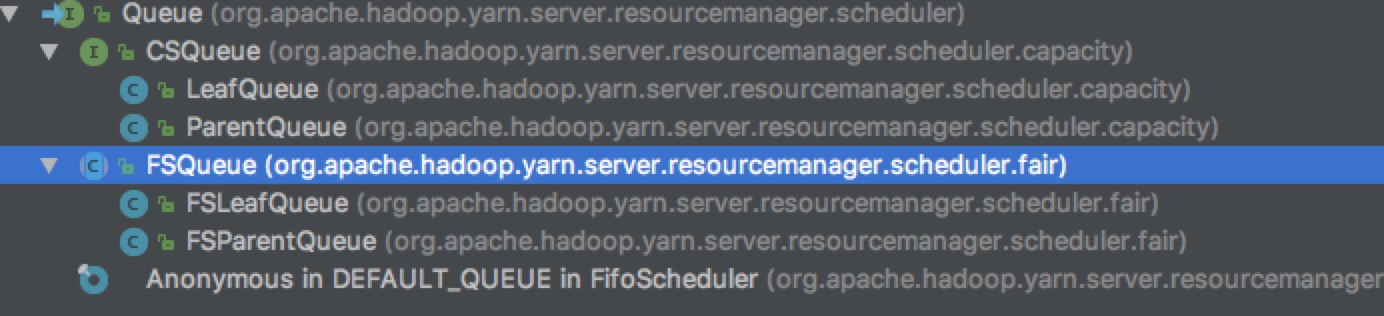
Yarn Queues
<Yarn> <Capacity Scheduler> <Source Code>的更多相关文章
- 简单物联网:外网访问内网路由器下树莓派Flask服务器
最近做一个小东西,大概过程就是想在教室,宿舍控制实验室的一些设备. 已经在树莓上搭了一个轻量的flask服务器,在实验室的路由器下,任何设备都是可以访问的:但是有一些限制条件,比如我想在宿舍控制我种花 ...
- 利用ssh反向代理以及autossh实现从外网连接内网服务器
前言 最近遇到这样一个问题,我在实验室架设了一台服务器,给师弟或者小伙伴练习Linux用,然后平时在实验室这边直接连接是没有问题的,都是内网嘛.但是回到宿舍问题出来了,使用校园网的童鞋还是能连接上,使 ...
- 外网访问内网Docker容器
外网访问内网Docker容器 本地安装了Docker容器,只能在局域网内访问,怎样从外网也能访问本地Docker容器? 本文将介绍具体的实现步骤. 1. 准备工作 1.1 安装并启动Docker容器 ...
- 外网访问内网SpringBoot
外网访问内网SpringBoot 本地安装了SpringBoot,只能在局域网内访问,怎样从外网也能访问本地SpringBoot? 本文将介绍具体的实现步骤. 1. 准备工作 1.1 安装Java 1 ...
- 外网访问内网Elasticsearch WEB
外网访问内网Elasticsearch WEB 本地安装了Elasticsearch,只能在局域网内访问其WEB,怎样从外网也能访问本地Elasticsearch? 本文将介绍具体的实现步骤. 1. ...
- 怎样从外网访问内网Rails
外网访问内网Rails 本地安装了Rails,只能在局域网内访问,怎样从外网也能访问本地Rails? 本文将介绍具体的实现步骤. 1. 准备工作 1.1 安装并启动Rails 默认安装的Rails端口 ...
- 怎样从外网访问内网Memcached数据库
外网访问内网Memcached数据库 本地安装了Memcached数据库,只能在局域网内访问,怎样从外网也能访问本地Memcached数据库? 本文将介绍具体的实现步骤. 1. 准备工作 1.1 安装 ...
- 怎样从外网访问内网CouchDB数据库
外网访问内网CouchDB数据库 本地安装了CouchDB数据库,只能在局域网内访问,怎样从外网也能访问本地CouchDB数据库? 本文将介绍具体的实现步骤. 1. 准备工作 1.1 安装并启动Cou ...
- 怎样从外网访问内网DB2数据库
外网访问内网DB2数据库 本地安装了DB2数据库,只能在局域网内访问,怎样从外网也能访问本地DB2数据库? 本文将介绍具体的实现步骤. 1. 准备工作 1.1 安装并启动DB2数据库 默认安装的DB2 ...
- 怎样从外网访问内网OpenLDAP数据库
外网访问内网OpenLDAP数据库 本地安装了OpenLDAP数据库,只能在局域网内访问,怎样从外网也能访问本地OpenLDAP数据库? 本文将介绍具体的实现步骤. 1. 准备工作 1.1 安装并启动 ...
随机推荐
- android -------- WIFI 详解
今天简单的来聊一下安卓开发中的Wifi,一些常用的基础,主要分为两部分: 1:WiFi的信息 2:WiFi的搜索和连接 现在app大多都需要从网络上获得数据.所以访问网络是在所难免.但是在访问网络之前 ...
- 04 爬虫数据存储之Mongodb
MongoDB 认识MongoDB MongoDB是一个基于分布式文件存储的数据库.由C++语言编写.旨在为WEB应用提供可扩展的高性能数据存储解决方案.MongoDB是一个介于关系数据库和非关系数据 ...
- Integer to English words leetcode java
问题描述: Convert a non-negative integer to its english words representation. Given input is guaranteed ...
- 解决gitHub下载速度慢的问题
转载:http://blog.csdn.net/x_studying/article/details/72588324 github被某个CDN被伟大的墙屏蔽所致. 解决方法: 1.访问http:// ...
- sql语句的各种模糊查询语句
一般模糊语句如下: SELECT 字段 FROM 表 WHERE 某字段 Like 条件 其中关于条件,SQL提供了四种匹配模式: 1.%:表示任意0个或多个字符.可匹配任意类型和长度的字符,有些情况 ...
- excel导入 导出
PHP页面 //设置header header("content-Type:text/html;charset=utf-8"); //设置文件大小的限制 ini_set(" ...
- java集合类整理
LinkedList 优点:插入删除迅速 缺点:不适合随机访问 List<String> staff = new LinkedList<String>(); staff.add ...
- jQuery-全屏滚动插件【fullPage.js】API 使用方法总结
jQuery-全屏滚动插件[fullPage.js]API 使用方法总结 jQuery-全屏滚动插件fullPage.js使用方法总结 作者github及下载地址:https://github.c ...
- python3线程启动与停止
转自: https://blog.csdn.net/weixin_38125866/article/details/76795462 https://www.cnblogs.com/lcchuguo/ ...
- SpringBoot鸡汤(注解集合二)
1.@NotNull :属性值不为空 2.@Profiles @Configuration @Profile("production") public class Producti ...