
基于Struts2框架的文件下载 --- Struts2
一、Struts2指定类型文件的下载
1、最终功能实现的截图:(点击文件下载链接,下载文件 )
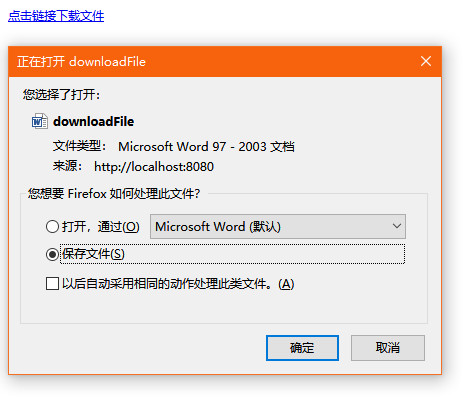
2、核心代码
index.jsp:
 <%@ page language="java" import="java.util.*" pageEncoding="UTF-8"%>

 <%

 String path = request.getContextPath();

 String basePath = request.getScheme()+"://"+request.getServerName()+":"+request.getServerPort()+path+"/";

 %>

 <!DOCTYPE HTML PUBLIC "-//W3C//DTD HTML 4.01 Transitional//EN">

 <html>

   <head>

     <base href="<%=basePath%>">

     <title>My JSP 'index.jsp' starting page</title>

     <meta http-equiv="pragma" content="no-cache">

     <meta http-equiv="cache-control" content="no-cache">

     <meta http-equiv="expires" content="0">

     <meta http-equiv="keywords" content="keyword1,keyword2,keyword3">

     <meta http-equiv="description" content="This is my page">

   </head>

   <body>

     <a href="<%=path%>/downloadFile?download=UploadFile/readme.doc">点击链接下载文件</a>

   </body>

 </html>
struts.xml:
 <?xml version="1.0" encoding="UTF-8" ?>

 <!DOCTYPE struts PUBLIC

     "-//Apache Software Foundation//DTD Struts Configuration 2.3//EN"

     "http://struts.apache.org/dtds/struts-2.3.dtd">

 <struts>

     <package name="default" namespace="/" extends="struts-default">

         <action name="downloadFile" class="com.thanlon.action.DownloadFileAction">

             <result name="success" type="stream"><!-- result类型是流(stream)类型 -->

                 <param name="inputName">inputStream</param><!-- inputName指向被下载文件的来源,对应Action中返回的InputStream -->

                 <param name="contentType">${contentType}</param><!-- 下载的内容类型,如图片类型、文档类型等…… -->

                 <param name="contentDisposition">

                     <!-- 指定文件下载的处理方式,内联(inline)和附件(attachment)两种方式,attachment会弹出文件保存对话框 -->

                     attachment;filename=${filename}

                 </param>

             </result>

         </action>

     </package>

 </struts>
DownloadFileAction.java:
 package com.thanlon.action;

 import java.io.InputStream;

 import org.apache.struts2.ServletActionContext;

 import com.opensymphony.xwork2.Action;

 public class DownloadFileAction implements Action {

     private String downloadPath;// 下载的路径

     private String contentType;// 下载文件的类型

     private String fileName;// 文件类型

     public String getDownloadPath() {

         return downloadPath;

     }

     public void setDownloadPath(String downloadPath) {

         this.downloadPath = downloadPath;

     }

     public String getContentType() {

         return contentType;

     }

     public void setContentType(String contentType) {

         this.contentType = contentType;

     }

     public String getFileName() {

         return fileName;

     }

     public void setFileName(String fileName) {

         this.fileName = fileName;

     }

     @Override

     public String execute() throws Exception {

         // TODO Auto-generated method stub

         downloadPath = ServletActionContext.getRequest().getParameter(

                 "download");

         System.out.println(downloadPath);// downloadPath为相对路径,打印出“/UploadFile/readme.doc”

         int position = downloadPath.lastIndexOf("/");// 借助lastIndexOf函数,从右向左查找第一个/

         System.out.println(position);// 打印"/"所造的坐标

         if (position > 0) {

             fileName = downloadPath.substring(position + 1);// 得到文件的名字(全名,带后缀)

             System.out.println(fileName);// 輸出文件名,本例輸出readme.doc

         } else {

             fileName = downloadPath;

         }

         contentType = "application/msword";// 指定下载问文件的类型

         return SUCCESS;

     }

     /**

      * 返回InputStream

      *

      * @return

      */

     public InputStream getInputStream() {

         InputStream inputStream = ServletActionContext.getServletContext()

                 .getResourceAsStream(downloadPath);

         // System.out.println(inputStream);输出inputStream,如果为null表示路径出错

         return inputStream;

     }

 }
二、Struts2多种类型(不指定)文件的下载
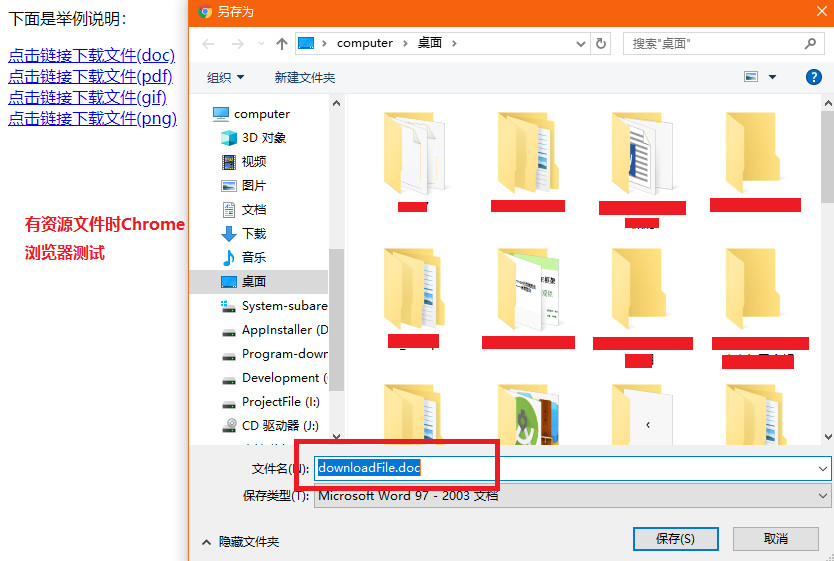
1、火狐浏览器下测试对比后,很明显可以看出添加资源文件后,下载时文件的类型被设置成文件真实类型。
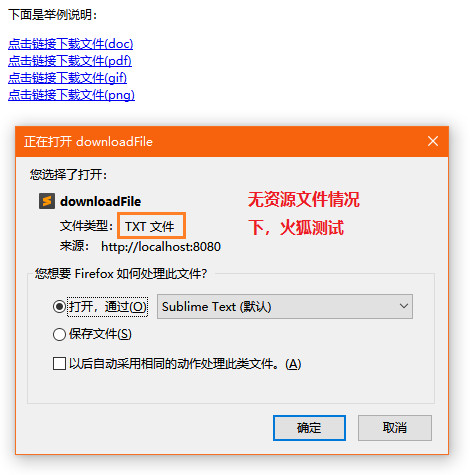
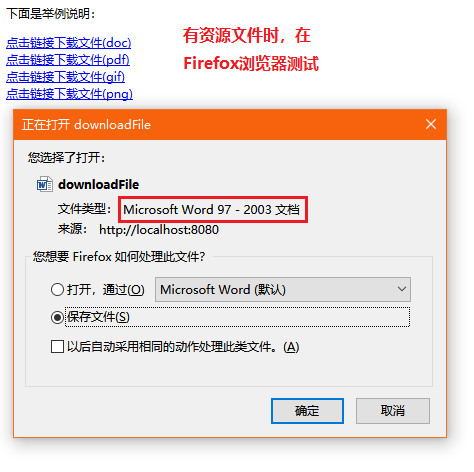
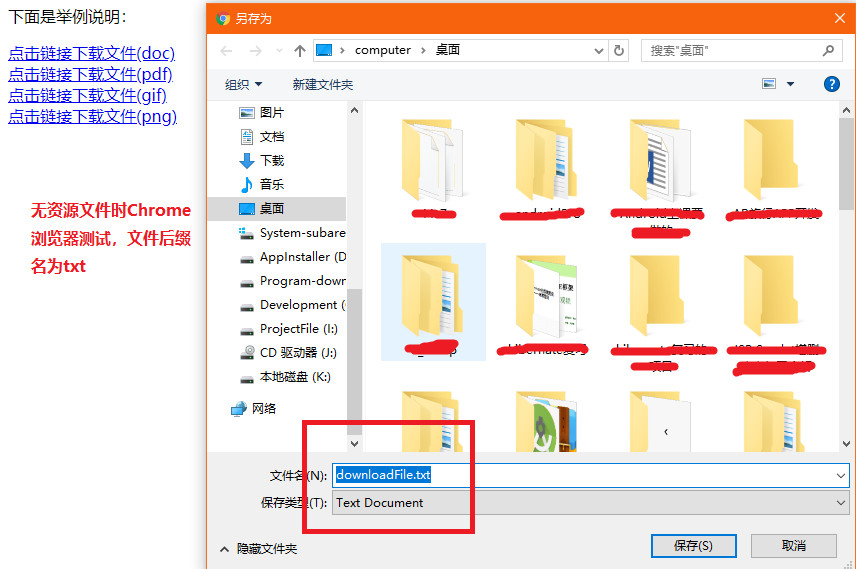
下面同样是有无资源文件的对比,也是很明显可以看出。使用资源文件的,下载文件时带上了正确的文件后缀。
2、核心代码
index.jsp:
 <%@ page language="java" import="java.util.*" pageEncoding="UTF-8"%>

 <%

 String path = request.getContextPath();

 String basePath = request.getScheme()+"://"+request.getServerName()+":"+request.getServerPort()+path+"/";

 %>

 <!DOCTYPE HTML PUBLIC "-//W3C//DTD HTML 4.01 Transitional//EN">

 <html>

   <head>

     <base href="<%=basePath%>">

     <title>My JSP 'index.jsp' starting page</title>

     <meta http-equiv="pragma" content="no-cache">

     <meta http-equiv="cache-control" content="no-cache">

     <meta http-equiv="expires" content="0">

     <meta http-equiv="keywords" content="keyword1,keyword2,keyword3">

     <meta http-equiv="description" content="This is my page">

   </head>

   <body>

   <p>下面是举例说明:</p>

       <a href="<%=path%>/downloadFile?download=UploadFile/readme.doc">点击链接下载文件(doc)</a><br>

     <a href="<%=path%>/downloadFile?download=UploadFile/thanlon.pdf">点击链接下载文件(pdf)</a><br>

     <a href="<%=path%>/downloadFile?download=UploadFile/demo.gif">点击链接下载文件(gif)</a><br>

     <a href="<%=path%>/downloadFile?download=UploadFile/logo.png">点击链接下载文件(png)</a>

   </body>

 </html>
struts.xml:
与上一例(Struts2指定类型文件的下载)的struts.xml相同
DownloadFileAction.java:
 package com.thanlon.action;

 import java.io.InputStream;

 import org.apache.struts2.ServletActionContext;

 import com.opensymphony.xwork2.Action;

 import com.opensymphony.xwork2.ActionSupport;

 public class DownloadFileAction extends ActionSupport {

     private String downloadPath;// 下载的路径

     private String contentType;// 下载文件的类型

     private String fileName;// 文件类型

     public String getDownloadPath() {

         return downloadPath;

     }

     public void setDownloadPath(String downloadPath) {

         this.downloadPath = downloadPath;

     }

     public String getContentType() {

         return contentType;

     }

     public void setContentType(String contentType) {

         this.contentType = contentType;

     }

     public String getFileName() {

         return fileName;

     }

     public void setFileName(String fileName) {

         this.fileName = fileName;

     }

     @Override

     public String execute() throws Exception {

         // TODO Auto-generated method stub

         downloadPath = ServletActionContext.getRequest().getParameter(

                 "download");

         System.out.println(downloadPath);// downloadPath为相对路径,打印出“/UploadFile/readme.doc”

         int position = downloadPath.lastIndexOf("/");// 借助lastIndexOf函数,从右向左查找第一个/

 //        System.out.println(position);// 打印"/"所在的坐标

         if (position > 0) {

             fileName = downloadPath.substring(position + 1);// 得到文件的名字(全名,带后缀)

             System.out.println(fileName);// 輸出文件名

         } else {

             fileName = downloadPath;

         }

         int extPos = fileName.lastIndexOf(".");

         System.out.println(extPos);

         String contentTypeKey = null;

         if (extPos > 0) {

             contentTypeKey = "struts.contentType" + fileName.substring(extPos);//带.的后缀

             System.out.println(contentTypeKey);

         }else {

             contentTypeKey =  "struts.contentType.txt";

             //如果没有在属性文件中指定类型:如果是文件,则下载的文件默认后缀为txt文件类型;如果是图片则不会是txt类型,会是自身类型,或者特殊类型,比如jpg会是jfif类型。

         }

         contentType =getText(contentTypeKey);// 指定下载问文件的类型此类继承了ActionSupport,直接使用getText()函数

         System.out.println(contentTypeKey);

         return SUCCESS;

     }

     /**

      * 返回InputStream

      *

      * @return

      */

     public InputStream getInputStream() {

         InputStream inputStream = ServletActionContext.getServletContext()

                 .getResourceAsStream(downloadPath);

         // System.out.println(inputStream);输出inputStream,如果为null表示路径出错

         return inputStream;

     }

 }
DownloadFileAction.properties:
 struts.contentType.gif=image/gif

 struts.contentType.jpg=image/jpg

 struts.contentType.jpeg=image/jpeg

 struts.contentType.bmp=image/bmp

 struts.contentType.png=image/png

 struts.contentType.txt=text/plain

 struts.contentType.swf=application/x-shockwave-flash

 struts.contentType.doc=application/msword

 struts.contentType.xls=application/vnd.ms-excel

 struts.contentType.pdf=application/pdf

 struts.contentType.ppt=application/vnd.ms-powerpoint

 struts.contentType.exe=application/octet-stream
附:个人网站www.nxl123.cn(后台采用Python Flask框架搭建,2019年1月1日将升级完成并正式启用。哎,本人是学生狗呢!网站做的不好希望大家多多提意见或建议吧!?别骂我就好!……以后SEO什么的还得多向大家学习……)
基于Struts2框架的文件下载 --- Struts2的更多相关文章
- Struts2框架学习(一)——Struts2的概念及搭建
一.Struts2的概念 使用优势:1)自动封装参数 2)参数校验 3)结果的处理(转发|重定向) 4)国际化 5)显示等待页面 6)防止表单重复提交 Struts2具有更加先进的架构以及思想 Str ...
- 第3章 Struts2框架--1、Struts2环境搭建
第3章 Struts2框架--1.Struts2环境搭建 搭建步骤: 1.从下载http://struts.apache.org 没找到Struts2.3.16版,就下载了2.3.29 2.拷贝后解压 ...
- Struts2框架之类型转换 --Struts2框架
Struts2框架实现了大多数常见的用于类型转换的转换器,开发人员不用自己编写类型转换代码,就可以实现数据类型的转换.下面一个Struts2框架类型转换的简单事例, 本例可在使用validate()方 ...
- struts2框架之文件下载(参考第三天学习笔记)
下载 1. 下载是一种响应方式 正常的响应:响应正文是html:response.getWriter().print("html"); 下载的响应: 1.一个流:字节数据:resp ...
- struts2框架概述
框架概述 什么是框架,为什么使用框架,框架优点 框架(framework)是一个基本概念上的结构,用于去解决或者处理复杂的问题 框架,即framework.其实就是某种应用的半成品,就是一组组件,供你 ...
- Struts2框架简介和示例
struts2框架 Struts2是java web的框架,在Java Web开发中,表示层框架,其核心是通过扩展Servlet来帮助处理http请求. Struct2的基本流程 Struct2的框架 ...
- MVC模式-----struts2框架(2)
MVC模式-----struts2框架 第一个struts2程序 struts2框架是通过一个过滤器将struts2集成到Web应用程序中的,这个过滤器的对象是StrutsprepareAndExec ...
- Struts2框架起源
曾经也用过S2SH框架做过几个项目,都不是工作中的,学习WEB开发的时候接触的第一套框架也是S2SH,可是工作之后一直没实用到S2SH 框架进行开发. 感觉曾经用这个框架的时候根本没有深入去了解这个框 ...
- Java之struts2框架学习
Java之struts2框架学习 About Struts2 Struts也是一款MVC框架 , Struts2是Struts的下一代产品,是在Struts1和WebWork的技术基础上进行了合并的全 ...
随机推荐
- Codeforces 827E Rusty String - 快速傅里叶变换 - 暴力
Grigory loves strings. Recently he found a metal strip on a loft. The strip had length n and consist ...
- WebSocket、Socket
https://www.cnblogs.com/jingmoxukong/p/7755643.html#undefined WebSocket 详解教程 WebSocket介绍,与Socket的区别 ...
- linux远程方式,以及基础命令
最近准备学习linux系统,购买了阿里巴巴的云服务器,系统为CentOS. 一.连接实例 1.使用管理终端. 这是阿里巴巴云服务器管理控制台,需要登录阿里巴巴,找到自己实例后,点击右侧远程连接即刻. ...
- Python3 tkinter基础 Button text,fg 按钮上显示的文字 文字的颜色
Python : 3.7.0 OS : Ubuntu 18.04.1 LTS IDE : PyCharm 2018.2.4 Conda ...
- Newcoder Metropolis(多源最短路 + Dijkstra堆优化)题解
题目链接:https://www.nowcoder.com/acm/contest/203/I?tdsourcetag=s_pcqq_aiomsg来源:牛客网 思路:我们用用fa[i]表示距离i最近的 ...
- 题解——HDU 4734 F(x) (数位DP)
这道题还是关于数位DP的板子题 数位DP有一个显著的特征,就是求的东西大概率与输入关系不大,理论上一般都是数的构成规律 然后这题就是算一个\( F(A) \)的公式值,然后求\( \left [ 0 ...
- (转)Understanding Memory in Deep Learning Systems: The Neuroscience, Psychology and Technology Perspectives
Understanding Memory in Deep Learning Systems: The Neuroscience, Psychology and Technology Perspecti ...
- NLog汇总
相关文章 NLog文章系列——系列文章目录以及简要介绍 Elasticsearch,Kibana,Logstash,NLog实现ASP.NET Core 分布式日志系统 ElasticSearch+N ...
- Codeforces-Anastasia and pebbles
这是一道很有意思的(水)题. 地址戳:http://codeforces.com/problemset/problem/789/A 题目的大意呢,就是一个可爱的大姐姐的故事.说是啊,她每天都带着两个一 ...
- Python 编码规范 PEP8
1 Introduction Guido 的核心思想是:对于代码而言,相比于写,它更多是被用来读的.这个指导旨在使Python代码更易读,且具有更强的协调性. 2 A Foolish Consiste ...