
Failed to load http://wantTOgo.com/get_sts_token/: No 'Access-Control-Allow-Origin' header is present on the requested resource. Origin 'http://fromHere.com' is therefore not allowed access.
Failed to load http://wantTOgo.com/get_sts_token/:
No 'Access-Control-Allow-Origin' header is present on the requested resource.
Origin 'http://fromHere.com' is therefore not allowed access.
package main

import (
   "./myKey"
   "fmt"
   "os"

   "github.com/aliyun/aliyun-sts-go-sdk/sts"
   "github.com/labstack/echo"
   "github.com/labstack/echo/middleware"
   "net/http"
)

func handleError(err error) {
   fmt.Println(err)
   os.Exit(-1)
}

const (
   accessKeyID     = myKey.AccessKeyID
   accessKeySecret = myKey.AccessKeySecret
   roleArn         = myKey.RoleArn
   sessionName     = myKey.SessionName
)

type ExceptionResp struct {
   Status  string
   Message string
}

func main() {
   e := echo.New()
   e.Use(middleware.CORSWithConfig(middleware.CORSConfig{
      // AllowOrigins: []string{"https://labstack.com", "https://labstack.net"},
      AllowOrigins: []string{"*"},
      // AllowHeaders: []string{echo.HeaderOrigin, echo.HeaderContentType, echo.HeaderAccept},
      AllowHeaders: []string{"*"},
   }))
   e.GET("/aliSTS/:uid", func(c echo.Context) error {
      uid := c.Param("uid")
      fmt.Println("LOG ", uid)
      stsClient := sts.NewClient(accessKeyID, accessKeySecret, roleArn, sessionName)
      resp, err := stsClient.AssumeRole(3600)
      if err != nil {
         handleError(err)
         r := &ExceptionResp{
            Status:  "-1",
            Message: "what?",
         }
         return c.JSON(http.StatusOK, r)
      }
      r := resp.Credentials
      return c.JSON(http.StatusOK, r)
   })
   e.Logger.Fatal(e.Start(":1324"))
}
<!DOCTYPE html>
<html lang="en">
<head>
    <meta charset="UTF-8">
    <title>Title</title>
</head>
<body>
 </body>
</html>
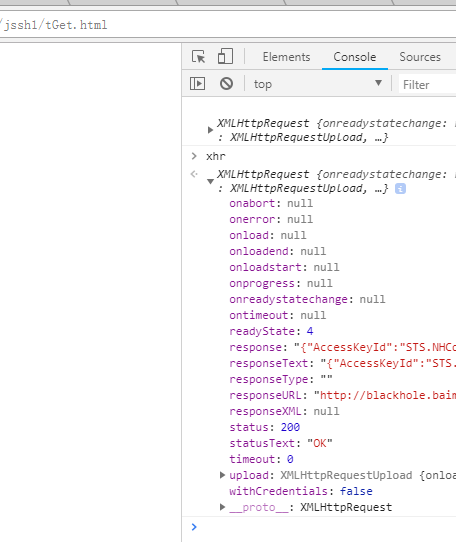
<script>
    const ourSTSurl = 'http://blackhole.com:1324/aliSTS/33333'
    const xhr = new XMLHttpRequest()
    const verb = 'GET'
    xhr.open(verb,ourSTSurl)
    xhr.setRequestHeader('Access-Control-Allow-Origin', '*');
    xhr.send()
    console.log(xhr)
</script>
Failed to load http://wantTOgo.com/get_sts_token/: No 'Access-Control-Allow-Origin' header is present on the requested resource. Origin 'http://fromHere.com' is therefore not allowed access.的更多相关文章
- XMLHttpRequest cannot load ''. No 'Access-Control-Allow-Origin' header is present on the requested resource. Origin ' ' is therefore not allowed access.
ajax跨域 禁止访问! 利用Access-Control-Allow-Origin响应头解决跨域请求
- elasticsearch按照配置时遇到的一些坑 [Failed to load settings from [elasticsearch.yml]]
这里整理几个空格引起的问题. 版本是elasticsearch-2.3.0 或者elasticsearch-rtf-master Exception in thread "main" ...
- Metaio在Unity3D中报错 Start: failed to load tracking configuration: TrackingConfigGenerated.xml 解决方法
报错:Start: failed to load tracking configuration: TrackingConfigGenerated.xml Start: failed to load t ...
- eclipse报错:Failed to load the JNI shared library
Eclipse运行时提示“Failed to load the JNI shared library /Java/jre6/bin/client/jvm.dll”的一个解决方案 因为 Eclipse ...
- struts的标签库出现Failed to load or instantiate TagExtraInfo class
使用struts的标签库出现Failed to load or instantiate TagExtraInfo class 最近在使用struts标签库的时候,在eclipse开发环境中是正常的,放 ...
- Eclipse - Failed to load the JNI shared Library (JDK)
When I try opening Eclipse, a pop-up dialog states: Failed to load the JNI shared library "C:/J ...
- Failed to load JavaHL Library.
以前使用的电脑是32位的,安装的svn可以正常使用,但是现在的电脑室64位的,安装好svn后,把项目提交到svn的过程中,总是弹出来一个错误的对话框: Failed to load JavaHL Li ...
- win2008server R2 x64 部署.net core到IIS上出现【Failed to load the dll from [C:\Program Files\dotnet\host\fxr\1.0.1\hostfxr.dll], HRESULT: 0x80070057】错误
win2008server R2 x64 部署.net core到IIS上出现[Failed to load the dll from [C:\Program Files\dotnet\host\fx ...
- eclipse failed to load the jni jvm.dll
问题:打开Eclipse弹出,eclipse failed to load the jni jvm.dll,一般都是本机的JDK与Eclipse位数不等{32-64,64-32} 解决:看本机Java ...
随机推荐
- 10.1综合强化刷题 Day2
a[问题描述]你是能看到第一题的 friends呢. —— hja世界上没有什么比卖的这 贵弹丸三还令人绝 ...
- spring源码学习(一)
Spring作为一个IOC容器,今天我们学习它作为web解析的地方,学习下webmvc包的代码.我们先看下web.xml文件 可以看到通过DispatcherServlet来实现页面的mapper处理 ...
- 解决百度ueditor配置上传目录为外部目录时,项目启动访问不到图片的问题。
如图所示,公司项目用到了百度的ueditor,配置的上传目录并不在项目根目录下,而是在外部目录中.于是在上传图片时,出现了无法获取图片的问题. 解决方法:添加该目录至tomcat项目部署目录中,如下图 ...
- Akka Stream之Graph
最近在项目中需要实现图的一些操作,因此,初步考虑使用Akka Stream的Graph实现.从而学习了下: 一.介绍 我们知道在Akka Stream中有三种简单的线性数据流操作:Source/Flo ...
- 初学React,setState后获取到的thisstate没变,还是初始state?
问题:(javascript)初学React,setState后获取到的thisstate没变,还是初始state?描述: getInitialState(){ return {data:[]}; } ...
- 80端口被屏蔽解决方法,80端口穿透之NAT端口映射技术
介绍一种NAT端口映射技术应用,达到80端口穿透目的,解决80端口被屏蔽的问题,也是80端口被屏蔽解决方法中经常用到的. 80端口穿透类似80端口转发,因为80端口被屏蔽,在数据层面来说是不能直接访问 ...
- MyEclipse Html自动提示功能的设置方法
操作方法: windows------preferences----------搜索 html----------找到 html Source这项--------- 右边视图,找到 content a ...
- 从需求的角度去理解Linux系列:总线、设备和驱动
笔者成为博客专家后整理以前原创的嵌入式Linux系列博文,现推出以让更多的读者受益. <从需求的角度去理解linux系列:总线.设备和驱动>是一篇有关如何学习嵌入式Linux系统的方法论文 ...
- 分层架构web容器的配置安全
转自:http://hi.baidu.com/shineo__o/item/7520d54c24d234c71081da82 /ps:本以为这是一个偶然配置失误造成的问题,但最近几天无聊时测试发现,有 ...
- TCP/IP详解 卷一(第三章 IP:网际协议)
IP是TCP/IP协议族中最为核心的协议.所有的TCP.UDP.ICMP及IGMP数据都以IP数据报格式传输. IP提供不可靠.无连接的数据报传送服务. 1.不可靠:就是它不能保证IP数据报能成功地到 ...