
基于django封装的常用装饰器和函数
1:返回操作成功的json数据
def response_success(message, data=None, data_list=[]):

    return HttpResponse(json.dumps({

        'code': 2000,#code由前后端配合指定

        'message': message,#提示信息

        'data': data,#返回单个对象

        'dataList': data_list#返回对象数组

}), 'application/json')- 1
- 2
- 3
- 4
- 5
- 6
- 7
2:返回操作失败的json数据
def response_failure(message, data=None, data_list=[]):

    return HttpResponse(json.dumps({

        'code': 4000,

        'message': message,

        'data': data,

        'dataList': data_list

}), 'application/json')- 1
- 2
- 3
- 4
- 5
- 6
- 7
3:拦截非get请求
def get(func):

    def in_fun(request):

        if request.method == 'GET':

            return func(request)

        else:

            return response_failure('not get request')

return in_fun- 1
- 2
- 3
- 4
- 5
- 6
- 7
- 8
4:拦截非post请求
def post(func):

    def in_fun(request):

        if request.method == 'POST':

            return func(request)

        else:

            return response_failure('not post request')

return in_fun- 1
- 2
- 3
- 4
- 5
- 6
- 7
- 8
5:参数检查
def params(*args):#接收传入的字段

    def check_params(func):

        def in_fun(request):

            p = []

            for val in args:#遍历客户端请求是否包含字段

                param = request.POST.get(val, 100)

                if param == 100:#若不包含则返回错误

                    return response_failure('need param %s' % val)

                else:

                    p.append(param)#若包含则传入数组返回给被装饰的函数

            return func(request, p)

        return in_fun

return check_params- 1
- 2
- 3
- 4
- 5
- 6
- 7
- 8
- 9
- 10
- 11
- 12
- 13
- 14
- 15
6:md5加密
def md5(s):

    m = hashlib.md5(s.encode('utf8'))

return m.hexdigest()- 1
- 2
- 3
7:保存文件
def save_file(file, save_path='photo'):

    destination = open(os.path.join(save_path, file.name), 'wb+')

    for chunk in destination:

        destination.write(chunk)

destination.close()- 1
- 2
- 3
- 4
- 5
这里传入的file是request.FILES对象,save_path是图片保存路径
@get和@post使用
1:在views模板下编写测试函数(记得在urls.py文件中进行相应配置)
2:将刚刚封装的函数所在模板引入views.py
3:使用@get进行拦截
@get

def test(request):

return response_success('test')#返回json- 1
- 2
- 3
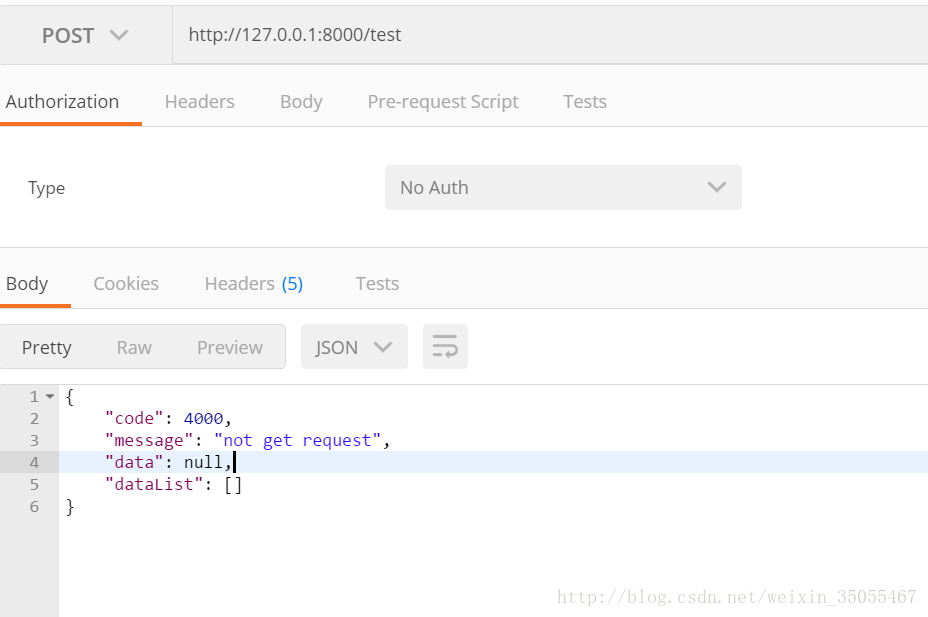
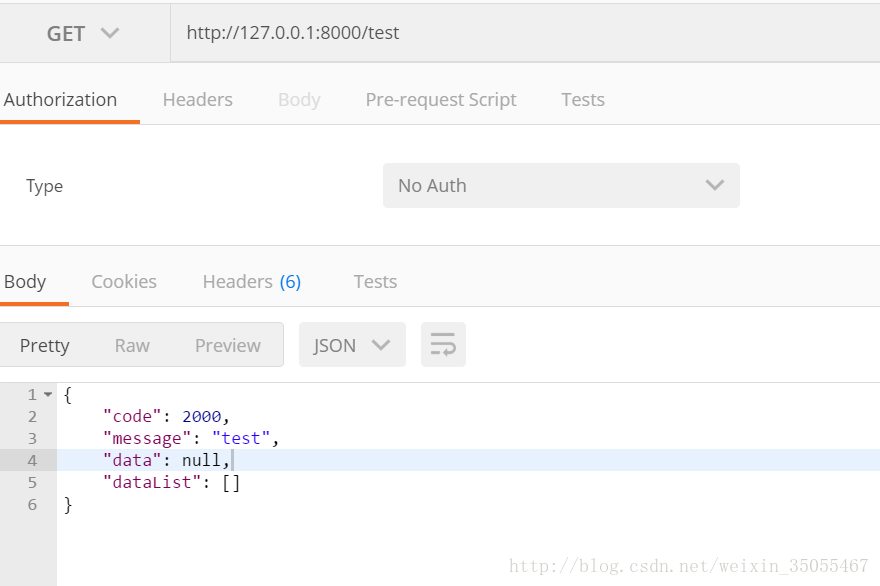
4:使用postman进行测试
post请求
get请求
@post的用法如上
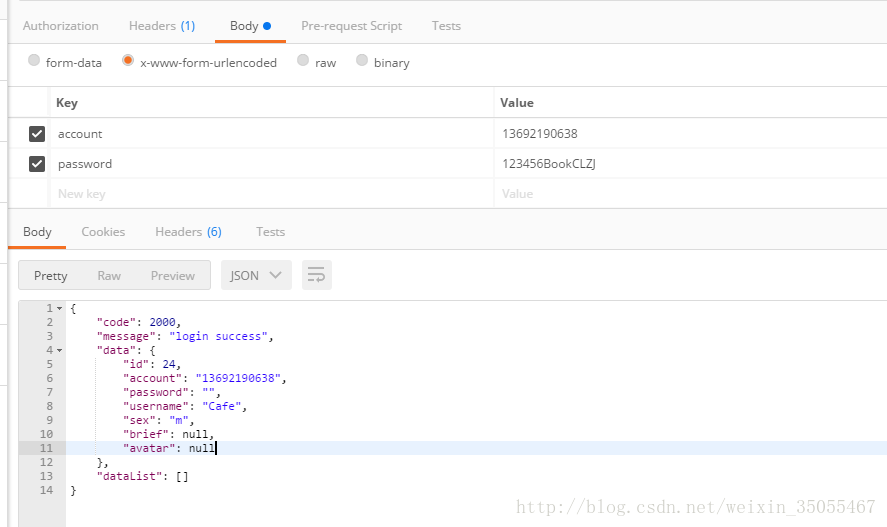
@params,response_success,response_failure使用
@post

@params('account', 'password')

def login(request, args):

    user = BUser.objects.filter(account=args[0], password=md5(args[1]))

    if len(user) == 0:

        return response_failure('account or password error')

    u = model_to_dict(user[0])

    u['password'] = ''

    request.session[config.LOGIN] = config.TAG_LOGIN

return response_success('login success', u)- 1
- 2
- 3
- 4
- 5
- 6
- 7
- 8
- 9
- 10
1:@params中传入你所需的字段
2:args是一个list,list里面的数据按字段顺序排列
3:如上面的例子args[0]为account字段的值args[1]是password字段的值
4:从数据库查询出来的结果要用model_to_dict方法才能返回json格式字符串
基于django封装的常用装饰器和函数的更多相关文章
- django类视图的装饰器验证
django类视图的装饰器验证 django类视图的get和post方法是由View内部调用dispatch方法来分发,最后调用as_view来完成一个视图的流程. 函数视图可以直接使用对应的装饰器 ...
- 给django视图类添加装饰器
要将login_required装饰到view class的dispatch方法上, 因为dispatch方法为类方法,不是单个的函数,所以需要将装饰函数的装饰器 login_required转化为装 ...
- 面向对象(三)——组合、多态、封装、property装饰器
组合.多态.封装.property装饰器 一.组合 1.什么是组合 组合指的是某一个对象拥有一个属性,该属性的值是另外一个类的对象 class Foo(): pass class Bar(): pas ...
- 基于linux信号的timeout装饰器
在做基于ray的分布式任务处理时,偶尔遇到由于ray集群不稳定导致的长时间连接不上,进而导致程序卡死,无法向后端返回任务状态的情况.但是ray的初始化函数本身未实现超时机制,因此设计基于多线程+信号的 ...
- Day11 Python基础之装饰器(高级函数)(九)
在python中,装饰器.生成器和迭代器是特别重要的高级函数 https://www.cnblogs.com/yuanchenqi/articles/5830025.html 装饰器 1.如果说装 ...
- python通过装饰器检查函数参数的数据类型的代码
把内容过程中比较常用的一些内容记录起来,下面内容段是关于python通过装饰器检查函数参数的数据类型的内容. def check_accepts(f): assert len(types) == f. ...
- python:带参数的装饰器,函数的有用信息
一.带参数的装饰器,函数的有用信息 def func1(): '''此函数的功能是完成的登陆的功能 return: 返回值是登陆成功与否(true,false) ''' print(333) func ...
- 关于Python装饰器内层函数为什么要return目标函数的一些个人见解
https://blog.csdn.net/try_test_python/article/details/80802199 前几天在学装饰器的时候,关于装饰器内层函数调用目标函数时是否return目 ...
- diango中让装了装饰器的函数的名字不是inner,而是原来的名字
让装了装饰器的函数的名字不是inner,而是原来的名字 from functools import wraps def wrapper(func): @wraps(func) # 复制了原来函数的名字 ...
随机推荐
- 开发ActiveX控件调用另一个ActiveX系列3——ActiveX调用另一个ActiveX
终于进入正题了,怎样在ActiveX中调用另一个ActiveX.我们的项目需要调用华视电子身份证识别仪的ActiveX控件 在这里有很多识别仪ActiveX插件下载:http://www.idukaq ...
- gulp入门-压缩js/css文件(windows)
类似于grunt,都是基于Node.js的前端构建工具.不过gulp压缩效率更高. 工具/原料 nodejs/npm 方法/步骤 首先要确保pc上装有node,然后在global环境和项目文件中都in ...
- 在eclipse中添加android ADT
对于程序开发的学者来说,eclipse并不陌生,它为我们提供了一个非常广阔的平台来开发程序.同样我们也可以用它来开发android程序. 但是在eclipse中并不能直接开发android程序,需要我 ...
- Android----SharedPreferences(存储数据)
SharedPreferences详解 我们在开发软件的时候,常需要向用户提供软件参数设置功能,例如我们常用的微信,用户可以设置是否允许陌生人添加自己为好友.对于软件配置参数的保存,如果是在windo ...
- Codeforces 390E Inna and Large Sweet Matrix 树状数组改段求段
题目链接:点击打开链接 题意:给定n*m的二维平面 w个操作 int mp[n][m] = { 0 }; 1.0 (x1,y1) (x2,y2) value for i : x1 to x2 for ...
- 常见 WEB 安全漏洞(转)
SQL注入 成因:程序未对用户的输入的内容进行过滤,从而直接代入数据库查询,所以导致了sql 注入 漏洞 . 思路:在URL处可以通过 单引号 和 and 1=1 and 1=2 等语句进行手工测试s ...
- 关于gcc
1 the architecture of gcc 2 自己编译gcc时的 --build --host --target选项的含义和用法 <1> --build 执行本次的gcc编译的主 ...
- m*n matrix min rank square matrix
m*n matrix m*n=1000 f(A)=25 https://www.cs.princeton.edu/courses/archive/spring12/cos598C/svdchapter ...
- 【题解】P4799[CEOI2015 Day2]世界冰球锦标赛
[题解][P4799 CEOI2015 Day2]世界冰球锦标赛 发现买票顺序和答案无关,又发现\(n\le40\),又发现从后面往前面买可以通过\(M\)来和从前面往后面买的方案进行联系.可以知道是 ...
- web前端开发-Ajax(1)
1.简单简绍Ajax的功能 Ajax是处于前端和后端之间的这么一个东西,他可以拿到你前端form的内容,并且在你触发Ajax的时候,先将某些数据发送到服务器端,等接受到服务器 返回的数据时,执行某个函 ...