
android studio发布公共类库到服务器maven仓库
在上一篇中提到了怎么创建私有maven库,这篇主要结合android studio的使用,直接进入正题,看以下步骤
1.创建android项目
创建Project,然后加一个library的module,此处省略一万字了
2.配置gradle
在项目的gradle.properties里面配置基本信息
GROUP=对应maven的groupId值,如果名字中包含SNAPSHOT字符,项目将会发布到snapshots仓库,没有则发布到releases仓库

VERSION_NAME=对应maven的version值

POM_ARTIFACT_ID=对应maven的artifactId值

SNAPSHOT_REPOSITORY_URL=前面配置的snapshots仓库地址

RELEASE_REPOSITORY_URL=前面配置的releases仓库地址

NEXUS_USERNAME=登录nexus oss的用户名

NEXUS_PASSWORD=登录nexus oss的密码
在module的build.gradle末尾加入下面代码
apply plugin: 'maven'

def isReleaseBuild() {

    return VERSION_NAME.contains("SNAPSHOT") == false

}

def getRepositoryUsername() {

    return hasProperty('NEXUS_USERNAME') ? NEXUS_USERNAME : ""

}

def getRepositoryPassword() {

    return hasProperty('NEXUS_PASSWORD') ? NEXUS_PASSWORD : ""

}

afterEvaluate { project ->

    uploadArchives {

        repositories {

            mavenDeployer {

                pom.groupId = GROUP

                pom.artifactId = POM_ARTIFACT_ID

                pom.version = VERSION_NAME

                repository(url: RELEASE_REPOSITORY_URL) {

                    authentication(userName: getRepositoryUsername(), password: getRepositoryPassword())

                }

                snapshotRepository(url: SNAPSHOT_REPOSITORY_URL) {

                    authentication(userName: getRepositoryUsername(), password: getRepositoryPassword())

                }

            }

        }

    }

    task androidJavadocs(type: Javadoc) {

        source = android.sourceSets.main.java.srcDirs

        classpath += project.files(android.getBootClasspath().join(File.pathSeparator))

    }

    task androidJavadocsJar(type: Jar, dependsOn: androidJavadocs) {

        classifier = 'javadoc'

        from androidJavadocs.destinationDir

    }

    task androidSourcesJar(type: Jar) {

        classifier = 'sources'

        from android.sourceSets.main.java.sourceFiles

    }

    artifacts {

        archives androidSourcesJar

        archives androidJavadocsJar

    }

}
3.发布公共库
./gradlew clean build uploadArchives

就一条命令,最后成功就OK了,如果失败根据具体情况找原因。
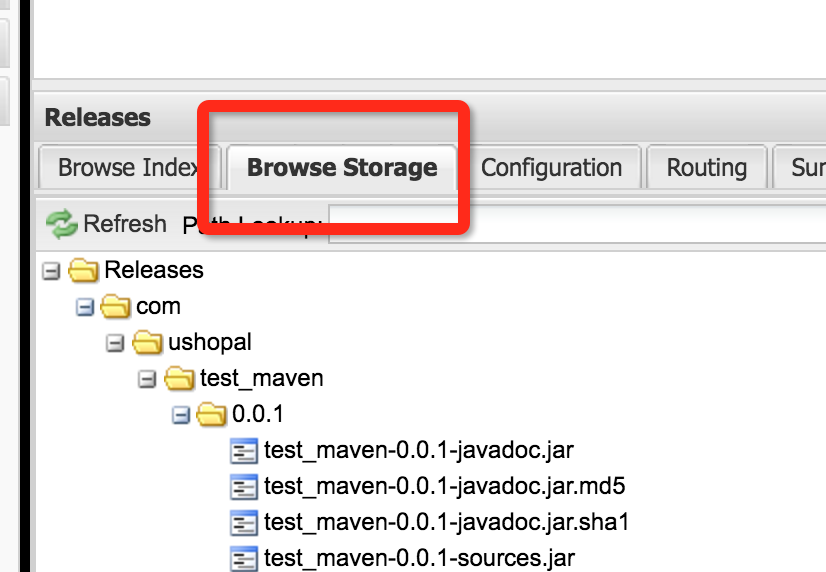
然后到nexus上查看是否上传成功
4.使用
在project中的build.gradle中的allprojects->repositories加入
maven { url "http://192.168.59.103:8081/content/repositories/releases/" }
在module的build.gradle中的dependencies加入
compile 'groupId:artifactId:version'
groupId,artifactId,version换成你自己的

build一切OK。

如有疑问欢迎交流
android studio发布公共类库到服务器maven仓库的更多相关文章
- 如何通过Android Studio发布library到jCenter和Maven Central
http://www.jianshu.com/p/3c63ae866e52# 在Android Studio里,如果你想引入任何library到自己的项目中,只需要很简单的在module的build. ...
- Android Studio导入第三方类库的方法
Android Studio导入第三方类库的方法 本人也刚刚开始尝试做android app的开发,听说android studio是Google支持的android 应用开发工具,所以想应该肯定比E ...
- Android Studio发布Release版本之坑--Unknown host 'd29vzk4ow07wi7.cloudfront.net'
使用Android Studio发布Release版本时,出现Unknown host 'd29vzk4ow07wi7.cloudfront.net'...错误. 解决方法:修改本机的DNS为8.8. ...
- Android——Android Studio导入SlidingMenu类库的方法
Android Studio导入SlidingMenu类库的方法(其他类库应该也适用) 本篇文章主要介绍了"Android Studio导入SlidingMenu类库的方法(其他类库应该 ...
- 如何将Android Studio与华为软件开发云代码仓库无缝对接(二)
上篇文章:如何将Android Studio与华为软件开发云代码仓库无缝对接(一) 上一章讲了,如何用Android Studio以软件开发云代码仓库为基础,新建一个项目.接下来,这一章继续讲建好项目 ...
- Android Studio发布项目到jcenter,一行代码引入Module
前面我们使用自己封装的okhttp项目时候,只需要app/build.gradle文件中加一行代码就能使用项目. compile 'com.ansen.http:okhttpencapsulation ...
- 建立企业内部mavenserver并使用Android Studio公布公共项目
由于Android Studio使用了Gradle构建工具,在library依赖的处理上是将被依赖的library作为一个module引入(拥有一份完整的library拷贝),而Eclipse的ADT ...
- Android Studio导入第三方类库的方法(转)
转自:链接 本人也刚刚开始尝试做android app的开发,听说android studio是Google支持的android 应用开发工具,所以想应该肯定比Eclipse好用吧,反正以前没有jav ...
- [Android Studio导入第三方类库方法] Error:(19, 23) 错误: 程序包org.apache.http不存在
本文主要参考以下链接: http://m.blog.csdn.net/blog/BoxRice/48575027 https://drakeet.me/android-studio http://ww ...
随机推荐
- 标准C程序设计七---35
Linux应用 编程深入 语言编程 标准C程序设计七---经典C11程序设计 以下内容为阅读: <标准C程序设计>(第7版) 作者 ...
- 如何获取MAC的进程数
参考链接: https://www.cnblogs.com/watchdatalearn2012620/p/3182477.html https://segmentfault.com/q/101000 ...
- 洛谷—— P1577 切绳子
https://www.luogu.org/problemnew/show/P1577 题目描述 有N条绳子,它们的长度分别为Li.如果从它们中切割出K条长度相同的 绳子,这K条绳子每条最长能有多长? ...
- codevs——3344 迷宫
3344 迷宫 时间限制: 1 s 空间限制: 32000 KB 题目等级 : 黄金 Gold 题解 题目描述 Description 小刚在迷宫内,他需要从A点出发,按顺序经过B, ...
- linux编译
文章一 1)用户点击编译程序时,编译程序将C++源代码转换成目标代码,目标代码通常由 机器指令和记录如何将程序加载到内存的信息组成.其后缀通常为.obj或.o: 2)目标文件中存储的只是用户所编写的代 ...
- 初学ElasticSeacher
这周,刚接手了同事那边的工作,项目里需要用到ElasticSeacher.但是,之前从未接触过,因此,看了ES的文档,开始慢慢的知道了一些ES的知识. 一.ES简介: Elasticsearch是一个 ...
- REBXOR
题面 Description 给定一个含N个元素的数组A,下标从1开始.请找出下面式子的最大值. (A[l1]xorA[l2+1]xor-xorA[r1])+(A[l2]xorA[l2+1]xor-x ...
- sql-server-next-version-ctp-1-4-now-available
https://blogs.technet.microsoft.com/dataplatforminsider/2017/03/17/sql-server-next-version-ctp-1-4-n ...
- repeated-substring-pattern
https://leetcode.com/problems/repeated-substring-pattern/ 下面这个方法,开始我觉得挺好.可惜还是超时了.后来我就加了一个剪枝策略,只有长度能够 ...
- Python基础语法01
Python 标识符 在python里,标识符有字母.数字.下划线组成. 在python中,所有标识符可以包括英文.数字以及下划线(_),但不能以数字开头. python中的标识符是区分大小写的. 以 ...