
Android笔记之文本随滑块移动的SeekBar
效果图
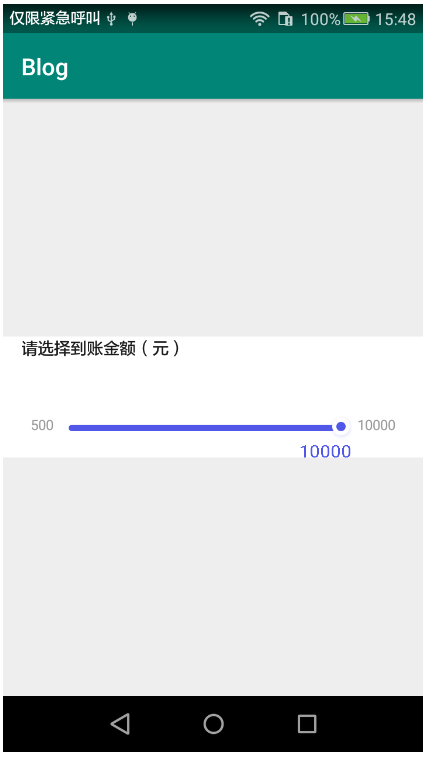
FloatingTextSeekBar.java
package com.bu_ish.blog;

import android.content.Context;

import android.graphics.Canvas;

import android.graphics.Color;

import android.graphics.Paint;

import android.os.Build;

import android.util.AttributeSet;

import android.util.Log;

import android.util.TypedValue;

import android.view.View;

import android.widget.LinearLayout;

import android.widget.SeekBar;

import java.lang.reflect.Field;

public class FloatingTextSeekBar extends LinearLayout {

    private SeekBar sb;

    private FloatingTextView ftv;

    private String startText = "100";

    private int max = 49;

    private float floatingTextX;

    private static final String TAG = FloatingTextSeekBar.class.getName();

    public FloatingTextSeekBar(Context context, AttributeSet attrs) {

        super(context, attrs);

        setOrientation(VERTICAL);

        sb = new SeekBar(context);

        LayoutParams sbLayoutParams = new LayoutParams(LayoutParams.MATCH_PARENT, LayoutParams.WRAP_CONTENT);

        sb.setLayoutParams(sbLayoutParams);

        sb.setPadding(16, 0, 16, 0);

        try {

            Class cls = sb.getClass().getSuperclass().getSuperclass();

            Field field = cls.getDeclaredField("mMaxHeight");

            field.setAccessible(true);

            field.set(sb, PixelTool.dpToPx(context, 5));

        } catch (NoSuchFieldException | IllegalAccessException ex) {

            Log.e(TAG, null, ex);

        }

        sb.setMax(max);

        sb.setProgressDrawable(getResources().getDrawable(R.drawable.seek_bar_progress_drawable));

        sb.setThumb(getResources().getDrawable(R.mipmap.ic_seek_bar_thumb));

        if (Build.VERSION.SDK_INT >= Build.VERSION_CODES.LOLLIPOP)

            sb.setSplitTrack(false);

        addView(sb);

        ftv = new FloatingTextView(context);

        LayoutParams ftvLayoutParams = new LayoutParams(LayoutParams.MATCH_PARENT, PixelTool.dpToPx(context, 12));

        ftvLayoutParams.topMargin = PixelTool.dpToPx(context, 2);

        ftv.setLayoutParams(ftvLayoutParams);

        ftv.setText(startText);

        addView(ftv);

        sb.setOnSeekBarChangeListener(new SeekBar.OnSeekBarChangeListener() {

            @Override

            public void onProgressChanged(SeekBar seekBar, int progress, boolean fromUser) {

                float step = seekBar.getWidth() / (float) max;

                floatingTextX = progress * step;

                ftv.setText((progress + Integer.parseInt(startText) / 100) * 100 + "");

            }

            @Override

            public void onStartTrackingTouch(SeekBar seekBar) {

            }

            @Override

            public void onStopTrackingTouch(SeekBar seekBar) {

            }

        });

    }

    public void setStartText(String startText) {

        this.startText = startText;

    }

    public void setMax(int max) {

        this.max = max;

        sb.setMax(max);

    }

    private class FloatingTextView extends View {

        private String text;

        private FloatingTextView(Context context) {

            super(context);

        }

        private void setText(String text) {

            this.text = text;

            invalidate();

        }

        @Override

        protected void onDraw(Canvas canvas) {

            super.onDraw(canvas);

            Paint paint = new Paint();

            paint.setColor(Color.parseColor("#ff5158e7"));

            float textSize = TypedValue.applyDimension(TypedValue.COMPLEX_UNIT_SP, 15, getResources().getDisplayMetrics());

            paint.setTextSize(textSize);

            paint.setTextAlign(Paint.Align.CENTER);

            float textWidth = paint.measureText(text);

            if (floatingTextX - textWidth / 2 < getLeft()) {

                floatingTextX += textWidth / 2;

            }

            if (floatingTextX + textWidth / 2 > getRight()) {

                floatingTextX -= textWidth / 2;

            }

            canvas.drawText(text, floatingTextX, getHeight(), paint);

        }

    }

}
seek_bar_progress_drawable.xml
<?xml version="1.0" encoding="utf-8"?>

<layer-list xmlns:android="http://schemas.android.com/apk/res/android">

    <item android:id="@android:id/background">

        <shape android:shape="rectangle">

            <solid android:color="#ffebebeb" />

            <corners

                android:bottomLeftRadius="3dp"

                android:bottomRightRadius="3dp"

                android:topLeftRadius="3dp"

                android:topRightRadius="3dp" />

        </shape>

    </item>

    <item android:id="@android:id/progress">

        <clip>

            <shape android:shape="rectangle">

                <solid android:color="#ff5158e7" />

                <corners

                    android:bottomLeftRadius="3dp"

                    android:bottomRightRadius="3dp"

                    android:topLeftRadius="3dp"

                    android:topRightRadius="3dp" />

            </shape>

        </clip>

    </item>

</layer-list>
activity_main.xml
<?xml version="1.0" encoding="utf-8"?>

<LinearLayout xmlns:android="http://schemas.android.com/apk/res/android"

    xmlns:tools="http://schemas.android.com/tools"

    android:layout_width="match_parent"

    android:layout_height="wrap_content"

    android:layout_gravity="center"

    android:background="@android:color/white"

    android:orientation="vertical">

    <TextView

        android:layout_width="wrap_content"

        android:layout_height="wrap_content"

        android:layout_marginLeft="16dp"

        android:text="请选择到账金额(元)"

        android:textColor="#ff1b1b1b"

        android:textSize="14sp" />

    <LinearLayout

        android:layout_width="match_parent"

        android:layout_height="wrap_content"

        android:gravity="center_horizontal">

        <TextView

            android:id="@+id/tvBorrowableMin"

            android:layout_width="wrap_content"

            android:layout_height="wrap_content"

            android:layout_marginTop="48dp"

            android:layout_marginRight="5dp"

            android:textColor="#ff999999"

            android:textSize="12sp"

            tools:text="100" />

        <com.bu_ish.blog.FloatingTextSeekBar

            android:id="@+id/ftsb"

            android:layout_width="250dp"

            android:layout_height="wrap_content"

            android:layout_marginTop="48dp" />

        <TextView

            android:id="@+id/tvBorrowableMax"

            android:layout_width="wrap_content"

            android:layout_height="wrap_content"

            android:layout_marginLeft="5dp"

            android:layout_marginTop="48dp"

            android:textColor="#ff999999"

            android:textSize="12sp"

            tools:text="5000" />

    </LinearLayout>

</LinearLayout>
MainActivity.java
package com.bu_ish.blog;

import android.support.v7.app.AppCompatActivity;

import android.os.Bundle;

import android.widget.TextView;

public class MainActivity extends AppCompatActivity {

    private TextView tvBorrowableMin, tvBorrowableMax;

    private FloatingTextSeekBar ftsb;

    private int borrowableMin = 500, borrowableMax = 10000;

    @Override

    protected void onCreate(Bundle savedInstanceState) {

        super.onCreate(savedInstanceState);

        setContentView(R.layout.activity_main);

        tvBorrowableMin = findViewById(R.id.tvBorrowableMin);

        tvBorrowableMax = findViewById(R.id.tvBorrowableMax);

        ftsb = findViewById(R.id.ftsb);

        tvBorrowableMin.setText(borrowableMin + "");

        tvBorrowableMax.setText(borrowableMax + "");

        ftsb.setStartText(borrowableMin + "");

        ftsb.setMax((borrowableMax - borrowableMin) / 100);

    }

}
完整Demo链接:https://pan.baidu.com/s/1ohRtbYsSJi8105brvj3fkQ,提取码:lwif
P.S.
SeekBar.setProgressDrawable(Drawable),设置进度颜色、进度背景
SeekBar.setThumb(Drawable),设置滑块
Android笔记之文本随滑块移动的SeekBar的更多相关文章
- Android学习笔记(17):文本框TextView类
TextView继承自View.用于显示文本.它有很多的子类,掌握其属性是非常重要的. watermark/2/text/aHR0cDovL2Jsb2cuY3Nkbi5uZXQv/font/5a6L5 ...
- Android笔记(十三) Android中的基本组件——文本
Android中常用的文本组件有 普通文本框(TextView)和编辑框(EditText)两种 EditText是TextView的子类,作用就是在界面上显示文本,区别是EditText允许用户编辑 ...
- Android笔记——Android中数据的存储方式(二)
我们在实际开发中,有的时候需要储存或者备份比较复杂的数据.这些数据的特点是,内容多.结构大,比如短信备份等.我们知道SharedPreferences和Files(文本文件)储存这种数据会非常的没有效 ...
- Android之EditText文本变化的监听
监听EditText的文本变化需要给EditText控件加一个addTextChangeListener监听器 editText.addTextChangeListener(textWatcher); ...
- Android笔记:触摸事件的分析与总结----TouchEvent处理机制
原创作品,允许转载,转载时请务必以超链接形式标明文章 原始出处 .作者信息和本声明.否则将追究法律责任.http://glblong.blog.51cto.com/3058613/1559320 ...
- Android开发:文本控件详解——TextView(一)基本属性
一.简单实例: 新建的Android项目初始自带的Hello World!其实就是一个TextView. 在activity_main.xml中可以新建TextView,从左侧组件里拖拽到右侧预览界面 ...
- Android笔记-3-EditText的属性介绍
[Android 基础]EditText的属性介绍 EditText继承TextView,所以EditText具有TextView的属性特点,下面主要介绍一些EditText的特有的输入法的属性特点 ...
- android笔记一 控件属性
<?xml version = "1.0" encoding = "utf-8"?> <LinearLayout xmlns:android= ...
- Android 笔记之 R 文件
Android笔记之R文件 h2{ color: #4abcde; } a{ color: blue; text-decoration: none; } a:hover{ color: red; te ...
随机推荐
- 转 Python爬虫实战二之爬取百度贴吧帖子
静觅 » Python爬虫实战二之爬取百度贴吧帖子 大家好,上次我们实验了爬取了糗事百科的段子,那么这次我们来尝试一下爬取百度贴吧的帖子.与上一篇不同的是,这次我们需要用到文件的相关操作. 本篇目标 ...
- linux命令——ll详解
一.ll命令 ll并不是linux下一个基本的命令,它实际上是ls -l的一个别名. Ubuntu默认不支持命令ll,必须用 ls -l,这样使用起来不是很方便. 如果要使用此命令,可以作如下修改:打 ...
- Lucene.net站内搜索-最简单搜索引擎代码
Lucene.Net核心类简介 先运行写好的索引的代码,再向下讲解各个类的作用,不用背代码. (*)Directory表示索引文件(Lucene.net用来保存用户扔过来的数据的地方)保存的地方,是抽 ...
- Codeforces Gym101606 A.Alien Sunset (2017 United Kingdom and Ireland Programming Contest (UKIEPC 2017))
2017 United Kingdom and Ireland Programming Contest (UKIEPC 2017) 寒假第一次组队训练赛,和学长一起训练,题目难度是3颗星,我和猪队友写 ...
- CF623
AIM Tech Round (Div. 1) <br > 这真是一套极好的题目啊.....虽然我不会做 <br > 代码戳这里 <br > A.Graph and ...
- Windows系统文件详解【大全】
这是网络上转载的一篇文章,找不到原创的出处了--详细的介绍了WINDOWS系统文件的用途,我想各位保存一份以后说不定会有用吧,呵呵..这里按A到Z为大家分好类了,查询的话可以按键盘的Ctrl+F进行搜 ...
- 我是如何通过CSRF拿到Shell的
织梦内容管理系统(DedeCms) 以简单.实用.开源而闻名,是国内最知名的PHP开源网站管理系统,也是使用用户最多的PHP类CMS系统,在经历多年的发展,目前的版本无论在功能,还是在易用性方面,都有 ...
- DICOM医学图像处理:深入剖析Orthanc的SQLite,了解WADO & RESTful API
背景: 上一篇博文简单翻译了Orthanc官网给出的CodeProject上“利用Orthanc Plugin SDK开发WADO插件”的博文,其中提到了Orthanc从0.8.0版本之后支持快速查询 ...
- Pearson product-moment correlation coefficient in java(java的简单相关系数算法)
一.什么是Pearson product-moment correlation coefficient(简单相关系数)? 相关表和相关图可反映两个变量之间的相互关系及其相关方向,但无法确切地表明两个变 ...
- 从头写一个Cucumber测试(一) Selenium Test
转载:https://yaowenjie.github.io/%E7%BC%96%E7%A8%8B%E7%9B%B8%E5%85%B3/cucumber-test, 背景(废话不读系列) 前段时间 ...