
深度学习中的Data Augmentation方法(转)基于keras
在深度学习中,当数据量不够大时候,常常采用下面4中方法:
2. Regularization. 数据量比较小会导致模型过拟合, 使得训练误差很小而测试误差特别大. 通过在Loss Function 后面加上正则项可以抑制过拟合的产生. 缺点是引入了一个需要手动调整的hyper-parameter. 详见 https://www.wikiwand.com/en/Regularization_(mathematics)
3. Dropout. 这也是一种正则化手段. 不过跟以上不同的是它通过随机将部分神经元的输出置零来实现. 详见 http://www.cs.toronto.edu/~hinton/absps/JMLRdropout.pdf
4. Unsupervised Pre-training. 用Auto-Encoder或者RBM的卷积形式一层一层地做无监督预训练, 最后加上分类层做有监督的Fine-Tuning. 参考 http://citeseerx.ist.psu.edu/viewdoc/download?doi=10.1.1.207.1102&rep=rep1&type=pdf
不同的任务背景下, 我们可以通过图像的几何变换, 使用以下一种或多种组合数据增强变换来增加输入数据的量. 这里具体的方法都来自数字图像处理的内容, 相关的知识点介绍, 网上都有, 就不一一介绍了.
- 旋转 | 反射变换(Rotation/reflection): 随机旋转图像一定角度; 改变图像内容的朝向;
- 翻转变换(flip): 沿着水平或者垂直方向翻转图像;
- 缩放变换(zoom): 按照一定的比例放大或者缩小图像;
- 平移变换(shift): 在图像平面上对图像以一定方式进行平移;
可以采用随机或人为定义的方式指定平移范围和平移步长, 沿水平或竖直方向进行平移. 改变图像内容的位置; - 尺度变换(scale): 对图像按照指定的尺度因子, 进行放大或缩小; 或者参照SIFT特征提取思想, 利用指定的尺度因子对图像滤波构造尺度空间. 改变图像内容的大小或模糊程度;
- 对比度变换(contrast): 在图像的HSV颜色空间,改变饱和度S和V亮度分量,保持色调H不变. 对每个像素的S和V分量进行指数运算(指数因子在0.25到4之间), 增加光照变化;
- 噪声扰动(noise): 对图像的每个像素RGB进行随机扰动, 常用的噪声模式是椒盐噪声和高斯噪声;
- 颜色变换(color): 在训练集像素值的RGB颜色空间进行PCA, 得到RGB空间的3个主方向向量,3个特征值, p1, p2, p3, λ1, λ2, λ3. 对每幅图像的每个像素Ixy=[IRxy,IGxy,IBxy]T进行加上如下的变化:
[p1,p2,p3][α1λ1,α2λ2,α3λ3]T
其中:αi是满足均值为0,方差为0.1的随机变量.
代码实现
作为实现部分, 这里介绍一下在python 环境下, 利用已有的开源代码库Keras作为实践:
 # -*- coding: utf-8 -*-

 __author__ = 'Administrator'

 # import packages

 from keras.preprocessing.image import ImageDataGenerator, array_to_img, img_to_array, load_img

 datagen = ImageDataGenerator(

         rotation_range=0.2,

         width_shift_range=0.2,

         height_shift_range=0.2,

         shear_range=0.2,

         zoom_range=0.2,

         horizontal_flip=True,

         fill_mode='nearest')

 img = load_img('C:\Users\Administrator\Desktop\dataA\lena.jpg')  # this is a PIL image, please replace to your own file path

 x = img_to_array(img)  # this is a Numpy array with shape (3, 150, 150)

 x = x.reshape((1,) + x.shape)  # this is a Numpy array with shape (1, 3, 150, 150)

 # the .flow() command below generates batches of randomly transformed images

 # and saves the results to the `preview/` directory

 i = 0

 for batch in datagen.flow(x,

                           batch_size=1,

                           save_to_dir='C:\Users\Administrator\Desktop\dataA\pre',#生成后的图像保存路径

                           save_prefix='lena',

                           save_format='jpg'):

     i += 1

     if i > 20: #这个20指出要扩增多少个数据

         break  # otherwise the generator would loop indefinitely
主要函数:ImageDataGenerator 实现了大多数上文中提到的图像几何变换方法.
- rotation_range: 旋转范围, 随机旋转(0-180)度;
- width_shift and height_shift: 随机沿着水平或者垂直方向,以图像的长宽小部分百分比为变化范围进行平移;
- rescale: 对图像按照指定的尺度因子, 进行放大或缩小, 设置值在0 - 1之间,通常为1 / 255;
- shear_range: 水平或垂直投影变换, 参考这里 https://keras.io/preprocessing/image/
- zoom_range: 按比例随机缩放图像尺寸;
- horizontal_flip: 水平翻转图像;
- fill_mode: 填充像素, 出现在旋转或平移之后.
效果如下图所示:

转载于:http://blog.csdn.net/mduanfire/article/details/51674098
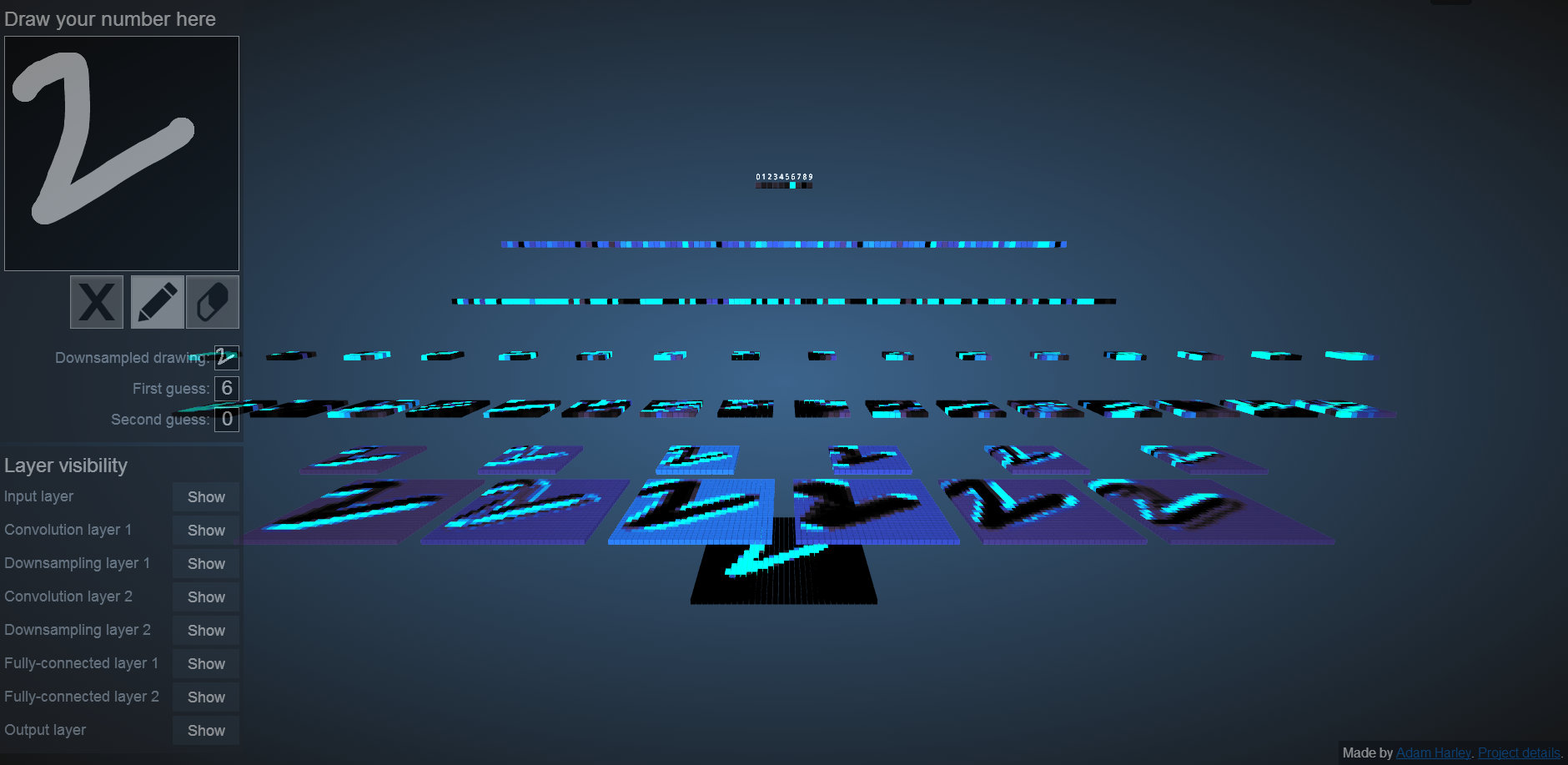
为什么要做变形,或者说数据增强。从这个网站可以看出 http://scs.ryerson.ca/~aharley/vis/conv/ 手写字符稍微变形点,就有可能识别出错,因此数据增强可以生成一些变形的数据,让网络提前适应
 # -*- coding: utf-8 -*-

 __author__ = 'Administrator'

 # import packages

 from keras.preprocessing.image import ImageDataGenerator, array_to_img, img_to_array, load_img

 datagen = ImageDataGenerator(

         rotation_range=0.2,

         width_shift_range=0.2,

         height_shift_range=0.2,

         shear_range=0.2,

         zoom_range=0.2,

         horizontal_flip=True,

         fill_mode='nearest')

 for k in range(33):

     numstr = "{0:d}".format(k);

     filename='C:\\Users\\Administrator\\Desktop\\bad\\'+numstr+'.jpg';

     ufilename = unicode(filename , "utf8")

     img = load_img(ufilename)  # this is a PIL image, please replace to your own file path

     x = img_to_array(img)  # this is a Numpy array with shape (3, 150, 150)

     x = x.reshape((1,) + x.shape)  # this is a Numpy array with shape (1, 3, 150, 150)

     # the .flow() command below generates batches of randomly transformed images

     # and saves the results to the `preview/` directory

     i = 0

     for batch in datagen.flow(x,

                               batch_size=1,

                               save_to_dir='C:\\Users\\Administrator\\Desktop\\dataA\\',#生成后的图像保存路径

                               save_prefix=numstr,

                               save_format='jpg'):

         i += 1

         if i > 20:

             break  # otherwise the generator would loop indefinitely

 end
 # -*- coding: utf- -*-

 __author__ = 'Administrator'

 # import packages

 from keras.preprocessing.image import ImageDataGenerator, array_to_img, img_to_array, load_img

 datagen = ImageDataGenerator(

         rotation_range=,

         width_shift_range=0.2,

         height_shift_range=0.2,

         rescale=./,

         shear_range=0.2,

         zoom_range=0.2,

         horizontal_flip=True,

         fill_mode='nearest')

 import os

 import sys

 reload(sys)

 sys.setdefaultencoding('utf8')

 ufilename = unicode("C:\\Users\\Administrator\\Desktop\\测试" , "utf8")

 for filename in os.listdir(ufilename):              #listdir的参数是文件夹的路径

     print ( filename)                                  #此时的filename是文件夹中文件的名称

     pathname='C:\\Users\\Administrator\\Desktop\\测试\\'+filename;

     #ufilename = unicode(pathname , "utf8")

     img = load_img(pathname)  # this is a PIL image, please replace to your own file path

     x = img_to_array(img)  # this is a Numpy array with shape (, , )

     x = x.reshape((,) + x.shape)  # this is a Numpy array with shape (, , , )

     # the .flow() command below generates batches of randomly transformed images

     # and saves the results to the `preview/` directory

     i =

     for batch in datagen.flow(x,

                               batch_size=,

                               save_to_dir='C:\\Users\\Administrator\\Desktop\\result\\',#生成后的图像保存路径

                               save_prefix=filename,

                               save_format='jpg'):

         i +=

         if i > :

             break  # otherwise the generator would loop indefinitely

 # datagen = ImageDataGenerator(

 #         rotation_range=0.2,

 #         width_shift_range=0.2,

 #         height_shift_range=0.2,

 #         rescale=./,

 #         shear_range=0.1,

 #         zoom_range=0.4,

 #         horizontal_flip=True,

 #         fill_mode='nearest')

 #

 # ufilename = unicode("C:\\Users\\Administrator\\Desktop\\训练" , "utf8")

 # for filename in os.listdir(ufilename):              #listdir的参数是文件夹的路径

 #     print ( filename)                                  #此时的filename是文件夹中文件的名称

 #     pathname='C:\\Users\\Administrator\\Desktop\\训练\\'+filename;

 #    # ufilename = unicode(pathname , "utf8")

 #     img = load_img(pathname)  # this is a PIL image, please replace to your own file path

 #     x = img_to_array(img)  # this is a Numpy array with shape (, , )

 #     x = x.reshape((,) + x.shape)  # this is a Numpy array with shape (, , , )

 #

 #     # the .flow() command below generates batches of randomly transformed images

 #     # and saves the results to the `preview/` directory

 #

 #     i =

 #

 #     for batch in datagen.flow(x,

 #                               batch_size=,

 #                               save_to_dir='C:\\Users\\Administrator\\Desktop\\result\\',#生成后的图像保存路径

 #                               save_prefix=filename,

 #                               save_format='jpg'):

 #         i +=

 #         if i > :

 #             break  # otherwise the generator would loop indefinitely
https://github.com/mdbloice/Augmentor
深度学习中的Data Augmentation方法(转)基于keras的更多相关文章
- 深度学习中数据的augmentation
为了提高模型的泛化能力,同时也为了增大数据集,我们往往需要对数据进行augmentation,在这篇博客中,将总结一下可以对数据进行的augmentation. 1.颜色数据增强,对图像亮度.饱和度. ...
- 深度学习中dropout策略的理解
现在有空整理一下关于深度学习中怎么加入dropout方法来防止测试过程的过拟合现象. 首先了解一下dropout的实现原理: 这些理论的解释在百度上有很多.... 这里重点记录一下怎么实现这一技术 参 ...
- 深度学习中Dropout原理解析
1. Dropout简介 1.1 Dropout出现的原因 在机器学习的模型中,如果模型的参数太多,而训练样本又太少,训练出来的模型很容易产生过拟合的现象. 在训练神经网络的时候经常会遇到过拟合的问题 ...
- Hebye 深度学习中Dropout原理解析
1. Dropout简介 1.1 Dropout出现的原因 在机器学习的模型中,如果模型的参数太多,而训练样本又太少,训练出来的模型很容易产生过拟合的现象. 在训练神经网络的时候经常会遇到过拟合的问题 ...
- 深度学习中正则化技术概述(附Python代码)
欢迎大家关注我们的网站和系列教程:http://www.tensorflownews.com/,学习更多的机器学习.深度学习的知识! 磐石 介绍 数据科学研究者们最常遇见的问题之一就是怎样避免过拟合. ...
- zz详解深度学习中的Normalization,BN/LN/WN
详解深度学习中的Normalization,BN/LN/WN 讲得是相当之透彻清晰了 深度神经网络模型训练之难众所周知,其中一个重要的现象就是 Internal Covariate Shift. Ba ...
- 深度学习中交叉熵和KL散度和最大似然估计之间的关系
机器学习的面试题中经常会被问到交叉熵(cross entropy)和最大似然估计(MLE)或者KL散度有什么关系,查了一些资料发现优化这3个东西其实是等价的. 熵和交叉熵 提到交叉熵就需要了解下信息论 ...
- 卷积在深度学习中的作用(转自http://timdettmers.com/2015/03/26/convolution-deep-learning/)
卷积可能是现在深入学习中最重要的概念.卷积网络和卷积网络将深度学习推向了几乎所有机器学习任务的最前沿.但是,卷积如此强大呢?它是如何工作的?在这篇博客文章中,我将解释卷积并将其与其他概念联系起来,以帮 ...
- 深度学习中 --- 解决过拟合问题(dropout, batchnormalization)
过拟合,在Tom M.Mitchell的<Machine Learning>中是如何定义的:给定一个假设空间H,一个假设h属于H,如果存在其他的假设h’属于H,使得在训练样例上h的错误率比 ...
随机推荐
- 解剖SQLSERVER 第十三篇 Integers在行压缩和页压缩里的存储格式揭秘(译)
解剖SQLSERVER 第十三篇 Integers在行压缩和页压缩里的存储格式揭秘(译) http://improve.dk/the-anatomy-of-row-amp-page-compre ...
- C#中使用OpenSSL的公钥加密/私钥解密
在C#中进行公钥加密/私钥解密,需要用RSACryptoServiceProvider,但是它不支持由OpenSSL生成的公钥/私钥字符串. 比如这样的公钥/私钥对( 公私钥生成方法见 http:// ...
- 设计模式之美:Null Object(空对象)
索引 意图 结构 参与者 适用性 效果 相关模式 实现 实现方式(一):Null Object 的示例实现. 意图 通过对缺失对象的封装,以提供默认无任何行为的对象替代品. Encapsulate t ...
- Asp.Net MVC中使用ACE模板之Jqgrid
第一次看到ACE模板,有种感动,有种相见恨晚的感觉,于是迅速来研究.它本身是基于bootstrap和jqueryui,但更nice,整合之后为后台开发节省了大量时间. 发现虽然不是完美,整体效果还是不 ...
- Android怎么找到最优适配资源
当我们将一些提供了不同的资源文件可供Android系统选择的时候,Android会在运行时会根据一套适配的规则选择最符合当前配置的资源.为了说明Android怎么选择资源,假设我们有以下可选的资源文件 ...
- python Web开发框架-Django (1)
以前用web.py(另外一款轻量级web开发框架)做一个监控管理平台,没有做特别的记录就不好拾起来.最近做一个日志聚合系统,使用的是django,这次就记下来,方便查询. Django是一个高效的we ...
- IOS UIView 02- 深入理解 Scroll Views
注:本人是翻译过来,并且加上本人的一点见解. 前言 可能你很难相信 UIScrollView 和一个标准的 UIView 差异并不大,scroll view 确实会多出一些方法,但这些方法只是和 UI ...
- python 多线程网络编程 ( 二 )
背景 我在[第一篇文章中]已经介绍了如何实现一个多线程的todo应用,接下来我将会研究如何使这个服务器完成下面这几个功能. 1.使用正则表达式解析用户发送的请求数据: 2.使用ThreadLocal技 ...
- iOS----CocoaPods的安装、使用和,原理+参考流程+常见问题
一.什么是CocoaPods CocoaPods是iOS项目的依赖管理工具,该项目源码在Github上管理.开发iOS项目不可避免地要使用第三方开源库,CocoaPods的出现使得我们可以节省设置和第 ...
- Java删除数据库中的数据
1:删除数据库中数据表中的数据同样也是一个非常用的技术,使用executeUpdate()方法执行用来做删除SQL的语句可以删除数据库表中的数据 2:本案例使用Statement接口中的execute ...