
Android之Notification介绍
Notification就是在桌面的状态通知栏。这主要涉及三个主要类:
Notification:设置通知的各个属性。
NotificationManager:负责发送通知和取消通知
Notification.Builder:Notification内之类,创建Notification对象。非常方便的控制所有的flags,同时构建Notification的风格。
主要作用:
1.创建一个状态条图标。
2.在扩展的状态条窗口中显示额外的信息(和启动一个Intent)。
3.闪灯或LED。
4.电话震动。
5.发出听得见的警告声(铃声,保存的声音文件)。
Notification是看不见的程序组件(Broadcast Receiver,Service和不活跃的Activity)警示用户有需要注意的事件发生的最好途径
下面主要介绍这三个类:
一、NotificationManager
这个类是这三个类中最简单的。主要负责将Notification在状态显示出来和取消。主要包括5个函数:void cancel(int id),void cancel(String tag, int id), void cancelAll(),void notify(int id, Notificationnotification),notify(String tag, int id, Notification notification)
看看这五个函数就知道这个类的作用了。但是在初始化对象的时候要注意:
NotificationManager nm = (NotificationManager) getSystemService(NOTIFICATION_SERVICE);
二、Notification
设置这个类主要是设置Notification的相关属性。初始化
Notification n = new Notification();
Notification里面有很多属性下面选择几个常用的介绍一下
icon 这个是设置通知的图标。像QQ的小企鹅
sound 这个是设置来通知时的提示音。
tickerText 设置提示的文字。
vibrate 来通知时振动。
when 设置来通知时的时间
flag 这个很有意思是设置通知在状态栏显示的方式。它的值可以设置为虾米这些值:
FLAG_NO_CLEAR 将flag设置为这个属性那么通知栏的那个清楚按钮就不会出现
FLAG_ONGOING_EVENT 将flag设置为这个属性那么通知就会像QQ一样一直在状态栏显示
DEFAULT_ALL 将所有属性设置为默认
DEFAULT_SOUND 将提示声音设置为默认
DEFAULT_VIBRATE 将震动设置为默认
三、Notification.Builder
这个类一般用于管理Notification,动态的设置Notification的一些属性。即用set来设置。也没啥好说的。
转自 http://blog.csdn.net/zqiang_55/article/details/7032025
StatusBarService:
package com.example.androidstatusbarnotification;

import android.app.IntentService;

import android.app.Notification;

import android.app.NotificationManager;

import android.app.PendingIntent;

import android.content.Intent;

import android.util.Log;

public class StatusBarService extends IntentService {

    private final static String TAG = "MainActivity";

    public StatusBarService() {

        super("StatusBarService");

        // TODO Auto-generated constructor stub

    }

    @Override

    protected void onHandleIntent(Intent intent) {

        Log.i(TAG, "开始下载");

        showNotification(false);

        try {

            Thread.sleep(10000);

            showNotification(true);

        } catch (InterruptedException e) {

            // TODO Auto-generated catch block

            e.printStackTrace();

        }

        Log.i(TAG, "下载完成");

    }

    private void showNotification(boolean finish) {

        Notification notification = new Notification();

        NotificationManager manager = (NotificationManager) getSystemService(NOTIFICATION_SERVICE);

        Intent intent = new Intent(this, MainActivity.class);

        PendingIntent conIntent = PendingIntent.getActivity(this, 0, intent, PendingIntent.FLAG_UPDATE_CURRENT);

        if (!finish) {

            notification.icon = R.drawable.ic_launcher;

            notification.tickerText = "开始下载";

            notification.setLatestEventInfo(this, "下载", "正在下载中……", conIntent);

        } else {

            notification.icon = R.drawable.ic_launcher;

            notification.tickerText = "下载完成";

            notification.setLatestEventInfo(this, "下载", "程序下载完毕", conIntent);

        }

        notification.defaults = Notification.DEFAULT_SOUND;// 添加声音提示

        // 下边的两个方式可以添加音乐

        // notification.sound =

        // Uri.parse("file:///sdcard/notification/ringer.mp3");

        // notification.sound =

        // Uri.withAppendedPath(Audio.Media.INTERNAL_CONTENT_URI, "6");

        // audioStreamType的值必须AudioManager中的值,代表着响铃的模式

        notification.audioStreamType = android.media.AudioManager.ADJUST_LOWER;

        manager.notify(R.layout.activity_main, notification);

    }

}
布局:
<LinearLayout xmlns:android="http://schemas.android.com/apk/res/android"

    xmlns:tools="http://schemas.android.com/tools"

    android:layout_width="match_parent"

    android:layout_height="match_parent"

    android:orientation="vertical"

    tools:context=".MainActivity" >

    <TextView

        android:layout_width="wrap_content"

        android:layout_height="wrap_content"

        android:text="@string/hello_world" />

    <Button

        android:id="@+id/btnStart"

        android:layout_width="wrap_content"

        android:layout_height="wrap_content"

        android:text="开始下载" />

</LinearLayout>
MainActivity:
package com.example.androidstatusbarnotification;

import android.os.Bundle;

import android.app.Activity;

import android.app.NotificationManager;

import android.content.Intent;

import android.view.Menu;

import android.view.View;

import android.view.View.OnClickListener;

import android.widget.Button;

public class MainActivity extends Activity {

    private final static String TAG = "MainActivity";

    private Button btnStart = null;

    @Override

    protected void onCreate(Bundle savedInstanceState) {

        super.onCreate(savedInstanceState);

        setContentView(R.layout.activity_main);

        btnStart = (Button) this.findViewById(R.id.btnStart);

        btnStart.setOnClickListener(new OnClickListener() {

            @Override

            public void onClick(View arg0) {

                Intent intent = new Intent(MainActivity.this, StatusBarService.class);

                startService(intent);//开始下载服务

            }

        });

    }

    /* (non-Javadoc)

     * @see android.app.Activity#onStart()

     */

    @Override

    protected void onStart() {

        // TODO Auto-generated method stub

        super.onStart();

        NotificationManager manager=(NotificationManager)getSystemService(NOTIFICATION_SERVICE);

        manager.cancel(R.layout.activity_main);//此处ID取页面的,进入页面后取消提示

    }

    @Override

    public boolean onCreateOptionsMenu(Menu menu) {

        // Inflate the menu; this adds items to the action bar if it is present.

        getMenuInflater().inflate(R.menu.main, menu);

        return true;

    }

}
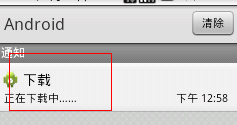
Android之Notification介绍的更多相关文章
- Android 通知栏Notification的整合 全面学习 (一个DEMO让你完全了解它)
在android的应用层中,涉及到很多应用框架,例如:Service框架,Activity管理机制,Broadcast机制,对话框框架,标题栏框架,状态栏框架,通知机制,ActionBar框架等等. ...
- Android发展简单介绍
Android一词的本义指“机器人”,同一时候也是Google于2007年11月5日宣布的基于Linux平台的开源手机操作系统的名称,该平台由操作系统.中间件.用户界面和应用软件组成,号称是首个为移动 ...
- Android 通知栏Notification的整合 全面学习 (一个DEMO让你全然了解它)
在android的应用层中,涉及到非常多应用框架.比如:Service框架,Activity管理机制,Broadcast机制,对话框框架,标题栏框架,状态栏框架.通知机制,ActionBar框架等等. ...
- Android的Notification的简介-android学习之旅(四十一)
Notification简介 Notification位于手机饿最上面,用于显示手机的各种信息,包括网络状态,电池状态,时间等. 属性方法介绍 代码示例 package peng.liu.test; ...
- Android开发——Notification通知的各种Style详解
本来是想与之前讲解使用Notification通知使用一起写的,查看了资料,觉得有必要将这Style部分单独拿出来讲解 前篇:Android开发——Notification通知的使用及Notifica ...
- 【转】 [置顶] Android 通知栏Notification的整合 全面学习 (一个DEMO让你完全了解它)
在Android的应用层中,涉及到很多应用框架,例如:Service框架,Activity管理机制,Broadcast机制,对话框框架,标题栏框架,状态栏框架,通知机制,ActionBar框架等等. ...
- android之Notification通知
我们在用手机的时候,如果来了短信,而我们没有点击查看的话,是不是在手机的最上边的状态栏里有一个短信的小图标提示啊?你是不是也想实现这种功能呢?今天的Notification就是解决这个问题的. pac ...
- Android 通知(Notification)
1.介绍 2.常用属性 3.java后台代码 package com.lucky.test30notification; import android.app.Notification; import ...
- Android sdk目录介绍
android sdk目录介绍 build-tools 各版本SDK编译工具 docs 离线开发者文档Android SDK API参考文档 extras 扩展开发包,如兼容架包. platforms ...
随机推荐
- Emacs-24.1 + ECB-2.40 + cscope-15.7a + cedet 无root权限指定目录安装与配置
emacs等安装在-/INSTALL目录下,在-下新建一个INSTALL目录. 1. emacs-24.1.tar.gz ecb-2.40.tar.gz cscope-15.7a.tar.bz2下载到 ...
- Linux学习进阶路线图
摘自:http://blog.csdn.net/zdwzzu2006/article/details/4334791 Linux 基础 Linux 基础 Linux安装专题教程 Linux中文环境 L ...
- centos7.2 默认启动内核修改
总所周知,修改centos6的内核启动顺序,只需要修改/etc/grub.conf 里的default项配置即可.那么centos7系统该如何修改呢? 下面就centos7系统修改内核,做如下记录: ...
- zookeeper 简介
一.简介 zookeeper是hadoop的一个子项目,A distribute coordination service for distributed applications 为了分布式应用而开 ...
- 解决web中的乱码
统一使用utf-8进行编码数据库的编码格式也是utf-8 对于页面post传过来的不会出现乱码 对于页面get 传过来值解决乱码 方法一:在业务层:userName = new String(user ...
- Paxos算法细节详解(一)--通过现实世界描述算法
Paxos分析 最近研究paxos算法,看了许多相关的文章,概念还是很模糊,觉得还是没有掌握paxos算法的精髓,所以花了3天时间分析了libpaxos3的所有代码,此代码可以从https://bit ...
- [.NET领域驱动设计实战系列]专题四:前期准备之工作单元模式(Unit Of Work)
一.前言 在前一专题中介绍了规约模式的实现,然后在仓储实现中,经常会涉及工作单元模式的实现.然而,在我的网上书店案例中也将引入工作单元模式,所以本专题将详细介绍下该模式,为后面案例的实现做一个铺垫. ...
- Oracle常用函数笔记
一.字符函数 1.dual 临时表 oracle中的临时变量表,此表只返回第一行第一列 例如:select sysdate from dual 输出:2014-6-9 11:20:39 2.Initc ...
- Github注册过程以及对管理软件的了解
二.目前流行的源程序管理软件和项目管理软件主要有以下一些: 1.Visual Source Safe 优点:如果开发工具是VS.NET,用VSS较合适,方便,安装配置和使用都简单,版本控制简单,打la ...
- VC++中开发汇编语言(转)
汇编程序结构 一个显示字符串的汇编程序 程序格式 一.模式定义 二.includelib语句 三.函数声明语句 四.数据和代码部分 Visual C/C++环境 建立工程 汇编程序的调试 一.设置断点 ...