
实体类在Windows程序中的高级应用--------------------》》心境是一种境界。
一、事务
我们在大家学到这,或多或少对事务都有一些理解了。今天的我也对事务有了更深一层的理解对我来说,我想与大家一起分享一下。
解析: 1.ADO.NET提供了事务处理功能
2.C#中开启事务
3.在咱们的SQL后台就不用开启事务了
4.eg.我要在FrmSW的窗体上添加年级,我们首先在数据库中在年级表中对其GradeName设置唯一约束,如果GradeName重复则事务会将其回滚,如GradeName不重复就会输出。
string str = "data source=.;initial catalog=MySchool;uid=sa;pwd=1";

            SqlConnection con = new SqlConnection(str);

            string sql = "insert into grade values(@gname)";

            SqlParameter para = new SqlParameter("@gname", txtName.Text);

            SqlCommand cmd = new SqlCommand(sql, con);

            //1.0  必须在连接打开之后,用连接对象con.beginTransaction

            SqlTransaction tran = con.BeginTransaction();

            cmd.Parameters.Add(para);

            con.Open();

            //1.1   将通过con构建出的事务对象和  cmd的Transaction属性绑定

            cmd.Transaction = tran;

                //初始值要给

                    int count = 0;

            try

            {

                count = cmd.ExecuteNonQuery();

                //1.3 提交事务

                tran.Commit();

            }

            catch (Exception ex)

            {

                //1.4回滚事务

                tran.Rollback();

                MessageBox.Show(ex.Message);

            }

            if (count > 0)

            {

                MessageBox.Show("添加成功!");

            }

            con.Close();
知识------------------》在我们断点时想看看它重复是否会回滚我们在数据库中写如下代码:
select * from Grade with(nolock)
二、Msgdiv组件的讲解。
1.Msgdiv类如下
using System;

using System.Collections.Generic;

using System.Text;

using System.Windows.Forms;

/// <summary>

/// 消息条回调函数委托

/// </summary>

public delegate void DGMsgDiv();

    /// <summary>

    /// 消息条类 带Timer计时

    /// </summary>

public class MsgDiv : System.Windows.Forms.Label

{

    private Timer timerLable = new Timer();

    /// <summary>

    /// 消息回调 委托对象

    /// </summary>

    private DGMsgDiv dgCallBack = null;

    #region 计时器

    /// <summary>

    /// 计时器

    /// </summary>

    public Timer TimerMsg

    {

        get { return timerLable; }

        set { timerLable = value; }

    }

    #endregion

    #region  MsgDiv构造函数

    /// <summary>

    /// MsgDiv构造函数

    /// </summary>

    public MsgDiv()

    {

        InitallMsgDiv(7, 7);

    }

    /// <summary>

    /// MsgDiv构造函数

    /// </summary>

    /// <param name="x">定位x轴坐标</param>

    /// <param name="y">定位y轴坐标</param>

    public MsgDiv(int x, int y)

    {

        InitallMsgDiv(x, y);

    }

    #endregion

    #region  初始化消息条

    /// <summary>

    /// 初始化消息条

    /// </summary>

    private void InitallMsgDiv(int x, int y)

    {

        this.AutoSize = true;

        this.BackColor = System.Drawing.Color.FromArgb(((int)(((byte)(255)))), ((int)(((byte)(255)))), ((int)(((byte)(192)))));

        this.BorderStyle = System.Windows.Forms.BorderStyle.FixedSingle;

        //this.ContextMenuStrip = this.cmsList;

        this.Font = new System.Drawing.Font("宋体", 11F, System.Drawing.FontStyle.Bold, System.Drawing.GraphicsUnit.Point, ((byte)(134)));

        this.ForeColor = System.Drawing.Color.Red;

        this.Location = new System.Drawing.Point(x, y);

        this.MaximumSize = new System.Drawing.Size(980, 525);

        this.Name = "msgDIV";

        this.Padding = new System.Windows.Forms.Padding(7);

        this.Size = new System.Drawing.Size(71, 31);

        this.TabIndex = 1;

        this.Text = "消息条";

        this.Visible = false;

        //给委托添加事件

        this.DoubleClick += new System.EventHandler(this.msgDIV_DoubleClick);

        this.MouseLeave += new System.EventHandler(this.msgDIV_MouseLeave);

        this.MouseHover += new System.EventHandler(this.msgDIV_MouseHover);

        this.timerLable.Interval = 1000;

        this.timerLable.Tick += new System.EventHandler(this.timerLable_Tick);

    }

    #endregion

    #region 将消息条添加到指定容器上

    /// <summary>

    /// 将消息条添加到指定容器上Form

    /// </summary>

    /// <param name="form"></param>

    public void AddToControl(Form form)

    {

        form.Controls.Add(this);

    }

    /// <summary>

    /// 将消息条添加到指定容器上GroupBox

    /// </summary>

    /// <param name="form"></param>

    public void AddToControl(GroupBox groupBox)

    {

        groupBox.Controls.Add(this);

    }

    /// <summary>

    /// 将消息条添加到指定容器上Panel

    /// </summary>

    /// <param name="form"></param>

    public void AddToControl(Panel panel)

    {

        panel.Controls.Add(this);

    }

    #endregion

    //---------------------------------------------------------------------------

    #region 消息显示 的相关参数们 hiddenClick,countNumber,constCountNumber

    /// <summary>

    /// 当前显示了多久的秒钟数

    /// </summary>

    int hiddenClick = 0;

    /// <summary>

    /// 要显示多久的秒钟数 可变参数

    /// </summary>

    int countNumber = 3;

    /// <summary>

    /// 要显示多久的秒钟数 固定参数

    /// </summary>

    int constCountNumber = 3;

    #endregion

    #region 计时器 显示countNumber秒钟后自动隐藏div -timerLable_Tick(object sender, EventArgs e)

    private void timerLable_Tick(object sender, EventArgs e)

    {

        if (hiddenClick > countNumber - 2)

        {

            MsgDivHidden();

        }

        else

        {

            hiddenClick++;

            //RemainCount();

        }

    }

    #endregion

    #region 隐藏消息框 并停止计时 +void MsgDivHidden()

    /// <summary>

    /// 隐藏消息框 并停止计时

    /// </summary>

    public void MsgDivHidden()

    {

        this.Text = "";

        this.Visible = false;

        this.hiddenClick = 0;

        //this.tslblRemainSecond.Text = "";

        if (this.timerLable.Enabled == true)

            this.timerLable.Stop();

        //调用 委托 然后清空委托

        if (dgCallBack != null && dgCallBack.GetInvocationList().Length > 0)

        {

            dgCallBack();

            dgCallBack -= dgCallBack;

        }

    }

    #endregion

    #region 在消息框中显示消息字符串 +void MsgDivShow(string msg)

    /// <summary>

    /// 在消息框中显示消息字符串

    /// </summary>

    /// <param name="msg">要显示的字符串</param>

    public void MsgDivShow(string msg)

    {

        this.Text = msg;

        this.Visible = true;

        this.countNumber = constCountNumber;//默认设置显示秒数为10;

        this.hiddenClick = 0;//重置倒数描述

        this.timerLable.Start();

    }

    #endregion

    #region 在消息框中显示消息字符串 并在消息消失时 调用回调函数 +void MsgDivShow(string msg, DGMsgDiv callback)

    /// <summary>

    /// 在消息框中显示消息字符串 并在消息消失时 调用回调函数

    /// </summary>

    /// <param name="msg">要显示的字符串</param>

    /// <param name="callback">回调函数</param>

    public void MsgDivShow(string msg, DGMsgDiv callback)

    {

        MsgDivShow(msg);

        dgCallBack = callback;

    }

    #endregion

    #region 在消息框中显示消息字符串 并在指定时间消息消失时 调用回调函数 +void MsgDivShow(string msg, int seconds, DGMsgDiv callback)

    /// <summary>

    /// 在消息框中显示消息字符串 并在消息消失时 调用回调函数

    /// </summary>

    /// <param name="msg">要显示的字符串</param>

    /// <param name="seconds">消息显示时间</param>

    /// <param name="callback">回调函数</param>

    public void MsgDivShow(string msg, int seconds, DGMsgDiv callback)

    {

        MsgDivShow(msg, seconds);

        dgCallBack = callback;

    }

    #endregion

    #region 在消息框中显示消息字符串,并指定消息框显示秒数 +void MsgDivShow(string msg, int seconds)

    /// <summary>

    /// 在消息框中显示消息字符串,并指定消息框显示秒数

    /// </summary>

    /// <param name="msg">要显示的字符串</param>

    /// <param name="seconds">消息框显示秒数</param>

    public void MsgDivShow(string msg, int seconds)

    {

        this.Text = msg;

        this.Visible = true;

        this.countNumber = seconds;

        this.hiddenClick = 0;//重置倒数描述

        this.timerLable.Start();

    }

    #endregion

    //---------------------------------------------------------------------------

    #region 事件们~~~! msgDIV_MouseHover,msgDIV_MouseLeave,msgDIV_DoubleClick

    //当鼠标停留在div上时 停止计时

    private void msgDIV_MouseHover(object sender, EventArgs e)

    {

        if (this.timerLable.Enabled == true)

            this.timerLable.Stop();

    }

    //当鼠标从div上移开时 继续及时

    private void msgDIV_MouseLeave(object sender, EventArgs e)

    {

        //当消息框正在显示、回复框没显示、计时器正停止的时候,重新启动计时器

        if (this.Visible == true && this.timerLable.Enabled == false)

            this.timerLable.Start();

    }

    //双击消息框时关闭消息框

    private void msgDIV_DoubleClick(object sender, EventArgs e)

    {

        MsgDivHidden();

    }

    #endregion

}
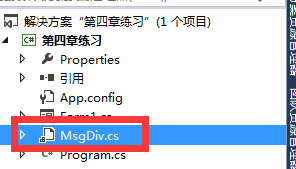
2. 我们要将其类型放在应用窗体下,为了方便大家以后找,我们应将其新建一个文件夹把这个类放进去。
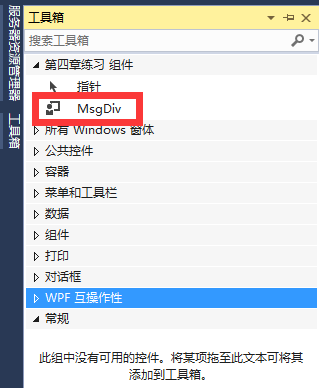
3.我们在工具类中会发现有这个控件——————————》就是你的类所生成的控件
4.我们将其窗体添加Label控件将其修改为“呵呵”,但是它的样子死板不够漂亮所以我们刚生成的控件就很绚丽我们还可以根据秒数进行更换。
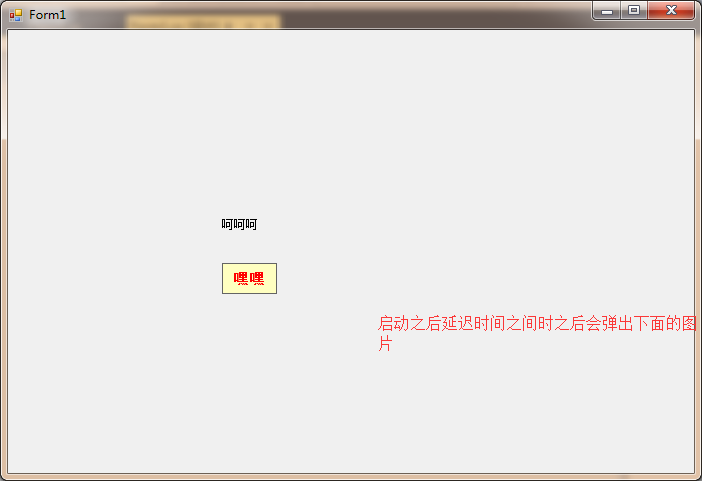
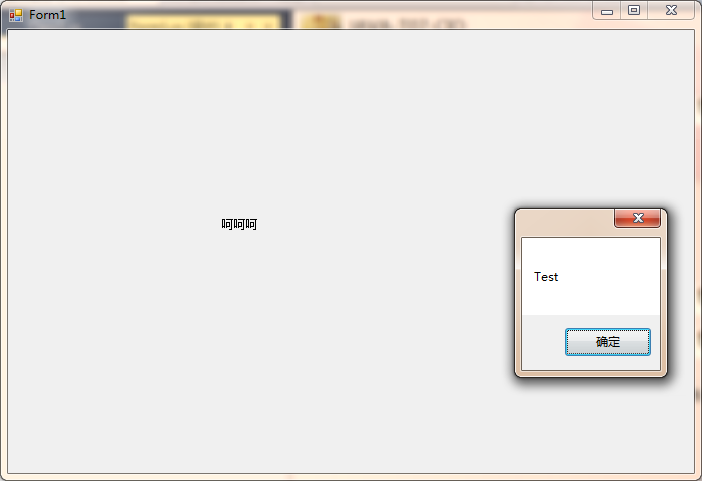
 private void Form1_Load(object sender, EventArgs e)

        {

            msgDiv1.MsgDivShow("嘿嘿", 3, Test);

            //MyTool tool = new MyTool();

            //List<Grade> list = tool.DataTableToList<Grade>(dt);

        }

        public void Test()

        {

            MessageBox.Show("Test");

        }
这就结束了这个控件,有没有非常的神奇********
三、DataTableToList的使用
1.将MyTool这个类放在MySchool.DAL层
using System;

using System.Collections.Generic;

using System.Data;

using System.Data.SqlClient;

using System.Linq;

using System.Reflection;

using System.Text;

using System.Threading.Tasks;

namespace MySchool.DAL

{

   public class MyTool

    {

        /// <summary>

        /// DataSetToList

        /// </summary>

        /// <typeparam name="T">转换类型</typeparam>

        /// <param name="dataSet">数据源</param>

        /// <param name="tableIndex">需要转换表的索引</param>

        /// <returns></returns>

        public IList<T> DataTableToList<T>(DataTable dt)

        {

            //确认参数有效

            if (dt == null )

                return null;

            List<T> list = new List<T>();

            for (int i = 0; i < dt.Rows.Count; i++)

            {

                //创建泛型对象

                T _t = Activator.CreateInstance<T>();

                //获取对象所有属性

                PropertyInfo[] propertyInfo = _t.GetType().GetProperties();

                for (int j = 0; j < dt.Columns.Count; j++)

                {

                    foreach (PropertyInfo info in propertyInfo)

                    {

                        //属性名称和列名相同时赋值

                        if (dt.Columns[j].ColumnName.ToUpper().Equals(info.Name.ToUpper()))

                        {

                            if (dt.Rows[i][j] != DBNull.Value)

                            {

                                info.SetValue(_t, dt.Rows[i][j], null);

                            }

                            else

                            {

                                info.SetValue(_t, null, null);

                            }

                            break;

                        }

                    }

                }

                list.Add(_t);

            }

            return list;

        }

    }

}
在MySchool.DAL层————————》这个类代替Foreach
 public List<Grade> LoadAllGradeToList()

        {

           // List<Grade> list = new List<Grade>();

            string sql = "select * from grade";

            DataTable dt = SQLHelper.ExecuteDataTable(sql);


        //代替Foreach
            MyTool tool=new MyTool();

           List<Grade> list=tool.DataTableToList<Grade>(dt);

            //将dt转成List<Student>

            //foreach (DataRow row in dt.Rows)

            //{

            //    //每一个row代表表中的一行   所以 一行对应一个年级对象

            //    Grade grade = new Grade();

            //    grade.GradeId = Convert.ToInt32(row["gradeid"]);

            //    grade.GradeName = row["gradename"].ToString();

            //    list.Add(grade);

            //}

            return list;

        }
四、多表数据绑定到同一个DataGridVIew
问题:既显示学生姓名 科目姓名 成绩
解析: 在实体类里创建新的实体类studentExtends:Student科目名称、成绩
在DAL层创建一个名称为StudentDal的类,在此类中定义一个方法LoadStudentInfo()返回值类型List<StudentExtends>
在BLL层调用dal的方法
在UI层后获取到BLL返回的泛型集合
将泛型作为DGV的数据源
public class StudentExtends:Student

    {

       //一个是科目名称

       public string SubjectName { get; set; }

       //考试时间

       public DateTime ExamDate { get; set; }

       //成绩

       public int StudentResult { get; set; }

    }
public List<StudentExtends> LoadStudentInfo()

       {

           List<StudentExtends> list=new List<StudentExtends>();

           string sql = @"select studentname,subjectname,studentresult,examdate

                          from student,subject,result

                          where student.studentno=result.studentno

                          and result.subjectid=subject.subjectid";

           DataTable dt=SQLHelper.ExecuteDataTable(sql);

           foreach (DataRow item in dt.Rows)

           {

               //一个item就是表中的一条记录(学生名称,科目名称 ,成绩和时间)

               //一个游离的 学生对象

                StudentExtends stu=new StudentExtends();

                stu.StudentName = item["studentname"].ToString();

                stu.SubjectName = item["subjectname"].ToString();

                stu.StudentResult = Convert.ToInt32(item["studentresult"]);

                stu.ExamDate = Convert.ToDateTime(item["examdate"]);

               list.Add(stu);

           }

           return list;

       }
 public List<StudentExtends> LoadStudentInfo()

      {

         return dal.LoadStudentInfo();

      }
 private void FrmSelectResult_Load(object sender, EventArgs e)

        {

          List<StudentExtends> list=  bll.LoadStudentInfo();

            dgvResult.DataSource = list;

        }

实体类在Windows程序中的高级应用--------------------》》心境是一种境界。的更多相关文章
- 在Java Web程序中使用监听器可以通过以下两种方法
之前学习了很多涉及servlet的内容,本小结我们说一下监听器,说起监听器,编过桌面程序和手机App的都不陌生,常见的套路都是拖一个控件,然后给它绑定一个监听器,即可以对该对象的事件进行监听以便发生响 ...
- Android中的Application类在应用程序中的应用
Application类 每次应用程序运行时,应用程序的Application类都保持实例化状态(都会持有该Application实例).与Activity不同的是,配置改变并不会导致应用程序重启.在 ...
- 关于编写Windows程序中启动兼容性问题
之前用qt4编写Windows程序的时候遇到了一个软件在系统的兼容性问题:用户在win10系统下使用这个程序的时候,如果没有用低于win10版本的兼容模式运行的时候,存在运行某部分功能的时候无法使用的 ...
- 在Windows程序中启用console输出-2016.01.04
在某些时候,我们可能需要在Win32窗口应用程序中打开控制台窗口,打印一些消息,或者作为当前程序的另外一个人机交互界面,或者为了帮助调试程序.为了达到这种效果,需要了解函数AllocConsole和C ...
- Runtime类 调用windows程序。
import java.io.*; public class webcyz { /** * @param args */ public static void main(String[] args) ...
- windows程序中拷贝文件的选择
最近需要在Windows下拷贝大量小文件(数量在十万级别以上).写了些拷贝文件的小程序,竟然发现不同的选择,拷贝的速度有天壤之别! 现有这样的测试数据:1500+小文件,总大小10M左右.现用不同方法 ...
- Mybatis实体类的映射文件中select,insert语句使用
id:在命名空间中唯一的标识符,可以被用来引用这条语句. parameterType:设置传入这条语句的参数的数据类型,如int,String...... resultType:设置从这条语句中返回数 ...
- 实体类调用泛型父类中的静态方法中执行CRUD——第二版
using System; using System.Collections.Generic; using System.Data.Entity; using System.Linq; namespa ...
- Windows系统中监控文件复制操作的几种方式
http://blog.sina.com.cn/s/blog_4596beaa0100lp4y.html 1. ICopyHook 作用: 监视文件夹和打印机移动,删除, 重命名, 复制操作. 可以得 ...
随机推荐
- eclipse导入cordova项目
eclipse导入cordova项目 导入老是出问题是不是?老是提议已存在是不是? 不知道如何改名字? 这里关键的一点是一定要选择对应的platform的目录,而不是你的项目的目录,不是你的项目的目录 ...
- InstallShield Limited Edition for Visual Studio 2013 图文教程(教你如何打包.NET程序)
InstallShield Limited Edition for Visual Studio 2013 图文教程(教你如何打包.NET程序) 标签: InstallShieldVS2013 2015 ...
- ASP.NET MVC在线人数统计
在Global.asax.cs文件中代码: protected void Application_Start() { Application[; AreaRegistration.RegisterAl ...
- hibernate(二)annotation第一个示例
一.在数据库中创建teacher表(数据库hibernate) create table teache( id int auto_increment primary key, name ), titl ...
- javase基础复习攻略《六》
学习JAVA的同学都知道,sun为我们封装了很多常用类,本篇就为大家总结一下我们经常使用的类.上一篇博客一位朋友留言问我String是不是引用数据类型?我通过查找资料发现String属于应用数据类型, ...
- XML序列化的时候如何支持Namespace
我曾经不止一次(当然不仅仅是我意识到这个问题)说到过,XML标准中的Namespace的设计其实是一个较为失败的设计,它有它的优点,但缺点更多. http://zzk.cnblogs.com/s?w= ...
- Java生成BASE64编码
1.所需jar包: BASE64Encoder.jar 2.在导包过程中,可能会出现工程不识别的情况.即:不能找到BASE64Encoder的jar包.此时,可以有两种方法解决这个问题: a. 只需 ...
- ansible写一个简单的playbook
前言 实现的功能很简单,就是通过ansible批量完成某个账户sudo权限的开通或关闭 目录结构 ├── group_vars #放置各种变量的目录,我这里没用 ├── hosts #主机和组配置,默 ...
- 【Swift学习】Swift编程之旅---控制流(九)
Swift提供了类似C语言的流程控制结构,包括可以多次执行任务的for和while循环,基于特定条件选择执行不同代码分支的if和switch语句,还有控制流程跳转到其他代码的break和continu ...
- GitHub简单教程
Hello World程序是计算机编程中由来已久的惯例,这是一个当你在学习新事物的时候开始的一个简单的小练习.让我们开始GitHub的"Hello World". 你将学会: - ...