
css text-fill-color与text-stroke讲解
顾名思义“text-fill-color”就是文字填充颜色而“text-stroke”就是文字描边。还别说,两个属性可以制作出各种炫酷的文字效果,不过IE系列都不支持,不过好在webkit都支持良好。
text-fill-color:color;
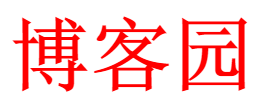
<style>

	h1{

		-webkit-text-fill-color:red;

	}

</style>

<h1>博客园</h1>
话说倒有点像color了,这种情况下倒是和color真的是一样的。
得注意一下:如果同时设置了
text-fill-color和color那么color不会起作用。
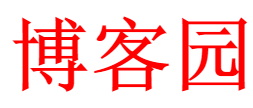
h1{

	-webkit-text-fill-color:red;

	color:green;

}
text-stroke:width color;

<style>

	h1{

		-webkit-text-stroke:1px red;

	}

</style>

<h1>博客园</h1>
好像这两个单独使用没有啥亮点,但如果结合起来使用那就不一样了。
text-stroke + text-fill-color制作文字镂空效果

<style>

	body{

		background-color:#000;

	}

	h1{

		font-size:60px;

		-webkit-text-fill-color:transparent;

		-webkit-text-stroke:1px #fff;

	}

</style>

<h1>博客园</h1>
原来就是设置边框为白色然后然文字颜色透明,背景颜色黑色,也就是黑白对比,自然文字就只能看见边框了。
如果再结合一下“background-clip”那就更强大了。
background-clip:text结合text-fill-color制作文字渐变效果

h1{

	font-size:60px;

	background: linear-gradient(to bottom,#FCF,#000);

	-webkit-background-clip:text;

	-webkit-text-fill-color:transparent;

}
注意:
background-clip必须放在background后面不然不起作用,之所以要用background是因为text-fill-color不能使用linear所以只好借助background了。
background-clip:text会将背景作为文字区域裁剪。

<style>

	h1{

		font-size:60px;

		background: url(bg.jpg) repeat;

		-webkit-background-clip:text;

		-webkit-text-fill-color:transparent;

	}

</style>

<h1>博客园</h1>
利用animation制作文字遮罩动画效果

<style>

	h1{

		font-size:60px;

		background: url(bg.jpg) repeat;

		-webkit-background-clip:text;

		-webkit-text-fill-color:transparent;

		animation:fn 5s alternate infinite;

	}

	@keyframes fn{

			0%{

				background-position:0px 0px;

			}

			20%{

				background-position:30% 0px;

			}

			50%{

				background-position:50% 0px;

			}

			70%{

				background-position:70% 0px;

			}

			100%{

				background-position:100% 0px;

			}

	}

</style>

<h1>博客园</h1>
待续...
css text-fill-color与text-stroke讲解的更多相关文章
- css text gradient color, css fonts gradient color
css text gradient color, css fonts gradient color css 字体渐变色 demo https://codepen.io/xgqfrms/pen/OJya ...
- 简单CSS实现闪烁动画(+1白话讲解)
原文:简单CSS实现闪烁动画(+1白话讲解) 本文转载于:猿2048网站⇒https://www.mk2048.com/blog/blog.php?id=icj2chj2ab 背景 本文承接自上文&l ...
- 论文阅读(Zhuoyao Zhong——【aixiv2016】DeepText A Unified Framework for Text Proposal Generation and Text Detection in Natural Images)
Zhuoyao Zhong--[aixiv2016]DeepText A Unified Framework for Text Proposal Generation and Text Detecti ...
- css系列教程--color direction line-height letter-spacing
css标签:colorcolor:用法color:指定文本的颜色color:red/#fff/unicode; direction:用法 direction:定义文本的方向.dirction:ltr/ ...
- "text"和new String("text")的区别
转自:What is the difference between “text” and new String(“text”)? new String("text"); expli ...
- scrollTo(String text) and scrollToExact(String text) method of Android Driver not working
Using the scrollTo(String text) and scrollToExact(String text) method of Android Driver. However the ...
- CSS border gradient color All In One
CSS border gradient color All In One CSS Gradient Borders border-image-source & border-image-sli ...
- sublime text less安装踩坑图文讲解(less无法生成css)
唉,怎么感觉做个前端几乎把所有的坑都踩遍了啊,别人按照网上安装了一遍就好使,我这里就死活不行. 先说一下我的问题:网上说的能安装的都按了,可是sublime就是不给我生成css文件,后来知道了,就是l ...
- Python+Selenium 利用ID,XPath,tag name,link text,partial link text,class name,css,name定位元素
使用firefox浏览器,查看页面元素,我们以“百度网页”为示例 一.ID定位元素 利用find_element_by_id()方法来定位网页元素对象 ①.定位百度首页,输入框的元素 ②.编写示 ...
- Sublime text —— 自定义Color theme
网上下载,XXX.tmTheme 样式,让后放置于 C:\Users\{用户名}\AppData\Roaming\Sublime Text 2\Packages\Color Scheme - Defa ...
随机推荐
- 恢复SQL Server被误删除的数据(再扩展)
恢复SQL Server被误删除的数据(再扩展) 大家对本人之前的文章<恢复SQL Server被误删除的数据> 反应非常热烈,但是文章里的存储过程不能实现对备份出来的日志备份里所删数据的 ...
- C#中那些[举手之劳]的性能优化
隔了很久没写东西了,主要是最近比较忙,更主要的是最近比较懒...... 其实这篇很早就想写了 工作和生活中经常可以看到一些程序猿,写代码的时候只关注代码的逻辑性,而不考虑运行效率 其实这对大多数程序猿 ...
- 前端学HTTP之内容协商
前面的话 一个URL常常需要代表若干不同的资源.例如那种需要以多种语言提供其内容的网站站点.如果某个站点有说法语的和说英语的两种用户,它可能想用这两种语言提供网站站点信息.理想情况下,服务器应当向英语 ...
- [C#] C# 知识回顾 - 特性 Attribute
C# 知识回顾 - 特性 Attribute [博主]反骨仔 [原文地址]http://www.cnblogs.com/liqingwen/p/5911289.html 目录 特性简介 使用特性 特性 ...
- 趣说游戏AI开发:曼哈顿街角的A*算法
0x00 前言 请叫我标题党!请叫我标题党!请叫我标题党!因为下面的文字既不发生在美国曼哈顿,也不是一个讲述美国梦的故事.相反,这可能只是一篇没有那么枯燥的关于算法的文章.A星算法,这个在游戏寻路开发 ...
- ASP.NET中画图形验证码
context.Response.ContentType = "image/jpeg"; //生成随机的中文验证码 string yzm = "人口手大小多少上中下男女天 ...
- android计算每个目录剩余空间丶总空间以及SD卡剩余空间
ublic class MemorySpaceCheck { /** * 计算剩余空间 * @param path * @return */ public static String getAvail ...
- Mysql - 函数
Mysql提供的函数是在是太多了, 很多我都见过, 别说用了. 园子里面, 有人弄了一个比较全的. MYSQL函数 我这里会将他写的完全拷贝下来, 中间会插入一些自己项目中使用过的心得 一.数学函数 ...
- wireshark 相关提示
Packet size limited during capture 提示说明标记的包没有抓全,在某些操作系统中,默认只抓96个字节,tcpdump中有"-s"参数可用于 ...
- Intelli IDEA 设置项目编码(Mac)
Intelli IDEA->Editor->File Encodings