
ASP.NET MVC Layout 嵌套
模板页Layout.cshtml代码(路径"~/Views/Backstage/MachineMng/Layout.cshtml"):
@{

    ViewBag.Title = "货机管理";

}

<!DOCTYPE html>

<html>

<head>

    <title>@ViewBag.Title</title>

    <style type="text/css">

        body

        {

            font-size: 12px;

            padding: 0;

            margin: 0;

            background-color: #666;

        }

        .ul-menu

        {

            float: left;

            margin: 0;

            padding: 0;

            margin-left: 3px;

        }

            .ul-menu li

            {

                float: left;

                list-style: none;

                margin: 0;

                padding: 0;

                width: 45px;

                height: 25px;

                line-height: 25px;

                text-align: center;

                margin-right: 20px;

                border: solid 1px #999;

                cursor: pointer;

            }

    </style>

    <script type="text/javascript" src="~/Scripts/jquery-1.8.2.js"></script>

    <script type="text/javascript">

        function gotourl(url) {

            window.location = url;

        }

    </script>

</head>

<body>

    <div style="width: 960px; margin: auto; background-color: #fff; padding: 7px;">

        <div style="height: 110px; border: solid 1px #999;">

            <div style="float: left; width: 105px; height: 65px; margin: 3px; text-align: center; border: solid 1px #999;">

                <div style="font-size: 16px; margin-top: 12px;">

                    IMU

                    <br />

                    120×90

                </div>

            </div>

            <div style="float: right; padding: 5px; margin-top: 5px;">

                <div style="float: left;">

                    欢迎您,<span>XXX</span> 【退出】

                </div>

                <div style="float: left; margin-left: 50px;">

                    @{

                        string[] weekDays = { "星期天", "星期一", "星期二", "星期三", "星期四", "星期五", "星期六" };

                    }

                    当前时间 @DateTime.Now.ToString("yyyy-MM-dd(" + weekDays[(int)DateTime.Now.DayOfWeek] + ")HH:mm")

                </div>

                <div style="float: left; margin-left: 50px; margin-right: 5px;">

                    帮助中心

                </div>

            </div>

            <div style="margin-top: 76px;">

                <ul class="ul-menu">

                    <li onclick="gotourl('@Url.Content("~/Backstage/MachineMng/MachineInfo/Index")')">货机</li>

                    <li onclick="gotourl('@Url.Content("~/Backstage/MachineMng/StartCargo/Index")')">运营</li>

                    <li>交易</li>

                    <li>系统</li>

                </ul>

            </div>

        </div>

        @RenderBody()

    </div>

</body>

</html>
模板页RoadSetLayout.cshtml代码:(路径"~/Views/Backstage/MachineMng/RoadSetLayout.cshtml"):
@{

    ViewBag.Title = "货道设置";

    Layout = Url.Content("~/Views/Backstage/MachineMng/Layout.cshtml");

}

<!DOCTYPE html>

<html>

<head>

    <title>@ViewBag.Title</title>

    <style type="text/css">

        .div-button1

        {

            float: left;

            width: 120px;

            height: 35px;

            border: solid 1px #999;

            font-size: 18px;

            line-height: 35px;

            text-align: center;

            cursor: pointer;

        }

        .div-button2

        {

            float: left;

            width: 120px;

            height: 30px;

            border: solid 1px #999;

            font-size: 14px;

            line-height: 30px;

            text-align: center;

            cursor: pointer;

        }

        .div-arrow

        {

            float: left;

            height: 55px;

            padding-top: 5px;

        }

        .div-arrow2

        {

            float: left;

            width: 35px;

            height: 22px;

            padding-top: 6px;

            margin-left: 10px;

        }

    </style>

    <script type="text/javascript" src="~/Scripts/jquery-1.8.2.js"></script>

    <script type="text/javascript" src="~/Scripts/My97DatePicker/WdatePicker.js"></script>

    <script type="text/javascript">

        $(function () {

        });

    </script>

</head>

<body>

    <div style="height: 200px; border: solid 1px #999; border-top: 0;">

        <div style="float: left; width: 200px; height: 150px; border: solid 1px #999; margin: 20px; padding: 5px;">

            <div style="text-align: center; font-size: 18px; line-height: 25px; padding-top: 10px;">

                货机现在运行正常

                <br />

                连续运行3天 72小时

            </div>

            <div style="padding-top: 10px; line-height: 20px;">

                货机数据已经与平台数据同步,无需插数据盘。

                请插入数据盘完成数据同步更新/数据盘已插入,数据传输完成10%

            </div>

        </div>

        <div style="float: right; width: 600px; height: 160px; margin: 20px; margin-right: 50px;">

            <div class="div-button1" style="margin-left: 100px; cursor: default; background-color: #eee;">

                暂停货机

            </div>

            <div onclick="gotourl('@Url.Content("~/Backstage/MachineMng/StartCargo/Index")')" class="div-button1" style="margin-left: 50px;">

                启动货机

            </div>

            <div style="float: left; width: 100%; height: 33px; line-height: 33px; text-align: center;">

                <div style="float: left; margin-left: 100px;">

                    货机暂停才可以进行以下操作:以下操作完成须启动货机

                </div>

            </div>

            <div style="float: left; width: 100%; height: 60px; line-height: 60px; text-align: center;">

                <div class="div-arrow" style="margin-left: 150px;">

                    <img  alt="" src="@Url.Content("~/Images/Cargo/roadset_arrow_down.png")" />

                </div>

                <div class="div-arrow" style="margin-left: 160px;">

                    <img alt="" src="@Url.Content("~/Images/Cargo/roadset_arrow_up.png")" />

                </div>

            </div>

            <div class="div-button2" onclick="gotourl('@Url.Content("~/Backstage/MachineMng/RoadSet/Index")')" style="margin-left: 50px;">

                商品货道设置

            </div>

            <div class="div-arrow2" style="">

                <img  alt="" src="@Url.Content("~/Images/Cargo/roadset_arrow_right.png")" />

            </div>

            <div class="div-button2" style="margin-left: 5px;">

                现金管理理

            </div>

            <div class="div-arrow2" style="">

                <img  alt="" src="@Url.Content("~/Images/Cargo/roadset_arrow_right.png")" />

            </div>

            <div class="div-button2" style="margin-left: 5px;">

                货机运维

            </div>

        </div>

    </div>

    @RenderBody()

</body>

</html>
Index页面代码(路径"~/Views/Backstage/MachineMng/RoadSet/Index.cshtml"):
@{
ViewBag.Title = "货道设置";
Layout = Url.Content("~/Views/Backstage/MachineMng/RoadSetLayout.cshtml");
}
<!DOCTYPE html>
<html>
<head>
<title>@ViewBag.Title</title>
<link type="text/css" href="~/Scripts/jquery-easyui-1.4.1/themes/default/easyui.css" rel="stylesheet" />
<style type="text/css">
body
{
font-size: 12px;
}
.div-box
{
float: left;
border: solid 1px #f5f5f5;
height: 148px;
width: 97px;
background-color: #f5f5f5;
cursor: default;
}
.div-box div
{
float: left;
margin-top: 15px;
margin-left: 9px;
height: 120px;
width: 80px;
line-height: 120px;
font-size: 16px;
font-family: 黑体;
text-align: center;
}
.ul-instructions
{
float: left;
width: 200px;
padding: 0;
margin: 0;
margin-left: 10px;
margin-top: 10px;
margin-bottom: 10px;
}
.ul-instructions li
{
float: left;
list-style: none;
width: 200px;
line-height: 25px;
font-size: 12px;
margin: 0;
padding: 3px;
}
.ul-instructions li div
{
float: left;
}
.div-road
{
float: left;
height: 130px;
width: 100px;
margin-left: 20px;
margin-top: 20px;
}
.table-road
{
background-color: #ffff00;
border: solid 1px #999;
}
.div-highlight
{
border: solid 1px #6dbde4 !important;
background-color: #dceaf2 !important;
}
.img-btn
{
cursor: pointer;
margin: 3px;
}
.img-btn2
{
cursor: pointer;
margin-left: 10px;
}
.table-addroads
{
width: 100%;
}
.table-addroads tr td:first-child
{
text-align: right;
}
.table-addroads tr td
{
height: 30px;
padding: 3px;
}
.input-green
{
background-color: green;
}
</style>
<script type="text/javascript" src="~/Scripts/jquery-1.8.2.js"></script>
<script type="text/javascript" src="~/Scripts/My97DatePicker/WdatePicker.js"></script>
<script type="text/javascript" src="~/Scripts/jquery-easyui-1.4.1/jquery.easyui.min.js"></script>
<script type="text/javascript" src="~/Scripts/SimpoWindow.js"></script>
<script type="text/javascript">
$(function () {
$("#tdboxs").load("Boxs?cargoCode=" + '@ViewBag.cargoCode' + "&t=" + new Date().valueOf(), function (data) {
$(".div-box:first").click();
});
});
//显示货柜的货道
function showBox(obj, boxId) {
$(".div-box").removeClass("div-highlight");
$(obj).addClass("div-highlight");
$("#divfloors").load("Floors?boxId=" + boxId + "&t=" + new Date().valueOf());
}
//添加货柜
function addbox(addType) {
if (confirm("确定添加?")) {
var cargoCode = '@ViewBag.cargoCode';
var floorType = $("input[name='floorType']:checked").val();
$.ajax({
type: "POST",
url: "@Url.Content("~/Backstage/MachineMng/RoadSet/AddBox")",
data: { "addType": addType, "cargoCode": cargoCode, "floorType": floorType },
success: function (d) {
var data = eval("(" + d + ")");
if (data.ok) {
$("#tdboxs").load("Boxs?cargoCode=" + cargoCode + "&t=" + new Date().valueOf(), function (data) {
if (addType == 1) {
$(".div-box:first").click();
} else {
$(".div-box:last").click();
}
});
} else {
alert("添加失败:" + data.msg);
}
},
error: function () {
alert("添加失败");
}
});
}
}
//删除货柜
function delbox(addType) {
if (confirm("确定删除?")) {
var cargoCode = '@ViewBag.cargoCode';
$.ajax({
type: "POST",
url: "@Url.Content("~/Backstage/MachineMng/RoadSet/DelBox")",
data: { "addType": addType, "cargoCode": cargoCode },
success: function (data) {
if (data == "ok") {
if (addType == 1) {
$(".div-box:first").remove();
}
else {
$(".div-box:last").remove();
}
$(".div-box:first").click();
}
else {
alert("删除失败" + data);
}
},
error: function () {
alert("删除失败");
}
});
}
}
//添加货道
function addroad(obj, boxId, floor) {
$.ajax({
type: "POST",
url: "@Url.Content("~/Backstage/MachineMng/RoadSet/AddRoad")",
data: { "boxId": boxId, "floor": floor },
success: function (d) {
var data = eval("(" + d + ")");
if (data.ok) {
var td = $(obj).parent().parent().parent().parent().find("td:first");
td.find("#divroads_" + floor).load("Roads?boxId=" + boxId + "&floor=" + floor + "&t=" + new Date().valueOf());
var roadNum = parseInt(td.find(".span-roadNum").text(), 10);
td.find(".span-roadNum").html((roadNum + 1).toString());
} else {
alert("添加失败:" + data.msg);
}
},
error: function () {
alert("添加失败");
}
});
}
//删除货道
function delroad(obj, boxId, floor) {
if (confirm("确定删除?")) {
$.ajax({
type: "POST",
url: "@Url.Content("~/Backstage/MachineMng/RoadSet/DelRoad")",
data: { "boxId": boxId, "floor": floor },
success: function (data) {
if (data == "ok") {
var td = $(obj).parent().parent().parent().parent().find("td:first");
td.find(".div-road:last").remove();
var roadNum = parseInt(td.find(".span-roadNum").text(), 10);
if (roadNum > 0) {
td.find(".span-roadNum").html((roadNum - 1).toString());
}
}
else {
alert("删除失败" + data);
}
},
error: function () {
alert("删除失败");
}
});
}
}
//添加货道层
function addfloor(obj, boxId) {
$.ajax({
type: "POST",
url: "@Url.Content("~/Backstage/MachineMng/RoadSet/AddFloor")",
data: { "boxId": boxId },
success: function (d) {
var data = eval("(" + d + ")");
if (data.ok) {
$("#divfloors").load("Floors?boxId=" + boxId + "&t=" + new Date().valueOf());
var div = $(obj).parent().parent();
var floorNum = parseInt(div.find(".span-floorNum").text(), 10);
div.find(".span-floorNum").html((floorNum + 1).toString());
} else {
alert("添加失败:" + data.msg);
}
},
error: function () {
alert("添加失败");
}
});
}
//删除货道层
function delfloor(obj, boxId) {
var div = $(obj).parent().parent().parent();
if (div.find(".table-floor").length < 2) return;
if (confirm("确定删除?")) {
$.ajax({
type: "POST",
url: "@Url.Content("~/Backstage/MachineMng/RoadSet/DelFloor")",
data: { "boxId": boxId },
success: function (d) {
var data = eval("(" + d + ")");
if (data.ok) {
div.find(".table-floor:last").remove();
var floorNum = parseInt(div.find(".span-floorNum").text(), 10);
div.find(".span-floorNum").html((floorNum - 1).toString());
} else {
alert("删除失败:" + data.msg);
}
},
error: function () {
alert("删除失败");
}
});
}
}
//批量添加货道
function addroads(obj, boxId, floor) {
SimpoWin.showWin2("更换货箱", "addroads", 240, 170);
var windiv = $("#addroads");
var btnOK = windiv.find("input[type='button']");
btnOK.bind("click", function () {
var roadNum = windiv.find("select[name='roadNum']").find("option:selected").val();
var roadSpec = windiv.find("select[name='roadSpec']").find("option:selected").val();
$.ajax({
type: "POST",
url: "@Url.Content("~/Backstage/MachineMng/RoadSet/AddRoads")",
data: { "boxId": boxId, "floor": floor, "roadNum": roadNum, "roadSpec": roadSpec },
success: function (d) {
var data = eval("(" + d + ")");
if (data.ok) {
var td = $(obj).parent().parent();
td.find("#divroads_" + floor).load("Roads?boxId=" + boxId + "&floor=" + floor + "&t=" + new Date().valueOf());
td.find(".span-roadNum").html(data.roadNum.toString());
} else {
alert("添加失败:" + data.msg);
}
},
error: function () {
alert("添加失败");
}
});
btnOK.unbind("click");
SimpoWin.closeWin2("addroads");
});
}
</script>
</head>
<body>
<div style="height: 30px; line-height: 30px; padding-top: 5px; border-left: solid 1px #999; border-right: solid 1px #999; text-align: center;">
客户喜好
<img alt="" src="@Url.Content("~/Images/Cargo/roadset_arrow_longright.png")" />
商品
<img alt="" src="@Url.Content("~/Images/Cargo/roadset_arrow_longright.png")" />
选择货道
<img alt="" src="@Url.Content("~/Images/Cargo/roadset_arrow_longright.png")" />
摆放商品
<img alt="" src="@Url.Content("~/Images/Cargo/roadset_arrow_longright.png")" />
完成货道商品绑定
</div>
<div id="divbox" style="border: solid 1px #999; border-top: 0; border-bottom: none;">
<table cellpadding="0" cellspacing="0" style="border-collapse: collapse; width: 100%;">
<tr>
<td style="width: 260px;">
<ul class="ul-instructions">
<li>
<div style="height: 25px; width: 25px; background-color: yellow;"></div>
<div style="height: 25px; margin-left: 10px;">黄色:表示更换货道</div>
</li>
<li>
<div style="height: 25px; width: 25px; background-color: green;"></div>
<div style="height: 25px; margin-left: 10px;">绿色:表示上货数量</div>
</li>
<li>
<div style="height: 25px; width: 25px; background-color: red;"></div>
<div style="height: 25px; margin-left: 10px;">红色:表示现有商品数</div>
</li>
<li>
<div style="height: 25px; width: 25px; background-color: gray;"></div>
<div style="height: 25px; margin-left: 10px;">灰色:表示最大商品数</div>
</li>
<li>
<div style="height: 23px; width: 23px; border: solid 1px #000; text-align: center;">调</div>
<div style="height: 25px; margin-left: 10px;">调:表示调换本商品</div>
</li>
<li>
<div style="height: 23px; width: 23px; border: solid 1px #000; text-align: center;">换</div>
<div style="height: 25px; margin-left: 10px;">换:表示更换商品种类</div>
</li>
</ul>
</td>
<td>
<div style="float: left;">
<div style="text-align: center; margin-top: 25px;">
<img onclick="addbox(1)" alt="" class="img-btn" src="@Url.Content("~/Images/Cargo/roadset_add.png")" />
</div>
<div style="margin-top: 50px; text-align: center;">
<img onclick="delbox(1)" alt="" class="img-btn" src="@Url.Content("~/Images/Cargo/roadset_Del.png")" />
</div>
</div>
</td>
<!--货柜-->
<td id="tdboxs">
</td>
<td>
<div style="float: left;">
<div style="text-align: center; margin-top: 25px;">
<img onclick="addbox(2)" alt="" class="img-btn" src="@Url.Content("~/Images/Cargo/roadset_add.png")" />
</div>
<div style="margin-top: 50px; text-align: center;">
<img onclick="delbox(2)" alt="" class="img-btn" src="@Url.Content("~/Images/Cargo/roadset_Del.png")" />
</div>
</div>
</td>
</tr>
<tr>
<td> </td>
<td> </td>
<td style="text-align: right;">
<input name="floorType" value="1" type="radio" checked="checked" />横箱<input name="floorType" value="0" type="radio" />竖箱</td>
<td> </td>
</tr>
</table>
</div>
<!--货道层-->
<div id="divfloors"></div>
<!-- 分隔线 -------------------------------------------------------------------------------------->
<!--更换货箱-->
<div id="addroads" style="display: none;">
<div style="padding: 10px;">
<table class="table-addroads" cellpadding="0" cellspacing="0" style="border-collapse: collapse;">
<tr>
<td style="width: 80px;">货道数:</td>
<td>
<select name="roadNum">
<option value="4">4货道</option>
<option value="6">6货道</option>
<option value="8">8货道</option>
<option value="10">10货道</option>
</select>
</td>
</tr>
<tr>
<td>货道型号:</td>
<td>
<select name="roadSpec">
<option value="C25/80">C25/80</option>
<option value="C10/50">C10/50</option>
<option value="C30/85">C30/85</option>
<option value="C15/75">C15/75</option>
</select>
</td>
</tr>
<tr>
<td colspan="2" style="text-align: center;">
<input type="button" value="确定" />
</td>
</tr>
</table>
</div>
</div>
<!--批量更换货道-->
<div id="replaceRoadSpec" style="display: none;">
<div style="padding: 10px;">
<table class="table-addroads" cellpadding="0" cellspacing="0" style="border-collapse: collapse;">
<tr>
<td>货道型号:</td>
<td>
<select name="roadSpec">
<option value="C25/80">C25/80</option>
<option value="C10/50">C10/50</option>
<option value="C30/85">C30/85</option>
<option value="C15/75">C15/75</option>
</select>
</td>
</tr>
<tr>
<td colspan="2" style="text-align: center;">
<input type="button" value="确定" />
</td>
</tr>
</table>
</div>
</div>
<!--更换单个货道-->
<div id="replaceRoadSpecSingle" style="display: none;">
<div style="padding: 10px;">
<table class="table-addroads" cellpadding="0" cellspacing="0" style="border-collapse: collapse;">
<tr>
<td>当前货道:</td>
<td id="currentRoadSpec"></td>
</tr>
<tr>
<td>货道型号:</td>
<td>
<select name="roadSpec">
<option value="C25/80">C25/80</option>
<option value="C10/50">C10/50</option>
<option value="C30/85">C30/85</option>
<option value="C15/75">C15/75</option>
</select>
</td>
</tr>
<tr>
<td colspan="2" style="text-align: center;">
<input type="button" value="确定" />
</td>
</tr>
</table>
</div>
</div>
</body>
</html>
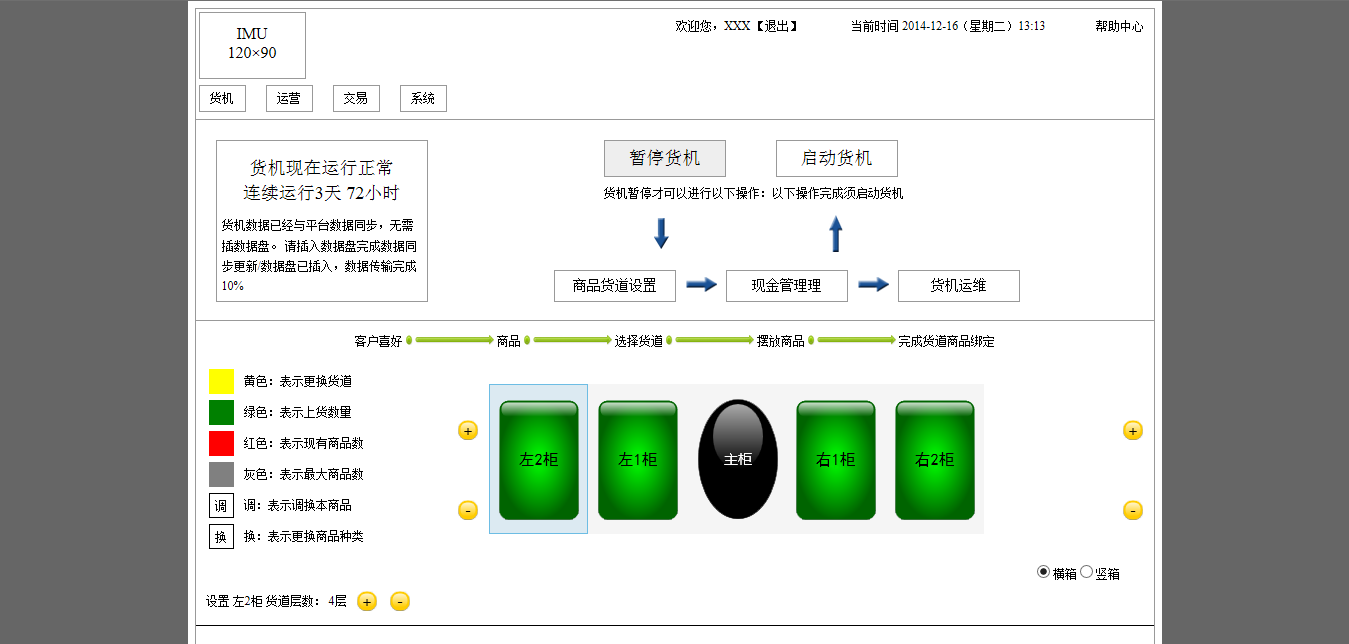
效果图:
ASP.NET MVC Layout 嵌套的更多相关文章
- 七天学会ASP.NET MVC (五)——Layout页面使用和用户角色管理
系列文章 七天学会ASP.NET MVC (一)——深入理解ASP.NET MVC 七天学会ASP.NET MVC (二)——ASP.NET MVC 数据传递 七天学会ASP.NET MVC (三)— ...
- asp.net mvc视图中嵌套分部视图
asp.net mvc中Layout相当于webForm中母版页,分部视图相当于webForm中的用户控件. 下面例子是一个视图如何嵌套分部视图: A是分部视图,B是一般视图(A,B中的代码省略) 我 ...
- 七天学会ASP.NET MVC (五)——Layout页面使用和用户角色管理 【转】
http://www.cnblogs.com/powertoolsteam/p/MVC_five.html 系列文章 七天学会ASP.NET MVC (一)——深入理解ASP.NET MVC 七天学会 ...
- 微冷的雨ASP.NET MVC之葵花宝典(MVC)
微冷的雨ASP.NET MVC之葵花宝典 By:微冷的雨 第一章 ASP.NET MVC的请求和处理机制. 在MVC中: 01.所有的请求都要归结到控制器(Controller)上. 02.约定优于配 ...
- 使用ASP.NET MVC局部视图避免JS拼接HTML,编写易于维护的HTML页面
以前使用ASP.NET WebForm开发时,喜欢使用Repeater控件嵌套的方式开发前台页面,这样就不用JS拼接HTML或者后台拼接HTML了,写出的HTML页面美观.简捷.易于维护,由于不用JS ...
- 7 天玩转 ASP.NET MVC — 第 5 天
目录 第 1 天 第 2 天 第 3 天 第 4 天 第 5 天 第 6 天 第 7 天 0. 前言 欢迎来到第五天的学习.希望第一天到第四天的学习,你都是开心的. 1. Lab 22 - 增加 Fo ...
- ASP.NET MVC 学习2、从Controller传递数据到View
参考:http://www.asp.net/mvc/tutorials/mvc-4/getting-started-with-aspnet-mvc4/adding-a-view 一,Control ...
- ASP.NET MVC局部视图
使用ASP.NET MVC局部视图避免JS拼接HTML,编写易于维护的HTML页面 以前使用ASP.NET WebForm开发时,喜欢使用Repeater控件嵌套的方式开发前台页面,这样就不用JS ...
- Asp.net mvc 中View 的呈现(二)
[toc] 上一节介绍了 Asp.net mvc 中除 ViewResult 外的所有的 ActionResult,这一节介绍 ViewResult. ViewResultBase ViewResul ...
随机推荐
- 招聘:有兴趣做一个与Android对等的操作系统么?
招聘:有兴趣做一个与Android对等的操作系统么? 前不久我发了一篇<八一八招聘的那些事儿>讲了我自己作为求职者对招聘的一些看法.那个时候我还在求职,对求职的结果还是挺满意的,五家公司面 ...
- 7张图片学习VIM教程
7张图片学习VIM教程 张图片设置为桌面背景,时不时的能看上一眼.慢慢就学会VIM了. VIM lesson 1 VIM lesson 2 VIM lesson 3 VIM lesson 4 VIM ...
- Senparc.Weixin.MP SDK 微信公众平台开发教程(七):解决用户上下文(Session)问题
从这篇文章中我们已经了解了微信公众平台消息传递的方式,这种方式有一个先天的缺陷:不同用户的请求都来自同一个微信服务器,这使得常规的Session无法使用(始终面对同一个请求对象,况且还有对方服务器Co ...
- ios 下创建,删除文件夹的方法
NSString *imageDir = [NSString stringWithFormat:@"%@/Caches/%@", NSHomeDirectory(), dirNam ...
- Oracle日期语言修改
-- value带有两个参数,第一个指下限,第二个指上限,将会生成下限到上限之间的数字,但不包含上限.select ceil(dbms_random.value(1000,9999)) from du ...
- 我心中的核心组件(可插拔的AOP)~调度组件quartz.net续~任务管理器的开发
回到目录 对于任务调度来说,越来越多的团队选择了quartz,它在java和.net环境下表现都十分优秀,配置简单,功能强大,时间表达式配置灵活,但在使用时,还是感觉缺点什么,怎么说,你在服务器上安装 ...
- contentEditable属性设置是否可编辑元素的内容
在HTML5中在标签新添加了一个属性contentEditable可以设置标签内的内容是否可以编辑: 设置contenteditable="true"标签内的元素(内容)可以编辑 ...
- TSql CTE 递归原理探究
CTE是如何进行递归的?产生递归的条件有三个,分别是 初始值 自身调用自身 结束递归的条件 1,示例代码 ;with cte as ( as jd union all as jd from cte ) ...
- struts2结果(Result)
一.结果(result)类型 result的type属性默认为dispatcher,其他常见的属性有redirect\chain\redirectAction <action name=&quo ...
- Request 接收参数乱码原理解析一:服务器端解码原理
“Server.UrlDecode(Server.UrlEncode("北京")) == “北京””,先用UrlEncode编码然后用UrlDecode解码,这条语句永远为true ...