
3 Ways to Learn Whether a Windows Program is 64-bit or 32-bit
More than 90% of Windows 8.1 installations are 64-bit and, as a result, more and more people use 64-bit operating systems and applications. Even popular applications like Google Chrome and 7-Zip are now using the 64-bit architecture to provide better performance. All this is good but, on a 64-bit operating system, you can run both 32-bit and 64-bit applications. How can you tell whether a program is 64-bit or 32-bit? To help you figure this out, we would like to share three ways of doing this, that work both in Windows 7 and Windows 8.1.
How to Determine What Version of Windows You Have Installed
First of all, you have to see which version of Windows you are using. Is it a 32-bit or a 64-bit version? If you are not sure which version you have installed, read this guide: How to Determine What Version of Windows You Have Installed.
If you are using a 32-bit version of Windows, all the applications that are installed are also 32-bit. You won't be able to install and use 64-bit applications on 32-bit operating systems.
However, if you are using a 64-bit version of Windows, you can use both 32-bit and 64-bit applications. Let's see how to figure out which programs are 32-bit and which are 64-bit.
How to Tell If a Program is 64-bit or 32-bit Using File Explorer or Windows Explorer
Usually, when you are installing a program or an application, it will be located in one of the following folders: "C:\Program Files" or "C:\Program Files (x86)". 64-bit applications tend to install themselves in the "C:\Program Files" folder while 32-bit applications install themselves in the "C:\Program Files (x86)" folder.

But, there are exceptions to this rule. For example, the 64-bit version of Google Chrome installs itself in the "C:\Program Files (x86)" folder. We do not know the reason why it does this. Also, you might encounter other 64-bit applications that do the same.
How to Tell If a Program is 64-bit or 32-bit Using the Task Manager
First, you need to open the Task Manager by any method you want. The fastest way to get there is to use this shortcut: Ctrl + Shift + Esc .
If you are using Windows 8.1, the first time you open the Task Manager, it will be displayed in compact view. Cick or tap More details.

Then, select the Details tab.

Right click or press and hold any column header and choose Select columns.

Now, you have to find and check the Platform box. Then, click or tap OK.
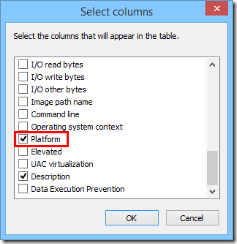
Run the application you are interested in and look at the Platform column in the Task Manager. For each running application or process, this column tells you if it is 32-bit or 64-bit.

In Windows 7, the process is slightly different than in Windows 8.1. Once the Task Manager is opened, select the Processestab.

Here you will see the list of processes that are running at the moment. If a program is 32-bit, near its name you will see the text: *32. If a program is 64-bit, you will only see its name, without *32 at the end.

How to Tell If a Program is 64-bit or 32-bit By Analyzing its Properties
Another method that works well is to analyze the properties of that program's executable file. First, you have to locate the launcher file (*.exe) or one of its shortcuts. Right click on it or press and hold and then select Properties.

Next, open the Compatibility tab.

Here, you need to check the "Run this program in compatibility mode for" box , and open the drop-down list. If the list starts with Windows Vista, then the application you selected is a 64-bit application.

If the list starts with Windows 95, then the application you selected is a 32-bit application.

IMPORTANT: Do not apply any compatibility settings and close the Properties window without making any changes.
Conclusion
These are the three easiest methods you can use to figure out whether an application is 64-bit or 32-bit, without installing third party tools. Try them out and let us know which is your favorite. Also, if you know other methods, don't hesitate to share them via the comments form below.
来自 <http://www.digitalcitizen.life/3-ways-learn-whether-windows-program-64-bit-or-32-bit>
3 Ways to Learn Whether a Windows Program is 64-bit or 32-bit的更多相关文章
- [Chapter 3 Process]Practice 3.12 Including the initial parent process, how many processes are created by the program shown in Figure 3.32?
3.12 Including the initial parent process, how many processes are created by the program shown in Fi ...
- Windows Server 2008 64 位 IIS7.5 ASP.NET MVC4 发布问题
问题描述: 环境与配置: ASP.NET MVC 4 WINDOWS SERVER 2008 64 位 应用程序池是选择的 .NET 4.0 与经典模式 在新建一个MVC 4 项目发现到服务器上后 ...
- windows 2008 R2 64位系统,找到Microsoft Excel 应用程序
在windows 2003 操作系统中, 1.在"开始"->"运行"中输入dcomcnfg.exe启动"组件服务", 2.依次双击& ...
- Windows 7,64位机器上安装DB2 7.2+FP7
1.要想在Windows 7,64位机器上安装DB2 7.2+FP7,注意:1)拷贝所有安装文件到本地2)设置setup.exe文件兼容windows 20003)使得users用户勾选“完全控制”权 ...
- Oracle 11G R2 在windows server 2008 64位安装时提示:无法在windows "开始"菜单或桌面上创建项
错误代码及解释: 在windows server 2008 64 位操作系统中安装 oracle 11G R2 64位 版本时提示:无法在windows "开始"菜单或桌面上创建 ...
- Windows server 2008 R2安装MySQL 32位ODBC驱动!
在Windows server 2008 R2安装MySQL 32位ODBC驱动,总是提示错误,我安装了DOTNET4的库,同时安装了VC2008.VC2012.VC2013的支持库,怎么还不行呢?M ...
- windows 下编译64位ffmpeg
window下如何编译ffmpeg 前文已有介绍,前面介绍的都是如何编译32位的库,本文主要介绍window 下如何编译64位ffmpeg库. 一.搭建编译环境 1.下载 windows下编译64位F ...
- 64位windows上访问64位oracle 12c
64位windows上访问64位oracle 12c,这会有啥问题? 没啥问题.问题是,我64位操作系统的机器上装了个oracle 10g.而oracle 10g好像是不区分啥32位.64位的,一律3 ...
- 使用Win7 64位旗舰版光盘映像安装Windows Home basic 64位操作系统
工作当中需要安装Windows home basic 64位操作系统,苦于手头没有该版本的安装光盘,也没时间下载其安装映像.因此,在现有资源“cn_windows_7_ultimate_with_sp ...
随机推荐
- 【LeetCode】1064. Fixed Point 解题报告(C++)
作者: 负雪明烛 id: fuxuemingzhu 个人博客:http://fuxuemingzhu.cn/ 目录 题目描述 题目大意 解题方法 暴力求解 日期 题目地址:https://leetco ...
- 【九度OJ】题目1107:搬水果 解题报告
[九度OJ]题目1107:搬水果 解题报告 标签(空格分隔): 九度OJ http://ac.jobdu.com/problem.php?pid=1107 题目描述: 在一个果园里,小明已经将所有的水 ...
- 【LeetCode】200. Number of Islands 岛屿数量
作者: 负雪明烛 id: fuxuemingzhu 个人博客: http://fuxuemingzhu.cn/ 目录 题目描述 题目大意 解题方法 DFS BFS 日期 题目地址:https://le ...
- 【剑指Offer】构建乘积数组 解题报告(Python)
[剑指Offer]构建乘积数组 解题报告(Python) 标签(空格分隔): 剑指Offer 题目地址:https://www.nowcoder.com/ta/coding-interviews 题目 ...
- 基于Spring MVC + Spring + MyBatis的【医院就诊挂号系统】
资源下载:https://download.csdn.net/download/weixin_44893902/21727306 一.语言和环境 1.实现语言: JAVA语言. 2.环境要求: MyE ...
- 图像数据到网格数据-3——实现Cuberille算法
前言 这是本博客网格生成算法系列的第三篇,第一篇里面介绍了最为流行的MarchingCubes算法,第二篇中使用新三角形表来对MC算法进行了简化改进,形成了SMC算法.而这篇将介绍一种新的不同与MC算 ...
- 深入 Laravel 内核之IOC容器
升级工厂前的准备工作 无规矩不成方圆,随着越来越多的行为出现,我们需要需要定下一些规范. 为了约束每一个行为的规范,需要定义一个行为接口: interface BehaviorInterface { ...
- Pytest_fixture(9)
什么是fixture fixture是pytest特有的功能,使用装饰器 @pytest.fixture 标记的函数在其他函数中能被当作参数传入并被调用. fixture有明确的名字,在其他函数,模块 ...
- Selenium_模拟键盘和鼠标操作(9)
模拟键盘键盘和鼠标操作主要使用到selenium的keys包,源码如下 class Keys(object): """ Set of special keys codes ...
- vue 传入后台的数据多了个=
解决方法: 在前端值参时用{} 在后台接收时用Map 来自为知笔记(Wiz)