
SpringBoot之MultipartFile文件上传(6)
1、静态文件
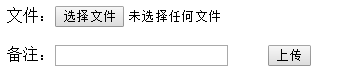
<!DOCTYPE html>
<html>
<head>
<meta charset="UTF-8">
<title>文件上传</title>
</head>
<body>
<form enctype="multipart/form-data" method="post" action="/v1/upload">
文件:<input type="file" name="fileName"/></br></br>
备注:<input type="text" name="remark"/>
<input type="submit" value="上传"/>
</form>
</body>
</html>
2、return result
package cn.xiaobing.demo.pojo;

public class Result {

    private int code;

    private Object data;

    private String msg;

    public int getCode() {

        return code;

    }

    public void setCode(int code) {

        this.code = code;

    }

    public Object getData() {

        return data;

    }

    public void setData(Object data) {

        this.data = data;

    }

    public String getMsg() {

        return msg;

    }

    public void setMsg(String msg) {

        this.msg = msg;

    }

    public Result(int code, Object data, String msg) {

        super();

        this.code = code;

        this.data = data;

        this.msg = msg;

    }

    public Result() {

        super();

    }

    @Override

    public String toString() {

        return "Result [code=" + code + ", data=" + data + ", msg=" + msg + "]";

    }

}
3、FileController
package cn.xiaobing.demo.controller;

import java.io.File;

import java.util.HashMap;

import java.util.Map;

import java.util.UUID;

import javax.servlet.http.HttpServletRequest;

import org.springframework.beans.factory.annotation.Value;

import org.springframework.context.annotation.PropertySource;

import org.springframework.stereotype.Controller;

import org.springframework.web.bind.annotation.RequestMapping;

import org.springframework.web.bind.annotation.RequestParam;

import org.springframework.web.bind.annotation.ResponseBody;

import org.springframework.web.multipart.MultipartFile;

import cn.xiaobing.demo.pojo.Result;

@Controller

@PropertySource(value = { "application.properties" })//指定配置文件

public class FileController {

    @Value("${web.upload.filepath}")//获取配置文件中的配置参数

    private String filePath;

//  private static final String filePath = "C:/oneself/eclipse-workspace/springboot-v0/src/main/resources/static/images";

    @RequestMapping(value="/v1/upload")

    @ResponseBody

    public Object upload(@RequestParam("fileName") MultipartFile file,HttpServletRequest request) {

        String remark = request.getParameter("remark");//备注信息

        String filename = file.getOriginalFilename();//获取文件名称

        String suffixname = filename.substring(filename.lastIndexOf("."));//后缀

        filename = UUID.randomUUID() + suffixname;//文件上传后重命名数据库存储

        File dest = new File(filePath,filename);

        Map<String, String> data = new HashMap<String, String>();

        data.put("filename", filename);

        data.put("备注 ", remark);

        try {

            //MultipartFile对象的transferTo方法用于文件的保存(效率和操作比原来用的FileOutputStream方便和高效)

            file.transferTo(dest);//拷贝文件到指定路径储存

            return new Result(0, data, "上传成功");

        } catch (Exception e) {

            e.printStackTrace();

            return new Result(-1, data, "上传失败");

        }

    }

}

4、启动项目
  .   ____          _            __ _ _

 /\\ / ___'_ __ _ _(_)_ __  __ _ \ \ \ \

( ( )\___ | '_ | '_| | '_ \/ _` | \ \ \ \

 \\/  ___)| |_)| | | | | || (_| |  ) ) ) )

  '  |____| .__|_| |_|_| |_\__, | / / / /

 =========|_|==============|___/=/_/_/_/

 :: Spring Boot ::        (v2.0.1.RELEASE)
5、访问upload.html上传文件
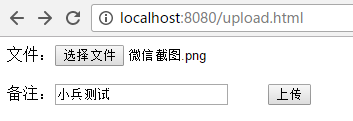
6、点击上传,上传文件成功

7、点击上传,上传失败

8、设置上传文件大小限制,编码如下,在启动类中添加@Bean方法
package cn.xiaobing.demo;

import javax.servlet.MultipartConfigElement;

import org.springframework.boot.SpringApplication;

import org.springframework.boot.autoconfigure.SpringBootApplication;

import org.springframework.boot.web.servlet.MultipartConfigFactory;

import org.springframework.context.annotation.Bean;

@SpringBootApplication

public class XiaoBingApplication {

    public static void main(String[] args) {

        SpringApplication.run(XiaoBingApplication.class,args);

    }

    @Bean

    public MultipartConfigElement multipartConfigElement() {

        MultipartConfigFactory factory = new MultipartConfigFactory();

        factory.setMaxFileSize("10240KB");//设置上传单个文件最大10M

        factory.setMaxRequestSize("102400KB");//设置上传文件总数据最大100M

        return factory.createMultipartConfig();

    }

}
9、maven打包执行
(1) pom.xml引入依赖
<build>

    <plugins>

        <plugin>

            <groupId>org.springframework.boot</groupId>

            <artifactId>spring-boot-maven-plugin</artifactId>

        </plugin>

    </plugins>

</build>
(2)打jar包-项目右键-Run As-Maven Install
[INFO] ------------------------------------------------------------------------

[INFO] BUILD SUCCESS

[INFO] ------------------------------------------------------------------------

[INFO] Total time: 45.874 s

[INFO] Finished at: 2020-06-29T23:44:45+08:00

[INFO] ------------------------------------------------------------------------
(3)启动项目
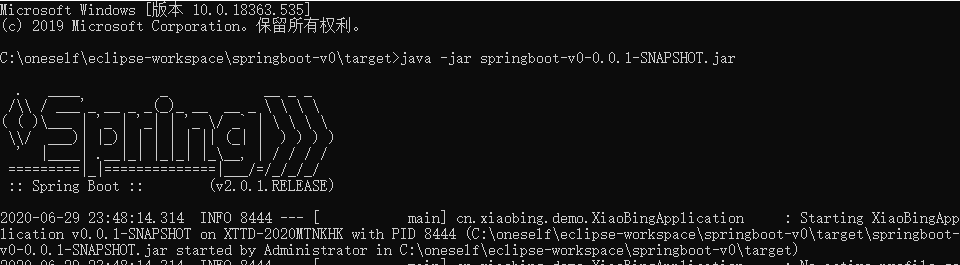
(4) Test

10、不足之处,后续优化。。。
SpringBoot之MultipartFile文件上传(6)的更多相关文章
- SpringBoot项目实现文件上传和邮件发送
前言 本篇文章主要介绍的是SpringBoot项目实现文件上传和邮件发送的功能. SpringBoot 文件上传 说明:如果想直接获取工程那么可以直接跳到底部,通过链接下载工程代码. 开发准备 环境要 ...
- Springboot如何启用文件上传功能
网上的文章在写 "springboot文件上传" 时,都让你加上模版引擎,我只想说,我用不上,加模版引擎,你是觉得我脑子坏了,还是觉得我拿不动刀了. springboot如何启用文 ...
- SpringBoot+BootStrap多文件上传到本地
1.application.yml文件配置 # 文件大小 MB必须大写 # maxFileSize 是单个文件大小 # maxRequestSize是设置总上传的数据大小 spring: servle ...
- SpringBoot之KindEditor文件上传
后端核心代码如下: package com.blog.springboot.controller; import java.io.BufferedOutputStream; import java.i ...
- springboot+vue实现文件上传
https://blog.csdn.net/mqingo/article/details/84869841 技术: 后端:springboot 前端框架:vue 数据库:mysql pom.xml: ...
- SpringBoot: 6.文件上传(转)
1.编写页面uploadFile.html <!DOCTYPE html> <html lang="en"> <head> <meta c ...
- Springboot(九).多文件上传下载文件(并将url存入数据库表中)
一. 文件上传 这里我们使用request.getSession().getServletContext().getRealPath("/static")的方式来设置文件的存储 ...
- springboot升级导致文件上传自动配置/tmp目录问题解决
1,..\web\src\main\resources\spring\web-men-applicationContext.xml 保留原有的bean配置 <bean id="mult ...
- SpringMVC实现 MultipartFile 文件上传
1. Maven 工程引入所需要的依赖包 2. 页面需要开放多媒体标签 3. 配置文件上传试图解析器 4. 接收图片信息,通过 IO 流写入磁盘(调用解析其中的方法即可) 如下: 1.1 引入所依赖的 ...
随机推荐
- Shell系列(13)- read
前言 作用是往脚本中传递参数,之前文章的位置参数变量也有此功能,但是只适用于脚本的作者,为什么?第三方用户不知道这个脚本要传递哪些参数,这些参数分别是什么.本篇随笔read就可以实现上述功能,别且该命 ...
- 如何在word中美观地插入编程代码
零.缘起 在整理Java笔记时,想把代码直接贴到word文档中,原来一直截图很麻烦,所以找到以下方法. 思想:问题比答案更重要!你能想到问题,才知道去百度搜索. 一.打开网站 http://www.p ...
- centos7安装sonarqube与使用
https://www.cnblogs.com/mascot1/p/11179767.html https://blog.csdn.net/superbfly/article/details/1039 ...
- VS2013的switch case缩进问题
原来的 更改设置 改完后
- mqtt网关服务器连接阿里云关联物模型
mqtt网关服务器连接阿里云关联物模型 卓岚专门为工业环境设计的RS485设备数据采集器/物联网网关,兼具串口服务器.Modbus网关.MQTT网关.RS485转JSON等多种功能于一体. 可以连接阿 ...
- Python3入门系列之-----元组
元组 Python 的元组与列表类似,不同之处在于元组的元素不能修改 元组使用小括号,列表使用方括号 元组创建很简单,只需要在括号中添加元素,并使用逗号隔开即可 实例 tup1 = (1,2,3,4, ...
- 解决导入MAVEN项目报错Dynamic Web Module 3.1 requires Java 1.7 or newer.
解释:web模块需要使用java1.7及以后的版本,目前的版本不符合.因而只需要修改java版本到1.7及以上即可. 解决方法: 1.保证 在eclipse 构建 web中关于java版本有三处需要修 ...
- 阿里限流神器Sentinel夺命连环 17 问?
1.前言 这是<spring Cloud 进阶>专栏的第五篇文章,这篇文章介绍一下阿里开源的流量防卫兵Sentinel,一款非常优秀的开源项目,经过近10年的双十一的考验,非常成熟的一款产 ...
- 测试rac数据文件建本地及处理
模拟用户zytuser的表空间ZYTUSER_TBS表空间添加数据文件到本地.--环境准备1.创建一个表空间--创建表空间create tablespace ZYTUSER_TBS datafile ...
- 题解 CF1103E Radix sum
题目传送门 题目大意 给出一个\(n\)个数的序列\(a_{1,2,..,n}\),可以选\(n\)次,每次可以选与上次选的相同的数,问对于\(\forall p\in[0,n-1]\)满足选出来的数 ...