
(3)ESP32 Python 制作一个办公室温度计
因为经常在办公室里面不知道实际室内温度是多少,所以用ESP32做了一个工具来进行温度&湿度的监测。在之前的文章当中,已经完成了ESP32的数据上云工作,如果要进行温度/湿度的检测。从原理上就是给ESP32连接对应的传感器,并把传感器的数据上报到阿里云物联网平台。
我们先来看看效果
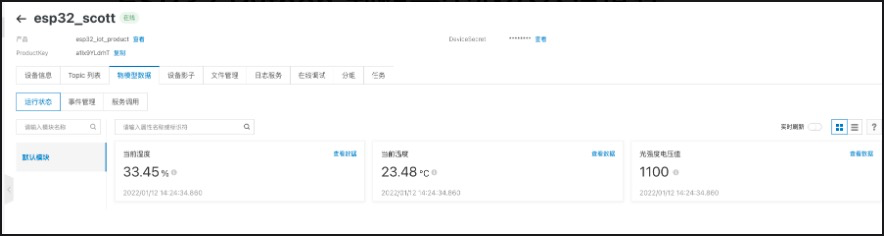
这样的话,每天上班前在家里可以先看看办公室空调是否已经把公司的温度提升上去,如果没有提升上去。那说明可能空调有问题,今日的取暖只能靠抖了。
下面我们说说,这个实现怎么搞。首先在阿里云IOT平台上,对我们之前的产品添加2个功能分别为当前湿度和当前温度。
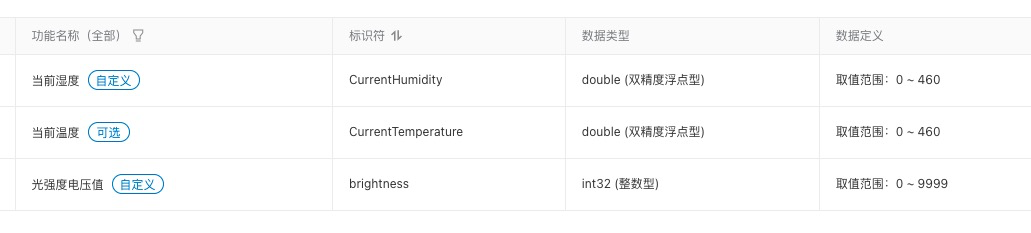
实现步骤如下:
- 根据所使用的硬件,进行board.json的配置。 因为我们的温度传感器使用的是sht3x, 使用I2C,在board.json的配置如下:
{

    "name": "haasedu",

    "version": "1.0.0",

    "io": {

      "sht3x": {

        "type": "I2C",

        "port": 0,

        "addrWidth": 7,

        "freq": 400000,

        "mode": "master",

        "devAddr": 68

      }

    },

    "debugLevel": "ERROR",

    "repl": "disable"

  }
- 实现代码
from driver import I2C

import sht3x

def report_iot_data(temperature, humidity ):

    upload_data = {'params': ujson.dumps({

        'CurrentHumidity': humidity, 'CurrentTemperature':temperature

    })

    }

    device.postProps(upload_data)

    print('UPDATE IOT SUCCESS!!!')

def get_light_temp_humi():

    temperature = humitureDev.getTemperature()

    humidity = humitureDev.getHumidity()

    report_iot_data(temperature, humidity)

    return temperature, humidity

i2cObj = I2C()

i2cObj.open("sht3x")

humitureDev = sht3x.SHT3X(i2cObj)

while True:

    data = get_light_temp_humi()

    utime.sleep(3)
进行烧录就可以了。
获取温度湿润还需要使用Haas团队写的一个驱动,代码如下
sht3x.py
"""

Copyright (C) 2015-2021 Alibaba Group Holding Limited

    MicroPython's driver for CHT8305

    Author: HaaS

    Date:   2021/09/14

"""

from micropython import const

import utime

from driver import I2C

'''

# sht3x commands definations

# read serial number:                            CMD_READ_SERIALNBR  0x3780

# read status register:                          CMD_READ_STATUS     0xF32D

# clear status register:                         CMD_CLEAR_STATUS    0x3041

# enabled heater:                                CMD_HEATER_ENABLE   0x306D

# disable heater:                                CMD_HEATER_DISABLE  0x3066

# soft reset:                                    CMD_SOFT_RESET      0x30A2

# accelerated response time:                     CMD_ART             0x2B32

# break, stop periodic data acquisition mode:    CMD_BREAK           0x3093

# measurement: polling, high repeatability:      CMD_MEAS_POLLING_H  0x2400

# measurement: polling, medium repeatability:    CMD_MEAS_POLLING_M  0x240B

# measurement: polling, low repeatability:       CMD_MEAS_POLLING_L  0x2416

'''

class SHT3X(object):

    # i2cDev should be an I2C object and it should be opened before __init__ is called

    def __init__(self, i2cDev):

        self._i2cDev = None

        if not isinstance(i2cDev, I2C):

            raise ValueError("parameter is not an I2C object")

        # make AHB21B's internal object points to _i2cDev

        self._i2cDev = i2cDev

        self.start()

    def start(self):

        # make sure AHB21B's internal object is valid before I2C operation

        if self._i2cDev is None:

            raise ValueError("invalid I2C object")

        # send clear status register command - 0x3041 - CMD_CLEAR_STATUS

        cmd = bytearray(2)

        cmd[0] = 0x30

        cmd[1] = 0x41

        self._i2cDev.write(cmd)

        # wait for 20ms

        utime.sleep_ms(20)

        return 0

    def getTempHumidity(self):

        if self._i2cDev is None:

            raise ValueError("invalid I2C object")

        tempHumidity = [-1, 2]

        # start measurement: polling, medium repeatability - 0x240B - CMD_MEAS_POLLING_M

        # if you want to adjust measure repeatability, you can send the following commands:

        # high repeatability: 0x2400 - CMD_MEAS_POLLING_H

        # low repeatability: 0x2416  - CMD_MEAS_POLLING_L

        cmd = bytearray(2)

        cmd[0] = 0x24

        cmd[1] = 0x0b

        self._i2cDev.write(cmd)

        # must wait for a little before the measurement finished

        utime.sleep_ms(20)

        dataBuffer = bytearray(6)

        # read the measurement result

        self._i2cDev.read(dataBuffer)

        # print(dataBuffer)

        # calculate real temperature and humidity according to SHT3X-DIS' data sheet

        temp = (dataBuffer[0]<<8) | dataBuffer[1]

        humi = (dataBuffer[3]<<8) | dataBuffer[4]

        tempHumidity[1] = humi * 0.0015259022

        tempHumidity[0] = -45.0 + (temp) * 175.0 / (0xFFFF - 1)

        return tempHumidity

    def getTemperature(self):

        data = self.getTempHumidity()

        return data[0]

    def getHumidity(self):

        data = self.getTempHumidity()

        return data[1]

    def stop(self):

        if self._i2cDev is None:

            raise ValueError("invalid I2C object")

        # stop periodic data acquisition mode

        cmd = bytearray(3)

        cmd[0] = 0x30

        cmd[1] = 0x93

        self._i2cDev.write(cmd)

        # wait for a little while

        utime.sleep_ms(20)

        self._i2cDev = None

        return 0

    def __del__(self):

        print('sht3x __del__')

if __name__ == "__main__":

    '''

    The below i2c configuration is needed in your board.json.

    "sht3x": {

        "type": "I2C",

        "port": 1,

        "addrWidth": 7,

        "freq": 400000,

        "mode": "master",

        "devAddr": 68

    },

    '''

    print("Testing sht3x ...")

    i2cDev = I2C()

    i2cDev.open("sht3x")

    sht3xDev = SHT3X(i2cDev)

    '''

    # future usage:

    i2cDev = I2C("sht3x")

    sht3xDev = sht3x.SHT3X(i2cDev)

    '''

    temperature = sht3xDev.getTemperature()

    print("The temperature is: %f" % temperature)

    humidity = sht3xDev.getHumidity()

    print("The humidity is: %f" % humidity)

    print("Test sht3x done!")
将程序代码烧录到开发板后,设备会联网,并且每3秒上报一次数据。发布的数据, 我们可以在阿里云物联网平台上的设备的物模型数据中看到。
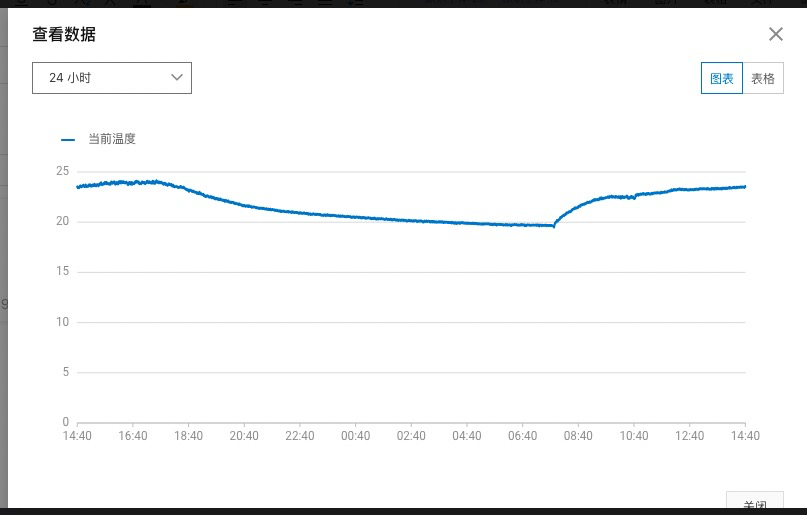
关于board.json的部分,需要根据自己采用的温度/湿度传感器,调整对应的GPIO的编号就行。
(3)ESP32 Python 制作一个办公室温度计的更多相关文章
- 用 Python 制作一个艺术签名小工具,给自己设计一个优雅的签名
生活中有很多场景都需要我们签字(签名),如果是一些不重要的场景,我们的签名好坏基本无所谓了,但如果是一些比较重要的场景,如果我们的签名比较差的话,就有可能给别人留下不太好的印象了,俗话说字如其人嘛,本 ...
- 利用Python制作一个只属于和她的聊天器,再也不用担心隐私泄露啦!
------------恢复内容开始------------ 是否担心微信的数据流会被监视?是否担心你和ta聊天的小秘密会被保存到某个数据库里?没关系,现在我们可以用Python做一个只属于你和ta的 ...
- python制作一个简单的中奖系统
注释: 展示图下的代码,我是用pycharm写的,是python解释器中的一种,本课没不同解释器的要求,可根据自己喜欢的解释器编写. 步骤: 本期给大家带来的是,一个简单的中奖系统,首先打开自己电脑上 ...
- python制作一个简单词云
首先需要安装三个包:# 安装:pip install matplotlib# 安装:pip install jieba# 安装pip install wordcloud 1.制作英文字母的词云 效果图 ...
- 3分钟教你用python制作一个简单词云
首先需要安装三个包: # 安装:pip install matplotlib # 安装:pip install jieba # 安装pip install wordcloud 1.制作英文字母的词云 ...
- 使用Python制作一个简单的刷博器
呵呵,不得不佩服Python的强大,寥寥几句代码就能做一个简单的刷博器. import webbrowser as web import time import os count=0 while co ...
- Python学习之旅:用Python制作一个打字训练小工具
一.写在前面 说道程序员,你会想到什么呢?有人认为程序员象征着高薪,有人认为程序员都是死肥宅,还有人想到的则是996和 ICU. 别人眼中的程序员:飞快的敲击键盘.酷炫的切换屏幕.各种看不懂的字符代码 ...
- python制作一个小型翻译软件
from urllib import parse,request import requests,re,execjs,json,time 英语查词翻译 class Tencent(): def ini ...
- python制作exe可执行文件的方法---使用pyinstaller
python制作exe可执行文件的方法---使用pyinstaller python生成windows下exe格式的可执行程序有三种可选方案: py2exe是大家所熟知的,今天要介绍pyinsta ...
随机推荐
- Apache Shiro使用官方自带的生成AES密钥
package test; import org.apache.shiro.codec.Base64; import javax.crypto.KeyGenerator; import javax.c ...
- 1021 - Painful Bases
1021 - Painful Bases PDF (English) Statistics Forum Time Limit: 2 second(s) Memory Limit: 32 MB As ...
- Lightoj1011 - Marriage Ceremonies
1011 - Marriage Ceremonies PDF (English) Statistics Forum Time Limit: 2 second(s) Memory Limit: 32 ...
- HDU 1052:Tian Ji -- The Horse Racing(贪心)
Tian Ji -- The Horse Racing Time Limit: 2000/1000 MS (Java/Others) Memory Limit: 65536/32768 K (Jav ...
- 5分钟搭建wordpress个人博客网站——宝塔傻瓜式部署,无坑系列,附赠主题和md插件[2021-12-31]
一.前言 自从买了服务器,小编已经马不停蹄的学了两天服务搭建的知识,问了很多大佬,快速搭建自己的博客网站.有四种方式,我在这里全部分享给大家.自己已经搭建好,欢迎大家过来看一下,给你提供个思路哈! 小 ...
- [opencv]图像预处理方案及方式
像识别中,图像质量的好坏直接影响识别算法的设计与效果精度,那么除了能在算法上的优化外,预处理技术在整个项目中占有很重要的因素,然而人们往往忽略这一点. 图像预处理,将每一个文字图像分检出来交给识别模块 ...
- CS5265 demoboard|CS5265测试板电路参考|CS5265 Typec转HDMI 4K60HZ方案
CS5265是TYPEC转HDMI2.0音视频转换芯片,CS5265符合DP1.4协议,且输出的视频信号是HDMI2.0 即4K60HZ CS5265集成了DP1.4兼容接收机和HDMI2.0b兼容 ...
- 论文翻译:2020_Acoustic Echo Cancellation by Combining Adaptive Digital Filter and Recurrent Neural Network
论文地址:https://arxiv.53yu.com/abs/2005.09237 自适应数字滤波与循环神经网络相结合的回声消除技术 摘要 回声消除(AEC)在语音交互中起关键作用.由于明确的数学原 ...
- 编写Java程序,在一个文件夹内,查找占用磁盘空间最大的 jpg 文件,并输出文件大小
查看本章节 查看作业目录 需求说明: 在一个文件夹内,查找占用磁盘空间最大的 jpg 文件,并输出文件大小 实现思路: 创建ImageFileFilter类实现FilenameFilter接口,且重写 ...
- javascript实现base64格式转码与解码
最近碰到一个需求,后端返回base64格式的数据,前端需要进行base64格式解码,好了,前端采用内部提供的atob函数进行解码,开完成,交付测试,然后测试小哥哥小姐姐反馈说中文乱码! 然后查了一下, ...