
websocket数据流解析
ceilometer获取数据暂时先不做解答,本篇注重websocket解决浏览器与openstack组件之间的实时状态更新。
大致流程如下:
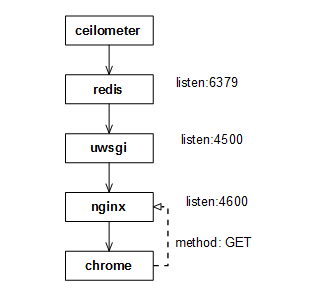
nginx配置的反向代理如下:
/etc/nginx/nginx.conf
include /etc/nginx/conf.d/*.conf;
/etc/nginx/conf.d/openstack.conf
upstream websocket_beijing {

    server 192.168.213.88:4500;

}

server {

    listen 81;

    #server_name horizon.plcloud.com;

    proxy_set_header        Host            $host;

    proxy_set_header        X-Real-IP       $remote_addr;

    proxy_set_header        X-Forwarded-For $proxy_add_x_forwarded_for;

    location / {

        include uwsgi_params;

        uwsgi_pass unix:/var/run/uwsgi/openstack.sock;

    }

    location /static/{

        alias /home/zzw/develop/horizon/static/;

    }

}

server {

    listen 4600;

    location / {

        proxy_pass http://websocket_beijing;

        proxy_http_version 1.1;

        proxy_set_header Upgrade $http_upgrade;

        proxy_set_header Connection "upgrade";

    }

}
日志说明:
/var/log/nginx/access.log #nginx访问日志
/var/log/nginx/error.log #nginx错误日志
uwsgi配置:
websocket.ini -> /home/zzw/develop/ceilometer/etc/ceilometer/websocket.ini
/etc/uwsgi/vassals/openstack.ini
# awcloud horizon uwsgi config file

[uwsgi]

# Django-related settings

# the virtualenv (full path)

# home = /var/plcloud/horizon/.venv

# the base directory (full path)

chdir = /home/zzw/develop/horizon/openstack_dashboard/wsgi

# Django's wsgi file

file = django.wsgi

# maximum number of worker processes

processes = 4

# the socket (use the full path to be safe

socket = /var/run/uwsgi/%n.sock

# with appropriate permissions - may be needed

chmod-socket = 777

daemonize = /var/log/uwsgi/%n.log
日志说明:
/var/log/uwsgi/openstack.log
/var/log/uwsgi/websocket.log
redis配置订阅模式:
/etc/redis.conf
daemonize yes

pidfile /var/run/redis/redis.pid

port 6379

tcp-backlog 511

bind 0.0.0.0

timeout 0

tcp-keepalive 0

loglevel notice

logfile /var/log/redis/redis.log

databases 16

save 900 1

save 300 10

save 60 10000

stop-writes-on-bgsave-error yes

rdbcompression yes

rdbchecksum yes

dbfilename dump.rdb

dir /var/lib/redis/

slave-serve-stale-data yes

slave-read-only yes

repl-disable-tcp-nodelay no

slave-priority 100

appendonly no

appendfilename "appendonly.aof"

appendfsync everysec

no-appendfsync-on-rewrite no

auto-aof-rewrite-percentage 100

auto-aof-rewrite-min-size 64mb

lua-time-limit 5000

slowlog-log-slower-than 10000

slowlog-max-len 128

notify-keyspace-events ""

hash-max-ziplist-entries 512

hash-max-ziplist-value 64

list-max-ziplist-entries 512

list-max-ziplist-value 64

set-max-intset-entries 512

zset-max-ziplist-entries 128

zset-max-ziplist-value 64

hll-sparse-max-bytes 3000

activerehashing yes

client-output-buffer-limit normal 0 0 0

client-output-buffer-limit slave 256mb 64mb 60

client-output-buffer-limit pubsub 32mb 8mb 60

hz 10

aof-rewrite-incremental-fsync yes
日志说明:
/var/log/redis/redis.log
ceilometer配置:
├── ceilometer.conf

├── ceilometertab.ini

├── matchmaker_ring.json

├── pipeline.yaml

├── policy.json

├── sources.json

└── templates

    ├── default.html

    └── default.sms
日志说明:
├── agent-notification.log

├── alarm-evaluator.log

├── alarm-notifier.log

├── api.log

├── auditor.log

├── central.log

├── checker.log

├── collector.log

├── compute.log

├── websocket.log

└── zmq-receiver.log
配置过程报错集锦:
1. uwsgi缺少对openssl支持,/var/log/uwsgi/websocket.log 报错如下:
[pid: |app: |req: /] 192.168.216.48 () { vars in bytes} [Thu Apr :: ] GET /websocket?uid=33d5edff940f4812b5368e54499991e4®ion=lab-test => generated bytes in msecs (HTTP/1.1 ) headers in bytes ( switches on core )
you need to build uWSGI with SSL support to use the websocket handshake api function !!!
解决方法:重新编译uwsgi,支持openssl
cd uwsgi-2.0./

make

stop uwsgi

python setup.py install

start uwsgi
websocket数据流解析的更多相关文章
- WebSocket协议解析
WebSocket协议解析 转载请注明出处:WebSocket解析 现在,很多网站为了实现推送技术,所用的技术都是轮询.轮询是指在特定的时间间隔(如每一秒),由浏览器对服务器发起HTTP请求,然后由服 ...
- iOS swift项目IM实现,从长连接到数据流解析分析之Socket
iOS swift项目IM实现,从长连接到底层数据解析分析之Socket 一:项目简介: 去年开始接手了一个国企移动项目,项目的需求是实现IM即时通讯功能. * 一期版本功能包括了: ...
- Websocket 协议解析
WebSocket protocol 是HTML5一种新的协议.它是实现了浏览器与服务器全双工通信(full-duplex). 现 很多网站为了实现即时通讯,所用的技术都是轮询(po ...
- 萌萌的websocket原理解析
转载自:http://www.zhihu.com/question/20215561 一.WebSocket是HTML5出的东西(协议),也就是说HTTP协议没有变化,或者说没关系,但HTTP是不支持 ...
- 转载-WebSocket协议解析
现在,很多网站为了实现推送技术,所用的技术都是轮询.轮询是指在特定的时间间隔(如每一秒),由浏览器对服务器发起HTTP请求,然后由服务器返回数据给浏览器.由于HTTP协议是惰性的,只有客户端发起请求, ...
- springMVC中数据流解析与装载
最近在看springmvc原理时,看到一篇比较赞的博文,留存学习,如果侵权,请告知,立删. 地址: https://my.oschina.net/lichhao/blog/172562
- pdf 数据流解析
根据这个解释可以认为,/CCITTFaxDecode应该指单色图像(每个像素占8位?还是1位),FlateDecode 指文字或者矢量图片(png) 参考论文:http://www.doc88.co ...
- 通讯框架 t-io 学习——websocket 部分源码解析
前言 前端时间看了看t-io的websocket部分源码,于是抽时间看了看websocket的握手和他的通讯机制.本篇只是简单记录一下websocket握手部分. WebSocket握手 好多人都用过 ...
- WebSocket解析
WebSocket解析 转载请注明出处:WebSocket解析 现在,很多网站为了实现推送技术,所用的技术都是轮询.轮询是指在特定的时间间隔(如每一秒),由浏览器对服务器发起HTTP请求,然后由服务器 ...
随机推荐
- C#基础之 派生类
1: 当创建派生类的实例时,会自动调用基类的默认构造函数 namespace parentTest { public class Reader { public Reader() { Console. ...
- 【千纸诗书】—— PHP/MySQL二手书网站后台开发之知识点记录
前言:使用PHP和MySQL开发后台管理系统的过程中,发现有一些通用的[套路小Tip],这里集中记录一下.结合工作中ing的后台业务,我逐渐体会到:除了技术知识外.能使用户体验好的“使用流程设计”积累 ...
- mybatis 一对多
person package com.kerwin.mybatis.pojo; import java.util.List; public class Person { private int id; ...
- 使用Visual Studio的动态连接库创建通用数据库连接对话框
1.在VS(此处文件夹文件以vs2010为例)安装文件夹下("%Visual Studio安装文件夹%/Common10/IDE/Microsoft.Data.ConnectionUI.Di ...
- tomcat优化---大数据量提交tomcat时,tomcat无法接收导致页面无反应
关于tomcat的一个优化问题: 有时候保存大数据量的数据时.tomcat不优化的话,页面会没反应.tomcat后台并不报错,仅仅是提示以下内容: 警告: More than the maximum ...
- Tornado框架的初步使用
Tornado的搭建很简单,使用pip,或者下载源码均可. 我们先看一个最简单的程序: import tornado.ioloop import tornado.web class MainHan ...
- 神奇的canvas——点与线绘制的绚丽动画效果
代码地址如下:http://www.demodashi.com/demo/11636.html 前言 之前在某网站上看到了一个canvas绘制的动画效果,虽然组成的元素很简单,只有点和线,但是视觉效果 ...
- excel文件打开乱码解决
Excel在读取csv的时候是通过读取文件头上的bom来识别编码的,如果文件头无bom信息,则默认按照unicode编码读取.(这个bom是微软自己定义的一种文件头部协定,顾名思义存储在文件头部,存储 ...
- netstat命令初探
Proto :网络传输协议,主要为tcp和udp Local Address :本地的ip:port Foreign Address:远程主机的ip:port State :连线状态,主要有监听( L ...
- TCP四次挥手断开连接详解
TCP四次挥手. 数据传输结束后,通信的双方都可释放连接.现在A和B都处于ESTABLISHED状态.A的应用程序先向TCP发出连接释放报文段,主动关闭TCP连接.A把连接释放报文段的首部FIN置为1 ...