
A guide to analyzing Python performance
来源:http://www.huyng.com/posts/python-performance-analysis/
While it’s not always the case that every Python program you write will require a rigorous performance analysis, it is reassuring to know that there are a wide variety of tools in Python’s ecosystem that one can turn to when the time arises.
Analyzing a program’s performance boils down to answering 4 basic questions:
- How fast is it running?
- Where are the speed bottlenecks?
- How much memory is it using?
- Where is memory leaking?
Below, we’ll dive into the details of answering these questions using some awesome tools.
Coarse grain timing with time
Let’s begin by using a quick and dirty method of timing our code: the good old unix utility time.
$ time python yourprogram.py

real    0m1.028s

user    0m0.001s

sys     0m0.003s
The meaning between the three output measurements are detailed in thisstackoverflow article, but in short
- real - refers to the actual elasped time
- user - refers to the amount of cpu time spent outside of kernel
- sys - refers to the amount of cpu time spent inside kernel specific functions
You can get a sense of how many cpu cycles your program used up regardless of other programs running on the system by adding together the sys and user times.
If the sum of sys and user times is much less than real time, then you can guess that
most your program’s performance issues are most likely related to IO waits.
Fine grain timing with a timing context manager
Our next technique involves direct instrumentation of the code to get access to finer grain timing information. Here’s a small snippet I’ve found invaluable for making ad-hoc timing measurements:
timer.py
import time

class Timer(object):

    def __init__(self, verbose=False):

        self.verbose = verbose

    def __enter__(self):

        self.start = time.time()

        return self

    def __exit__(self, *args):

        self.end = time.time()

        self.secs = self.end - self.start

        self.msecs = self.secs * 1000  # millisecs

        if self.verbose:

            print 'elapsed time: %f ms' % self.msecs
In order to use it, wrap blocks of code that you want to time with Python’s withkeyword and this Timer context
manager. It will take care of starting the timer when your code block begins execution and stopping the timer when your code block ends.
Here’s an example use of the snippet:
from timer import Timer

from redis import Redis

rdb = Redis()

with Timer() as t:

    rdb.lpush("foo", "bar")

print "=> elasped lpush: %s s" % t.secs

with Timer() as t:

    rdb.lpop("foo")

print "=> elasped lpop: %s s" % t.secs
I’ll often log the outputs of these timers to a file in order to see how my program’s performance evolves over time.
Line-by-line timing and execution frequency with a profiler
Robert Kern has a nice project called line_profiler which I often use to see how fast and how often each line of code is running in my scripts.
To use it, you’ll need to install the python package via pip:
$ pip install line_profiler
Once installed you’ll have access to a new module called “line_profiler” as well as an executable script “kernprof.py”.
To use this tool, first modify your source code by decorating the function you want to measure with the @profile decorator. Don’t worry, you don’t have to import anyting
in order to use this decorator. The kernprof.py script automatically injects it into your script’s runtime during execution.
primes.py
@profile

def primes(n):

    if n==2:

        return [2]

    elif n<2:

        return []

    s=range(3,n+1,2)

    mroot = n ** 0.5

    half=(n+1)/2-1

    i=0

    m=3

    while m <= mroot:

        if s[i]:

            j=(m*m-3)/2

            s[j]=0

            while j<half:

                s[j]=0

                j+=m

        i=i+1

        m=2*i+3

    return [2]+[x for x in s if x]

primes(100)
Once you’ve gotten your code setup with the @profile decorator, usekernprof.py to
run your script.
$ kernprof.py -l -v fib.py
The -l option tells kernprof to inject the @profile decorator into your script’s
builtins, and -v tells kernprof to display timing information once you’re script finishes. Here’s one the output should look like for the above script:
Wrote profile results to primes.py.lprof

Timer unit: 1e-06 s

File: primes.py

Function: primes at line 2

Total time: 0.00019 s

Line #      Hits         Time  Per Hit   % Time  Line Contents

==============================================================

     2                                           @profile

     3                                           def primes(n):

     4         1            2      2.0      1.1      if n==2:

     5                                                   return [2]

     6         1            1      1.0      0.5      elif n<2:

     7                                                   return []

     8         1            4      4.0      2.1      s=range(3,n+1,2)

     9         1           10     10.0      5.3      mroot = n ** 0.5

    10         1            2      2.0      1.1      half=(n+1)/2-1

    11         1            1      1.0      0.5      i=0

    12         1            1      1.0      0.5      m=3

    13         5            7      1.4      3.7      while m <= mroot:

    14         4            4      1.0      2.1          if s[i]:

    15         3            4      1.3      2.1              j=(m*m-3)/2

    16         3            4      1.3      2.1              s[j]=0

    17        31           31      1.0     16.3              while j<half:

    18        28           28      1.0     14.7                  s[j]=0

    19        28           29      1.0     15.3                  j+=m

    20         4            4      1.0      2.1          i=i+1

    21         4            4      1.0      2.1          m=2*i+3

    22        50           54      1.1     28.4      return [2]+[x for x in s if x]
Look for lines with a high amount of hits or a high time interval. These are the areas where optimizations can yield the greatest improvements.
How much memory does it use?
Now that we have a good grasp on timing our code, let’s move on to figuring out how much memory our programs are using. Fortunately for us, Fabian Pedregosa has implemented a nice memory
profiler modeled after Robert Kern’s line_profiler.
First install it via pip:
$ pip install -U memory_profiler

$ pip install psutil
(Installing the psutil package here is recommended because it greatly improves the performance of the memory_profiler).
Like line_profiler, memory_profiler requires that you decorate your function of interest with an @profile decorator like so:
@profile

def primes(n):

    ...

    ...
To see how much memory your function uses run the following:
$ python -m memory_profiler primes.py
You should see output that looks like this once your program exits:
Filename: primes.py

Line #    Mem usage  Increment   Line Contents

==============================================

     2                           @profile

     3    7.9219 MB  0.0000 MB   def primes(n):

     4    7.9219 MB  0.0000 MB       if n==2:

     5                                   return [2]

     6    7.9219 MB  0.0000 MB       elif n<2:

     7                                   return []

     8    7.9219 MB  0.0000 MB       s=range(3,n+1,2)

     9    7.9258 MB  0.0039 MB       mroot = n ** 0.5

    10    7.9258 MB  0.0000 MB       half=(n+1)/2-1

    11    7.9258 MB  0.0000 MB       i=0

    12    7.9258 MB  0.0000 MB       m=3

    13    7.9297 MB  0.0039 MB       while m <= mroot:

    14    7.9297 MB  0.0000 MB           if s[i]:

    15    7.9297 MB  0.0000 MB               j=(m*m-3)/2

    16    7.9258 MB -0.0039 MB               s[j]=0

    17    7.9297 MB  0.0039 MB               while j<half:

    18    7.9297 MB  0.0000 MB                   s[j]=0

    19    7.9297 MB  0.0000 MB                   j+=m

    20    7.9297 MB  0.0000 MB           i=i+1

    21    7.9297 MB  0.0000 MB           m=2*i+3

    22    7.9297 MB  0.0000 MB       return [2]+[x for x in s if x]
IPython shortcuts for line_profiler and memory_profiler
A little known feature of line_profiler and memory_profiler is that both programs
have shortcut commands accessible from within IPython. All you have to do is type the following within an IPython session:
%load_ext memory_profiler

%load_ext line_profiler
Upon doing so you’ll have access to the magic commands %lprun and %mprunwhich behave
similarly to their command-line counterparts. The major difference here is that you won’t need to decorate your to-be-profiled functions with the@profile decorator. Just
go ahead and run the profiling directly within your IPython session like so:
In [1]: from primes import primes

In [2]: %mprun -f primes primes(1000)

In [3]: %lprun -f primes primes(1000)
This can save you a lot of time and effort since none of your source code needs to be modified in order to use these profiling commands.
Where’s the memory leak?
The cPython interpreter uses reference counting as it’s main method of keeping track of memory. This means that every object contains a counter, which is incremented when a reference to the object is stored somewhere, and decremented when a reference to it
is deleted. When the counter reaches zero, the cPython interpreter knows that the object is no longer in use so it deletes the object and deallocates the occupied memory.
A memory leak can often occur in your program if references to objects are held even though the object is no longer in use.
The quickest way to find these “memory leaks” is to use an awesome tool calledobjgraph written by Marius Gedminas. This tool allows you to see the number of objects in memory and also locate
all the different places in your code that hold references to these objects.
To get started, first install objgraph:
pip install objgraph
Once you have this tool installed, insert into your code a statement to invoke the debugger:
import pdb; pdb.set_trace()
Which objects are the most common?
At run time, you can inspect the top 20 most prevalent objects in your program by running:
(pdb) import objgraph

(pdb) objgraph.show_most_common_types()

MyBigFatObject             20000

tuple                      16938

function                   4310

dict                       2790

wrapper_descriptor         1181

builtin_function_or_method 934

weakref                    764

list                       634

method_descriptor          507

getset_descriptor          451

type                       439
Which objects have been added or deleted?
We can also see which objects have been added or deleted between two points in time:
(pdb) import objgraph

(pdb) objgraph.show_growth()

.

.

.

(pdb) objgraph.show_growth()   # this only shows objects that has been added or deleted since last show_growth() call

traceback                4        +2

KeyboardInterrupt        1        +1

frame                   24        +1

list                   667        +1

tuple                16969        +1
What is referencing this leaky object?
Continuing down this route, we can also see where references to any given object is being held. Let’s take as an example the simple program below:
x = [1]

y = [x, [x], {"a":x}]

import pdb; pdb.set_trace()
To see what is holding a reference to the variable x, run theobjgraph.show_backref() function:
(pdb) import objgraph

(pdb) objgraph.show_backref([x], filename="/tmp/backrefs.png")
The output of that command should be a PNG image stored at/tmp/backrefs.png and it should look something like this:
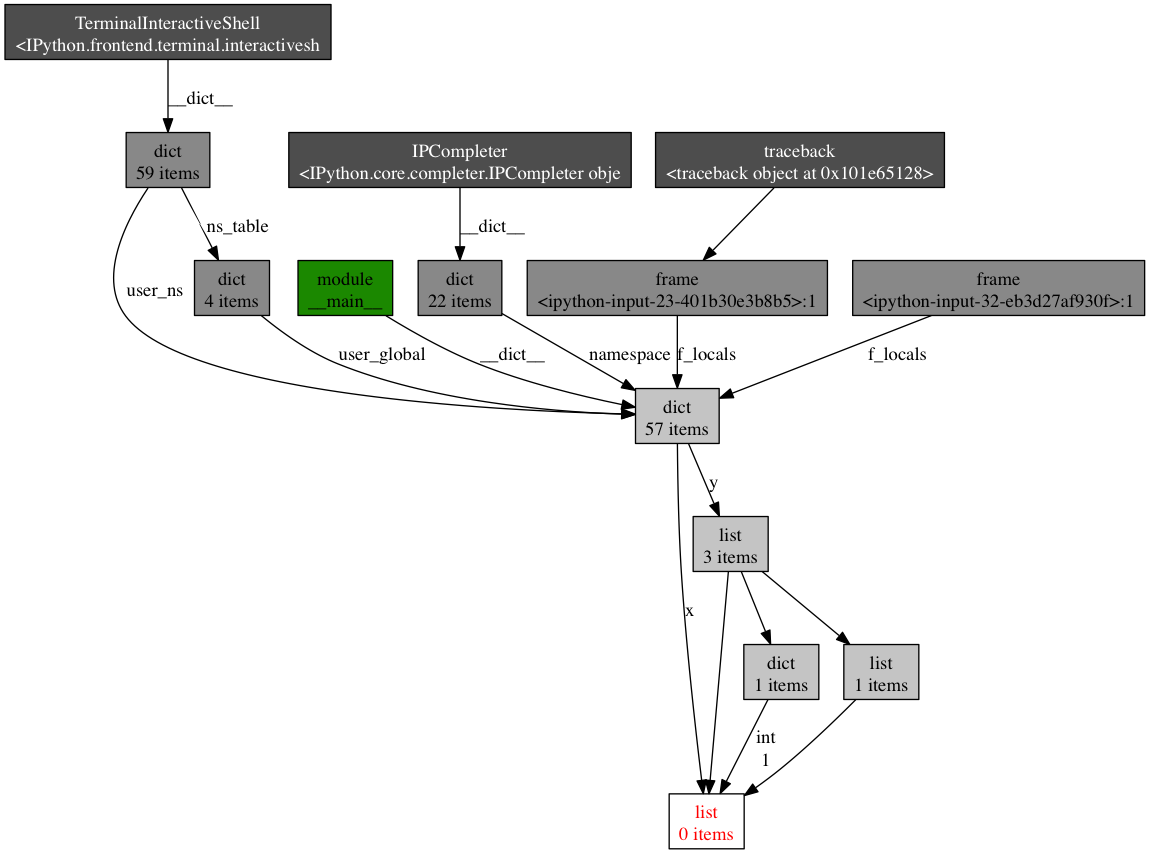
The box at the bottom with red lettering is our object of interest. We can see that it’s referenced by the symbol x once and by the list y three
times. If x is the object causing a memory leak, we can use this method to see why it’s not automatically being deallocated by tracking down all of its references.
So to review, objgraph allows us to:
- show the top N objects occupying our python program’s memory
- show what objects have been deleted or added over a period of time
- show all references to a given object in our script
Effort vs precision
In this post, I’ve shown you how to use several tools to analyze a python program’s performance. Armed with these tools and techniques you should have all the information required to track down most memory leaks as well as identify speed bottlenecks in a Python
program.
As with many other topics, running a performance analysis means balancing the tradeoffs between effort and precision. When in doubt, implement the simplest solution that will suit your current needs.
Refrences
will send out interesting links on twitter so follow me if you like this kind stuff.
Related Posts
A guide to analyzing Python performance的更多相关文章
- Android 性能优化(25)*性能工具之「Systrace」Analyzing UI Performance with Systrace:用Systrace得到ui性能报告
Analyzing UI Performance with Systrace In this document Overview 简介 Generating a Trace 生成Systrace文件 ...
- Analyzing UI Performance with Systrace 使用systrace工具分析ui性能
While developing your application, you should check that user interactions are buttery smooth, runni ...
- Analyzing Storage Performance using the Windows Performance Analysis ToolKit (WPT)
https://blogs.technet.microsoft.com/robertsmith/2012/02/07/analyzing-storage-performance-using-the-w ...
- 转帖:Python应用性能分析指南
原文:A guide to analyzing Python performance While it’s not always the case that every Python program ...
- [Python]程序性能分析
有些脚本发现比预期要慢的多,就需要找到瓶颈,然后做相应的优化,参考A guide to analyzing Python performance,也可以说是翻译. 指标 运行时间 时间瓶颈 内存使用 ...
- Python学习资料下载地址(转)
[转]Python学习资料和教程pdf 开发工具: Python语言集成开发环境 Wingware WingIDE Professional v3.2.12 Python语言集成开发环境 Wingwa ...
- python面试大全
问题一:以下的代码的输出将是什么? 说出你的答案并解释. class Parent(object): x = 1 class Child1(Parent): pass class Child2(Par ...
- [转]Python学习资料和教程pdf
开发工具: Python语言集成开发环境 Wingware WingIDE Professional v3.2.12 Python语言集成开发环境 Wingware WingIDE Professio ...
- python公司面试题集锦 python面试题大全
问题一:以下的代码的输出将是什么? 说出你的答案并解释. class Parent(object): x = 1 class Child1(Parent): pass class Child2(Par ...
随机推荐
- Spark Streaming从Flume Poll数据案例实战和内幕源码解密
本节课分成二部分讲解: 一.Spark Streaming on Polling from Flume实战 二.Spark Streaming on Polling from Flume源码 第一部分 ...
- jquery怎样获得父级窗体的大小
方法例如以下: $(window.parent.window).width() 注意: window能够省略.如:$(parent).width(),parent能够有多级,比方:$(parent.p ...
- Java Executor框架
java.util.concurrent 包中包含灵活的线程池实现,但是更重要的是,它包含用于管理实现 Runnable 的任务的执行的整个框架,该框架称为 Executor 框架.该框架基于生产者- ...
- vue单文件 style important引入样式
使用@import引入外部css,作用域是全局的 <template> </template> <script> export default { name: &q ...
- lodash capitalize 首字母大写
_.capitalize([string='']) 转换字符串首字母为大写,剩下为小写. _.capitalize('FRED'); // => 'Fred'
- jQuery控制form表单元素聚焦
CreateTime--2017年5月28日08:57:16Author:Marydon jQuery使form表单的第一个文本框聚焦 /** * 使form表单的第一个文本框聚焦 */ func ...
- 《windows核心编程》 18章 堆
堆的优缺点: 优点:让我们专心解决手头问题,不必理会分配粒度和页边界这类事情. 缺点:分配和释放内存块的速度比其他方式慢,而且也无法对物理存储器的调拨和撤销进行直接控制. 什么是堆: 堆就是一块预订的 ...
- 转MQTT SERVER 性能测试报告
硬件环境: 内存4G CPU4核 SERVER及端口: apollo端口 61619 mosquitto:端口 1884 activeMQ端口:1883 emqtt 端口1885 测试方法 并发测试: ...
- C++语言基础(1)-命名空间
一个中大型软件往往由多名程序员共同开发,会使用大量的变量和函数,当有两个人都同时定义了一个名字相同的全局变量或函数的时候,若是把他们的代码整合在一块编译,此时编译器就会提示变量或函数重复定义,C++为 ...
- 自定义注解日志功能与shrio框架冲突的问题
<beans xmlns="http://www.springframework.org/schema/beans" xmlns:xsi="http://www.w ...